
Arxiv Latex Mcp
What is Arxiv Latex Mcp
arxiv-latex-mcp is an MCP server that utilizes arxiv-to-prompt to fetch and process LaTeX sources from arXiv, enabling precise interpretation of mathematical expressions in scientific papers.
Use cases
Use cases include asking questions about specific theorems or equations in arXiv papers, facilitating research and comprehension of complex scientific concepts.
How to use
To use arxiv-latex-mcp, add the specified configuration to your Claude Desktop config file, ensuring the command points to the correct path. After saving, restart Claude and access the MCP tools to query arXiv papers.
Key features
Key features include direct access to arXiv LaTeX sources, enhanced understanding of mathematical content, and compatibility with Claude Desktop for seamless integration.
Where to use
arxiv-latex-mcp is particularly useful in fields such as computer science, mathematics, and engineering, where accurate interpretation of mathematical expressions is essential.
Clients Supporting MCP
The following are the main client software that supports the Model Context Protocol. Click the link to visit the official website for more information.





Overview
What is Arxiv Latex Mcp
arxiv-latex-mcp is an MCP server that utilizes arxiv-to-prompt to fetch and process LaTeX sources from arXiv, enabling precise interpretation of mathematical expressions in scientific papers.
Use cases
Use cases include asking questions about specific theorems or equations in arXiv papers, facilitating research and comprehension of complex scientific concepts.
How to use
To use arxiv-latex-mcp, add the specified configuration to your Claude Desktop config file, ensuring the command points to the correct path. After saving, restart Claude and access the MCP tools to query arXiv papers.
Key features
Key features include direct access to arXiv LaTeX sources, enhanced understanding of mathematical content, and compatibility with Claude Desktop for seamless integration.
Where to use
arxiv-latex-mcp is particularly useful in fields such as computer science, mathematics, and engineering, where accurate interpretation of mathematical expressions is essential.
Clients Supporting MCP
The following are the main client software that supports the Model Context Protocol. Click the link to visit the official website for more information.
Content
arxiv-latex MCP Server

An MCP server that enables Claude Desktop, Cursor, or other MCP clients to directly access and process arXiv papers by fetching the LaTeX source. It uses arxiv-to-prompt under the hood to handle downloading and processing the LaTeX.
Why use the LaTeX source instead of uploading PDFs? Many PDF chat applications often struggle with mathematical content and equation-heavy papers. By utilizing the original LaTeX source code from arXiv papers, the LLM can accurately understand and handle equations and notations. This approach is particularly valuable for fields like computer science, mathematics, and engineering where precise interpretation of mathematical expressions is crucial.
Installation
Add the following configuration to your config file:
{
  "mcpServers": {
    "arxiv-latex-mcp": {
      "command": "uv",
      "args": [
        "--directory",
        "/ABSOLUTE/PATH/TO/arxiv-latex-mcp",
        "run",
        "arxiv-latex-mcp.py"
      ]
    }
  }
}
You may need to replace the command field with the full path of uv: check this by running which uv (MacOS/Linux) or where uv (Windows).
Restart the application after saving the above.
For Claude Desktop, click on the hammer icon, and you should see get_paper_prompt in the list of “Available MCP tools”.
Example
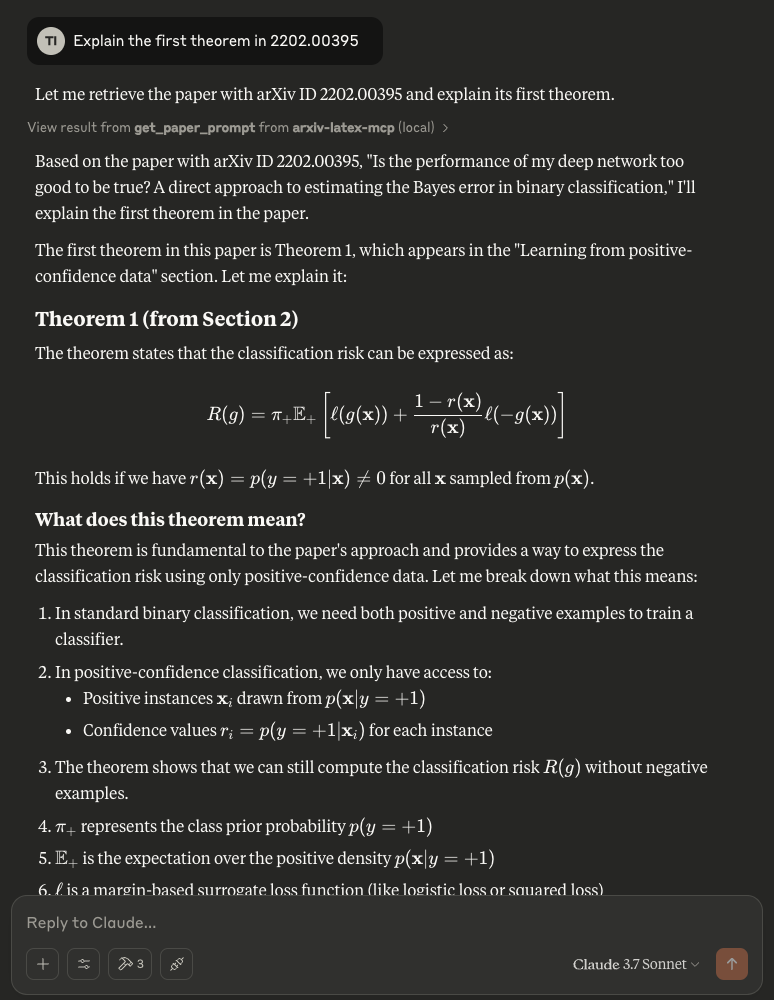
Try asking questions about a paper from arXiv, e.g., “Explain the first theorem in 2202.00395”
Dev Tools Supporting MCP
The following are the main code editors that support the Model Context Protocol. Click the link to visit the official website for more information.







