
Arxiv Search Mcp
What is Arxiv Search Mcp
arXiv Search MCP Server is a tool designed to search and retrieve academic papers from arXiv.org. It acts as an MCP server that allows users to easily access and fetch relevant research papers based on their interests and needs.
Use cases
The server can be utilized by researchers, students, and academics who need to find recent papers in specific fields. It is particularly useful for those looking to stay updated with the latest developments in areas such as Artificial Intelligence, Machine Learning, and other scientific disciplines.
How to use
To use the arXiv Search MCP server, install Deno, clone the repository, and run the server in development mode. Users can send search requests specifying the desired arXiv category and the maximum number of results. The server responds with formatted output that includes titles, authors, summaries, and links to the papers.
Key features
Key features include the ability to search papers by category, retrieve the latest submissions sorted by date, and provide a formatted output with essential paper details such as titles, authors, summaries, and direct links. It supports a range of popular arXiv categories, enhancing research efficiency.
Where to use
This tool can be integrated into various research applications and academic environments where paper retrieval is essential. It is particularly suited for use in research labs, educational institutions, and collaborative projects requiring access to up-to-date academic literature.
Clients Supporting MCP
The following are the main client software that supports the Model Context Protocol. Click the link to visit the official website for more information.





Overview
What is Arxiv Search Mcp
arXiv Search MCP Server is a tool designed to search and retrieve academic papers from arXiv.org. It acts as an MCP server that allows users to easily access and fetch relevant research papers based on their interests and needs.
Use cases
The server can be utilized by researchers, students, and academics who need to find recent papers in specific fields. It is particularly useful for those looking to stay updated with the latest developments in areas such as Artificial Intelligence, Machine Learning, and other scientific disciplines.
How to use
To use the arXiv Search MCP server, install Deno, clone the repository, and run the server in development mode. Users can send search requests specifying the desired arXiv category and the maximum number of results. The server responds with formatted output that includes titles, authors, summaries, and links to the papers.
Key features
Key features include the ability to search papers by category, retrieve the latest submissions sorted by date, and provide a formatted output with essential paper details such as titles, authors, summaries, and direct links. It supports a range of popular arXiv categories, enhancing research efficiency.
Where to use
This tool can be integrated into various research applications and academic environments where paper retrieval is essential. It is particularly suited for use in research labs, educational institutions, and collaborative projects requiring access to up-to-date academic literature.
Clients Supporting MCP
The following are the main client software that supports the Model Context Protocol. Click the link to visit the official website for more information.
Content
arXiv Search MCP Server
An MCP server that provides tools to search and fetch papers from arXiv.org.
Features
- Search papers by category
- Get latest papers sorted by submission date
- Formatted output with title, authors, summary, and link
Development
Prerequisites
- Deno installed on your system
- MCP compatible environment
Setup
- Clone the repository
- Install dependencies:
deno cache --reload src/main.ts
Running the Server
Development mode with file watching:
deno task dev
Build executable:
deno task compile
Integration with Claude Desktop
Add the following configuration to your claude_desktop_config.json:
{
  "mcpServers": {
    "arxiv-search-mcp": {
      "command": "/path/to/dir/arxiv-search-mcp/bin/arxiv-search-mcp"
    }
  }
}
Replace /path/to/dir with the actual path to your compiled binary.
Usage
Example usage screenshot:
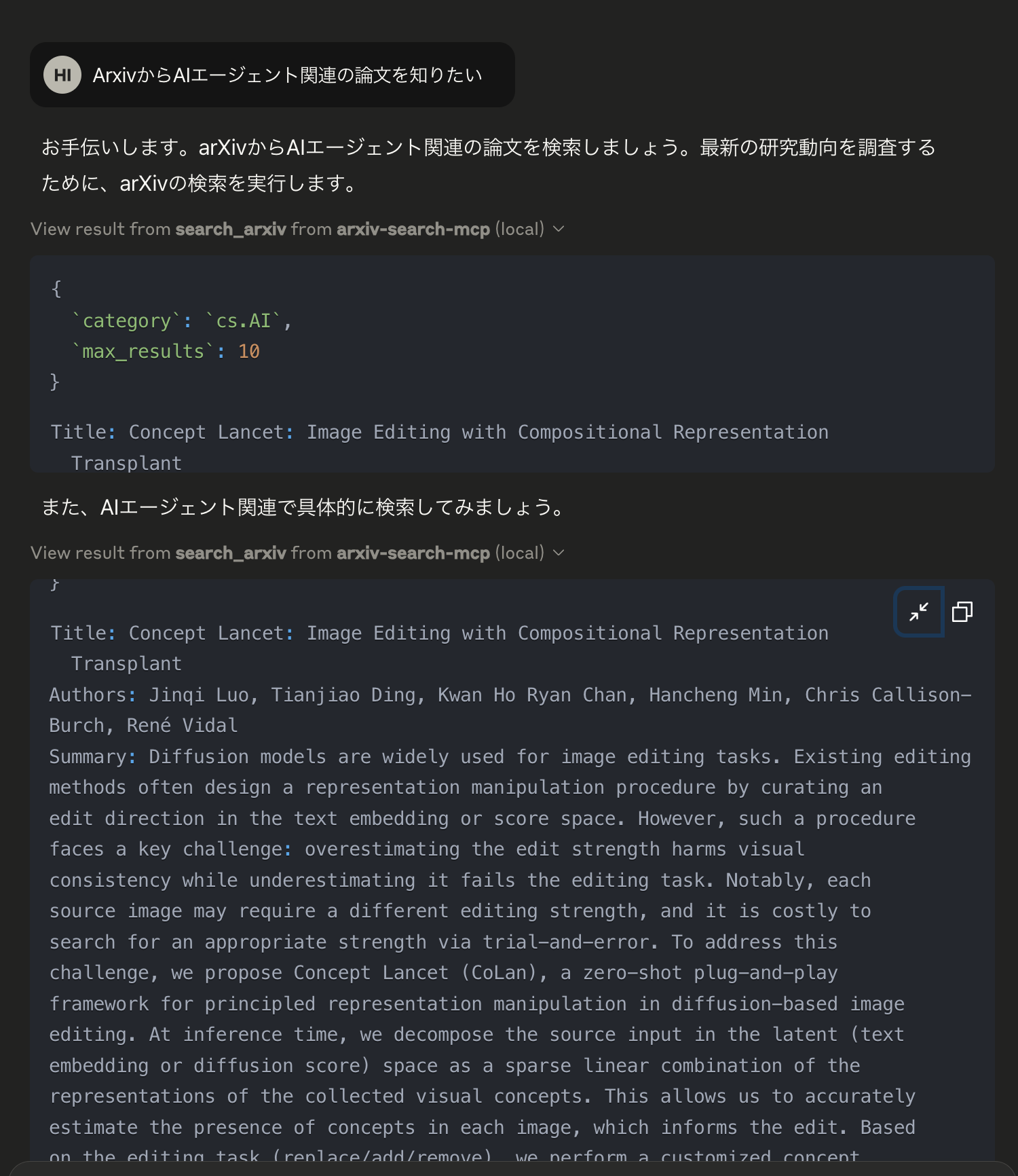
The server provides a tool named search_arxiv that accepts the following parameters:
{
  "category": string,    // arXiv category (e.g., cs.AI, cs.LG, astro-ph)
  "max_results": number  // Number of papers to fetch (1-100, default: 5)
}
Example
Request:
{
  "category": "cs.AI",
  "max_results": 5
}
This will return the 5 most recent papers from the Artificial Intelligence category.
Available Categories
Some popular arXiv categories:
cs.AI: Artificial Intelligencecs.LG: Machine Learningcs.CL: Computation and Languagecs.CV: Computer Visioncs.NE: Neural and Evolutionary Computingcs.RO: Roboticsastro-ph: Astrophysicsphysics: Physicsmath: Mathematicsq-bio: Quantitative Biology
For a complete list of categories, visit arXiv taxonomy.
License
This project is licensed under the MIT License - see the LICENSE file for details.
Dev Tools Supporting MCP
The following are the main code editors that support the Model Context Protocol. Click the link to visit the official website for more information.







