
Assetcli Init
What is Assetcli Init
assetCLI-init is a command-line interface tool developed by Goldman Sachs for managing the governance, multisig, and funding lifecycle of decentralized autonomous organizations (DAOs) through AI-assisted agents.
Use cases
Use cases include creating and managing DAOs, executing funding proposals, managing treasury funds, and facilitating community governance through voting and proposal execution.
How to use
To use assetCLI-init, clone the repository, install dependencies, and configure your wallet. You can create DAOs, manage treasury, create proposals, and execute votes using command-line commands or the natural language interface.
Key features
Key features include DAO creation, treasury management, proposal creation, a voting system, execution of proposals, wallet management, and integration with the Model Context Protocol (MCP) for natural language interactions.
Where to use
assetCLI-init is used in the blockchain and decentralized finance (DeFi) sectors, particularly for managing DAOs and facilitating governance processes.
Clients Supporting MCP
The following are the main client software that supports the Model Context Protocol. Click the link to visit the official website for more information.





Overview
What is Assetcli Init
assetCLI-init is a command-line interface tool developed by Goldman Sachs for managing the governance, multisig, and funding lifecycle of decentralized autonomous organizations (DAOs) through AI-assisted agents.
Use cases
Use cases include creating and managing DAOs, executing funding proposals, managing treasury funds, and facilitating community governance through voting and proposal execution.
How to use
To use assetCLI-init, clone the repository, install dependencies, and configure your wallet. You can create DAOs, manage treasury, create proposals, and execute votes using command-line commands or the natural language interface.
Key features
Key features include DAO creation, treasury management, proposal creation, a voting system, execution of proposals, wallet management, and integration with the Model Context Protocol (MCP) for natural language interactions.
Where to use
assetCLI-init is used in the blockchain and decentralized finance (DeFi) sectors, particularly for managing DAOs and facilitating governance processes.
Clients Supporting MCP
The following are the main client software that supports the Model Context Protocol. Click the link to visit the official website for more information.
Content
Winner of the Solana MCP AI Agent Competition
assetCLI - Goldman Sachs for AI Agents
assetCLI is a comprehensive AI-native platform for token launches, liquidity management, and team treasury operations on Solana. It leverages the Model Context Protocol (MCP) to provide natural language interactions for all operations.
!assetCLI
We have no token on Pump.fun, daos.fun or any other platform.
🌟 Features
- Token Launch: Create tokens with bonding curves for fair price discovery
- Flexible Base Asset: Use any SPL_TOKEN or TOKEN_22 standard token as the base for your bonding curve, not just native SOL
- Advanced Bonding Curve Math: Utilizes pump science and a linear bonding curve (X=Y*Z, X constant) for AMM price discovery
- InterfaceAccount Support: Full compatibility with both SPL_TOKEN and TOKEN_22 standards for mints and token accounts
- Raydium Integration: Raydium CPI for CPMM pool creation and locking, with both mainnet and devnet builds (devnet via feature flag)
- Metaplex Metadata: On-chain Metaplex program integration for project token metadata
- SystemAccount Signer PDA: Bonding curve operations use a SystemAccount signer PDA for secure, programmatic actions
- Ordered Pair Validation: CPMM pool creation checks ordered pairs on both client and contract sides
- Custom Authority & Vault: Use authority_address and vault_address for asset transfers, enabling use beyond Squads, Realms DAO, etc.
- Localnet Scripts: Scripts for local development, including cloning bpf-upgradable programs and system accounts for CPIs
- Squads Multisig Integration: Secure team treasury management
- Automatic Raydium Migration: Seamless transition to DEX when bonding curves complete
- Perana/Numeraire Integration: Access to stable pool swaps and liquidity provisioning
- Treasury Management: Fund and manage multisig vaults
- Wallet Management: Import, create, and fund wallets
- Model Context Protocol (MCP): Natural language interaction for all operations
Model Context Protocol (MCP) Interface
assetCLI uses the powerful Model Context Protocol (MCP) interface that allows natural language interaction through compatible AI clients like Claude Desktop.
Setting Up the MCP Interface
Prerequisites
- A compatible MCP client (e.g., Claude Desktop)
- Node.js (v16+)
- pnpm (recommended)
Configuration
Setting up Claude Desktop MCP server
- Clone the repository and install dependencies:
# Clone the repository
git clone https://github.com/assetCLI/assetCLI.git
cd assetCLI

# Install dependencies
pnpm install

# Build the project
pnpm build
- Change the Claude Desktop MCP server settings:
For MacOS:
code ~/Library/Application\ Support/Claude/claude_desktop_config.json
For Windows:
code $env:AppData\Claude\claude_desktop_config.json
The final configuration should look like the following:
{
  "mcpServers": {
    "assetCLI": {
      "command": "node",
      "args": [
        "$(pwd)/dist/mcp-server.js"
      ]
    }
  }
}
Using Natural Language Commands
The MCP interface supports natural language commands. Here are examples of what you can ask:
Configuration and Setup
Set my cluster to devnet
Import my wallet from ~/.config/solana/id.json
Show me my wallet information
What's the current configuration?
Multisig Management
Create a new multisig wallet called "Project Treasury" with 3 members and a threshold of 2
Show me details about my multisig
Fund my multisig with 0.5 SOL
Bonding Curve Operations
Initialize the bonding curve protocol
Create a new bonding curve token named "Community Token" with symbol "CMT"
Get information about the bonding curve for mint address xyz789
Buy 2 WSOL worth of tokens from the bonding curve
Sell 100 tokens back to the bonding curve
Simulate swapping 1 WSOL for tokens to see expected output
Check if a bonding curve is complete
Migrate a completed bonding curve to Raydium
List all available bonding curve tokens
Perana Pool Operations
List all available Perana pools
Get information about the tripool
Swap 10 USDC for USDT through the Perana pool
Add liquidity to the susd pool
Remove liquidity from the tripool
Wallet Operations
Show my wallet balance
Create a new wallet
Get token balances in my wallet
Utility Operations
Look up transaction signature xyz789
What happened in transaction abc123?
Demo
Watch assetCLI in action with MCP-powered natural language commands
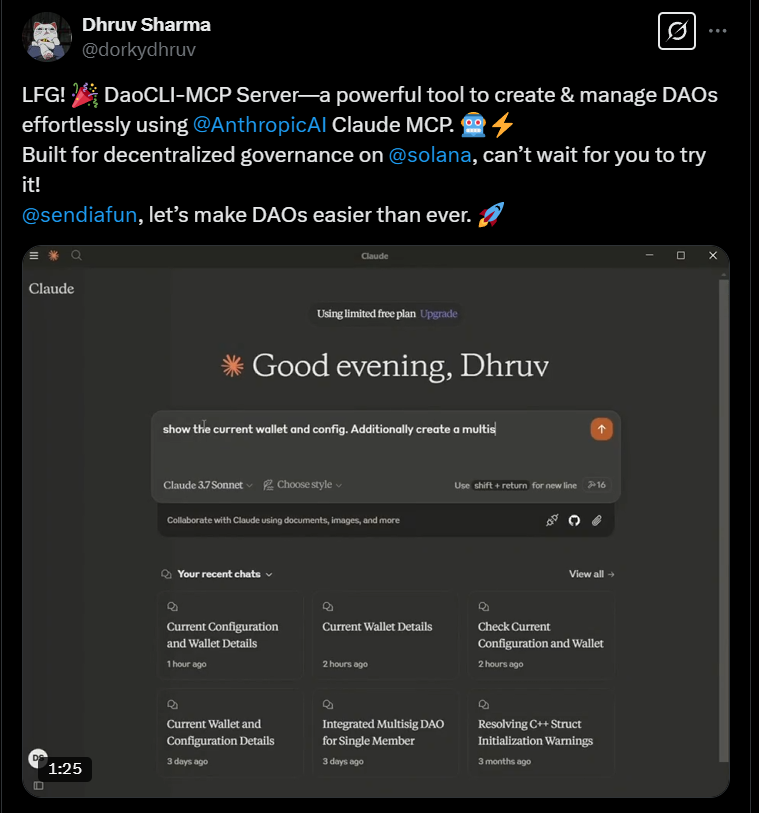
Follow us on YouTube for more demos and tutorials
🏗️ Project Structure
assetCLI/
├── programs/
│   └── bonding-curve/        # Solana program for bonding curves
├── src/
│   ├── mcp/                  # MCP tools and resources
│   │   ├── bonding-curve.ts  # Bonding curve MCP tools
│   │   ├── config-and-wallet.ts # Wallet configuration tools
│   │   ├── multisig.ts       # Multisig MCP tools
│   │   ├── perana-tools.ts   # Perana integration tools
│   │   └── agent-tools.ts    # Solana-agent-kit DeFi tools
│   ├── services/             # Core business logic
│   │   ├── bonding-curve-service.ts  # Bonding curve implementation
│   │   ├── multisig-service.ts       # Squads multisig implementation
│   │   └── perana-service.ts         # Perana/Numeraire service
│   ├── utils/                # Utility functions
│   ├── types/                # TypeScript type definitions
│   ├── debug/                # Debug scripts for testing
│   └── mcp-server.ts         # MCP server implementation
├── tests/                    # Test files
└── dist/                     # Compiled output
🧩 Architecture
The application integrates multiple key components:
- Bonding Curve Protocol: For token launches with automatic liquidity and price discovery, supporting both SPL_TOKEN and TOKEN_22 standards
- Raydium Integration: Raydium CPI for CPMM pool creation and locking, with ordered pair validation
- Metaplex Metadata: On-chain metadata for project tokens
- SystemAccount Signer PDA: Secure, programmatic operations for the bonding curve
- Custom Authority & Vault: Flexible asset management for advanced use cases
- Squads Multisig: For multi-signature transaction approval and team treasury management
- Perana/Numeraire: For stable pool operations and liquidity management
- Model Context Protocol (MCP): For AI-assisted interactions and operations
- Solana-Agent-Kit: Extended DeFi and on-chain operations via MCP
- Localnet Scripts: For local development and testing, including program and account setup
Key workflows include:
- Token Launch: Create a token with bonding curve economics, optionally managed by a Squads multisig
- Bonding Phase: Users buy tokens through the bonding curve, with prices increasing as more tokens are purchased
- Completion & Migration: Once the bonding curve goal is reached, automatic migration to Raydium DEX
- Stable Pool Operations: Interact with Perana’s Numeraire pools for stable asset management
- DeFi Operations: Use solana-agent-kit for advanced on-chain actions
🛠️ Development
To set up a development environment:
# Clone the repository
git clone https://github.com/assetCLI/assetCLI-init.git
cd assetCLI-init

# Install dependencies
pnpm install

# Build the project
pnpm build
🔍 Troubleshooting
- Insufficient funds errors: Ensure your wallet has enough SOL
- Transaction errors: Verify that you’re using correct account addresses
- “Account not found” errors: The blockchain might be congested; try again
- MCP connection issues: Verify the MCP server is running and accessible
- Natural language parsing errors: Try using more specific language or make your request more explicit
- Bonding curve errors: Check that you’ve initialized the bonding curve protocol
- BN conversion errors: Ensure decimal amounts are handled properly
- Perana pool errors: Verify you’re using valid pool names or addresses
- CPMM/Curve errors: Ensure ordered pairs and base assets are correct
- Localnet issues: Use provided scripts for localnet setup and program deployment
📜 License
This project is licensed under the MIT License - see the LICENSE file for details.
Dev Tools Supporting MCP
The following are the main code editors that support the Model Context Protocol. Click the link to visit the official website for more information.







