
Automcp
What is Automcp
AutoMCP is a code generator for the Model Context Protocol (MCP) that automatically generates server and client code based on YAML service definitions.
Use cases
Use cases for AutoMCP include rapid development of microservices, creating client libraries for various tools, and facilitating agentic workflows in applications that utilize the MCP.
How to use
To use AutoMCP, clone the repository, install dependencies using npm or yarn, define a service in a YAML file, and run the generator script to create the server and client code.
Key features
Key features include generating MCP-compatible server code, creating client libraries for easy service consumption, generating handler stubs for tool functionality, and organizing code by service in dedicated directories.
Where to use
AutoMCP can be used in software development environments where the Model Context Protocol is implemented, particularly in applications requiring automated server-client code generation.
Clients Supporting MCP
The following are the main client software that supports the Model Context Protocol. Click the link to visit the official website for more information.





Overview
What is Automcp
AutoMCP is a code generator for the Model Context Protocol (MCP) that automatically generates server and client code based on YAML service definitions.
Use cases
Use cases for AutoMCP include rapid development of microservices, creating client libraries for various tools, and facilitating agentic workflows in applications that utilize the MCP.
How to use
To use AutoMCP, clone the repository, install dependencies using npm or yarn, define a service in a YAML file, and run the generator script to create the server and client code.
Key features
Key features include generating MCP-compatible server code, creating client libraries for easy service consumption, generating handler stubs for tool functionality, and organizing code by service in dedicated directories.
Where to use
AutoMCP can be used in software development environments where the Model Context Protocol is implemented, particularly in applications requiring automated server-client code generation.
Clients Supporting MCP
The following are the main client software that supports the Model Context Protocol. Click the link to visit the official website for more information.
Content
AutoMCP
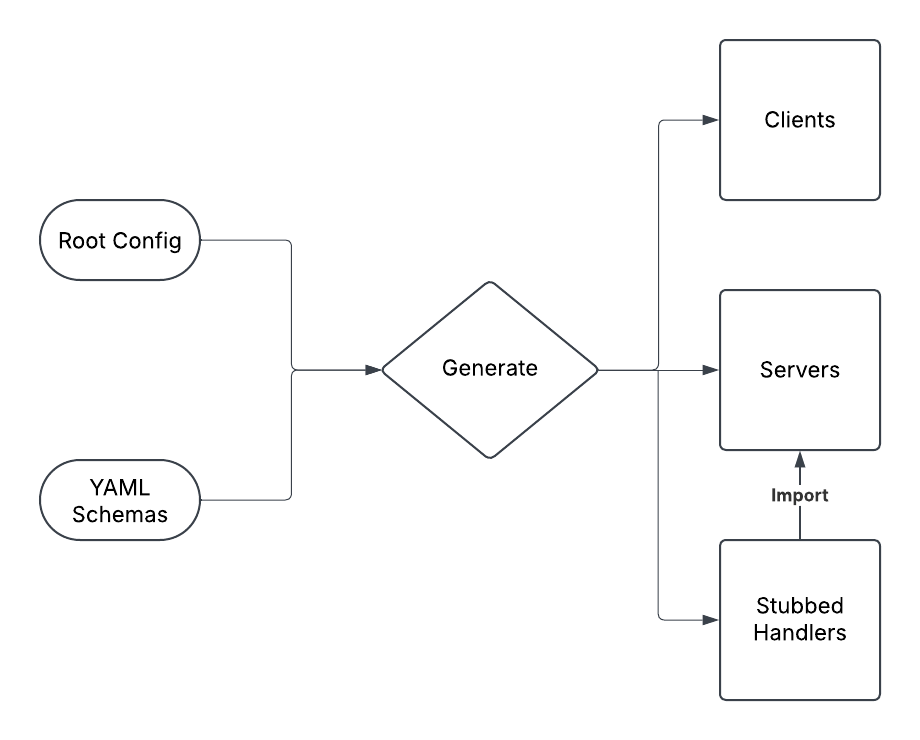
AutoMCP is a code generator for the Model Context Protocol that automatically creates server and client code based on YAML service definitions.
This is a work in progress. The repo contains artifacts that will be removed when finalized for packaging for npm, pypl, etc.
Please refer to MCP Agent to have an idea of how you could use this in agentic workflows.
Features
- Generates MCP-compatible server code
- Generates client libraries for easy service consumption
- Creates handler stubs for implementing tool functionality
- Organizes code by service in dedicated directories
Getting Started
Prerequisites
- Node.js 18 or higher
- npm or yarn
Installation
- Clone this repository
- Install dependencies:
npm install
Usage
Defining a Service
Create a YAML file in the services/[service-name]/ directory with the following structure:
service:
  name: ServiceName
  version: 1.0.0
  description: Description of your service

tools:
  - name: toolName
    description: Description of what the tool does
    parameters:
      - name: paramName
        type: string
        description: Description of the parameter
    returns:
      type: string
      description: Description of what the tool returns
Generating Code
Run the generator script:
./bin/automcp.sh generate
This will:
- Create server code in
generated/[service-name]/[service-name]_server.ts - Create client code in
generated/[service-name]/[service-name]_client.ts - Create handler stubs in
src/custom/[service-name]/[tool-name]Handlers.ts
Implementing Handlers
Edit the generated handler files in src/custom/[service-name]/ to implement your tool functionality.
Using the Generated Clients
import { ServiceNameClient } from "./generated/service-name/service_name_client.js";

async function main() {
  const client = new ServiceNameClient();

  try {
    await client.connect();

    // Call a tool
    const result = await client.toolName({ paramName: "value" });
    console.log(result);
  } finally {
    await client.disconnect();
  }
}

main().catch(console.error);
Example
See the examples/client_example.ts file for a complete example of using the generated clients.
Testing
Use the test script to verify the functionality of your services:
./bin/test-service.sh [service-name]
Temporary Directory Structure (will be improved for packaging)
.
├── bin/                    # Scripts
├── examples/               # Example usage
├── generated/              # Generated code
│   ├── service-name/       # Service-specific generated code
│   │   ├── service_name_server.ts
│   │   └── service_name_client.ts
├── services/               # Service definitions
│   └── service-name/       # Service-specific YAML files
├── src/                    # Source code
│   ├── custom/             # Custom handler implementations
│   │   └── service-name/   # Service-specific handlers
│   │       └── toolHandlers.ts
│   └── generator.ts        # Code generator
└── templates/              # Code templates
    ├── client.ts.ejs       # Client template
    └── server.ts.ejs       # Server template
Future Plans
- Support for multiple programming languages
- Add custom typing so schemas do not drift from generated code
- Integration with existing MCP solutions
- Implement with prompts and resource mechanisms
- Enhanced composition mechanisms for complex tool chains
License
MIT
Dev Tools Supporting MCP
The following are the main code editors that support the Model Context Protocol. Click the link to visit the official website for more information.







