
Aws Nova Canvas Mcp
What is Aws Nova Canvas Mcp
aws-nova-canvas-mcp is an MCP server designed for generating and editing images using the Nova Canvas model from Amazon Bedrock. It leverages advanced AI capabilities to facilitate various image manipulation tasks.
Use cases
Use cases for aws-nova-canvas-mcp include creating unique artwork from text prompts, enhancing existing images through inpainting, generating variations of images for A/B testing, and removing backgrounds for product images.
How to use
To use aws-nova-canvas-mcp, clone the repository from GitHub, configure the Claude Desktop settings by adding the required environment variables, and run the server using the specified command. Ensure you have the necessary AWS credentials set up.
Key features
Key features include Text to Image generation, Image Inpainting, Image Outpainting, Image Variation, Image Conditioning, Color Guided Generation, Background Removal, and the ability to show image thumbnails.
Where to use
aws-nova-canvas-mcp can be used in various fields such as digital art creation, graphic design, marketing, and any area that requires image generation and editing capabilities.
Clients Supporting MCP
The following are the main client software that supports the Model Context Protocol. Click the link to visit the official website for more information.





Overview
What is Aws Nova Canvas Mcp
aws-nova-canvas-mcp is an MCP server designed for generating and editing images using the Nova Canvas model from Amazon Bedrock. It leverages advanced AI capabilities to facilitate various image manipulation tasks.
Use cases
Use cases for aws-nova-canvas-mcp include creating unique artwork from text prompts, enhancing existing images through inpainting, generating variations of images for A/B testing, and removing backgrounds for product images.
How to use
To use aws-nova-canvas-mcp, clone the repository from GitHub, configure the Claude Desktop settings by adding the required environment variables, and run the server using the specified command. Ensure you have the necessary AWS credentials set up.
Key features
Key features include Text to Image generation, Image Inpainting, Image Outpainting, Image Variation, Image Conditioning, Color Guided Generation, Background Removal, and the ability to show image thumbnails.
Where to use
aws-nova-canvas-mcp can be used in various fields such as digital art creation, graphic design, marketing, and any area that requires image generation and editing capabilities.
Clients Supporting MCP
The following are the main client software that supports the Model Context Protocol. Click the link to visit the official website for more information.
Content
AWS Nova Canvas MCP Server


An MCP server that allows you to generate and edit images using the Nova Canvas model of Amazon Bedrock.
Features
- Text to Image
- Image Inpainting
- Image Outpainting
- Image Variation
- Image Conditioning
- Color Guided Generation
- Background Removal
- Show Image Thumbnails
Installation
Claude Desktop Setup
- Configure Claude Desktop
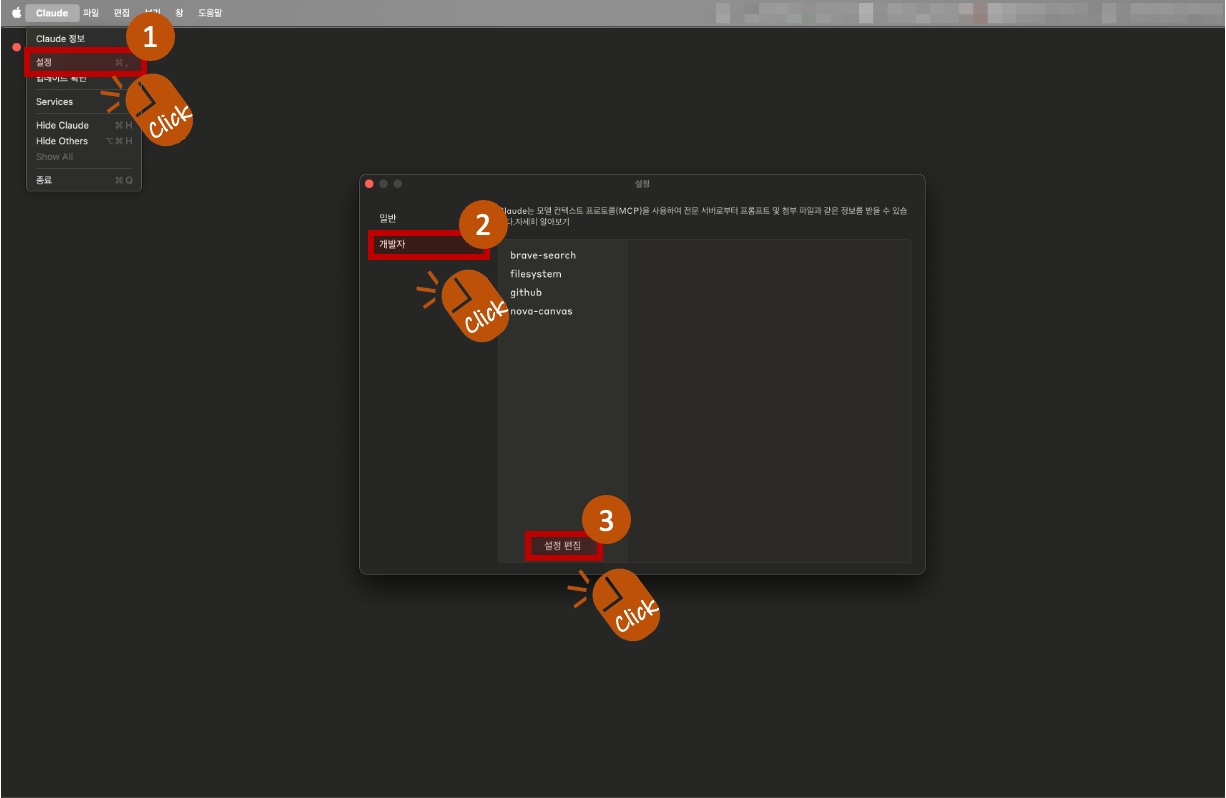
- Click on Claude > Settings from the Claude Desktop menu.
- When the popup appears, select Developer from the left menu, and click the Edit Settings button.
- This will open a folder containing the settings file. The name of this settings file is:
claude_desktop_config.json
-
Add the following content to the settings file (Python version):
-
python version
✅ Only AWS_PROFILE is required. Other variables like AWS_ACCESS_KEY_ID, AWS_SECRET_ACCESS_KEY, AWS_REGION, and PORT are optional and not necessary if your AWS profile is set correctly.
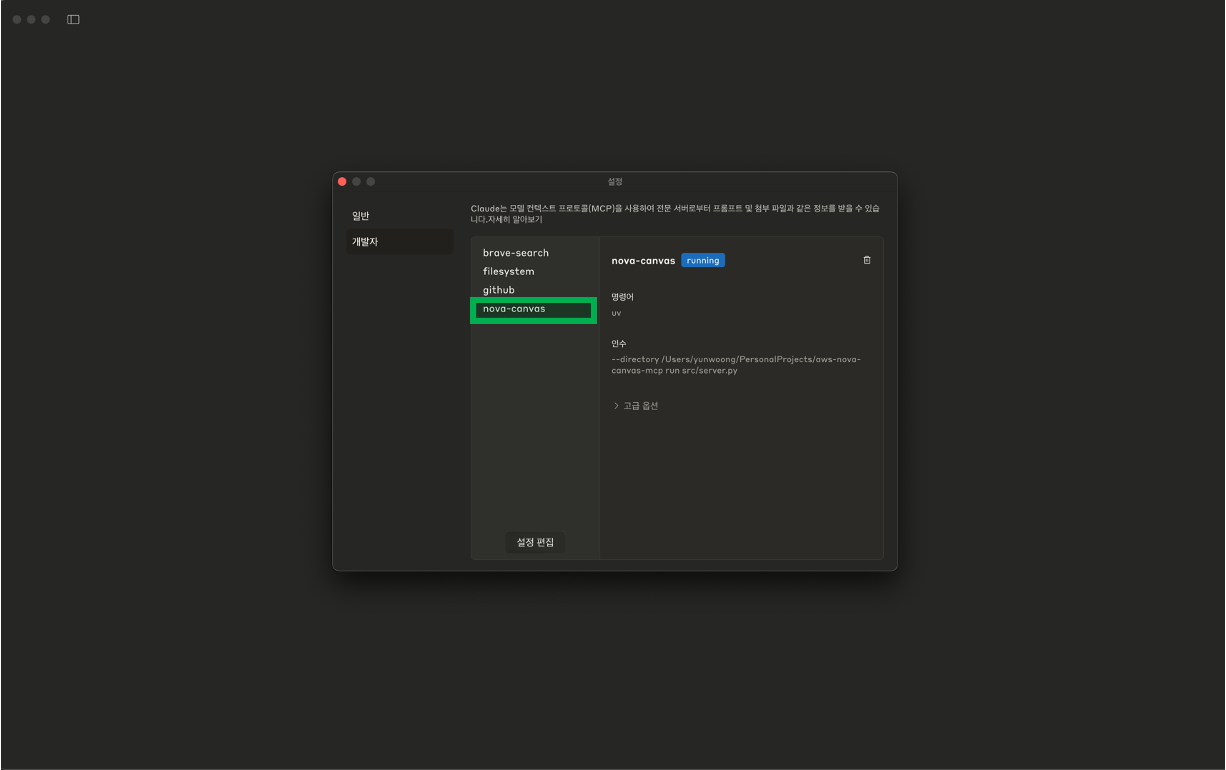
⚙️ If the setup is completed successfully, you can see that the “nova-canvas” item has been added in Claude > Settings > Developer tab.
⚠️ Important: MCP settings only work on the Claude desktop app, not the Claude web browser version
-
Image Save Location
By default, all generated or edited images will be saved in the following directory:
- macOS / Linux:
~/Desktop/aws-nova-canvas - Windows:
C:\Users\YourUsername\Desktop\aws-nova-canvas
📁 If no image save path is specified, the application will automatically create and use the folder above.
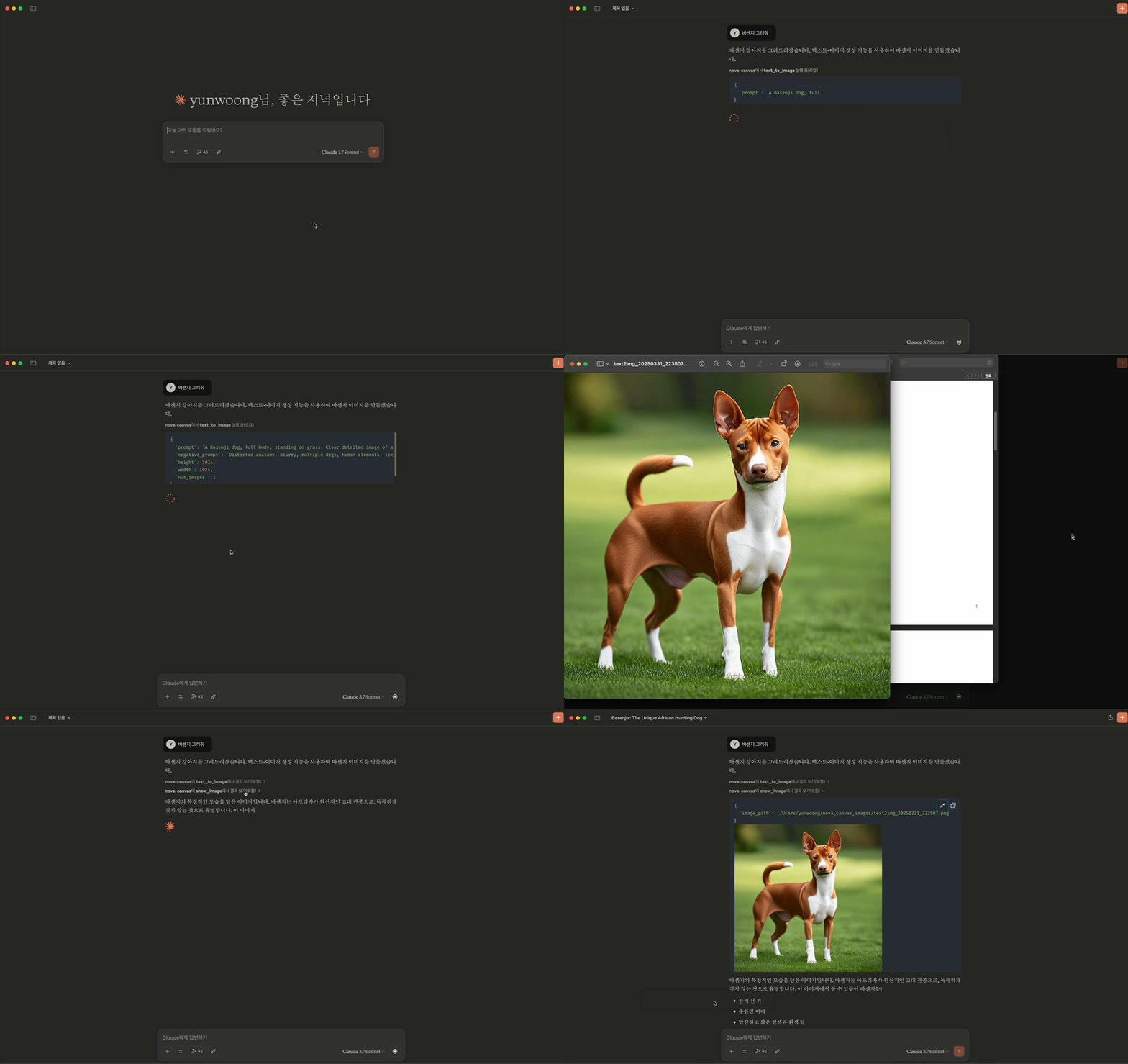
Usage Example
Limitations
- Prompt text supports up to 1024 characters
- Image generation allows up to 3 images at a time
- Image variation requires 1-5 reference images
- Color guide supports 1-10 color codes
License
MIT License
Dev Tools Supporting MCP
The following are the main code editors that support the Model Context Protocol. Click the link to visit the official website for more information.







