
Azd Mcp Ts
What is Azd Mcp Ts
azd-mcp-ts is an Azure Developer CLI template designed to deploy a Model Context Protocol (MCP) server written in TypeScript to Azure Container Apps using Server-Sent Events (SSE) Transport.
Use cases
Use cases for azd-mcp-ts include building AI solutions that require real-time data updates, developing applications that utilize the Model Context Protocol for enhanced data context management, and creating scalable web applications hosted on Azure.
How to use
To use azd-mcp-ts, log in to Azure Developer CLI, initialize the template with ‘azd init’, provision Azure infrastructure and deploy the application using ‘azd up’. After deployment, verify the MCP server is running by accessing the ‘/sse’ endpoint in your browser.
Key features
Key features of azd-mcp-ts include easy deployment to Azure Container Apps, support for TypeScript, and the ability to stream data using Server-Sent Events (SSE).
Where to use
azd-mcp-ts can be used in fields such as AI development, real-time data streaming applications, and any scenario requiring a Model Context Protocol server.
Clients Supporting MCP
The following are the main client software that supports the Model Context Protocol. Click the link to visit the official website for more information.





Overview
What is Azd Mcp Ts
azd-mcp-ts is an Azure Developer CLI template designed to deploy a Model Context Protocol (MCP) server written in TypeScript to Azure Container Apps using Server-Sent Events (SSE) Transport.
Use cases
Use cases for azd-mcp-ts include building AI solutions that require real-time data updates, developing applications that utilize the Model Context Protocol for enhanced data context management, and creating scalable web applications hosted on Azure.
How to use
To use azd-mcp-ts, log in to Azure Developer CLI, initialize the template with ‘azd init’, provision Azure infrastructure and deploy the application using ‘azd up’. After deployment, verify the MCP server is running by accessing the ‘/sse’ endpoint in your browser.
Key features
Key features of azd-mcp-ts include easy deployment to Azure Container Apps, support for TypeScript, and the ability to stream data using Server-Sent Events (SSE).
Where to use
azd-mcp-ts can be used in fields such as AI development, real-time data streaming applications, and any scenario requiring a Model Context Protocol server.
Clients Supporting MCP
The following are the main client software that supports the Model Context Protocol. Click the link to visit the official website for more information.
Content
powergentic/azd-mcp-ts 
An azd template to deploy a Model Context Protocol (MCP) server written in TypeScript to Azure Container Apps using SSE Transport.
Prerequisites
To deploy this template you will need to have the following installed:
Deployment
To use this template, follow these steps using the Azure Developer CLI:
-
Log in to Azure Developer CLI. This is only required once per-install.
azd auth login -
Initialize this template using
azd init:azd init --template powergentic/azd-mcp-ts -
Ensure Docker Engine is running on your machine. This will be needed by
azdto build the Docker image for the app prior to deployment to Azure Container Apps. -
Use
azd upto provision your Azure infrastructure and deploy the web application to Azure.azd up -
Once the template has finished provisioning all resources, and Azure Container Apps has completed deploying the app container (this can take a minute or so after
azd upcompletes to finish), the MCP server will be running.
-
To verify the MCP server is running, navigate your browser to the
/sseurl for the app within your browser.Example URL:
https://ca-mcp-vnv7lqmg46722.bravebeach-29a82758.eastus2.azurecontainerapps.io/sseThis will open a streaming output within the browser that will look similar to the following:

-
Congratulations, you now have a simple MCP Server written in TypeScript up and running in Azure! You can now customize this app to build the specific MCP server you need for your AI solution.
Architecture Diagram
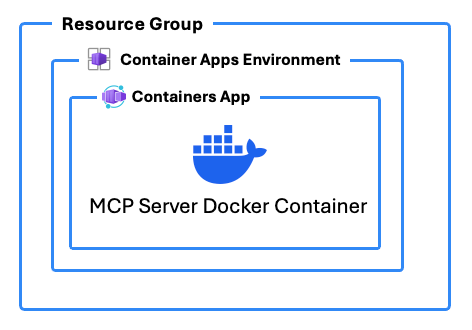
In addition to deploying Azure Resources to host the MCP server, this template includes a DOCKERFILE that builds the MCP server app with TypeScript.
Azure Resources
These are the Azure resources that are deployed with this template:
- Container Apps Environment - The environment for hosting the Container App
- Container App - The hosting for the MCP server app
- Log Analytics and Application Insights - Logging for the Container Apps Environment
- Container Registry - Used to deploy the custom Docker container for the app
Resource Links
Here are some additional resource links that help explain the topics around building custom MCP Servers in TypeScript and about what MCP and SSE are:
- How to Build and Deploy an MCP Server with TypeScript and Azure Developer CLI (azd) using Azure Container Apps and Docker by Chris Pietschmann
Author
This azd template was written by Chris Pietschmann, founder of Powergentic.ai, Microsoft MVP, HashiCorp Ambassador, and Microsoft Certified Trainer (MCT).
Dev Tools Supporting MCP
The following are the main code editors that support the Model Context Protocol. Click the link to visit the official website for more information.







