
Azure Mcp
What is Azure Mcp
azure-mcp is a Python-based tool designed for managing Azure Virtual Machines (VMs) using the Model-Context Protocol (MCP) with natural language processing capabilities.
Use cases
Use cases include automating the management of Azure VMs, simplifying cloud resource management for users unfamiliar with command-line interfaces, and enhancing productivity through natural language commands.
How to use
To use azure-mcp, clone the repository, set up a Python virtual environment, install the required dependencies, configure your Azure credentials in the .env file, and run the MCP server using the command ‘uv run .\src\main.py’.
Key features
Key features include the ability to create, list, and delete Azure VMs, manage associated network resources, and interact with the tool using natural language through an LLM Client like Claude or Visual Studio Code.
Where to use
azure-mcp can be used in cloud computing environments, particularly for developers and system administrators managing Azure infrastructure.
Clients Supporting MCP
The following are the main client software that supports the Model Context Protocol. Click the link to visit the official website for more information.





Overview
What is Azure Mcp
azure-mcp is a Python-based tool designed for managing Azure Virtual Machines (VMs) using the Model-Context Protocol (MCP) with natural language processing capabilities.
Use cases
Use cases include automating the management of Azure VMs, simplifying cloud resource management for users unfamiliar with command-line interfaces, and enhancing productivity through natural language commands.
How to use
To use azure-mcp, clone the repository, set up a Python virtual environment, install the required dependencies, configure your Azure credentials in the .env file, and run the MCP server using the command ‘uv run .\src\main.py’.
Key features
Key features include the ability to create, list, and delete Azure VMs, manage associated network resources, and interact with the tool using natural language through an LLM Client like Claude or Visual Studio Code.
Where to use
azure-mcp can be used in cloud computing environments, particularly for developers and system administrators managing Azure infrastructure.
Clients Supporting MCP
The following are the main client software that supports the Model Context Protocol. Click the link to visit the official website for more information.
Content
Azure VM Management MCP
A Python-based demo tool for managing Azure VMs using the MCP (Model-Context Protocol). This project provides a simple interface to create, list, and delete Azure VMs along with their associated network resources using an LLM Client such as Claude or Visual Studio Code using natural language.
Prerequisites
- Python 3.13 or higher
- Azure subscription
- Azure CLI (for authentication)
- An LLM/MCP Client. Can use Claude or Visual Studio Code
Installation
- Clone this repository:
git clone https://github.com/brauliomsft/azure-mcp
cd azure-mcp
- Install uv and set up the Python project and environment
powershell -ExecutionPolicy ByPass -c "irm https://astral.sh/uv/install.ps1 | iex"
- Create and activate a virtual environment:
uv venv
.venv\Scripts\activate
- Install dependencies:
pip install -r src/requirements.txt
Configuration
- Copy the example environment file:
cp src/.env.example src/.env
- Update the
.envfile with your Azure credentials:
AZURE_RESOURCE_GROUP = "your-resource-group"
AZURE_LOCATION = "your-location"
SUBSCRIPTION_ID = "your-subscription-id"
Available Commands
The project provides the following MCP tools:
list_vms: Lists all VMs in the specified resource groupcreate_vm: Creates a new Ubuntu 18.04 VM with basic networking setupdelete_vm: Deletes a VM and its associated network resources
Usage
Run the MCP server:
uv run .\src\main.py
MCP Client Configuration (For Claude)
Claude
- Navigate to Claude Configuration file (
C:\Users\<user>\AppData\Roaming\Claude for Windows) - Add the following text to the claude_desktop_config.json file. Make sure to use the full path on your local machine. Eg. 'C:\code\azure-mcp\src’
{
  "mcpServers": {
    "Azure VM": {
      "command": "uv",
      "args": [
        "--directory",
        "<FULL_PATH\\>azure-mcp\\src\\",
        "run",
        "main.py"
      ]
    }
  }
}
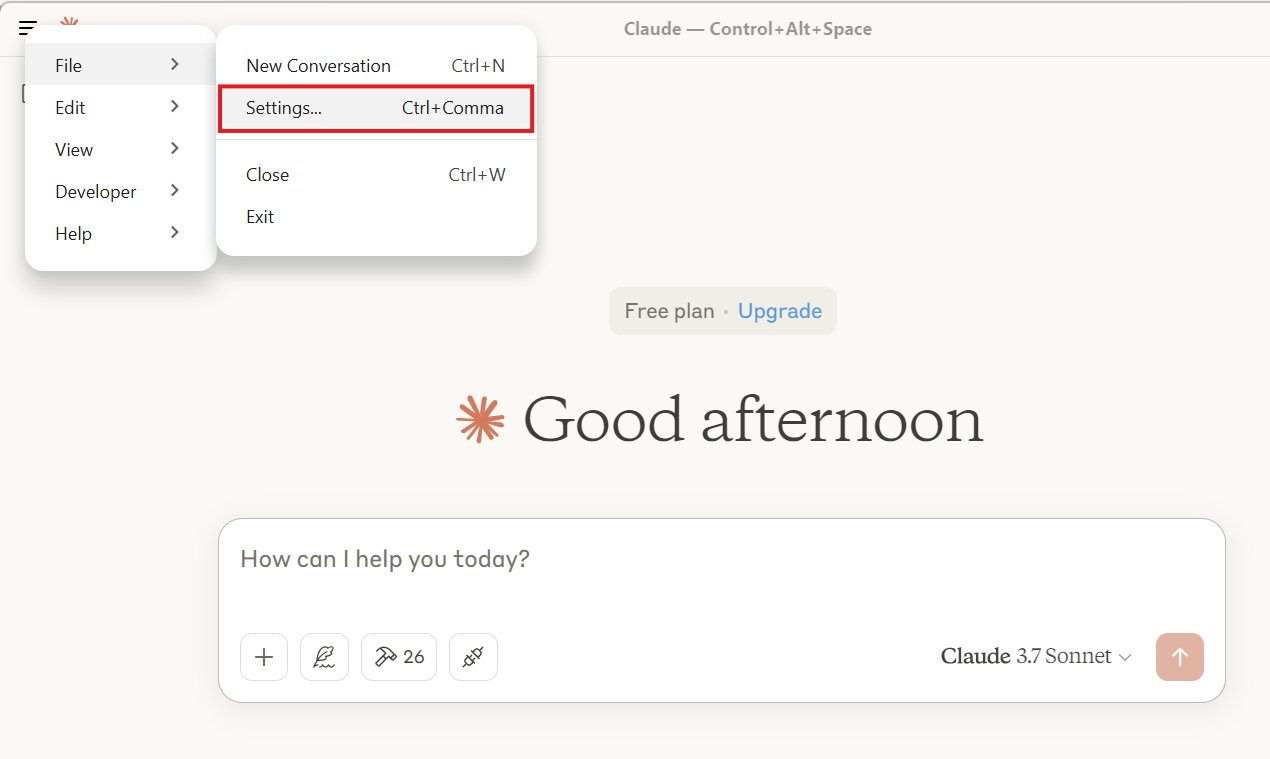
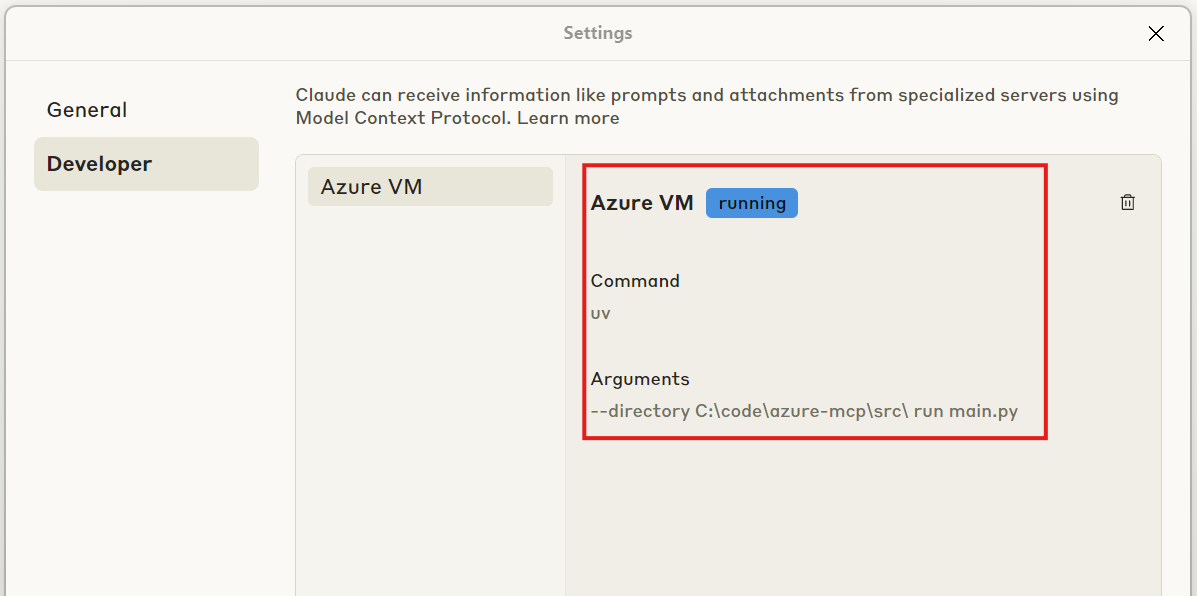
- Validate that Claude is now connected to the MCP Server. Open Claude App and Navigate to File -> Settings. The “Azure MCP” Server should show as Running in the Developer tab
Project Structure
├── src/
│   ├── azure_clients.py    # Azure SDK client initialization
│   ├── networking.py       # Network resource management
│   ├── vm_operations.py    # VM management operations
│   └── main.py            # Entry point
├── pyproject.toml         # Project dependencies and metadata
└── README.md
Security Note
⚠️ The default VM configuration uses a hardcoded password. For production use, modify the create_vm function in vm_operations.py to use more secure authentication methods.
Contributing
Contributions are welcome! Please feel free to submit a Pull Request.
Dev Tools Supporting MCP
The following are the main code editors that support the Model Context Protocol. Click the link to visit the official website for more information.







