
Backlog Mcp
What is Backlog Mcp
Backlog-MCP is an integration system that allows users to access Backlog’s API through the Model Context Protocol (MCP). This enables AI assistants to directly interact with Backlog’s functionalities, such as task creation and project management.
Use cases
Use cases for Backlog-MCP include automating task creation via AI assistants, managing project timelines, and integrating Backlog functionalities into custom applications for enhanced productivity.
How to use
To use Backlog-MCP, you need to set up the server by modifying the provided JSON configuration. Ensure to replace the directory path with your downloaded directory and provide your Backlog API key in the environment variables. Then, run the server using the specified command.
Key features
Key features of Backlog-MCP include seamless integration with Backlog’s API, support for AI-driven task management, and the ability to automate project workflows through MCP-compatible clients.
Where to use
Backlog-MCP can be used in project management, software development, and any environment where task tracking and collaboration are essential, particularly in teams utilizing Backlog for project organization.
Clients Supporting MCP
The following are the main client software that supports the Model Context Protocol. Click the link to visit the official website for more information.





Overview
What is Backlog Mcp
Backlog-MCP is an integration system that allows users to access Backlog’s API through the Model Context Protocol (MCP). This enables AI assistants to directly interact with Backlog’s functionalities, such as task creation and project management.
Use cases
Use cases for Backlog-MCP include automating task creation via AI assistants, managing project timelines, and integrating Backlog functionalities into custom applications for enhanced productivity.
How to use
To use Backlog-MCP, you need to set up the server by modifying the provided JSON configuration. Ensure to replace the directory path with your downloaded directory and provide your Backlog API key in the environment variables. Then, run the server using the specified command.
Key features
Key features of Backlog-MCP include seamless integration with Backlog’s API, support for AI-driven task management, and the ability to automate project workflows through MCP-compatible clients.
Where to use
Backlog-MCP can be used in project management, software development, and any environment where task tracking and collaboration are essential, particularly in teams utilizing Backlog for project organization.
Clients Supporting MCP
The following are the main client software that supports the Model Context Protocol. Click the link to visit the official website for more information.
Content
Backlog MCP (Model Context Protocol) Integration
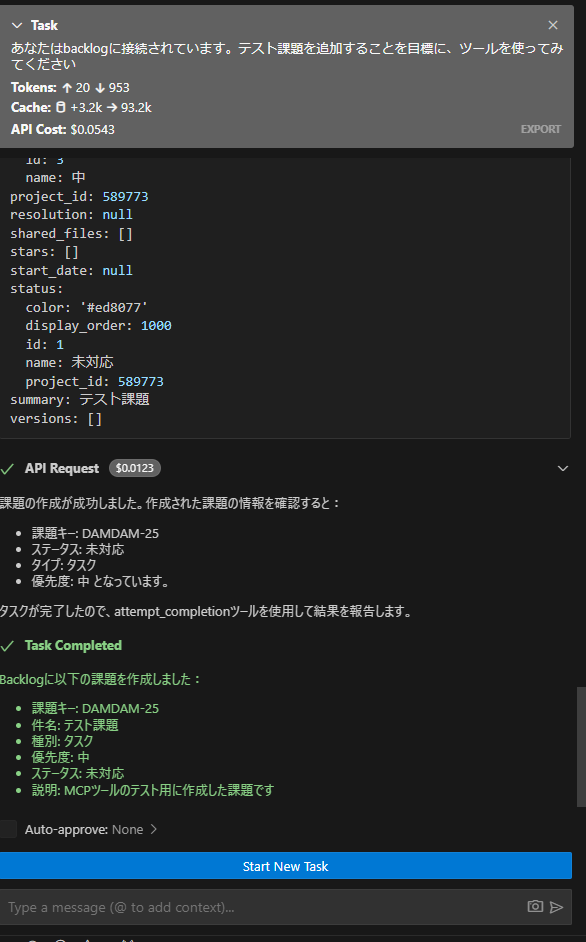
このプロジェクトは、BacklogのAPIをModel Context Protocol (MCP)を通じて利用可能にするための統合システムです。これにより、AIアシスタントがBacklogの機能(課題の作成、プロジェクト管理など)を直接操作できるようになります。
インストール方法
技術スタック
- Python
- OpenAPI Generator
- Model Context Protocol (MCP)
- Poetry (依存関係管理)
- Backlog API
開発フロー
- BacklogのAPIドキュメントをスクレイピング
- OpenAPI仕様を生成
- Pythonクライアントを生成
- MCPサーバーを実装
- AIアシスタントからBacklog APIを利用
注意事項
- Backlog APIキーの取り扱いには十分注意してください
- APIの利用制限に注意してください
- 自動生成されたコードは手動で修正しないでください
Dev Tools Supporting MCP
The following are the main code editors that support the Model Context Protocol. Click the link to visit the official website for more information.







