
Balldontlie Mcp
What is Balldontlie Mcp
balldontlie-mcp is an MCP Server implementation that integrates the Balldontlie API, providing information about players, teams, and games for the NBA, NFL, and MLB.
Use cases
Use cases include building sports statistics dashboards, creating fantasy sports applications, and developing sports news aggregators.
How to use
To use balldontlie-mcp, sign up for an API key at Balldontlie.io, install the server via Smithery, and configure it in your Claude Desktop settings.
Key features
Key features include retrieving lists of teams, players, and games for NBA, NFL, and MLB, with options for filtering by league, player names, and specific dates.
Where to use
balldontlie-mcp can be used in sports analytics, app development, and any platform requiring real-time data on NBA, NFL, and MLB.
Clients Supporting MCP
The following are the main client software that supports the Model Context Protocol. Click the link to visit the official website for more information.





Overview
What is Balldontlie Mcp
balldontlie-mcp is an MCP Server implementation that integrates the Balldontlie API, providing information about players, teams, and games for the NBA, NFL, and MLB.
Use cases
Use cases include building sports statistics dashboards, creating fantasy sports applications, and developing sports news aggregators.
How to use
To use balldontlie-mcp, sign up for an API key at Balldontlie.io, install the server via Smithery, and configure it in your Claude Desktop settings.
Key features
Key features include retrieving lists of teams, players, and games for NBA, NFL, and MLB, with options for filtering by league, player names, and specific dates.
Where to use
balldontlie-mcp can be used in sports analytics, app development, and any platform requiring real-time data on NBA, NFL, and MLB.
Clients Supporting MCP
The following are the main client software that supports the Model Context Protocol. Click the link to visit the official website for more information.
Content
Balldontlie MCP Server

An MCP Server implementation that integrates the Balldontlie API, to provide information about players, teams and games for the NBA, NFL and MLB.
Tools
-
get_teams
- Get a list of teams for the NBA, NFL or MLB
- Inputs:
league(enum [‘NBA’, ‘NFL’, ‘MLB’]): The sports league to get teams for
-
get_players
- Gets a list of players for the NBA, NFL or MLB
- Inputs:
league(enum [‘NBA’, ‘NFL’, ‘MLB’]): The sports league to get players forfirstName(string, optional): The first name of the player to search forlastName(string, optional): The last name of the player to search forcursor(number, optional): Cursor for pagination
-
get_games
- Gets the list of games for the NBA, NFL or MLB
- Inputs:
league(enum [‘NBA’, ‘NFL’, ‘MLB’]): The sports league to get games fordates(string[], optional): Get games for specific dates, format: YYYY-MM-DDteamIds(string[], optional): Get games for specific gamescursor(number, optional): Cursor for pagination
-
get_game
- Get a specific game from one of the following leagues NBA, MLB, NFL
- Inputs:
league(enum [‘NBA’, ‘NFL’, ‘MLB’]): The sports league to get the game forgameId(number): The id of the game from the get_games tool
Prompts
- schedule_generator
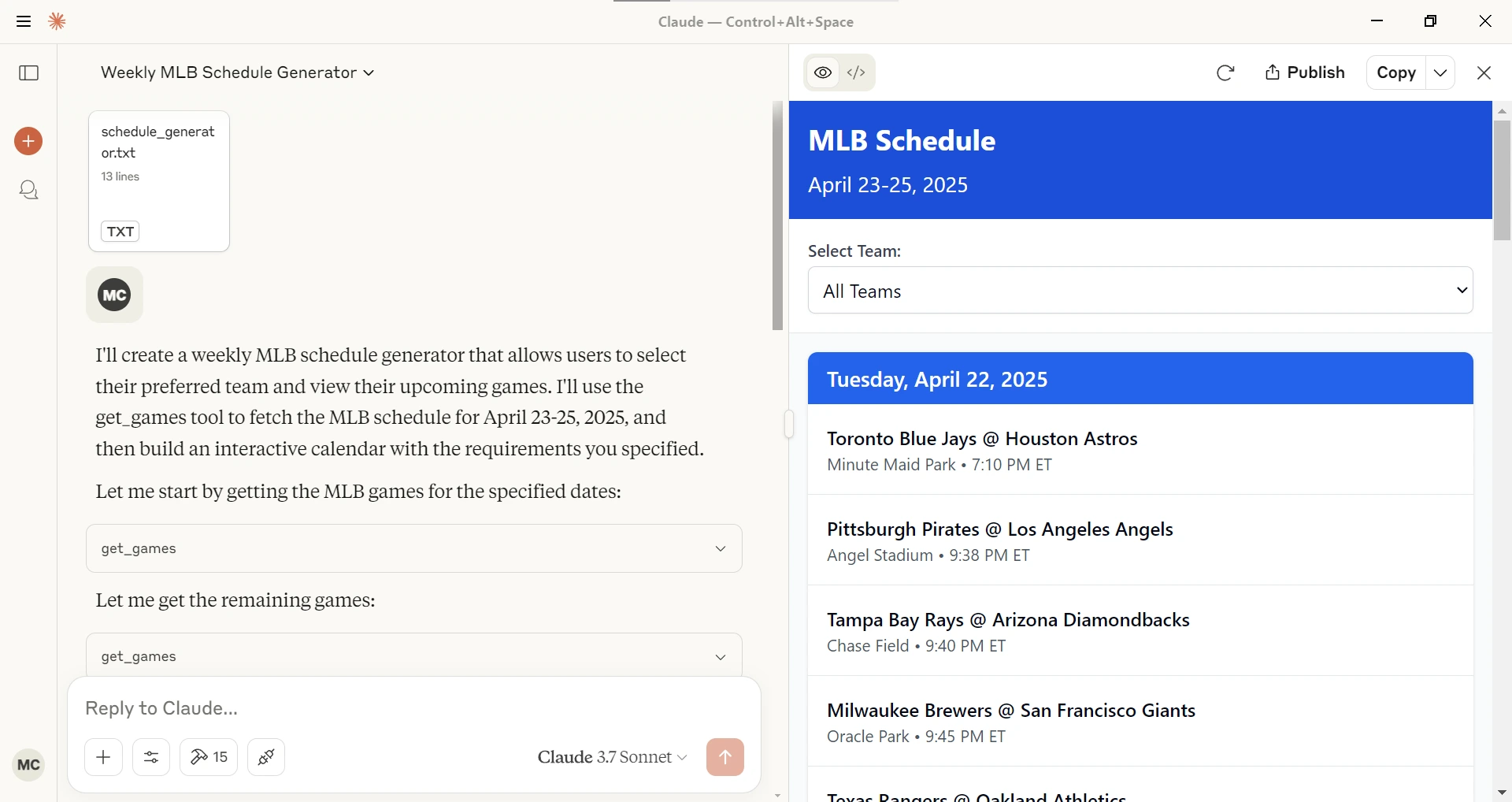
Given a league (NBA, MLB, NFL), a starting date and ending date generates an interactive schedule in Claude Desktop.
Configuration
Getting an API Key
- Sign up for account at Balldontlie.io
- The free plan is enough for this MCP Server
Installing via Smithery
To install balldontlie-mcp for Claude Desktop automatically via Smithery:
npx -y @smithery/cli install @mikechao/balldontlie-mcp --client claude
Usage with Claude Desktop
Add this to your claude_desktop_config.json:
{
  "mcp-servers": {
    "balldontlie": {
      "command": "npx",
      "args": [
        "-y",
        "balldontlie-mcp"
      ],
      "env": {
        "BALLDONTLIE_API_KEY": "YOUR API KEY HERE"
      }
    }
  }
}
Usage with LibreChat
mcpServers:
  balldontlie:
    command: sh
    args:
      - -c
      - BALLDONTLIE_API_KEY=your-api-key-here npx -y balldontlie-mcp
License
This MCP server is licensed under the MIT License. This means you are free to use, modify, and distribute the software, subject to the terms and conditions of the MIT License. For more details, please see the LICENSE file in the project repository.
Disclaimer
This library is not officially associated with balldontlie.io. It is a third-party implementation of the balldontlie api with a MCP Server.
Dev Tools Supporting MCP
The following are the main code editors that support the Model Context Protocol. Click the link to visit the official website for more information.







