Beanquery Mcp
What is Beanquery Mcp
beanquery-mcp is an experimental implementation of the Model Context Protocol (MCP) that allows AI assistants to query and analyze Beancount ledger files using Beancount Query Language (BQL) and the beanquery tool.
Use cases
Use cases include automated financial reporting, querying specific financial transactions, and integrating AI assistants for interactive financial data analysis.
How to use
To use beanquery-mcp, set the Beancount ledger file with the set_ledger_file command and run BQL queries using the run_query command. You can also access available tables and accounts through specific resource URLs.
Key features
Key features include integration with Beancount ledger files, support for Beancount Query Language (BQL), and standardized communication between AI assistants and financial data, enhancing data accessibility and analysis.
Where to use
beanquery-mcp is suitable for financial analysis, accounting, and any application that requires querying structured financial data stored in Beancount format.
Clients Supporting MCP
The following are the main client software that supports the Model Context Protocol. Click the link to visit the official website for more information.





Overview
What is Beanquery Mcp
beanquery-mcp is an experimental implementation of the Model Context Protocol (MCP) that allows AI assistants to query and analyze Beancount ledger files using Beancount Query Language (BQL) and the beanquery tool.
Use cases
Use cases include automated financial reporting, querying specific financial transactions, and integrating AI assistants for interactive financial data analysis.
How to use
To use beanquery-mcp, set the Beancount ledger file with the set_ledger_file command and run BQL queries using the run_query command. You can also access available tables and accounts through specific resource URLs.
Key features
Key features include integration with Beancount ledger files, support for Beancount Query Language (BQL), and standardized communication between AI assistants and financial data, enhancing data accessibility and analysis.
Where to use
beanquery-mcp is suitable for financial analysis, accounting, and any application that requires querying structured financial data stored in Beancount format.
Clients Supporting MCP
The following are the main client software that supports the Model Context Protocol. Click the link to visit the official website for more information.
Content
Beanquery MCP
The Beancount MCP Server is an experimental implementation of the Model Context Protocol (MCP) designed to interface with Beancount ledger files. Leveraging the Beancount Query Language (BQL) and the beanquery tool, this server enables seamless querying and analysis of financial data stored in Beancount format. By integrating MCP, the server facilitates standardized communication between AI assistants and Beancount ledgers, enhancing the accessibility and utility of financial data.
Note: This server is experimental and may undergo significant changes. It is recommended to use it in a development environment and provide feedback for further improvements.
A generated sample ledger can be found in sample.bean
Available Resources and Tools
- Tools:
set_ledger_file: Set the Beancount ledger file to use for queries (if not set via environment variable).run_query: Run a BQL query against the loaded Beancount file.
- Resources:
beanquery://tables: Get a list of tables that BQL can access.beanquery://accounts: Get a list of accounts in the loaded Beancount file.
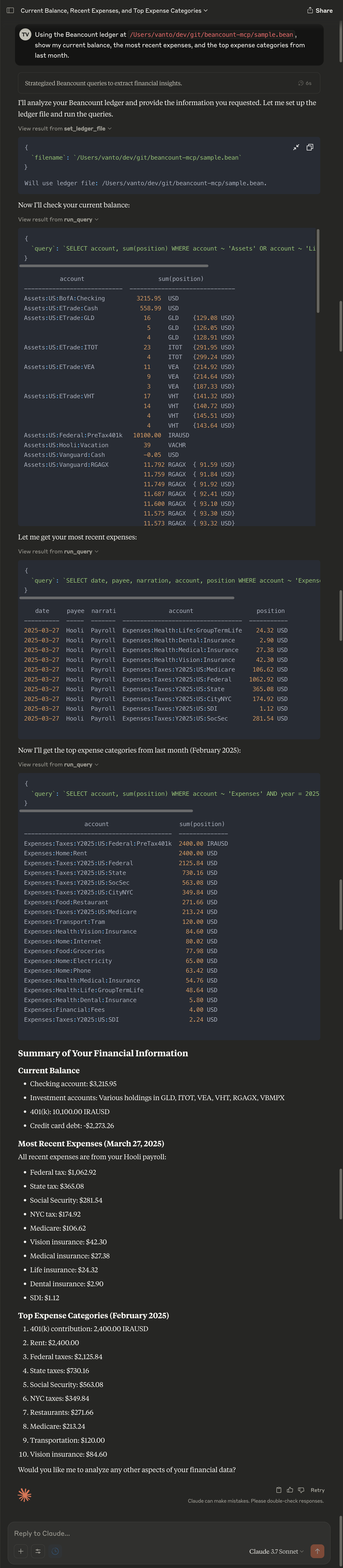
Example using Claude.ai
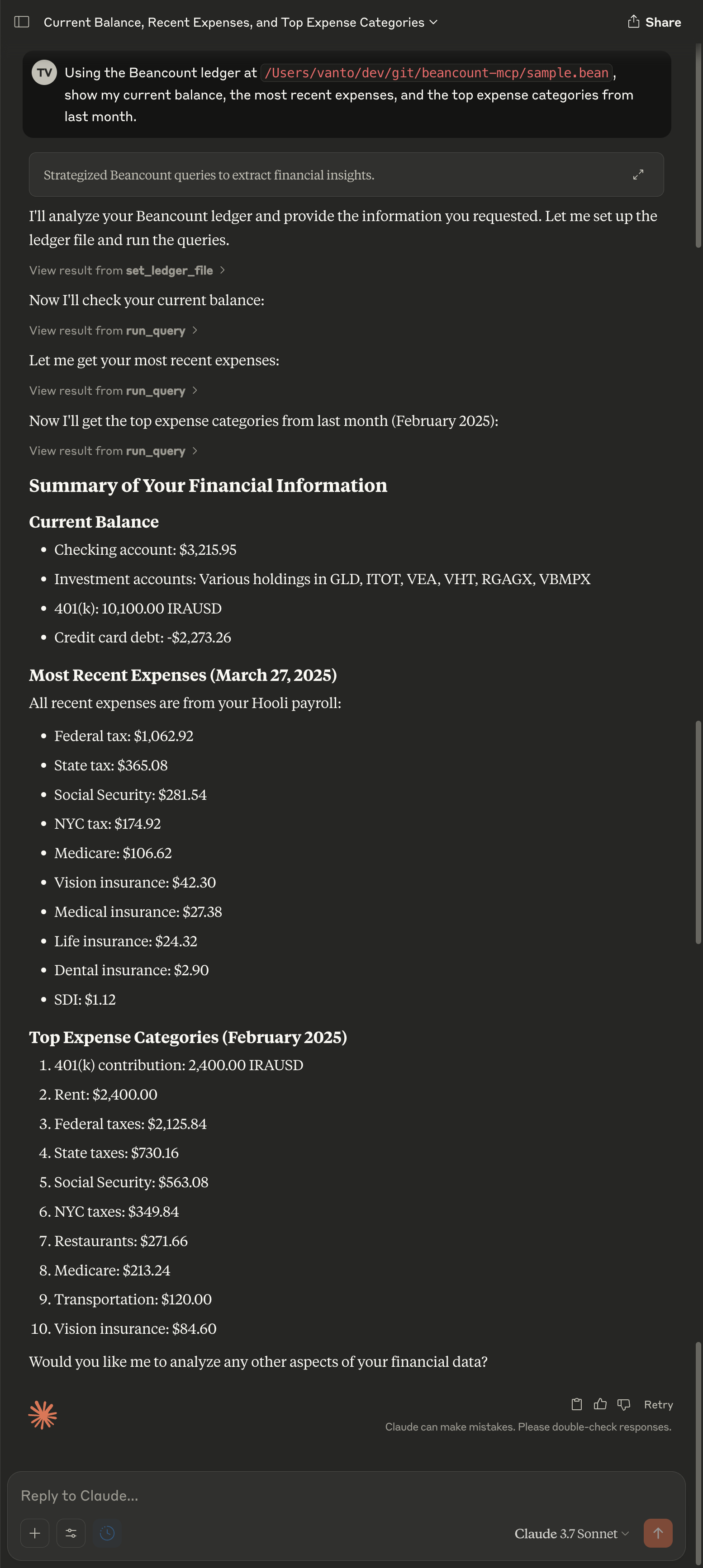
For a screenshot with expanded MCP interactions, see here.
⚠️ Privacy Warning
This tool interfaces with language model providers (LLMs) via the Model Context Protocol (MCP), and as such may transmit parts of your Beancount ledger—including potentially confidential or private financial information—to third-party services.
Please use this tool with caution, especially when:
- Your ledger contains sensitive data (e.g., client names, salary details, health-related expenses).
- You are using a cloud-hosted or non-self-hosted LLM backend.
Recommendations:
- Mask or redact sensitive data in test ledgers.
- Use self-hosted LLMs when possible.
- Review the data being sent via MCP to ensure compliance with your privacy and security requirements.
[!CAUTION]
You are responsible for the protection of your financial data. Do not share ledgers you would not be comfortable exposing.
Setup
Prerequisites
- Python 3.10 or later
- uv for managing Python projects (recommended)
Usage
Running the Server
-
Development Mode:
Use the MCP Inspector to test and debug your server:mcp dev server.py -
Claude Desktop Integration:
Install the server into Claude Desktop:mcp install server.py-
Quick Start:
uv run mcp install server.py -v BEANCOUNT_LEDGER=$(pwd)/sample.bean --with beancount --with beanquery -
Custom Name:
uv run mcp install server.py --name "Beanquery MCP Server" --with beancount --with beanquery -
Environment Variables:
uv run mcp install server.py -v BEANCOUNT_LEDGER=/path/to/your/ledger.bean --with beancount --with beanquery
uv run mcp install server.py -f .env --with beancount --with beanquery
-
Testing
Run the test suite using pytest:
pytest server_test.py
Contributing
- Fork the repository.
- Create a feature branch:
git checkout -b feature-name - Commit your changes:
git commit -m "Add feature description" - Push to your branch:
git push origin feature-name - Open a pull request.
License
This project is licensed under the MIT License. See the LICENSE file for details.
Dev Tools Supporting MCP
The following are the main code editors that support the Model Context Protocol. Click the link to visit the official website for more information.