
Beepf Mcp
What is Beepf Mcp
beepf-mcp is an observability interface integration tool based on the Model Context Protocol (MCP) that encapsulates the capabilities supported by beepf, such as BPF topology and performance collection, through the MCP protocol.
Use cases
Use cases for beepf-mcp include system performance monitoring, retrieving detailed information about node programs, and analyzing metrics for optimization in complex systems.
How to use
To use beepf-mcp, clone the repository, install dependencies, and build the project. Start the server using ‘./beepf-mcp’. Configure the MCP settings in Cursor to interact with the server and access the available MCP tools.
Key features
Key features of beepf-mcp include: 1. topo: Retrieve system topology information. 2. prog: Get a list of node programs. 3. prog_detail: Fetch details of a specific node program (requires progId). 4. prog_dump: Obtain data dumps of a specific node program (requires progId). 5. node_metrics: Access node metrics data.
Where to use
beepf-mcp can be used in fields requiring system observability and monitoring, particularly in environments utilizing BPF for performance analysis and topology mapping.
Clients Supporting MCP
The following are the main client software that supports the Model Context Protocol. Click the link to visit the official website for more information.





Overview
What is Beepf Mcp
beepf-mcp is an observability interface integration tool based on the Model Context Protocol (MCP) that encapsulates the capabilities supported by beepf, such as BPF topology and performance collection, through the MCP protocol.
Use cases
Use cases for beepf-mcp include system performance monitoring, retrieving detailed information about node programs, and analyzing metrics for optimization in complex systems.
How to use
To use beepf-mcp, clone the repository, install dependencies, and build the project. Start the server using ‘./beepf-mcp’. Configure the MCP settings in Cursor to interact with the server and access the available MCP tools.
Key features
Key features of beepf-mcp include: 1. topo: Retrieve system topology information. 2. prog: Get a list of node programs. 3. prog_detail: Fetch details of a specific node program (requires progId). 4. prog_dump: Obtain data dumps of a specific node program (requires progId). 5. node_metrics: Access node metrics data.
Where to use
beepf-mcp can be used in fields requiring system observability and monitoring, particularly in environments utilizing BPF for performance analysis and topology mapping.
Clients Supporting MCP
The following are the main client software that supports the Model Context Protocol. Click the link to visit the official website for more information.
Content
BeePF MCP Server
基于 Model Context Protocol (MCP) 实现的 BeePF 可观测性接口集成工具。
简介
本项目使用 mark3labs/mcp-go 框架将 BeePF 项目中的可观测性相关接口转换为 MCP 工具,使大语言模型能够通过 MCP 协议调用这些接口获取系统数据。
功能特性
本工具提供了以下 MCP 工具:
- topo: 获取系统拓扑信息
- prog: 获取节点程序列表
- prog_detail: 获取特定节点程序详情(需要 progId 参数)
- prog_dump: 获取特定节点程序数据转储(需要 progId 参数)
- node_metrics: 获取节点指标数据
安装
# 克隆项目
git clone https://github.com/cen-ngc5139/beepf-mcp.git
cd beepf-mcp

# 安装依赖
go mod tidy

# 构建项目
go build -o beepf-mcp .
使用方法
直接启动
./beepf-mcp
服务器将以标准输入/输出方式启动,可以与支持 MCP 的客户端(例如 MCPHost)进行交互。
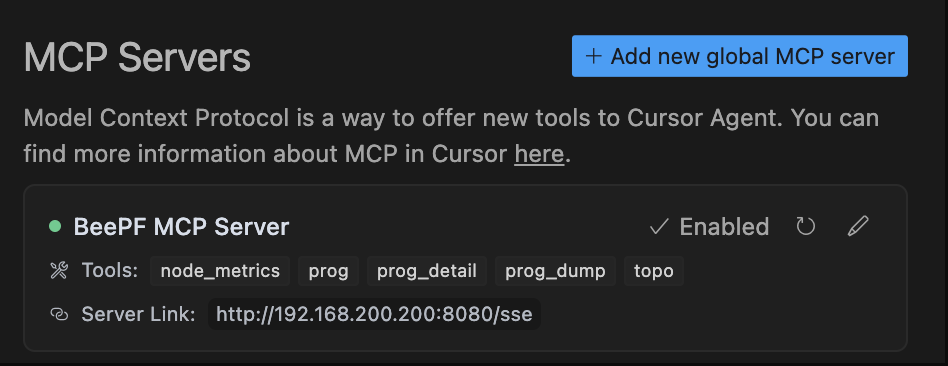
Cursor 添加 MCP 配置
在 Cursor 的设置中添加 MCP 配置,添加如下配置:
{
  "mcpServers": {
    "BeePF MCP Server": {
      "url": "http://192.168.200.200:8080/sse"
    }
  }
}
添加后,在 Cursor 的命令面板中输入 /tools 即可看到 MCP 工具列表,选择对应的工具即可使用。
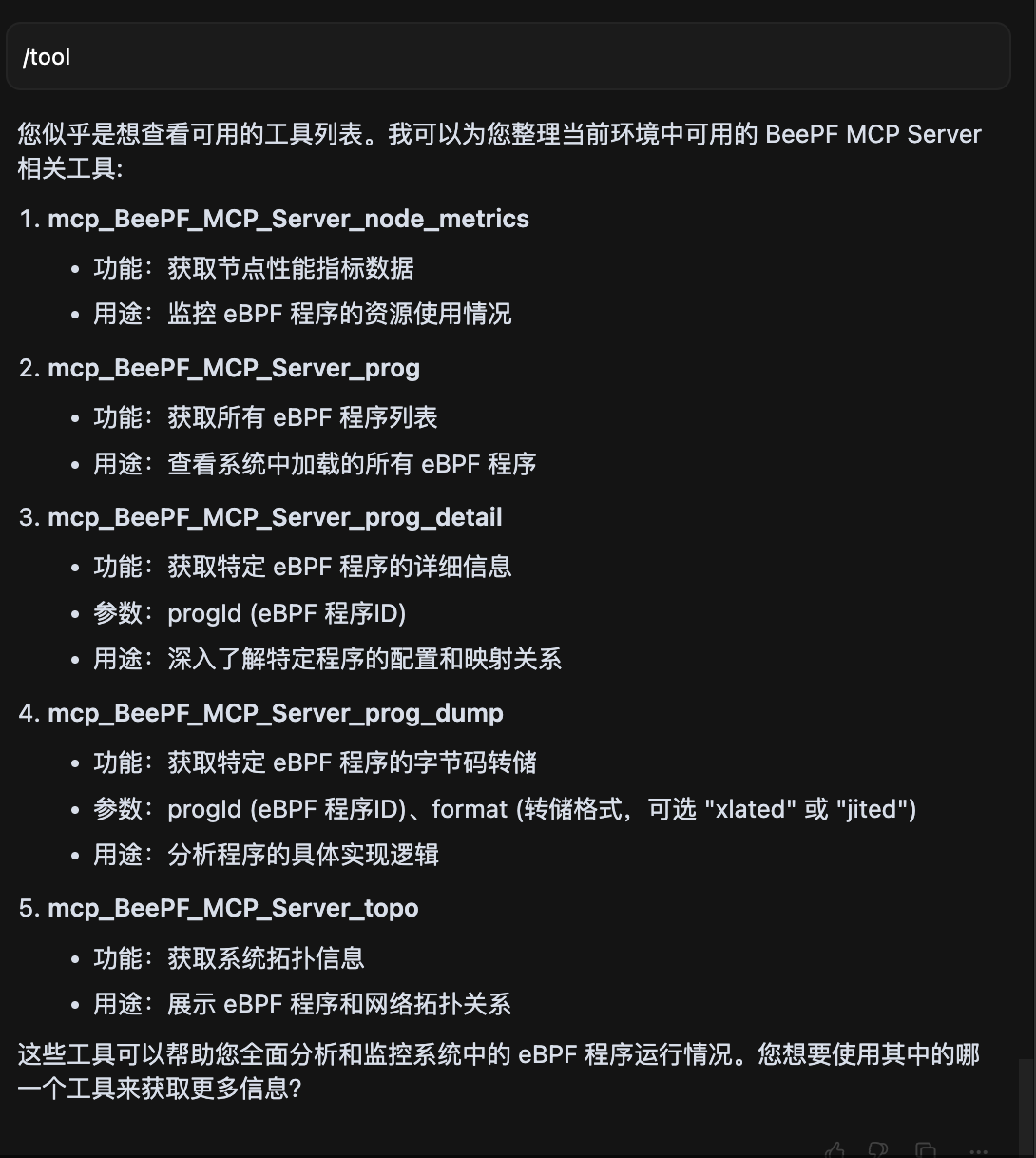
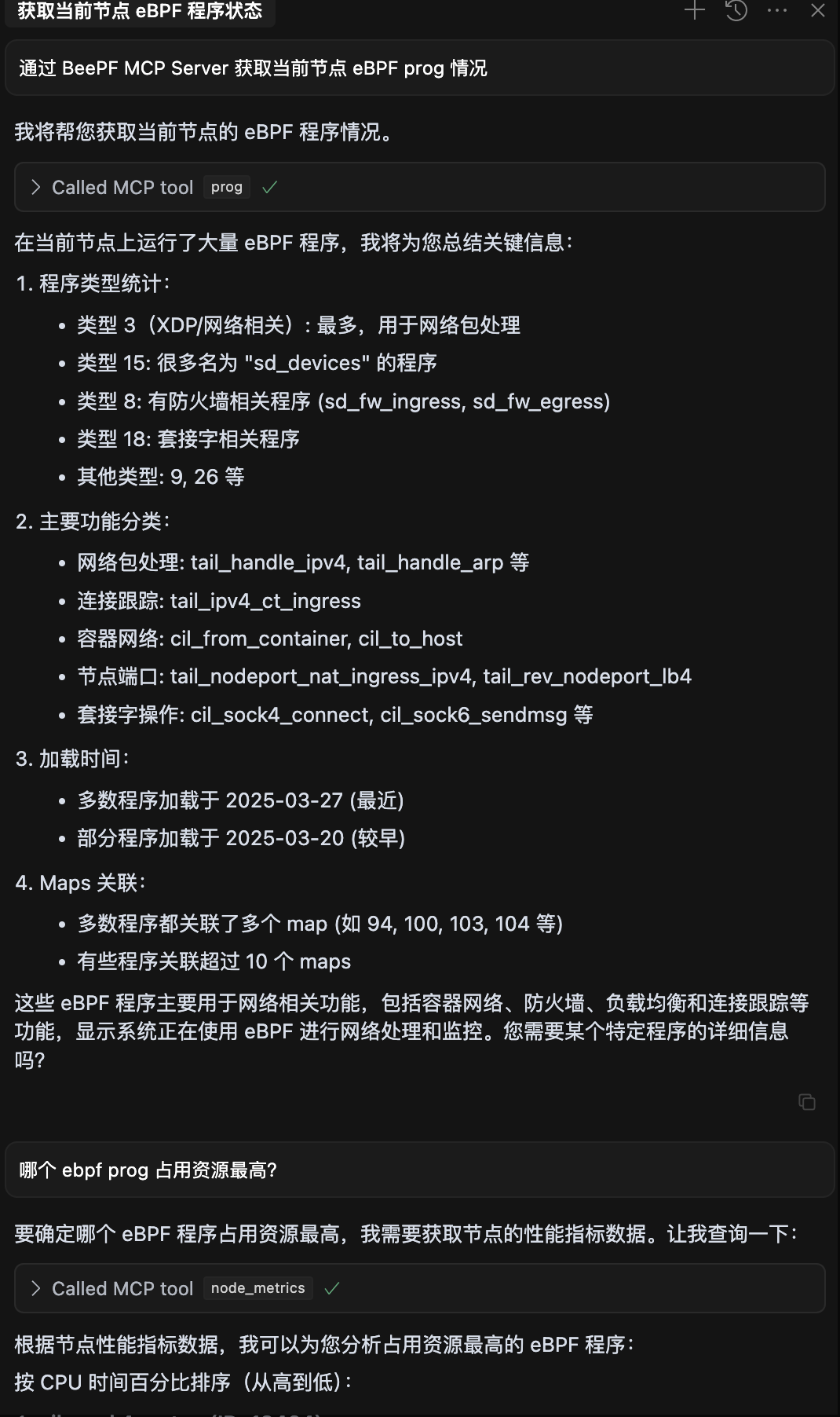
示例交互
联系与贡献
欢迎提交 Issue 和 Pull Request 来改进此项目。
Dev Tools Supporting MCP
The following are the main code editors that support the Model Context Protocol. Click the link to visit the official website for more information.







