
C2 Search Mcp
What is C2 Search Mcp
c2_search_mcp is a threat intelligence integration query service based on FastMCP, designed to query threat intelligence data for IP addresses, URLs, and file hashes (MD5, SHA1, SHA256). It integrates multiple threat intelligence platform APIs to provide security analysts and system administrators with convenient threat intelligence querying capabilities, enhancing threat detection and response efficiency.
Use cases
Use cases for c2_search_mcp include automated threat intelligence queries in security operations centers (SOCs), integration with incident response workflows, and providing security analysts with quick access to threat data for decision-making.
How to use
To use c2_search_mcp, clone the repository, install the required dependencies using the uv package manager, configure your API keys in the config.yaml file, and add the service to your MCP client configuration. You can then run the service and perform queries through various integrated platforms.
Key features
Key features of c2_search_mcp include multi-source data integration from platforms like VirusTotal and AbuseIPDB, a unified query interface for standardized API access, high-performance design with asynchronous query handling, and flexible extensibility through a modular architecture.
Where to use
c2_search_mcp can be used in cybersecurity environments, threat intelligence analysis, incident response teams, and any organization that requires efficient querying of threat intelligence data to enhance security measures.
Clients Supporting MCP
The following are the main client software that supports the Model Context Protocol. Click the link to visit the official website for more information.





Overview
What is C2 Search Mcp
c2_search_mcp is a threat intelligence integration query service based on FastMCP, designed to query threat intelligence data for IP addresses, URLs, and file hashes (MD5, SHA1, SHA256). It integrates multiple threat intelligence platform APIs to provide security analysts and system administrators with convenient threat intelligence querying capabilities, enhancing threat detection and response efficiency.
Use cases
Use cases for c2_search_mcp include automated threat intelligence queries in security operations centers (SOCs), integration with incident response workflows, and providing security analysts with quick access to threat data for decision-making.
How to use
To use c2_search_mcp, clone the repository, install the required dependencies using the uv package manager, configure your API keys in the config.yaml file, and add the service to your MCP client configuration. You can then run the service and perform queries through various integrated platforms.
Key features
Key features of c2_search_mcp include multi-source data integration from platforms like VirusTotal and AbuseIPDB, a unified query interface for standardized API access, high-performance design with asynchronous query handling, and flexible extensibility through a modular architecture.
Where to use
c2_search_mcp can be used in cybersecurity environments, threat intelligence analysis, incident response teams, and any organization that requires efficient querying of threat intelligence data to enhance security measures.
Clients Supporting MCP
The following are the main client software that supports the Model Context Protocol. Click the link to visit the official website for more information.
Content
威胁情报集成查询服务
项目概述
本项目是基于FastMCP的威胁情报集成查询服务,支持查询IP地址、URL或文件哈希(MD5、SHA1、SHA256)等信息的威胁情报数据。该服务集成了多个威胁情报平台的API,为安全分析人员和系统管理员提供便捷的威胁情报查询功能,以提升威胁识别和响应的效率。
功能特点
- 多源数据整合:集成VirusTotal、AbuseIPDB、微步在线等主流威胁情报平台
- 统一查询接口:提供标准化的API接口,支持批量查询和自动化集成
- 高性能设计:采用异步查询机制,支持并发请求处理
- 灵活扩展性:模块化架构设计,易于集成新的情报源
项目结构
c2_search_mcp/
├── src/                       # 源代码目录
│   ├── modules/               # 模块目录
│   │   ├── logging/           # 日志处理模块
│   │   ├── query_processor/   # 查询处理模块
│   │   ├── result_aggregator/ # 结果聚合模块
│   │   ├── threat_intel/      # 威胁情报API集成
│   ├── config.py              # 配置管理
│   ├── main.py                # 主程序入口
│   └── __init__.py            # 包初始化文件
├── tests/                     # 测试代码
├── docs/                      # 文档
├── config.example.yaml        # 配置文件示例
├── requirements.txt           # Python依赖项
├── pyproject.toml             # 项目配置文件
├── uv.lock                    # uv锁定文件,确保环境一致性
└── README.md                  # 项目说明文档
安装说明
环境要求
- Python 3.12 或更高版本
- uv包管理工具
安装步骤
-
克隆代码仓库
git clone https://github.com/xuanyu123/c2_search_mcp.git cd c2_search_mcp -
安装uv(如果尚未安装)
# Windows pip install uv # Linux/macOS curl -sSf https://github.com/astral-sh/uv/releases/latest/download/uv-installer.sh | bash -
使用uv同步开发环境(推荐)
# 使用uv.lock文件同步依赖 uv sync -
配置API密钥
cp config.example.yaml config.yaml
# 编辑config.yaml,填入各平台的API密钥
使用方法
配置MCP服务
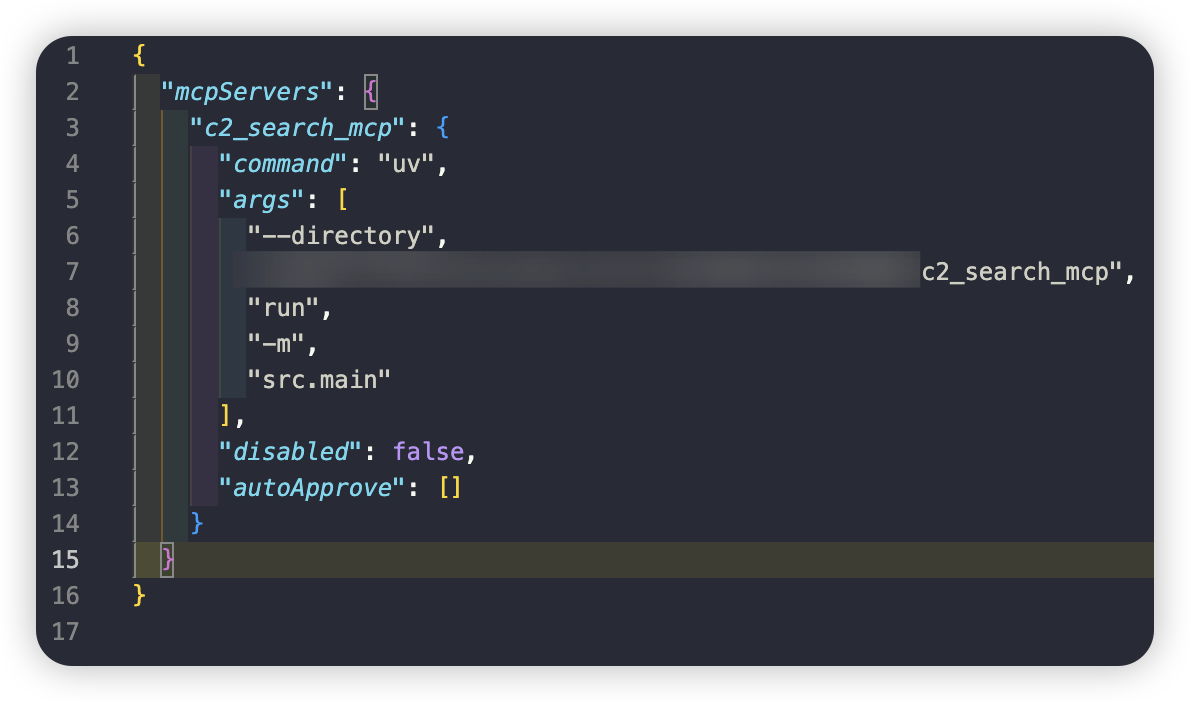
添加到您的 MCP 客户端配置文件,将"YOU_C2_SEARCH_MCP_DIR_PATH"替换为您自己的目录。
"c2_search_mcp": {
   "command": "uv",
   "args": [
      "--directory",
      "YOU_C2_SEARCH_MCP_DIR_PATH",
      "run",
      "-m",
      "src.main"
   ],
   "disabled": false,
   "autoApprove": []
}
使用示例
cursor集成
- 配置mcp
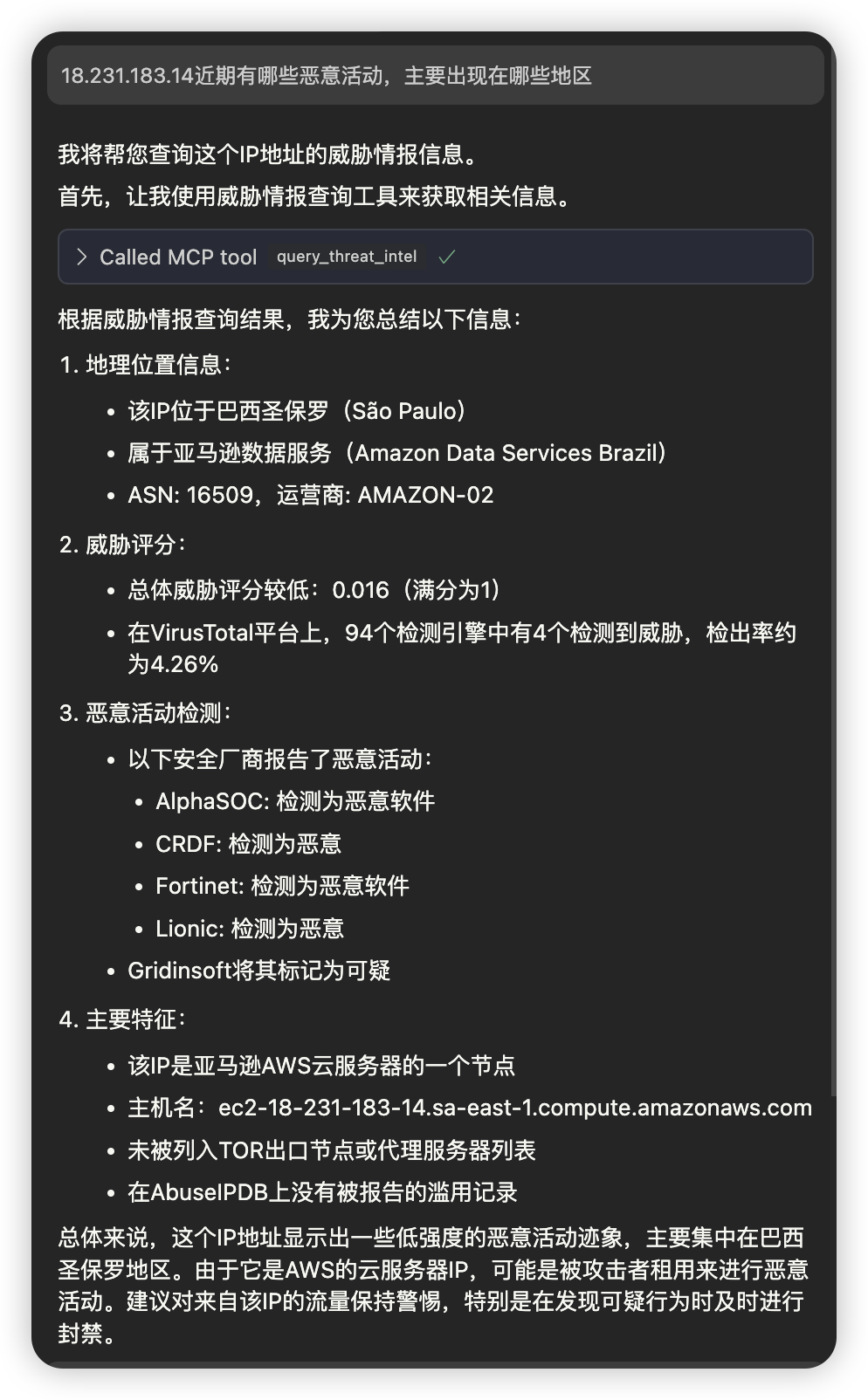
- cursor agent模式下,通过自然语言进行查询
Cherry Studio集成
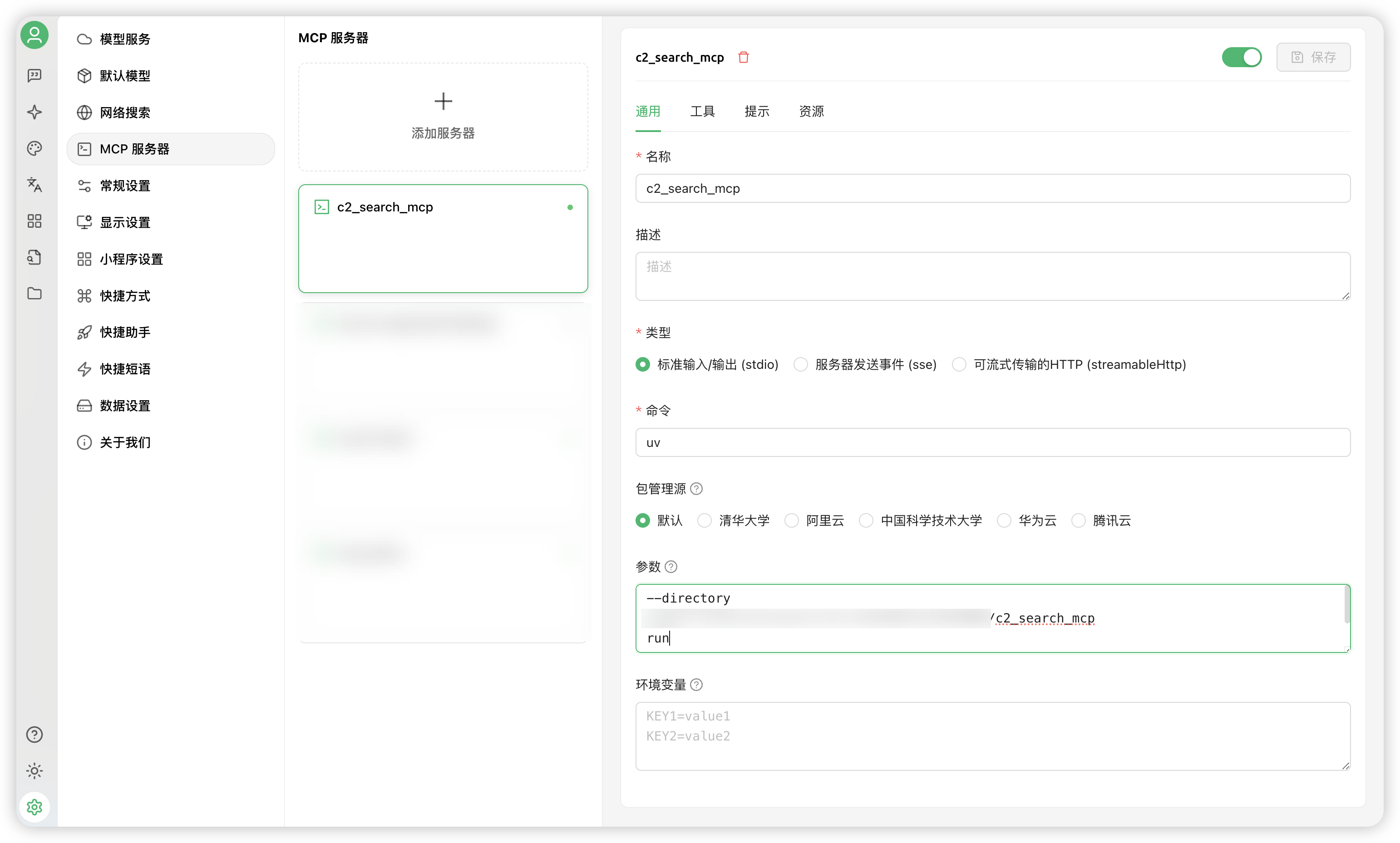
- 配置mcp
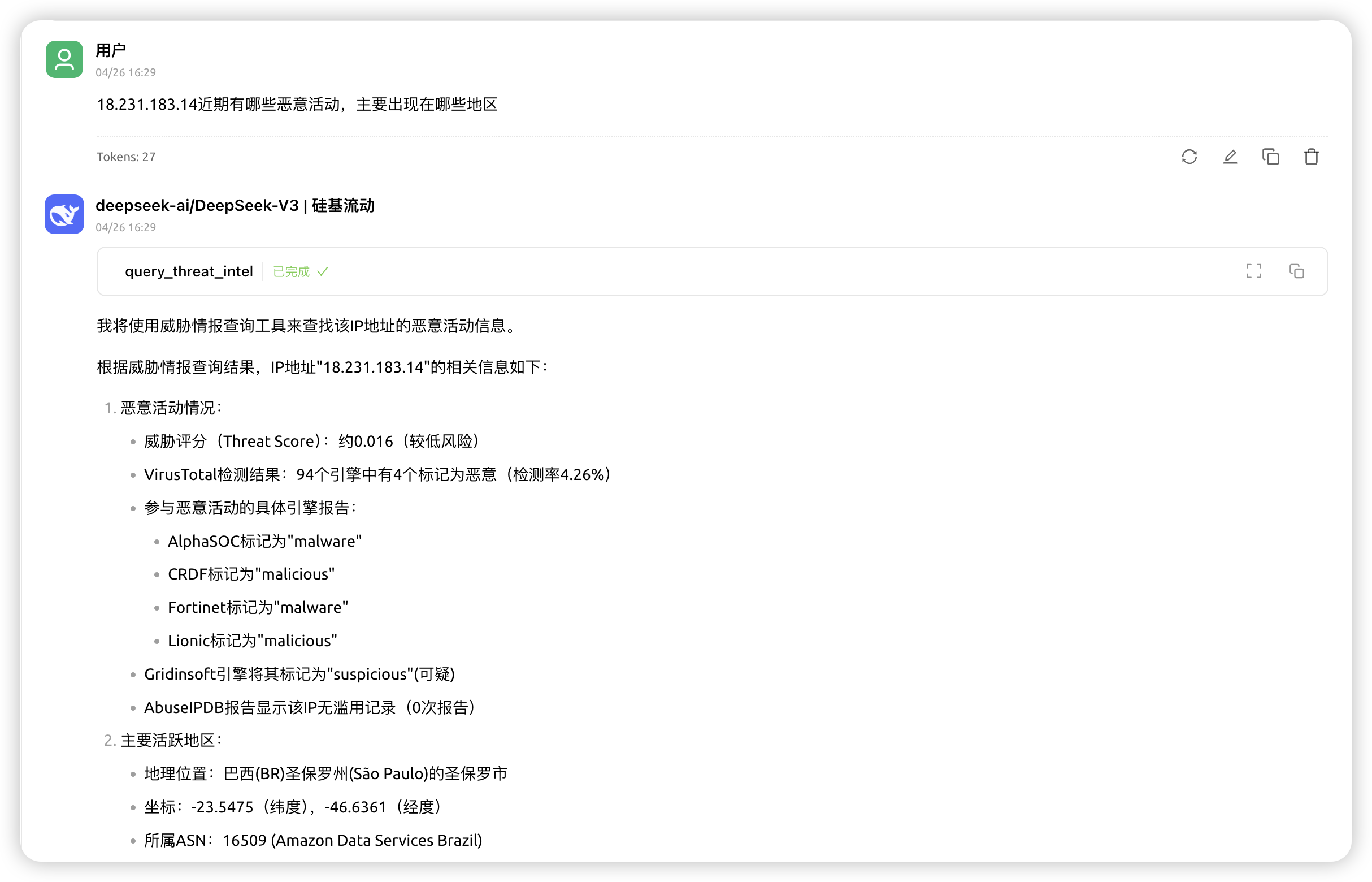
- Cherry Studio agent模式下,通过自然语言进行查询
开发调试
MCP Inspector调试
MCP Inspector是一个强大的调试工具,可以帮助您监控和调试MCP服务的运行状态。
-
启动 Inspector
fastmcp dev src/main.py或者直接npx运行
npx @modelcontextprotocol/inspector uv run src/main.py -
访问调试界面
- 打开浏览器访问
http://localhost:port(端口在控制台查看) - 在Inspector界面中可以看到所有注册的MCP服务
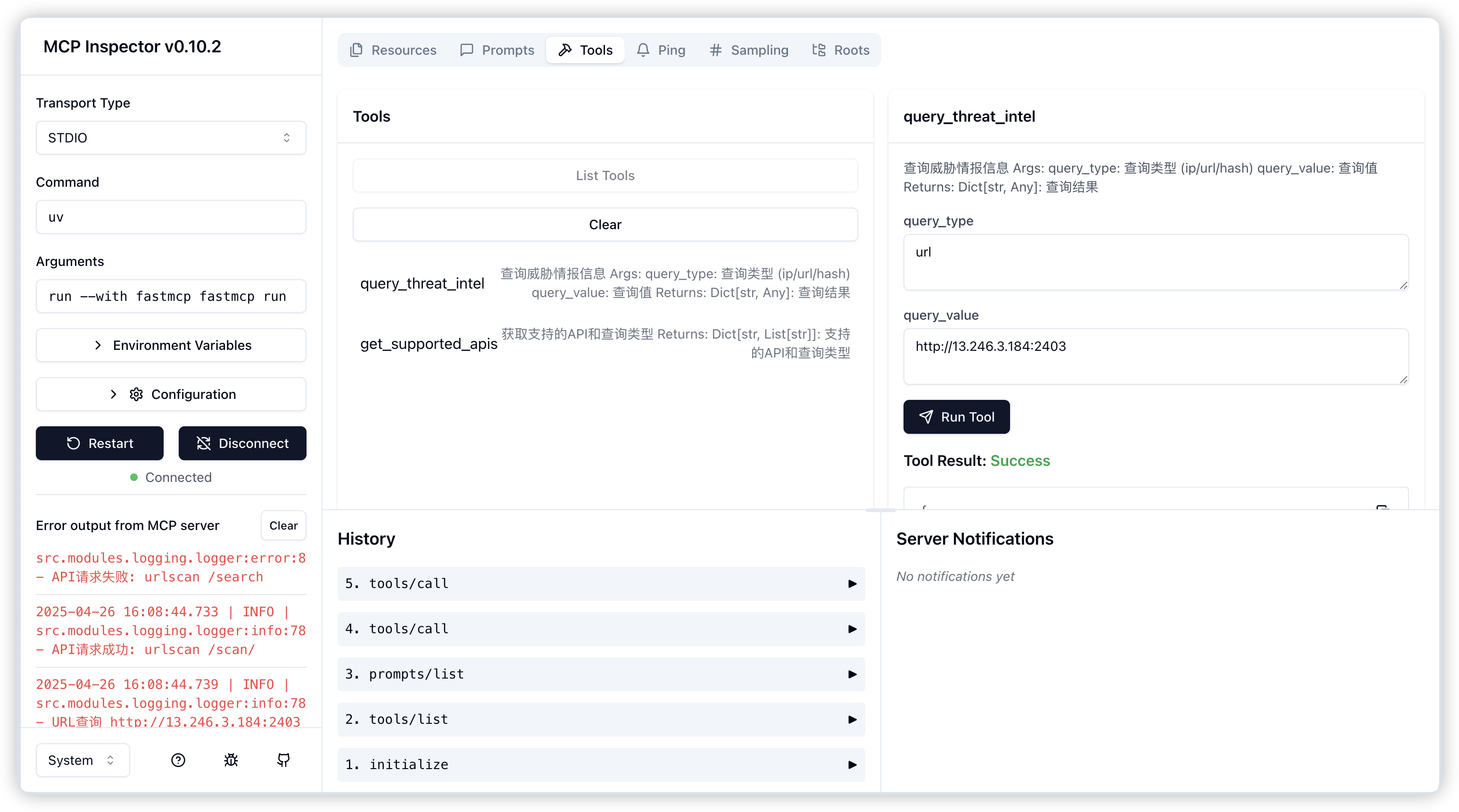
- 打开浏览器访问
-
调试功能
- 实时监控服务状态
- 查看请求/响应日志
- 测试API接口
- 查看性能指标
故障排除
-
服务无法启动
- 检查配置文件是否正确
- 确认所有依赖已正确安装
- 查看日志文件获取详细错误信息
-
API调用失败
- 验证API密钥是否正确配置
- 检查网络连接状态
- 确认API请求限制是否超出
贡献指南
欢迎提交问题报告和功能请求。如果您想贡献代码,请遵循以下步骤:
- Fork 项目仓库
- 创建您的功能分支 (
git checkout -b feature/amazing-feature) - 提交您的更改 (
git commit -m 'Add some amazing feature') - 推送到分支 (
git push origin feature/amazing-feature) - 开启一个 Pull Request
许可证
本项目采用 MIT 许可证 - 详见 LICENSE 文件。
Dev Tools Supporting MCP
The following are the main code editors that support the Model Context Protocol. Click the link to visit the official website for more information.







