
Catalog Api Mcp Server
What is Catalog Api Mcp Server
catalog-api-mcp-server is a tool designed to validate or manage the status of P&C (Property and Casualty) insurance services.
Use cases
Use cases include validating the status of insurance products, managing service interactions, and integrating with other tools for enhanced insurance service management.
How to use
To use catalog-api-mcp-server, activate the MCP agent in Visual Studio Code (VSC) and configure the settings.json file with the required server commands. Start the MCP server and select the agent option to interact with the configured tools.
Key features
Key features include the ability to validate and manage insurance service states, integration with Visual Studio Code, and support for various tools defined in the configuration.
Where to use
catalog-api-mcp-server is primarily used in the insurance industry, specifically for managing and validating the status of insurance services.
Clients Supporting MCP
The following are the main client software that supports the Model Context Protocol. Click the link to visit the official website for more information.





Overview
What is Catalog Api Mcp Server
catalog-api-mcp-server is a tool designed to validate or manage the status of P&C (Property and Casualty) insurance services.
Use cases
Use cases include validating the status of insurance products, managing service interactions, and integrating with other tools for enhanced insurance service management.
How to use
To use catalog-api-mcp-server, activate the MCP agent in Visual Studio Code (VSC) and configure the settings.json file with the required server commands. Start the MCP server and select the agent option to interact with the configured tools.
Key features
Key features include the ability to validate and manage insurance service states, integration with Visual Studio Code, and support for various tools defined in the configuration.
Where to use
catalog-api-mcp-server is primarily used in the insurance industry, specifically for managing and validating the status of insurance services.
Clients Supporting MCP
The following are the main client software that supports the Model Context Protocol. Click the link to visit the official website for more information.
Content
catalog-api-mcp-server
Piloto de herramienta para validar o gestionar el estado de P&C
Configuración
Inicialmente, se debera activar en VSC el agente de MCP

Después, dentro del VSC en el fichero settings.json agregar la siguiente configuración:
"mcp": {
        "servers": {
            "test-catalog-status": {
                "command": "{{JAVA_HOME}}",
                    "args": [
                        "-jar",
                        "{{LOCAL_PATH}}\\catalog-api-mcp-server\\target\\catalog-api-mcp-server-0.0.1-SNAPSHOT.jar"
                    ]
            }
        }
    }
Se debera iniciar el servidor MCP dandole a start
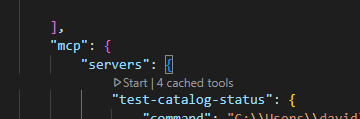
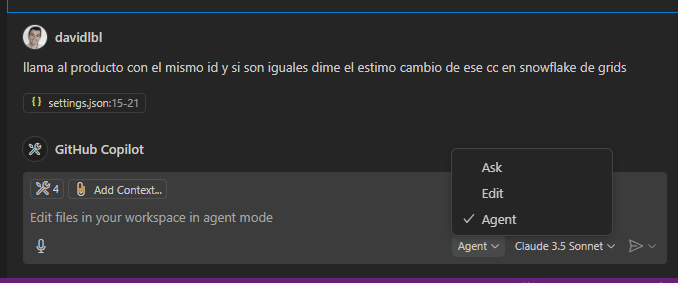
Al iniciar, se debera seleccionar la opción de agent y aparecerán todas las tools configuradas, la cuales permitirá interactuar con el servidor MCP en local
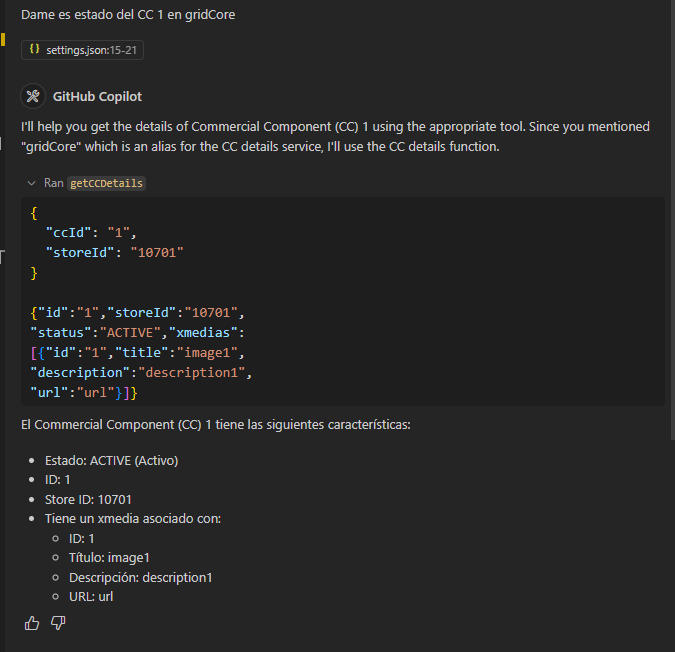
Validación
Ya teniendo todo, se podrá preguntar información que tenga el MCP, según lo configurado en las tools definidas
Documentación relacionada
Dev Tools Supporting MCP
The following are the main code editors that support the Model Context Protocol. Click the link to visit the official website for more information.







