
Cmr Mcp
What is Cmr Mcp
cmr-mcp is a Model Context Protocol (MCP) designed for NASA’s Earthdata Common Metadata Repository (CMR). It facilitates the integration of AI retrievals with NASA’s dataset catalog through EarthAccess.
Use cases
Use cases for cmr-mcp include searching for specific datasets based on time ranges, keywords, and other criteria, as well as integrating AI capabilities into data discovery workflows.
How to use
To use cmr-mcp, clone the repository to your local environment, install the required dependencies using the ‘uv’ package manager, and configure your LLM client (e.g., Claude desktop or ChatGPT desktop) to connect to the MCP server. You can then prompt your agent to search for datasets in CMR.
Key features
Key features of cmr-mcp include seamless integration with AI retrieval systems, support for various dataset queries, and a user-friendly configuration process for LLM clients.
Where to use
cmr-mcp is primarily used in data retrieval and analysis within scientific research, particularly in fields related to Earth sciences, climate studies, and environmental monitoring.
Clients Supporting MCP
The following are the main client software that supports the Model Context Protocol. Click the link to visit the official website for more information.





Overview
What is Cmr Mcp
cmr-mcp is a Model Context Protocol (MCP) designed for NASA’s Earthdata Common Metadata Repository (CMR). It facilitates the integration of AI retrievals with NASA’s dataset catalog through EarthAccess.
Use cases
Use cases for cmr-mcp include searching for specific datasets based on time ranges, keywords, and other criteria, as well as integrating AI capabilities into data discovery workflows.
How to use
To use cmr-mcp, clone the repository to your local environment, install the required dependencies using the ‘uv’ package manager, and configure your LLM client (e.g., Claude desktop or ChatGPT desktop) to connect to the MCP server. You can then prompt your agent to search for datasets in CMR.
Key features
Key features of cmr-mcp include seamless integration with AI retrieval systems, support for various dataset queries, and a user-friendly configuration process for LLM clients.
Where to use
cmr-mcp is primarily used in data retrieval and analysis within scientific research, particularly in fields related to Earth sciences, climate studies, and environmental monitoring.
Clients Supporting MCP
The following are the main client software that supports the Model Context Protocol. Click the link to visit the official website for more information.
Content
Model Context Protocol (MCP) for NASA Earthdata Search (CMR)
This module is a model context protocol (MCP) for NASA’s earthdata common metedata repository (CMR). The goal of this MCP server is to integrate AI retrievals with NASA Catalog of datasets by way of Earthaccess.
Dependencies
uv - a rust based python package manager
a LLM client, such as Claude desktop or chatGPT desktop (for consuming the MCP)
Install and Run
Clone the repository to your local environment, or where your LLM client is running.
git clone https://github.com/podaac/cmr-mcp.git
cd cmr-mcp
Install uv
curl -LsSf https://astral.sh/uv/install.sh | sh
uv venv
source .venv/bin/activate
Install packages with uv
uv sync
use the outputs of which uv (UV_LIB) and PWD (CMR_MCP_INSTALL) to update the following configuration.
Adding to AI Framework
In this example we’ll use Claude desktop.
Update the claude_desktop_config.json file (sometimes this must be created). On a mac, this is often found in ~/Library/Application\ Support/Claude/claude_desktop_config.json
Add the following configuration, filling in the values of UV_LIB and CMR_MCP_INSTALL - don’t use environment variables here.
{
    "mcpServers": {
        "cmr": {
            "command": "$UV_LIB$",
            "args": [
                "--directory",
                "$CMR_MCP_INSTALL$",
                "run",
                "cmr-search.py"
            ]
        }
    }
}
Use the MCP Server
Simply prompt your agent to search cmr for... data. Below is a simple example of this in action.
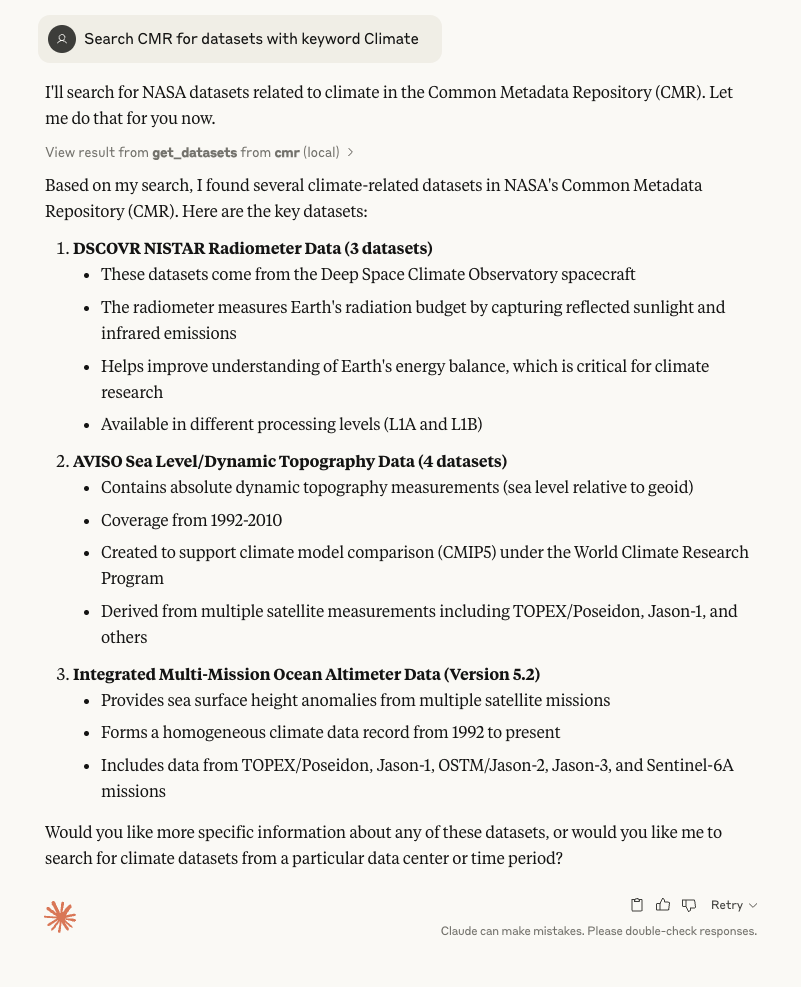
Other prompts that can work:
- Search CMR for datasets from 2024 to 2025
- Search CMR for PO.DAAC datasets from 2020 to 2024 with keyword Climate
Dev Tools Supporting MCP
The following are the main code editors that support the Model Context Protocol. Click the link to visit the official website for more information.







