
Cookbook Mcp Server
What is Cookbook Mcp Server
The cookbook-mcp-server is a specialized MCP server designed for managing and retrieving recipes from a cookbook.
Use cases
Use cases include creating a digital cookbook application, integrating recipe retrieval in cooking websites, and developing educational tools for culinary training.
How to use
To use the cookbook-mcp-server, first clone the repository containing the recipes, set the path in the cookbook.py file, configure the MCP client, and run the server. Optionally, modifications can be made for SSE server usage.
Key features
Key features include the ability to retrieve all dishes from the cookbook and access individual recipes through specific commands.
Where to use
The cookbook-mcp-server can be utilized in culinary applications, recipe management systems, and educational platforms focused on cooking.
Clients Supporting MCP
The following are the main client software that supports the Model Context Protocol. Click the link to visit the official website for more information.





Overview
What is Cookbook Mcp Server
The cookbook-mcp-server is a specialized MCP server designed for managing and retrieving recipes from a cookbook.
Use cases
Use cases include creating a digital cookbook application, integrating recipe retrieval in cooking websites, and developing educational tools for culinary training.
How to use
To use the cookbook-mcp-server, first clone the repository containing the recipes, set the path in the cookbook.py file, configure the MCP client, and run the server. Optionally, modifications can be made for SSE server usage.
Key features
Key features include the ability to retrieve all dishes from the cookbook and access individual recipes through specific commands.
Where to use
The cookbook-mcp-server can be utilized in culinary applications, recipe management systems, and educational platforms focused on cooking.
Clients Supporting MCP
The following are the main client software that supports the Model Context Protocol. Click the link to visit the official website for more information.
Content
cookbook-mcp-server
一个菜谱mcp server
支持工具:
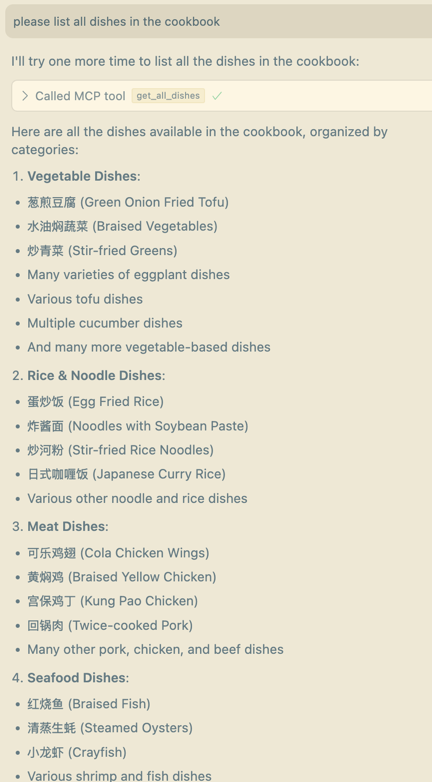
- get_all_dishes:获取cookbook中的所有菜谱
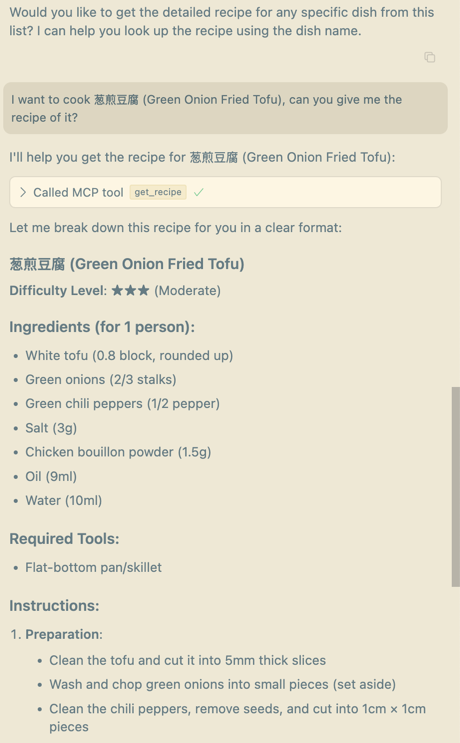
- get_recipe:获取任意菜品的菜谱
环境配置
# Create a new directory for our project
uv init cookbook
cd cookbook

# Create virtual environment and activate it
uv venv
source .venv/bin/activate

# Install dependencies
uv add "mcp[cli]"
使用方法
-
获取菜谱:
菜谱:https://github.com/Anduin2017/HowToCook/tree/mastergit clone https://github.com/Anduin2017/HowToCook/tree/master -
替换cookbook.py中的cookbook路径。将1中clone下来的仓库的dishes文件夹路径填入下面常量
# Constants COOKBOOK_URL = "/PATH/OF/YOUR/COOKBOOK" -
配置mcp client。
{ "mcpServers": { "cookbook": { "command": "/PATH/OF/uv", "args": [ "--directory", "/PATH/OF/ROOT/mcp-server-cookbook/cookbook", "run", "/PATH/OF/ROOT/mcp-server-cookbook/cookbook.py" ] } } } -
如果使用sse server,需要进行一下修改
- cookbook.py中修改执行入口
if __name__ == "__main__": # Initialize and run the server mcp.run(transport='sse') - mcp client配置修改。注意端口号。
{
  "mcpServers": {
    "cookbook": {
      "url": "http://localhost:PORT/sse"
    }
  }
}
- cookbook.py中修改执行入口
cursor中效果截图
Dev Tools Supporting MCP
The following are the main code editors that support the Model Context Protocol. Click the link to visit the official website for more information.







