
Create Mcp Server App
What is Create Mcp Server App
create-mcp-server-app is a CLI tool designed to quickly scaffold Model Context Protocol (MCP) server applications with built-in TypeScript support.
Use cases
Use cases include building RESTful APIs, microservices, or any server-side applications that need to adhere to the Model Context Protocol, allowing developers to quickly set up and customize their server applications.
How to use
To use create-mcp-server-app, run one of the following commands in your terminal: npx create-mcp-server-app my-mcp-server, pnpm create mcp-server-app my-mcp-server, or yarn create mcp-server-app my-mcp-server to generate a new MCP server application.
Key features
Key features include quick setup of MCP server applications, built-in TypeScript support, modern development tooling, a well-structured project template, and ease of extension and customization.
Where to use
create-mcp-server-app can be used in software development projects that require the implementation of server applications following the Model Context Protocol, especially in TypeScript environments.
Clients Supporting MCP
The following are the main client software that supports the Model Context Protocol. Click the link to visit the official website for more information.





Overview
What is Create Mcp Server App
create-mcp-server-app is a CLI tool designed to quickly scaffold Model Context Protocol (MCP) server applications with built-in TypeScript support.
Use cases
Use cases include building RESTful APIs, microservices, or any server-side applications that need to adhere to the Model Context Protocol, allowing developers to quickly set up and customize their server applications.
How to use
To use create-mcp-server-app, run one of the following commands in your terminal: npx create-mcp-server-app my-mcp-server, pnpm create mcp-server-app my-mcp-server, or yarn create mcp-server-app my-mcp-server to generate a new MCP server application.
Key features
Key features include quick setup of MCP server applications, built-in TypeScript support, modern development tooling, a well-structured project template, and ease of extension and customization.
Where to use
create-mcp-server-app can be used in software development projects that require the implementation of server applications following the Model Context Protocol, especially in TypeScript environments.
Clients Supporting MCP
The following are the main client software that supports the Model Context Protocol. Click the link to visit the official website for more information.
Content
create-mcp-app
A powerful scaffolding toolkit for creating Model Context Protocol (MCP) applications with modern development practices.
Overview
create-mcp-app is a monorepo project that provides tools and templates for building MCP applications. It uses modern development practices and tools to ensure a smooth development experience. The project is designed to help developers quickly set up and start building MCP applications with best practices and modern tooling.
Features
- 🚀 Instant project scaffolding for MCP applications
- 📦 First-class TypeScript support with strict type checking
- 🔧 Modern development toolchain with ESLint, Prettier, and Husky
- 🎯 Extensible and customizable templates for both server and client
- 🏗️ Monorepo architecture with Turborepo for efficient development
- 📝 Comprehensive documentation and examples
- 🔍 Built-in testing setup with Jest
- 🛠️ Development tools and utilities
Project Structure
This project is organized as a monorepo using Turborepo, containing:
create-mcp-app/
├── apps/                          # Application packages
│   ├── create-mcp-server-app/     # Server application template
│   │   ├── src/                   # Source code
│   │   ├── boilerplate/          # Template files
│   │   ├── docs/                 # Documentation
│   │   └── dist/                 # Build output
│   │
│   └── create-mcp-client-app/    # Client application template
│       ├── src/                   # Source code
│       ├── boilerplate/          # Template files
│       ├── docs/                 # Documentation
│       └── dist/                 # Build output
│
├── packages/                      # Shared packages and configurations
├── .vscode/                      # VS Code configuration
└── package.json                  # Root package configuration
Quick Start
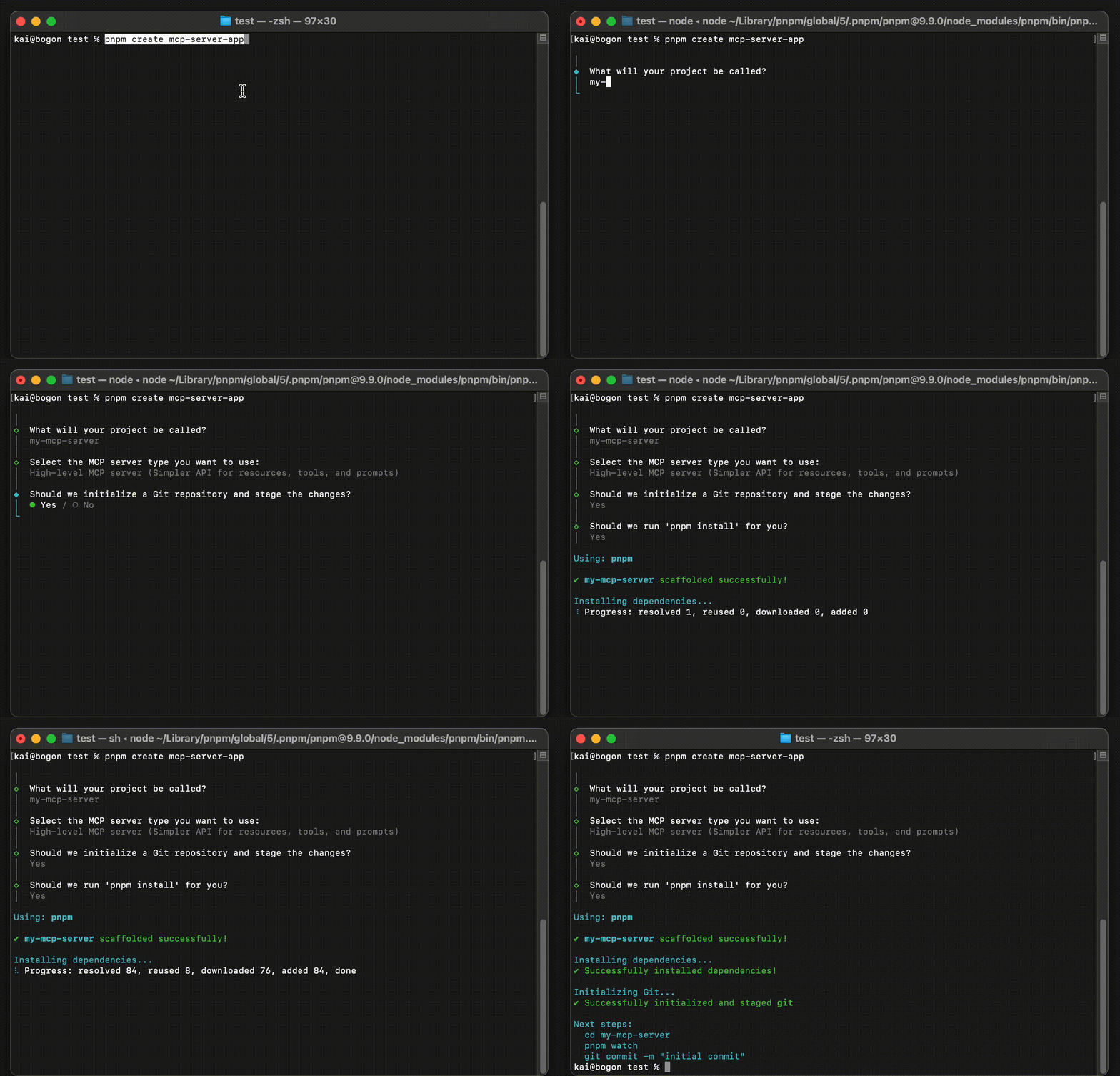
To create a new MCP server application (see detailed guide):
npx create-mcp-server-app@latest my-mcp-server
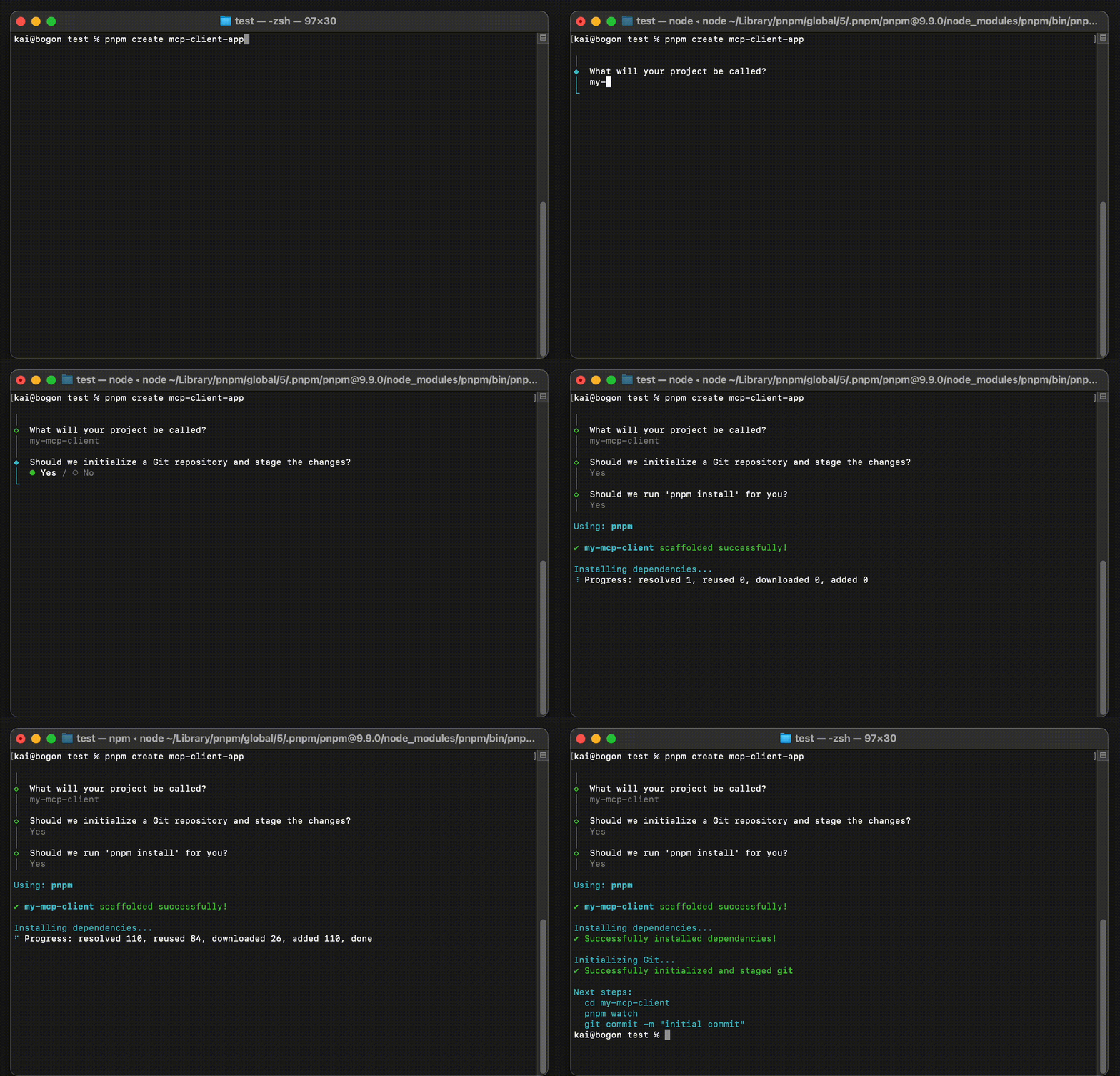
To create a new MCP client application (see detailed guide):
npx create-mcp-client-app@latest my-mcp-client
Development
Prerequisites
- Node.js 16.x or later
- pnpm 7.x or later
Package Management
This project uses pnpm for package management. To get started with development:
# Install dependencies
pnpm install

# Build all packages
pnpm build

# Run development environment
pnpm dev

# Run tests
pnpm test

# Lint code
pnpm lint
Contributing
We welcome contributions! Here’s how you can help:
- Fork the repository
- Create your feature branch (
git checkout -b feature/amazing-feature) - Commit your changes (
git commit -m 'Add some amazing feature') - Push to the branch (
git push origin feature/amazing-feature) - Open a Pull Request
Please make sure to:
- Follow the existing code style
- Add tests for new features
- Update documentation as needed
- Keep commits clean and well-described
Issues and Bugs
If you find a bug or have a suggestion:
License
This project is licensed under the terms of the license included in the LICENSE file.
Dev Tools Supporting MCP
The following are the main code editors that support the Model Context Protocol. Click the link to visit the official website for more information.







