
Cursor Feedback
What is Cursor Feedback
Cursor Feedback is a tool designed to facilitate interactive feedback through text and images, allowing users to provide visual context and enhance communication.
Use cases
Use cases include providing visual feedback on design prototypes, collaborating on software features, and gathering user input during testing phases.
How to use
To use Cursor Feedback, synchronize your environment with ‘uv sync’, run the server using ‘uv run server.py’, and configure the settings in the Cursor configuration file as specified.
Key features
Key features include text feedback and image support, enabling users to paste images directly into the feedback interface for a more interactive experience.
Where to use
Cursor Feedback can be utilized in various fields such as software development, user experience design, and any area requiring collaborative feedback and communication.
Clients Supporting MCP
The following are the main client software that supports the Model Context Protocol. Click the link to visit the official website for more information.





Overview
What is Cursor Feedback
Cursor Feedback is a tool designed to facilitate interactive feedback through text and images, allowing users to provide visual context and enhance communication.
Use cases
Use cases include providing visual feedback on design prototypes, collaborating on software features, and gathering user input during testing phases.
How to use
To use Cursor Feedback, synchronize your environment with ‘uv sync’, run the server using ‘uv run server.py’, and configure the settings in the Cursor configuration file as specified.
Key features
Key features include text feedback and image support, enabling users to paste images directly into the feedback interface for a more interactive experience.
Where to use
Cursor Feedback can be utilized in various fields such as software development, user experience design, and any area requiring collaborative feedback and communication.
Clients Supporting MCP
The following are the main client software that supports the Model Context Protocol. Click the link to visit the official website for more information.
Content
Cursor Feedback MCP
- Original Project: noopstudios/interactive-feedback-mcp ⭐
Features
- [x] Text Feedback
- [x] Image Support
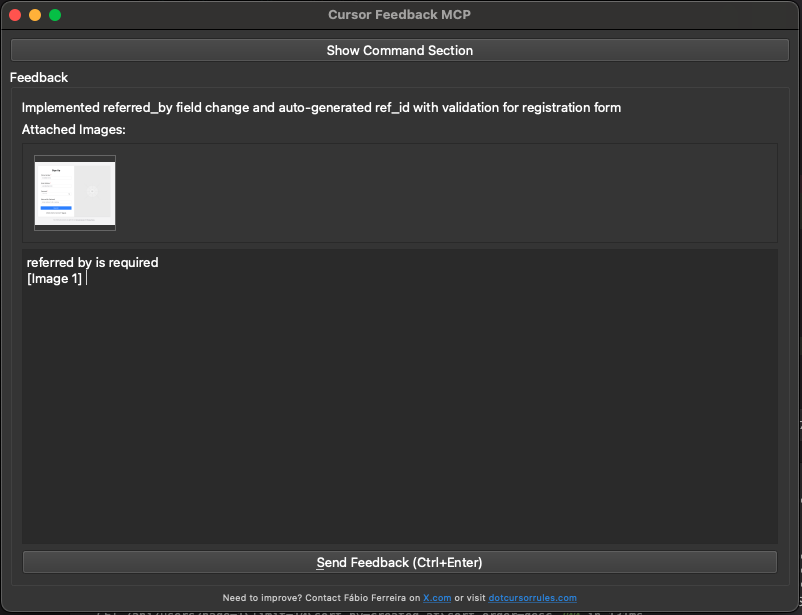
The interactive feedback UI allows you to paste images directly, making it easy to provide visual feedback and context. This is the main feature that makes this MCP tool unique.
Usage
- uv sync
- uv run server.py
- Configure in Cursor:
{
  "mcpServers": {
    "interactive-feedback-mcp": {
      "command": "uv",
      "args": [
        "--directory",
        "/Users/oplacrm/workspace/mcp/cursor-feedback",
        "run",
        "server.py"
      ],
      "timeout": 600,
      "autoApprove": [
        "interactive_feedback"
      ]
    }
  }
}- Cursor rules
See .cursorrules file for the complete interactive feedback rule configuration. This rule ensures that:
- Interactive feedback is called before asking clarifying questions
- Interactive feedback is called before completing requests
- Proper parameters are provided for effective feedback collection
Dev Tools Supporting MCP
The following are the main code editors that support the Model Context Protocol. Click the link to visit the official website for more information.







