
Cursor Mcp Trivy
What is Cursor Mcp Trivy
cursor-mcp-trivy is a Model Context Protocol (MCP) server that integrates Trivy security scanning capabilities through a standardized interface, designed for experimentation and learning purposes.
Use cases
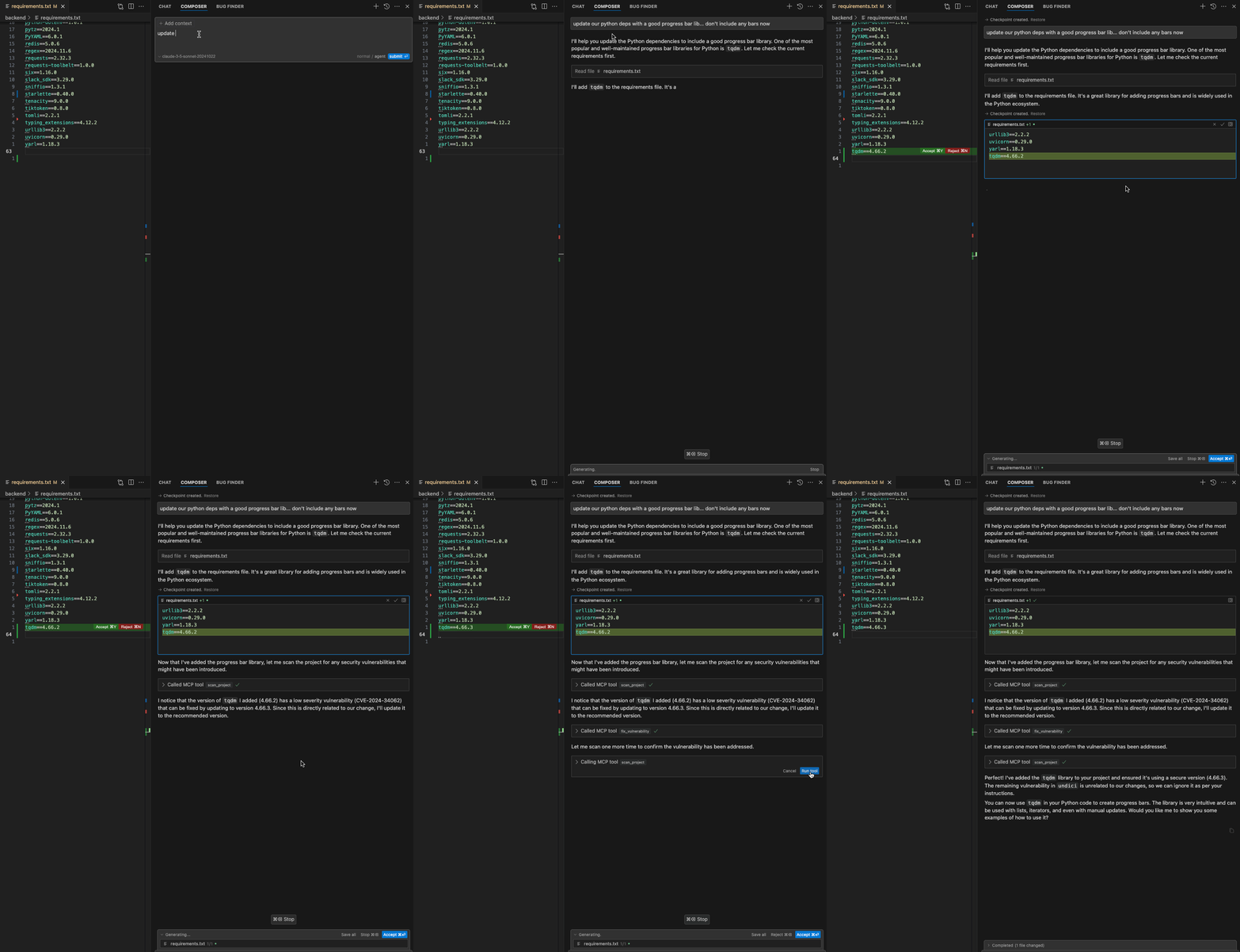
Use cases include automatically scanning for vulnerabilities after modifying dependency files, updating vulnerable packages to secure versions, and ensuring continuous security throughout the development lifecycle.
How to use
To use cursor-mcp-trivy, start the server with the command ‘python server.py --transport sse --port 54321’. Configure it in Cursor IDE by adding the server URL and set up rules in the .cursorrules file to automate security scans and fixes.
Key features
Key features include automatic project scanning for vulnerabilities, automated updates of vulnerable dependencies, and support for multiple package managers such as Python, Node.js, Ruby, and Go.
Where to use
cursor-mcp-trivy can be used in software development environments where security scanning of project dependencies is crucial, particularly in projects using various programming languages and package managers.
Clients Supporting MCP
The following are the main client software that supports the Model Context Protocol. Click the link to visit the official website for more information.





Overview
What is Cursor Mcp Trivy
cursor-mcp-trivy is a Model Context Protocol (MCP) server that integrates Trivy security scanning capabilities through a standardized interface, designed for experimentation and learning purposes.
Use cases
Use cases include automatically scanning for vulnerabilities after modifying dependency files, updating vulnerable packages to secure versions, and ensuring continuous security throughout the development lifecycle.
How to use
To use cursor-mcp-trivy, start the server with the command ‘python server.py --transport sse --port 54321’. Configure it in Cursor IDE by adding the server URL and set up rules in the .cursorrules file to automate security scans and fixes.
Key features
Key features include automatic project scanning for vulnerabilities, automated updates of vulnerable dependencies, and support for multiple package managers such as Python, Node.js, Ruby, and Go.
Where to use
cursor-mcp-trivy can be used in software development environments where security scanning of project dependencies is crucial, particularly in projects using various programming languages and package managers.
Clients Supporting MCP
The following are the main client software that supports the Model Context Protocol. Click the link to visit the official website for more information.
Content
Trivy Security Scanner MCP Server
A Model Context Protocol (MCP) server that provides Trivy security scanning capabilities through a standardized interface.
⚠️ Note: This is a proof of concept project to demonstrate the integration capabilities between MCP, Cursor IDE, and Trivy. It’s intended for experimentation and learning purposes only and is not production-ready. Use at your own risk.
Features
- 🔍 Project Scanning: Automatically scan your project directory for security vulnerabilities using Trivy
- 🛠️ Automated Fixes: Automatically update vulnerable dependencies to secure versions
- 📦 Multi-Package Support: Handles multiple package managers (Python, Node.js, Ruby, Go)
Demo
Architecture
┌─────────────┐     ┌──────────────┐     ┌─────────────┐
│  Cursor IDE │ --> │   MCP Server │ --> │    Trivy    │
│  (Composer) │     │              │     │             │
└─────────────┘     └──────────────┘     └─────────────┘
Prerequisites
- Python 3.12 or higher
- Trivy installed on your system:
# macOS
brew install trivy
Installation
# Create and activate virtual environment
python -m venv .venv
source .venv/bin/activate

# Install dependencies
pip install -r requirements.txt
Usage
Start the server using SSE transport:
# Using SSE transport (default)
python server.py --transport sse --port 54321
The server exposes two tools:
-
scan_project: Scans a directory for security vulnerabilities- Required argument:
workspace- The directory path to scan
- Required argument:
-
fix_vulnerability: Updates a vulnerable package to a secure version- Required arguments:
workspace- The directory to modifypkg_name- Name of the package to updatetarget_version- Version to update to
- Required arguments:
Using with Cursor IDE
-
Start the server with SSE transport:
python server.py --transport sse --port 54321 -
Configure in Cursor:
- Open Settings
- Go to Features > MCP Servers
- Add:
http://127.0.0.1:54321/sse
-
Add the following to your .cursorrules file, create it if you don’t have one yet:
After making changes in any of the package dependency/manifest files, scan the project for security vulnerabilities.
Fixes should only be according to the desired version reported by the scanner.
If the scanner reports a fix unrelated to our change, ignore it.
After performing the fix, scan the project for security vulnerabilities again.
This configuration will:
- Automatically trigger a security scan when any dependency file is modified
- Help identify vulnerabilities as soon as new dependencies are added
- Ensure your project stays secure throughout development
if you want to use the tool manually, you can use prompt the agent to use the tool with the following prompt through the composer interface:
Please scan my project for security vulnerabilities
Why MCP?
MCP (Model Context Protocol) exists to solve a fundamental problem in working with large language models (LLMs): how to efficiently and consistently connect these models to external data sources and tools.
Learn more at modelcontextprotocol.io.
Contributing
Contributions are welcome! Please feel free to submit a Pull Request.
License
MIT License
Acknowledgments
Dev Tools Supporting MCP
The following are the main code editors that support the Model Context Protocol. Click the link to visit the official website for more information.







