
Cursor Notebook
What is Cursor Notebook
Cursor-notebook is a personal knowledge base and experimental playground designed for everything related to Cursor, including custom rules, prompt engineering, MCP (Model Context Protocol), workflows, and productivity hacks. It serves as a collection of insights, tools, snippets, and notes, functioning both as a lab and a logbook.
Use cases
Use cases for cursor-notebook include automating repetitive tasks, managing complex workflows, enhancing coding efficiency through structured logic, and creating a personalized knowledge base for quick access to insights and tools relevant to specific projects.
How to use
To use cursor-notebook, users can start by exploring the various MCP servers available, customizing their Cursor rules, and implementing workflows that enhance productivity. Resources such as blogs and official documentation provide guidance on effectively utilizing Cursor and its features.
Key features
Key features of cursor-notebook include extensibility through MCP servers, the ability to create custom rules, support for prompt engineering, structured workflows, and a collection of productivity hacks. It also offers a user-friendly interface for managing insights and tools.
Where to use
Cursor-notebook can be used in various fields such as software development, data analysis, project management, and any area that benefits from enhanced productivity and structured workflows. It is particularly useful for individuals looking to optimize their coding and workflow processes.
Clients Supporting MCP
The following are the main client software that supports the Model Context Protocol. Click the link to visit the official website for more information.





Overview
What is Cursor Notebook
Cursor-notebook is a personal knowledge base and experimental playground designed for everything related to Cursor, including custom rules, prompt engineering, MCP (Model Context Protocol), workflows, and productivity hacks. It serves as a collection of insights, tools, snippets, and notes, functioning both as a lab and a logbook.
Use cases
Use cases for cursor-notebook include automating repetitive tasks, managing complex workflows, enhancing coding efficiency through structured logic, and creating a personalized knowledge base for quick access to insights and tools relevant to specific projects.
How to use
To use cursor-notebook, users can start by exploring the various MCP servers available, customizing their Cursor rules, and implementing workflows that enhance productivity. Resources such as blogs and official documentation provide guidance on effectively utilizing Cursor and its features.
Key features
Key features of cursor-notebook include extensibility through MCP servers, the ability to create custom rules, support for prompt engineering, structured workflows, and a collection of productivity hacks. It also offers a user-friendly interface for managing insights and tools.
Where to use
Cursor-notebook can be used in various fields such as software development, data analysis, project management, and any area that benefits from enhanced productivity and structured workflows. It is particularly useful for individuals looking to optimize their coding and workflow processes.
Clients Supporting MCP
The following are the main client software that supports the Model Context Protocol. Click the link to visit the official website for more information.
Content
📓 cursor-notebook
A personal knowledge base and experimental playground for everything related to Cursor.
This includes custom rules, prompt engineering, MCP (Model Context Protocol), workflows, and productivity hacks.
A growing collection of insights, tools, snippets, and notes — part lab, part logbook.
✍️ Blog: How I Use MCP and Cursor Rules
Cursor has transformed the way I approach coding, and in this blog post, I want to share my personal workflow, the Model Context Protocol (MCP) servers I utilize, and how I’ve structured my Cursor rules to boost my productivity and coding efficiency.
⚙️ MCP Servers and Where to Get Them
One of Cursor’s strengths lies in its extensibility through MCP servers. I found several incredibly useful MCP servers on Smithery.ai.
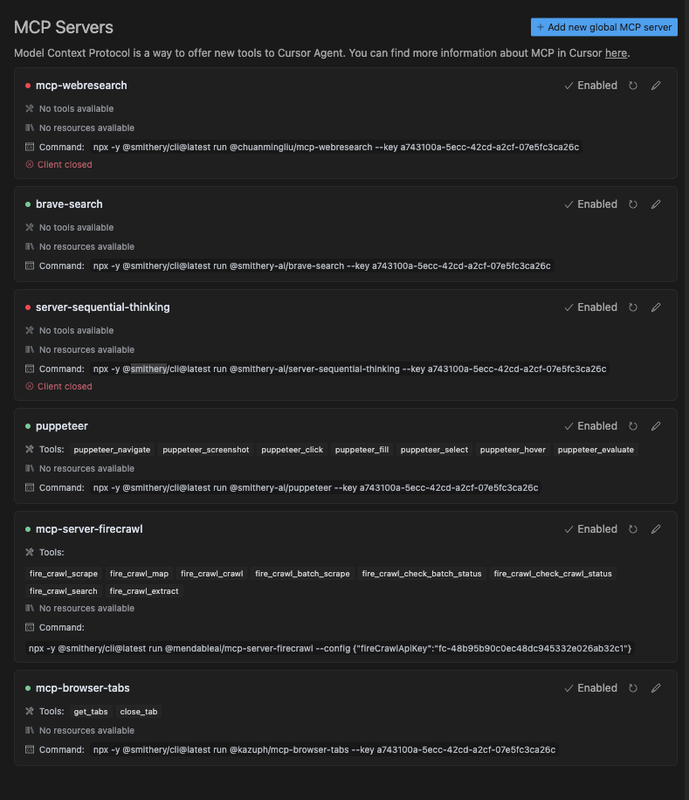
Here’s a quick overview of the servers I rely on daily:
- 🔍 Brave Search – Powerful web search directly in Cursor.
- 🧠 Server Sequential Thinking – Great for structured logic and step-by-step workflows.
- 🤖 Puppeteer – Automates browser tasks, scraping, and web interaction.
- 🔥 Firecrawl – Excellent for scraping, mapping, and data extraction.
- 🗂️ Browser Tabs – Manage tabs programmatically for multitasking and flow.
📸 Here’s a snapshot of my current MCP server setup:
📚 Learning Resources for Cursor
Starting with Cursor can feel daunting, but these helped me tremendously:
- 📝 Nick Craux’s blog post on Cursor tips – Packed with actionable insights.
- ⚙️ Trigger.dev’s guide to Cursor rules – A practical overview.
- 📘 Official Cursor documentation – The source of truth.
🧩 My Customized Cursor Rules Journey
I started by adopting the PRD-focused rule setup from
🎥 JeredBlu’s YouTube tutorial.
Then, I refined my rules further after reading
🧠 “AI Blindspots” by ezyang, which inspired me to address specific limitations in AI-assisted coding.
📄 Access My Complete Cursor Rules
All of my global rules are available in a single file:
➡️ coding-best-practices.mdc
Use it freely as a reference or starting point for your own rule set.
🛠️ Adding Project-Specific Rules
When starting a new project:
- I clarify the tech stack.
- I pull relevant Cursor rules from
🔗 awesome-cursorrules by PatrickJS.
This targeted method keeps my rules lean, relevant, and effective.
✅ Conclusion
Setting up Cursor effectively has:
- 🚀 Boosted my coding workflow
- 🧠 Increased clarity and efficiency
- 📈 Elevated the quality of AI-assisted output
I hope this helps you build your own powerful Cursor workflow!
Feel free to share your own tips — I’d love to learn from your journey too.
Dev Tools Supporting MCP
The following are the main code editors that support the Model Context Protocol. Click the link to visit the official website for more information.







