
Customer Order Mcp Ai
What is Customer Order Mcp Ai
customer-order-mcp-ai is an experimental AI assistant designed for the Experimental Printer Store, enabling customer interactions regarding product inventory, facilitating purchases, and providing analytics support.
Use cases
Use cases include assisting customers with product inquiries via CLI or web interfaces, facilitating online purchases, and providing real-time analytics on order transactions.
How to use
To use customer-order-mcp-ai, set up the environment by installing necessary dependencies, configure the LLM provider with your API key, and run the microservices for product API. Interact with the AI assistant through CLI or web storefront.
Key features
Key features include real-time access to product information and inventory levels, personalized product recommendations, seamless purchase facilitation, real-time inventory updates, and ad-hoc analytics through natural language queries.
Where to use
customer-order-mcp-ai can be used in retail environments, specifically in online stores or marketplaces that require customer support and inventory management.
Clients Supporting MCP
The following are the main client software that supports the Model Context Protocol. Click the link to visit the official website for more information.





Overview
What is Customer Order Mcp Ai
customer-order-mcp-ai is an experimental AI assistant designed for the Experimental Printer Store, enabling customer interactions regarding product inventory, facilitating purchases, and providing analytics support.
Use cases
Use cases include assisting customers with product inquiries via CLI or web interfaces, facilitating online purchases, and providing real-time analytics on order transactions.
How to use
To use customer-order-mcp-ai, set up the environment by installing necessary dependencies, configure the LLM provider with your API key, and run the microservices for product API. Interact with the AI assistant through CLI or web storefront.
Key features
Key features include real-time access to product information and inventory levels, personalized product recommendations, seamless purchase facilitation, real-time inventory updates, and ad-hoc analytics through natural language queries.
Where to use
customer-order-mcp-ai can be used in retail environments, specifically in online stores or marketplaces that require customer support and inventory management.
Clients Supporting MCP
The following are the main client software that supports the Model Context Protocol. Click the link to visit the official website for more information.
Content
Storefront MCP Tool Enable AI-Assistant
Experimental Printer Store MCP-SSE Enabled AI Assistant that support customer inquiries about product inventory, facilitates purchase transactions, and handles analytics questions.
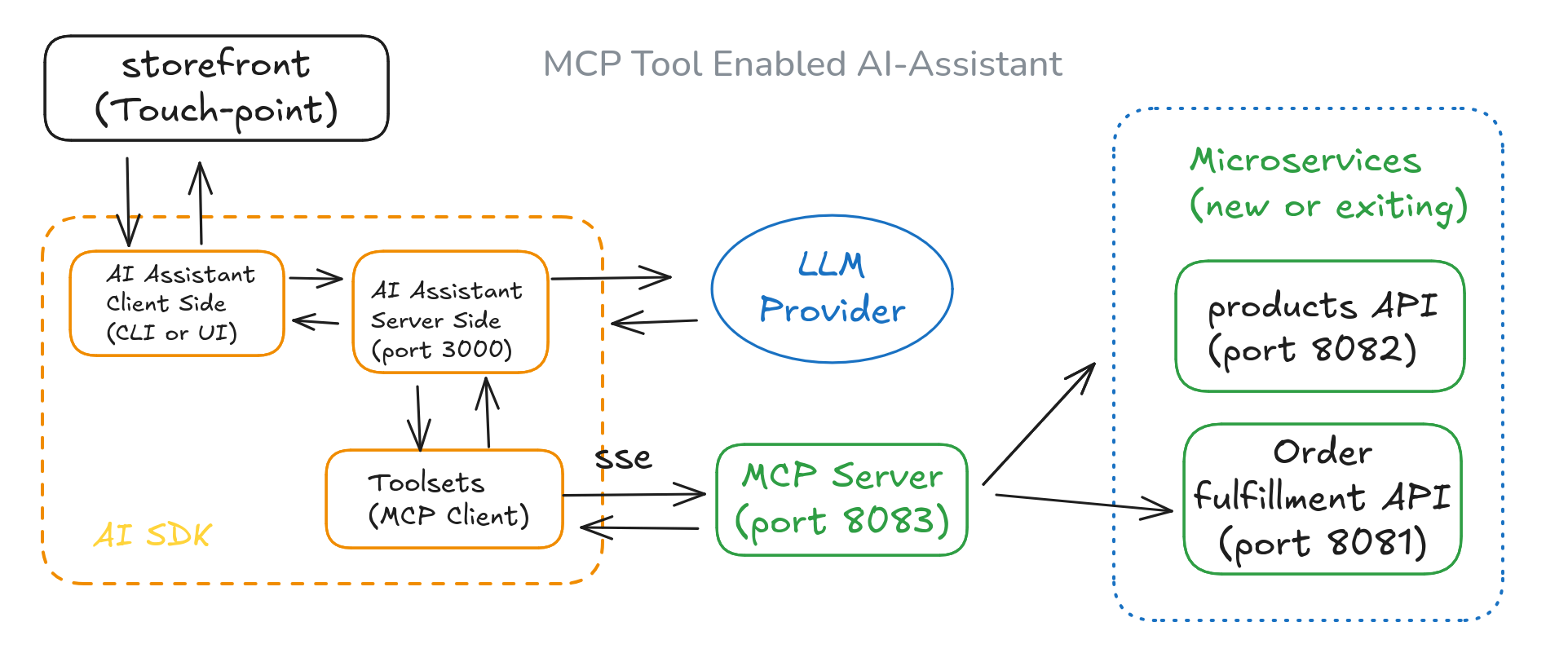
Solution Architecture
Features
- Provide customer service through AI/Assistant with real-time access to product information and inventory levels, allowing for custom orders.
- Recommend products based on customer preferences and available stock.
- Use the MCP tool server for real-time interaction with microservices.
- Check real-time inventory levels when answering product inquiries.
- Facilitate product purchases by using product IDs and quantities.
- Update inventory levels in real time after order fulfillment.
- Offer ad-hoc analytics on order transactions through natural language queries.
Use Case Samples
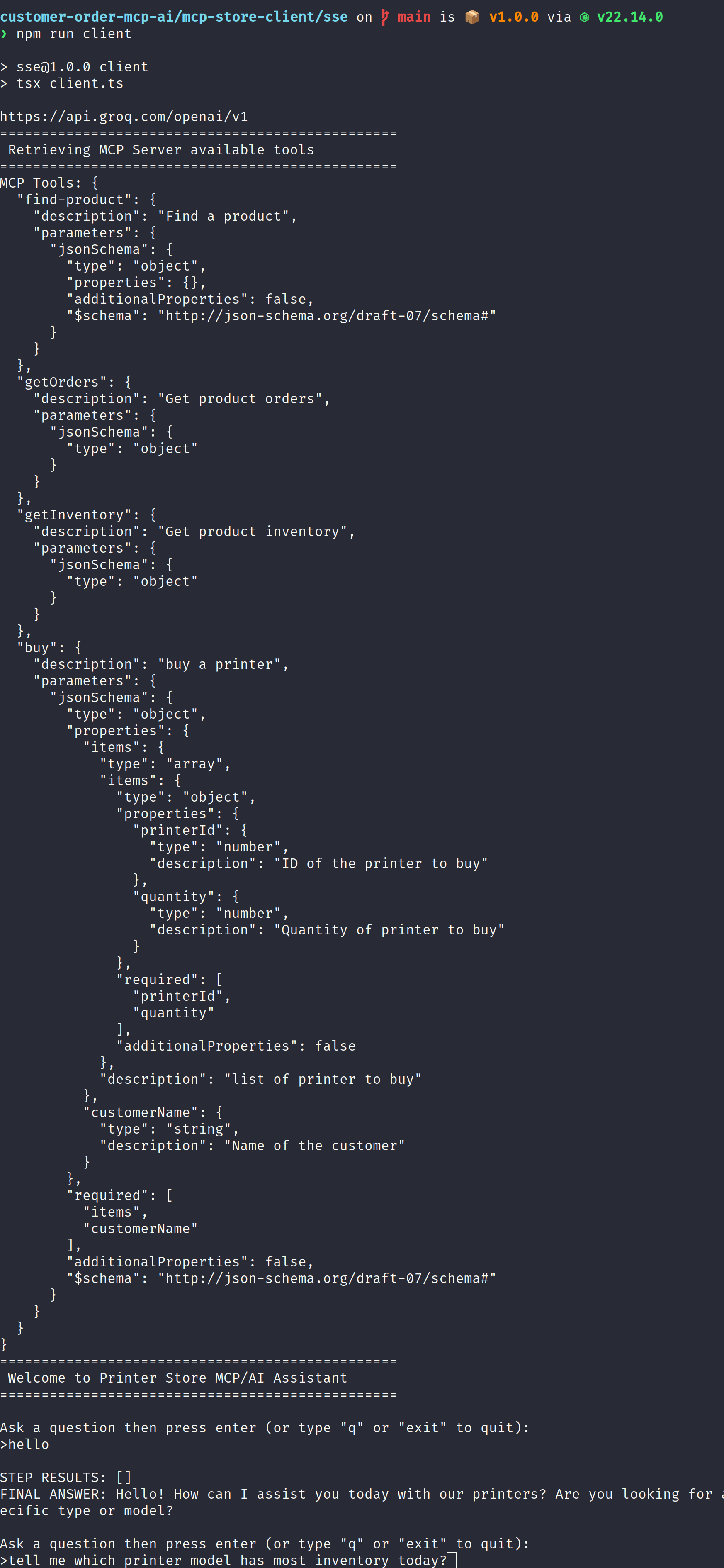
Using CLI AI/Assistant in support
Using Web AI/Assistant in Web storefront
Environment Setup
❯ node --version
v22.14.0
❯ npm --version
10.9.2
❯ pnpm --version
10.6.5
Setup LLM Provider
❯ cat .env_example
GROQ_API_KEY="Your GROQ_API_KEY"
GROQ_API_URL="https://api.groq.com/openai/v1"
> make a copy to file .env
cp .env.examples .env
> enter your own API key
repeat above step in MCP client and server folder
Setup API Servers
Run Microservices Products API (port 8082)
$ git clone https://github.com/minyang-chen/customer-order-mcp-ai.git
$ cd backoffice-products-api
$ npm install
$ npm run dev
result log
customer-order-mcp-ai/backoffice-products-api on main via v22.14.0 ❯ npm run dev > [email protected] dev > PORT=8082 tsx watch server.ts Printer Store Products API Server is running on port http://localhost:8082 /products
Run Microservices Order Fulfimment API (port 8081)
$ git clone https://github.com/minyang-chen/customer-order-mcp-ai.git
$ cd backoffice-fulfillment-api
$ npm install
$ npm run dev
result log
❯ npm run dev

> [email protected] dev
> PORT=8081 tsx watch server.ts

Printer Store Fulfillment API Server is running on port http://localhost:8081
/inventory
/orders
/purchase
Setup MCP Servers
Run Order MCP Server (port 8083)
$ git clone https://github.com/minyang-chen/customer-order-mcp-ai.git
$ cd mcp-order-server
$ npm install
$ npm run dev
result log
❯ npm run start

> [email protected] start
> node order-sse-server.js

Printer Store MCP SSE Server is running on http://localhost:8083/sse
/sse
/messages
Setup Assistant
Run CLI AI/Assistant
$ git clone https://github.com/minyang-chen/customer-order-mcp-ai.git
$ cd mcp-store-client/sse
$ npm install
$ npm run dev
result log
customer-order-mcp-ai/mcp-store-client/sse on main is 📦 v1.0.0 via v22.14.0 ❯ npm run client > [email protected] client > tsx client.ts https://api.groq.com/openai/v1 ================================================ Retrieving MCP Server available tools ================================================ MCP Tools: {{
Technology Stack
LLM Provider - Groq (Qwen2.5)
AI SDK by Vercel
Nodejs / express for microservices
Contribution
welcome any suggestions and improvement ideas.
Dev Tools Supporting MCP
The following are the main code editors that support the Model Context Protocol. Click the link to visit the official website for more information.







