
Deep Seek Agent Mcp
What is Deep Seek Agent Mcp
DeepSeek Agent MCP is a multifunctional agent system project that utilizes the DeepSeek AI model within the MCP (Model-Client-Protocol) framework. It includes a weather assistant capable of retrieving weather information, executing Shell commands, and providing current time information.
Use cases
Use cases include creating a weather assistant, executing system commands through a chat interface, and providing real-time information in applications that require user interaction.
How to use
To use DeepSeek Agent MCP, clone the repository, set up a virtual environment, install dependencies, configure environment variables, and then start the MCP server and client applications using the provided commands.
Key features
Key features include weather information retrieval using the Gaode Map API, Shell command execution capability, current time reporting, streaming responses from a large language model, and an interactive chat interface.
Where to use
DeepSeek Agent MCP can be used in various domains such as personal assistants, weather applications, and any system requiring interactive command execution and real-time information retrieval.
Clients Supporting MCP
The following are the main client software that supports the Model Context Protocol. Click the link to visit the official website for more information.





Overview
What is Deep Seek Agent Mcp
DeepSeek Agent MCP is a multifunctional agent system project that utilizes the DeepSeek AI model within the MCP (Model-Client-Protocol) framework. It includes a weather assistant capable of retrieving weather information, executing Shell commands, and providing current time information.
Use cases
Use cases include creating a weather assistant, executing system commands through a chat interface, and providing real-time information in applications that require user interaction.
How to use
To use DeepSeek Agent MCP, clone the repository, set up a virtual environment, install dependencies, configure environment variables, and then start the MCP server and client applications using the provided commands.
Key features
Key features include weather information retrieval using the Gaode Map API, Shell command execution capability, current time reporting, streaming responses from a large language model, and an interactive chat interface.
Where to use
DeepSeek Agent MCP can be used in various domains such as personal assistants, weather applications, and any system requiring interactive command execution and real-time information retrieval.
Clients Supporting MCP
The following are the main client software that supports the Model Context Protocol. Click the link to visit the official website for more information.
Content
DeepSeek Agent MCP
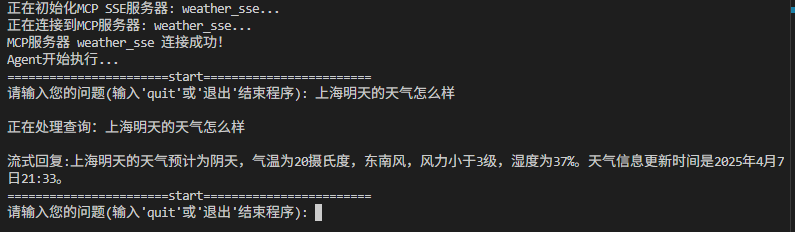
DeepSeek Agent MCP 是一个利用 DeepSeek AI 模型与 MCP(Model-Client-Protocol)框架创建多功能代理系统的项目。该项目包含一个天气助手,可以获取天气信息、执行 Shell 命令并提供当前时间信息。
功能特点
- 使用高德地图 API 获取天气信息
- Shell 命令执行能力
- 当前时间报告
- 大语言模型的流式响应
- 交互式聊天界面
系统要求
- Python 3.13 或更高版本
- OpenAI Agent 框架
- DeepSeek API 密钥
- 高德地图天气 API 密钥(用于天气功能)
安装步骤
-
克隆仓库:
git clone https://github.com/tujiaw/deep_seek_agent_mcp.git cd deep_seek_agent_mcp -
设置虚拟环境:
python -m venv .venv # Windows 系统 .venv\Scripts\activate # Linux/Mac 系统 source .venv/bin/activate -
安装依赖:
pip install uv uv pip install -e . -
配置环境变量:
- 基于提供的
.env.example创建.env文件 - 添加您的 DeepSeek API 密钥和高德地图天气 API 密钥
- 基于提供的
使用方法
启动 MCP 服务器
uv run python ./mcp_server.py
服务器默认将在 0.0.0.0:8080 上启动。您可以指定不同的主机和端口:
uv run python ./mcp_server.py --host 127.0.0.1 --port 9000
运行客户端应用
uv run python ./llm_client.py
这将启动一个交互式会话,您可以与助手进行对话。
配置说明
环境变量
API_KEY:您的 DeepSeek API 密钥BASE_URL:DeepSeek API 基础 URL(默认:https://api.deepseek.com)MODEL_NAME:使用的大语言模型(默认:deepseek-chat)OPENWEATHER_API_KEY:您的高德地图天气 API 密钥
MCP 配置
mcp.json 文件包含连接 MCP 服务器的配置:
{
  "mcpServers": {
    "weather_sse": {
      "url": "http://localhost:8080/sse",
      "env": {
        "API_KEY": ""
      }
    }
  }
}
系统架构
系统由两个主要组件组成:
- MCP 服务器(
mcp_server.py):通过 MCP 协议向大语言模型代理提供工具和功能 - LLM 客户端(
llm_client.py):管理与 DeepSeek AI 模型和 MCP 服务器的通信
可用工具
get_weather:获取指定城市的天气信息power_shell:执行 Windows shell 命令now_time:返回当前时间
Dev Tools Supporting MCP
The following are the main code editors that support the Model Context Protocol. Click the link to visit the official website for more information.







