
Deepdesk
What is Deepdesk
Deepdesk is an enterprise-grade platform designed for creating, managing, and deploying AI agents, enabling organizations to harness advanced AI capabilities while maintaining control over their data and infrastructure.
Use cases
Use cases include automating customer support interactions, providing data-driven insights through AI analysis, and facilitating internal communication within organizations.
How to use
Users can create custom AI agents tailored to their specific needs, integrate them with enterprise data sources through a unified chat interface, and deploy them without the complexity of managing multiple integrations.
Key features
Key features include an interactive chat interface for seamless communication, secure private data integration, support for the MCP protocol, flexible model integration with various LLM providers, on-premises LLM support, and vendor independence.
Where to use
Deepdesk can be utilized in various sectors such as customer service, data analysis, and enterprise resource management, where AI agents can enhance operational efficiency and decision-making.
Clients Supporting MCP
The following are the main client software that supports the Model Context Protocol. Click the link to visit the official website for more information.





Overview
What is Deepdesk
Deepdesk is an enterprise-grade platform designed for creating, managing, and deploying AI agents, enabling organizations to harness advanced AI capabilities while maintaining control over their data and infrastructure.
Use cases
Use cases include automating customer support interactions, providing data-driven insights through AI analysis, and facilitating internal communication within organizations.
How to use
Users can create custom AI agents tailored to their specific needs, integrate them with enterprise data sources through a unified chat interface, and deploy them without the complexity of managing multiple integrations.
Key features
Key features include an interactive chat interface for seamless communication, secure private data integration, support for the MCP protocol, flexible model integration with various LLM providers, on-premises LLM support, and vendor independence.
Where to use
Deepdesk can be utilized in various sectors such as customer service, data analysis, and enterprise resource management, where AI agents can enhance operational efficiency and decision-making.
Clients Supporting MCP
The following are the main client software that supports the Model Context Protocol. Click the link to visit the official website for more information.
Content
Deepdesk



Overview
Deepdesk is an enterprise-grade platform for creating, managing, and deploying AI agents. It empowers organizations to leverage advanced AI capabilities while maintaining complete control over their data and infrastructure.
Purpose
Deepdesk addresses several key challenges in enterprise AI adoption:
- Custom Agent Creation: Build and manage AI agents tailored to specific enterprise use cases
- Integrated Interaction: Access a unified chat interface for engaging with AI agents and enterprise data sources
- Simplified Integration: Deploy custom AI agents without the complexity of managing multiple data source integrations
- Security-First Design: Maintain data privacy and security within your company’s infrastructure
Key Features
- 💬 Interactive Chat Interface: Seamless communication with AI agents
- 🔒 Private Data Integration: Connect securely to enterprise data sources
- 🔄 MCP Protocol Support: Industry-standard Model Control Protocol for agent communication
- 🔌 Flexible Model Integration: Adapters for various LLM providers
- 🏢 On-Premises LLM Support: Run open-source LLMs within your company VPC
- 🔓 Vendor Independence: No vendor lock-in
Architecture Principles
Inspired by Anthropic’s approach to building effective agents, Deepdesk follows these core principles:
- Simplicity: Building the right system rather than the most sophisticated one
- Transparency: Making agent planning steps explicit and visible
- Well-designed Tools: Providing clear, well-documented interfaces between agents and systems
- Standardized Communication: Using MCP (Model Control Protocol) for consistent agent interactions
- Modularity: Adapter system for connecting to various LLM providers
- Enterprise Security: Infrastructure designed to keep business data within your control
System Architecture
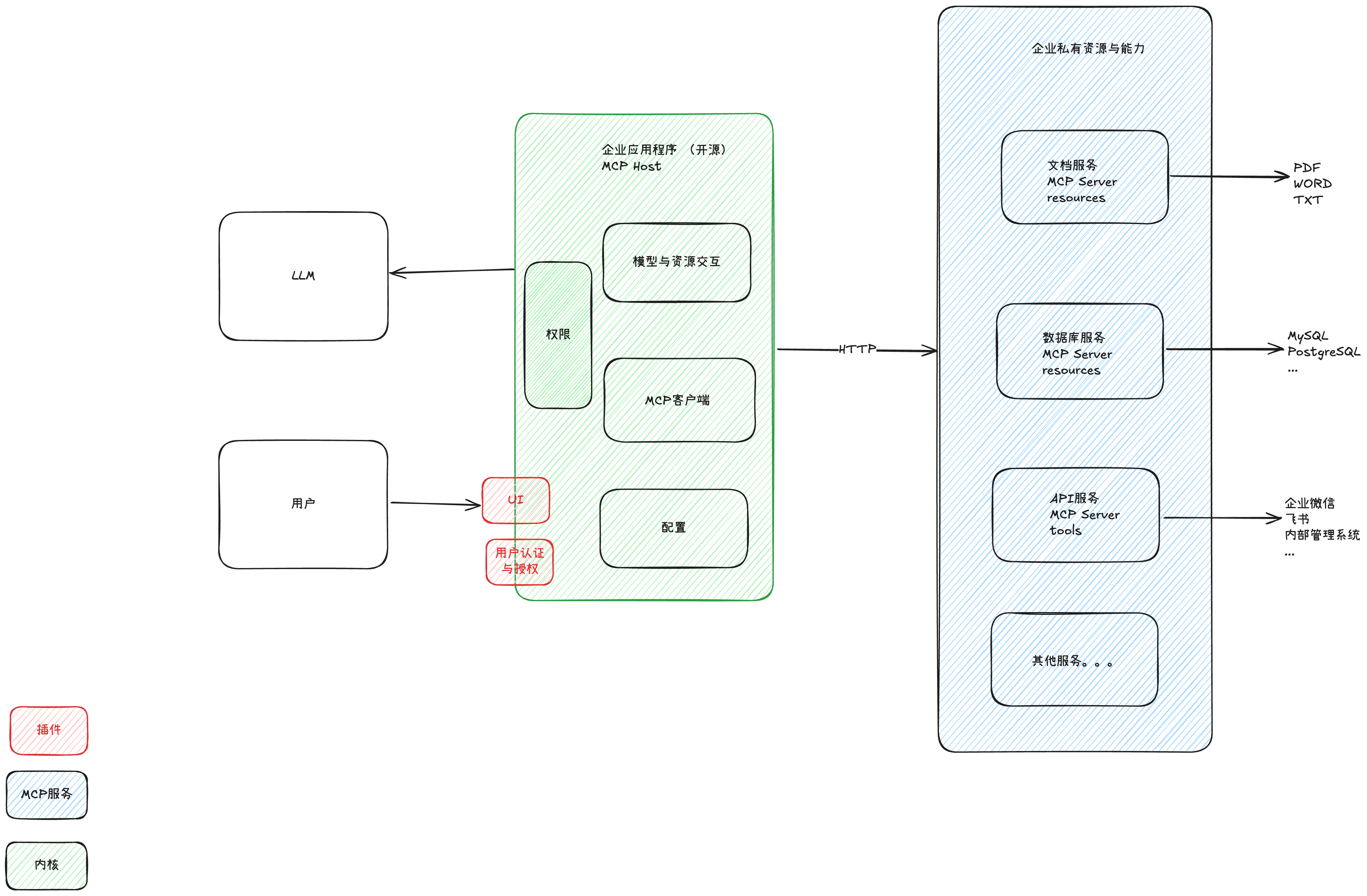
The architecture consists of:
- User Interface Layer: Intuitive UI with authentication and authorization
- MCP Host: Core component with permissions management, interaction layer, MCP client, and configuration system
- LLM Engine: Handles language processing tasks
- Enterprise Services: Document, database, API and other enterprise service integrations
Data Flow:
User → UI → MCP Host → MCP Client → Enterprise Services (via HTTP)
LLM invocation occurs through the MCP Host.
Getting Started
Prerequisites
- Java Development Kit (JDK) 21+
- Maven (included via Maven Wrapper)
- Node.js with
npx(for MCP server) - Python 3.13.x with uv package manager (for MCP server)
- API keys as environment variables:
export OPENAI_API_KEY='your-openai-api-key'
# optionally depending on your needs
export ANTHROPIC_API_KEY='your-anthropic-api-key'
export BRAVE_API_KEY="your-brave-api-key"
Quick Start
# Run the application
./mvnw spring-boot:run

# Build executable JAR
./mvnw clean package

# Run tests
./mvnw test
Native Builds
Deepdesk supports native executable generation for Linux, macOS, and Windows.
# Build native executable
./mvnw clean package -Pnative
Native executables for all platforms are also available in GitHub Releases.
Security & Privacy
- Data Sovereignty: Business data remains within your infrastructure
- Private Deployment: Support for local LLM hosting in private VPCs
- Zero Data Leakage: No external data transmission required with local models
License
This project is licensed under the GNU Affero General Public License v3.0 (AGPL-3.0). See the LICENSE file or visit: https://www.gnu.org/licenses/agpl-3.0.en.html
Dev Tools Supporting MCP
The following are the main code editors that support the Model Context Protocol. Click the link to visit the official website for more information.







