
Deno Mcp
What is Deno Mcp
The Deno Model Context Protocol (MCP) server is a tool that facilitates interaction between AI assistants, such as Cursor, and Deno projects, allowing for functionalities like running tests and viewing code coverage directly in the development environment.
Use cases
Use cases for Deno MCP include executing tests for specific files or entire projects, collecting code coverage data, and integrating AI tools to streamline the development workflow.
How to use
To use the Deno MCP server, add the required configuration to your workspace’s ‘.cursor/mcp.json’ file. After configuring, restart the MCP tool in Cursor settings to apply the changes.
Key features
Key features include running Deno tests with various options (like coverage, documentation evaluation, snapshot updates, and resource leak tracing) and viewing detailed code coverage reports generated by ‘deno coverage’.
Where to use
Deno MCP can be used in software development environments where Deno is employed, particularly in projects that require integration with AI assistants for enhanced testing and code analysis.
Clients Supporting MCP
The following are the main client software that supports the Model Context Protocol. Click the link to visit the official website for more information.





Overview
What is Deno Mcp
The Deno Model Context Protocol (MCP) server is a tool that facilitates interaction between AI assistants, such as Cursor, and Deno projects, allowing for functionalities like running tests and viewing code coverage directly in the development environment.
Use cases
Use cases for Deno MCP include executing tests for specific files or entire projects, collecting code coverage data, and integrating AI tools to streamline the development workflow.
How to use
To use the Deno MCP server, add the required configuration to your workspace’s ‘.cursor/mcp.json’ file. After configuring, restart the MCP tool in Cursor settings to apply the changes.
Key features
Key features include running Deno tests with various options (like coverage, documentation evaluation, snapshot updates, and resource leak tracing) and viewing detailed code coverage reports generated by ‘deno coverage’.
Where to use
Deno MCP can be used in software development environments where Deno is employed, particularly in projects that require integration with AI assistants for enhanced testing and code analysis.
Clients Supporting MCP
The following are the main client software that supports the Model Context Protocol. Click the link to visit the official website for more information.
Content
Deno MCP Server


The Deno Model Context Protocol (MCP) server provides a bridge for AI
assistants, like Cursor, to interact with your Deno projects. It enables
functionalities such as running tests and viewing code coverage directly within
your development environment.
Features
- Run Deno Tests: Execute tests for specific files, directories, or your
entire project.- Supports standard Deno test options:
--coverage: Collect coverage profile data.--doc: Evaluate code blocks in JSDoc and Markdown.--update: Update snapshot files for test cases.--trace-leaks: Enable tracing of resource leaks.
- Supports standard Deno test options:
- View Code Coverage: Display detailed coverage reports generated by
deno coverage.
Getting Started
To integrate the Deno MCP server with Cursor, add the following configuration to
your workspace’s .cursor/mcp.json file:
{
  "mcpServers": {
    "deno": {
      "command": "deno",
      "args": ["run", "-A", "jsr:@udibo/deno-mcp", "-A"]
    }
  }
}
After adding this configuration, restart the MCP tool in your Cursor settings to
apply the changes.
Important Note on Arguments: Any arguments provided in the args array
after the script path (e.g., jsr:@udibo/deno-mcp or ./custom-server.ts)
will be automatically passed to the deno test command when the test tool is
executed. For instance, the trailing -A in the example configurations above
will be included in all test tool invocations, effectively running tests with
all permissions by default.
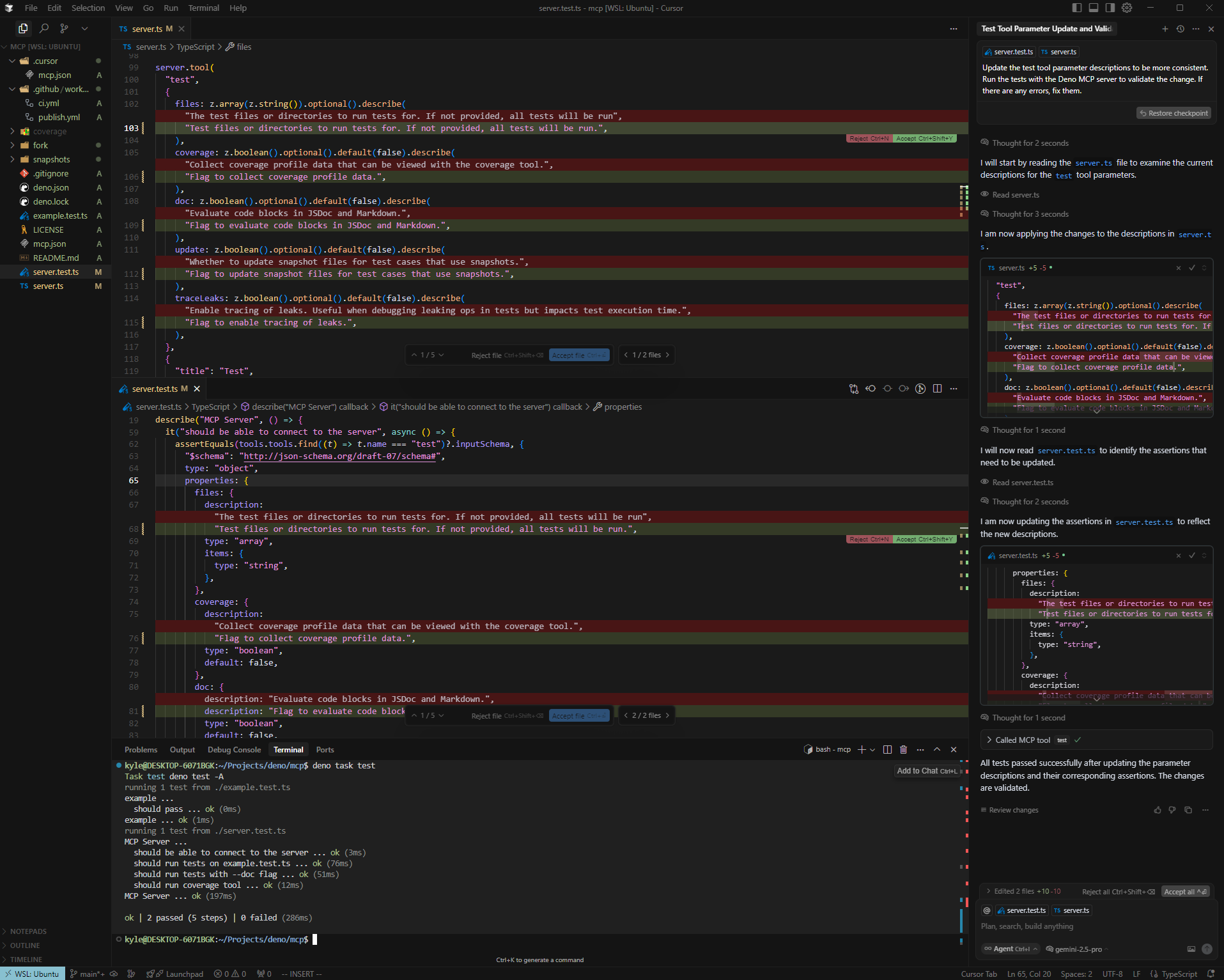
Example Usage
Here’s an example of Cursor interacting with the Deno MCP server to run tests:
Extending the Server
You can extend the base Deno MCP server with your own custom tools. This allows
you to tailor its functionality to your specific project needs.
Example: Adding an echo tool
-
Create a new TypeScript file (e.g.,
custom-server.ts):import { server, StdioServerTransport } from "jsr:@udibo/deno-mcp"; // Or your local path if developing import { z } from "https://deno.land/x/[email protected]/mod.ts"; // Or your preferred way to import Zod server.tool( "echo", { message: z.string().describe("The message to echo."), }, { "title": "Echo Message", "description": "A simple tool that echoes back the provided message.", }, ({ message }) => { return Promise.resolve({ content: [{ type: "text", text: `Echo: ${message}`, }], }); }, ); if (import.meta.main) { const transport = new StdioServerTransport(); await server.connect(transport); } -
Update your
.cursor/mcp.jsonto use your custom server script:{ "mcpServers": { "deno": { "command": "deno", "args": ["run", "-A", "./custom-server.ts", "-A"] } } } -
Important: Restart the MCP tool in your Cursor settings for the changes
to take effect. Remember the note above about arguments: the trailing-A
here will also be passed todeno test.
Contributing
Contributions are welcome! Please feel free to open an issue or submit a pull
request.
License
This project is licensed under the MIT License. See the LICENSE
file for details.
Dev Tools Supporting MCP
The following are the main code editors that support the Model Context Protocol. Click the link to visit the official website for more information.







