
Dify Mcp Server
What is Dify Mcp Server
Dify MCP Server is a TypeScript-based Model Context Protocol (MCP) server that connects the MCP Client to Dify applications, dynamically exposing them as tools for direct use within the MCP Client.
Use cases
Use cases include building applications that leverage Dify’s capabilities, enhancing user interaction with multiple Dify tools, and integrating Dify applications into existing workflows.
How to use
To use Dify MCP Server, clone the repository, install dependencies using npm or yarn, build the project, and configure it with your API keys and settings in the MCP Client.
Key features
Key features include dynamic Dify integration, robust request handling with retries, support for various input types, and configurable settings for API keys and timeouts.
Where to use
Dify MCP Server can be used in applications that require integration with multiple Dify services, particularly in environments where a unified interface for various tools is beneficial.
Clients Supporting MCP
The following are the main client software that supports the Model Context Protocol. Click the link to visit the official website for more information.





Overview
What is Dify Mcp Server
Dify MCP Server is a TypeScript-based Model Context Protocol (MCP) server that connects the MCP Client to Dify applications, dynamically exposing them as tools for direct use within the MCP Client.
Use cases
Use cases include building applications that leverage Dify’s capabilities, enhancing user interaction with multiple Dify tools, and integrating Dify applications into existing workflows.
How to use
To use Dify MCP Server, clone the repository, install dependencies using npm or yarn, build the project, and configure it with your API keys and settings in the MCP Client.
Key features
Key features include dynamic Dify integration, robust request handling with retries, support for various input types, and configurable settings for API keys and timeouts.
Where to use
Dify MCP Server can be used in applications that require integration with multiple Dify services, particularly in environments where a unified interface for various tools is beneficial.
Clients Supporting MCP
The following are the main client software that supports the Model Context Protocol. Click the link to visit the official website for more information.
Content
Dify MCP Server

A TypeScript-based MCP (Model Context Protocol) server that connects the MCP Client to Dify applications. This server dynamically exposes Dify applications as tools that can be used directly within the MCP Client.
Overview
This server implements the Model Context Protocol to bridge between MCP Client and Dify applications. It dynamically fetches application specifications from Dify APIs and exposes them as MCP tools. The server allows users to interact with multiple Dify applications through a unified interface within the MCP Client.
Features
Dynamic Dify Integration
- Connects to multiple Dify applications using API keys
- Automatically fetches application metadata and parameters
- Dynamically generates tool interfaces based on Dify application specifications
- Supports various input types including text, paragraphs, and select dropdowns
Request Handling
- Robust error handling with request retries
- Support for both blocking and streaming response modes
- JSON BigInt handling for large numeric values
Configuration
- API keys configured through environment variables
- Configurable base URL and timeout settings
- Fallback to default values when environment variables are not available
Installation
Prerequisites
- Node.js (v16 or higher)
- npm or yarn
Setup
- Clone the repository
git clone https://github.com/zhuzhoulin/dify-mcp-server.git
cd dify-mcp-server
- Install dependencies
npm install
- Build the project
npm run build
Integration with Windsurf IDE
To use with Windsurf IDE, add the server config to your MCP settings:
{
  "mcpServers": {
    "dify-mcp-server": {
      "command": "node",
      "args": [
        "/path/to/dify-mcp-server/build/index.js"
      ],
      "env": {
        "AGENT_API_KEYS": "key1,key2,key3",
        "BASE_URL": "https://api.dify.ai",
        "TIMEOUT": "60000"
      }
    }
  }
}
Environment Variables
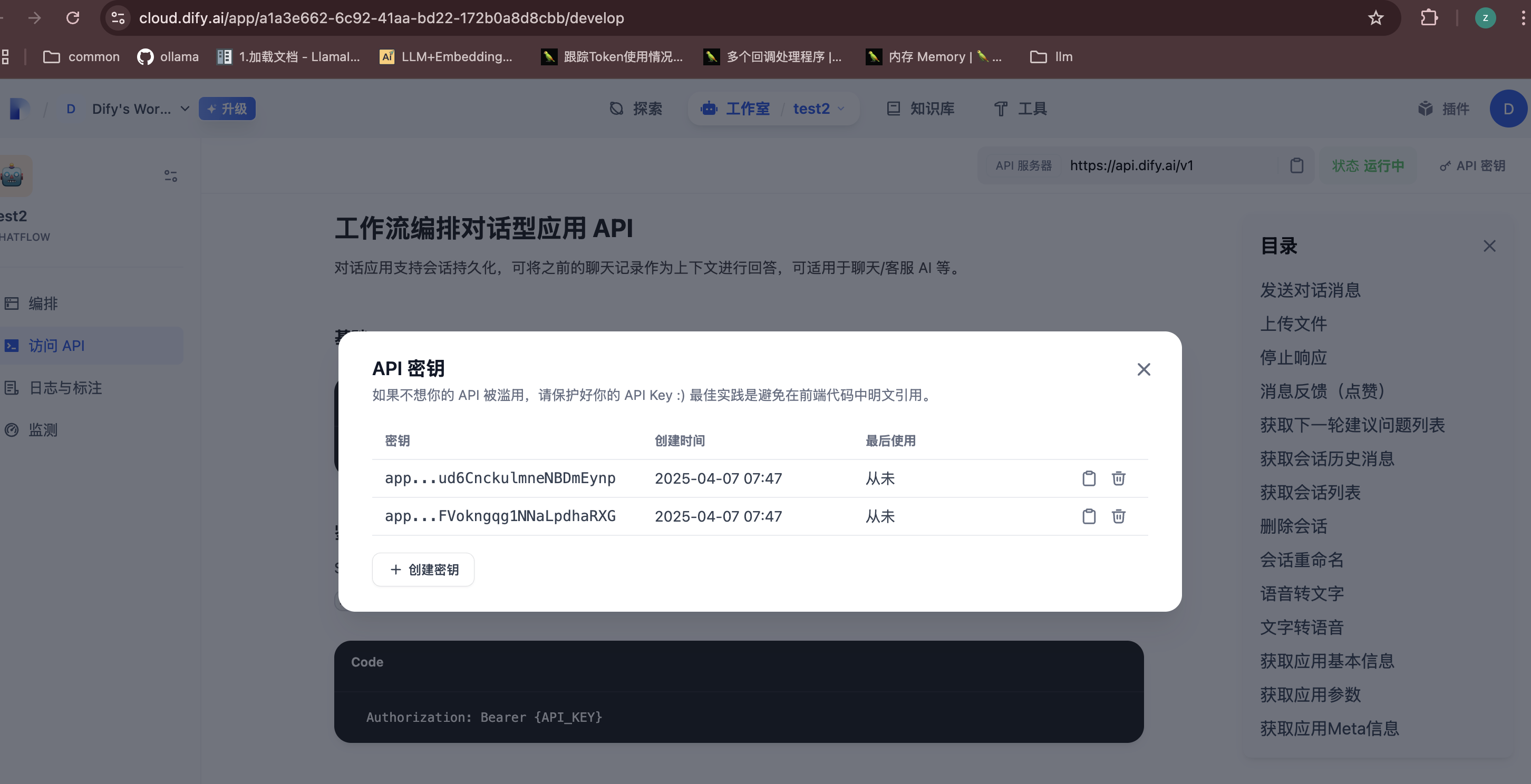
AGENT_API_KEYS: Comma-separated list of Dify API keysBASE_URL: Base URL for Dify API(default:https://api.dify.ai)TIMEOUT: Request timeout in milliseconds (default: 60000)
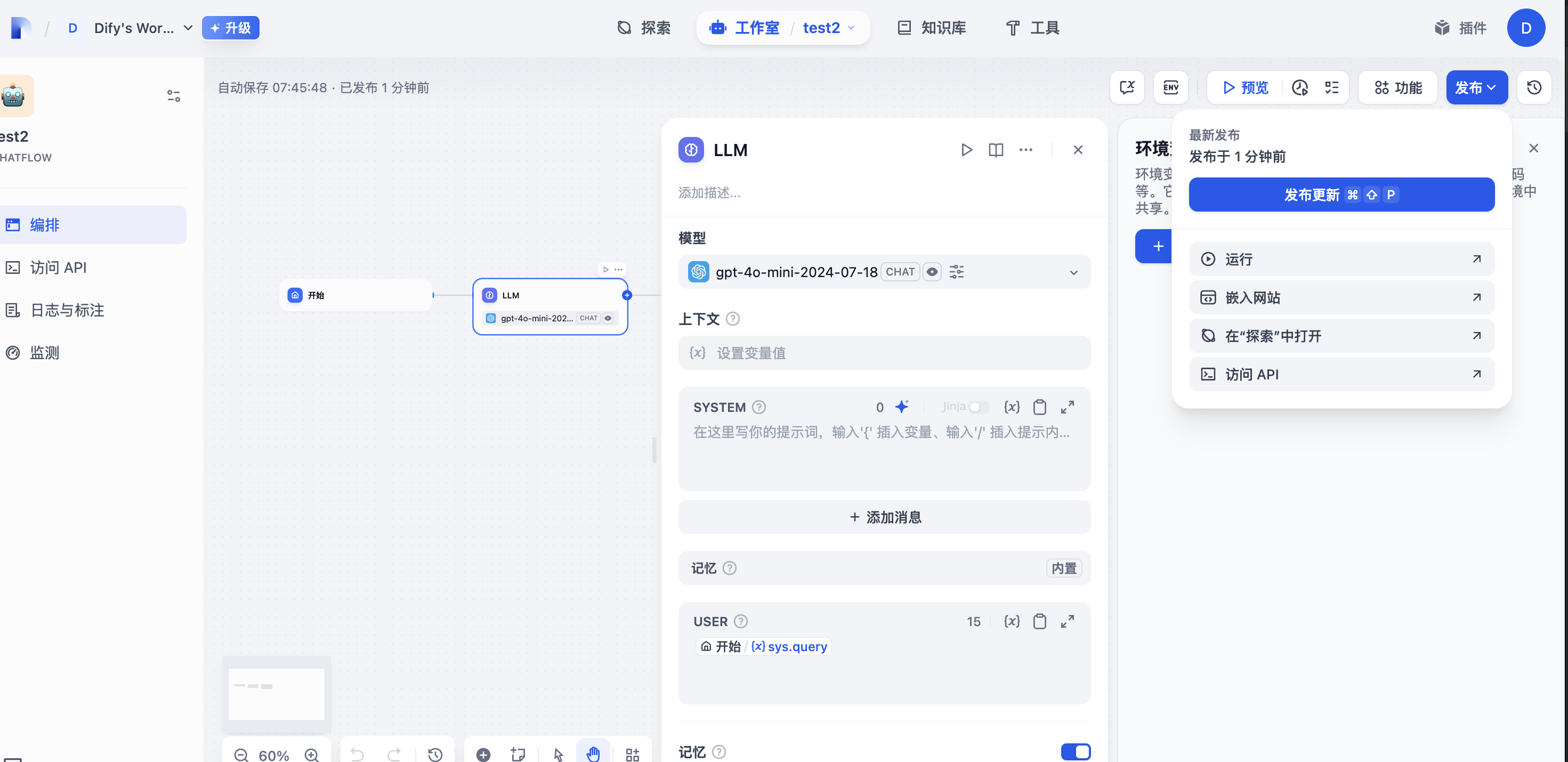
How to get Environment Variables
API密钥(AGENT_API_KEYS): 多个以,分割
Usage
Once configured, the Dify MCP Server will:
- Connect to the specified Dify applications using the provided API keys
- Fetch application metadata and parameter specifications
- Generate MCP tool interfaces based on the Dify application configurations
- Make these tools available within the Windsurf IDE
Each Dify application will be exposed as a separate tool with a name format of dify_app_info_{application_name}.
Development
Available Scripts
npm run build: Build the projectnpm run prepare: Prepare the project for distributionnpm run watch: Watch for changes and rebuildnpm run inspector: Run the MCP inspector for debugging
Project Structure
src/index.ts: Main server implementationsrc/request.ts: HTTP client for Dify API communicationsrc/type.ts: TypeScript interfaces for Dify API
Troubleshooting
If you encounter issues:
- Verify your API keys are correct and have the necessary permissions
- Check that the BASE_URL is accessible from your environment
- Review server logs for detailed error messages
- Ensure the Dify applications are properly configured and accessible
License
This project is licensed under the terms specified in the LICENSE file.
Dev Tools Supporting MCP
The following are the main code editors that support the Model Context Protocol. Click the link to visit the official website for more information.







