
Drone Ci Mcp
What is Drone Ci Mcp
drone-ci-mcp is an MCP server designed to expose the Drone CI/CD server as a set of tools, providing access to build information and logs in a read-only format.
Use cases
Use cases for drone-ci-mcp include monitoring build statuses, retrieving logs for debugging purposes, and integrating with other tools that require access to CI/CD information without modifying it.
How to use
To use drone-ci-mcp, set up the MCP server and connect it to your Drone CI/CD server. You can then access build information and logs through the provided endpoints, ensuring that you only utilize the read-only features.
Key features
Key features of drone-ci-mcp include read-only access to build information, logs, and a streamlined interface for interacting with Drone CI/CD tools.
Where to use
drone-ci-mcp can be used in software development environments where Drone CI/CD is employed, particularly in continuous integration and continuous deployment workflows.
Clients Supporting MCP
The following are the main client software that supports the Model Context Protocol. Click the link to visit the official website for more information.





Overview
What is Drone Ci Mcp
drone-ci-mcp is an MCP server designed to expose the Drone CI/CD server as a set of tools, providing access to build information and logs in a read-only format.
Use cases
Use cases for drone-ci-mcp include monitoring build statuses, retrieving logs for debugging purposes, and integrating with other tools that require access to CI/CD information without modifying it.
How to use
To use drone-ci-mcp, set up the MCP server and connect it to your Drone CI/CD server. You can then access build information and logs through the provided endpoints, ensuring that you only utilize the read-only features.
Key features
Key features of drone-ci-mcp include read-only access to build information, logs, and a streamlined interface for interacting with Drone CI/CD tools.
Where to use
drone-ci-mcp can be used in software development environments where Drone CI/CD is employed, particularly in continuous integration and continuous deployment workflows.
Clients Supporting MCP
The following are the main client software that supports the Model Context Protocol. Click the link to visit the official website for more information.
Content
drone-ci-mcp
An opinionated mcp server that exposes drone.io ci build information and logs as MCP. Will only support readonly features.
[!WARNING]
Still Under Active Development, use at your own risk
Usage
Launch the transport
npx -y drone-ci-mcp --access-token=<access-token-from-drone> --server-url=<url>
Claude Settings
MCP Inspector
npx @modelcontextprotocol/inspector npx -y drone-ci-mcp --access-token=<token> --server-url=<url>
Tools
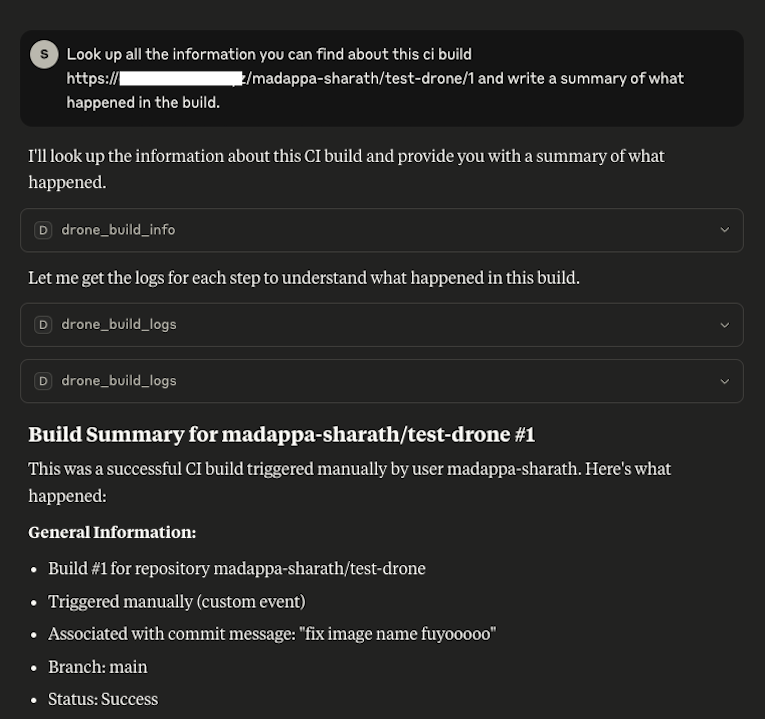
drone_build_info
Readonly tool that looks up a build information and returns the output as YAML.
Inputs:
- repoSlug - The slug of the repository in drone. Combination of owner/org and repository name seperated by ‘/’, i.e. owner/repo
- buildNumber - The drone CI build number
Outputs:
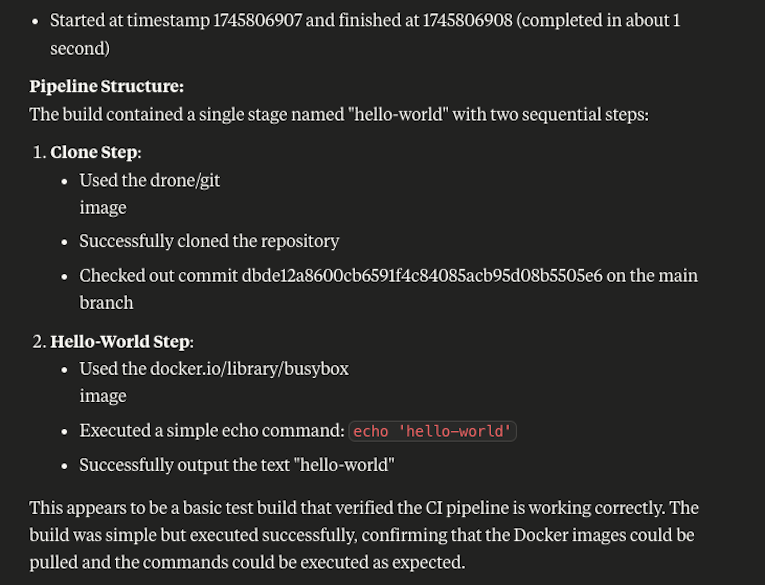
Response from https://docs.drone.io/api/builds/build_info/ as Mardown + YAML
# Build **1** in **<repo slug>**

```yaml
id: 1
repo_id: 5
trigger:<trigger>
number: 1
status: success
event: custom
action: ''
link: >-
  https://github.com/<commit-link>
timestamp: 0
message: <commit message>
before: dbde12a8600cb6591f4c84085acb95d08b5505e6
after: dbde12a8600cb6591f4c84085acb95d08b5505e6
ref: refs/heads/main
source_repo: ''
source: main
target: main
author_login: <username>
author_name: <name>
author_email: <email>
author_avatar: <avatar>
sender: madappa-sharath
started: 1745806907
finished: 1745806908
created: 1745806904
updated: 1745806907
version: 3
stages:
  - id: 1
    repo_id: 5
    build_id: 1
    number: 1
    name: hello-world
    kind: pipeline
    type: docker
    status: success
    errignore: false
    exit_code: 0
    machine: drone-runner-65d8dd8798-rf8xr
    os: linux
    arch: arm64
    started: 1745806907
    stopped: 1745806908
    created: 1745806904
    updated: 1745806908
    version: 4
    on_success: true
    on_failure: false
    steps:
      - id: 1
        step_id: 1
        number: 1
        name: clone
        status: success
        exit_code: 0
        started: 1745806907
        stopped: 1745806908
        version: 4
        image: drone/git:latest
        .....
```
drone_build_info
Readonly tool that looks up a logs for a step.
Inputs:
- repoSlug - The slug of the repository in drone. Combination of owner/org and repository name seperated by ‘/’, i.e. owner/repo
- buildNumber - The drone CI build number
- stageNumber - The build stage number. Indicated by the field ‘number’ on a stage
- stepId - The build step id. Indicated by the field ‘step_id’ on a step
Outputs:
Response from https://docs.drone.io/api/builds/build_logs/ as Mardown
# Logs for step 2 in stage **1** of **1** build in **<repo slug>** repository

```shell
+ echo 'hello-world'
,hello-world
```
Demo
Dev Tools Supporting MCP
The following are the main code editors that support the Model Context Protocol. Click the link to visit the official website for more information.







