
Erddap Mcp Demo
What is Erddap Mcp Demo
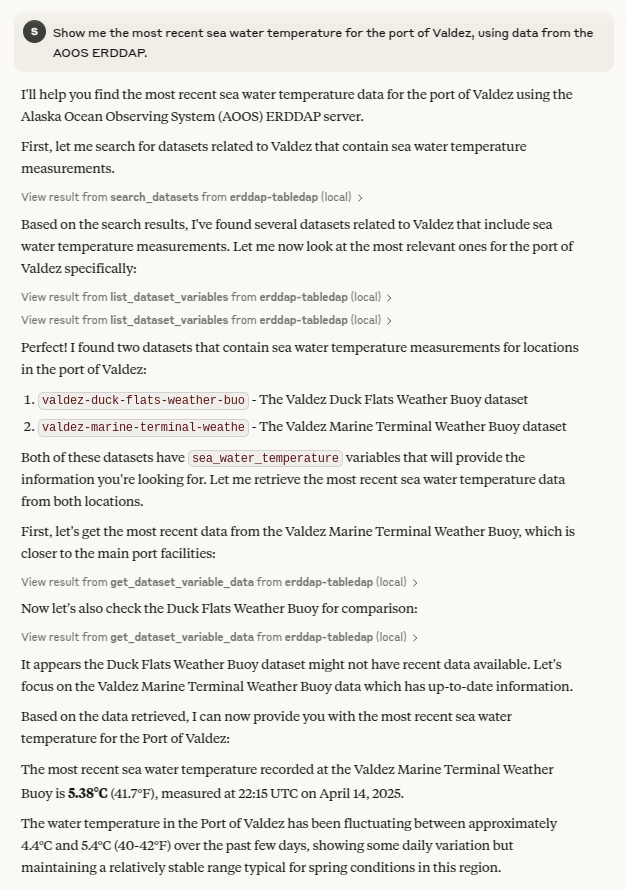
erddap-mcp-demo is a demonstration server for the Model Context Protocol (MCP), designed to enable large language models (LLMs) to interact with ERDDAP’s search, metadata, and tabledap services.
Use cases
Use cases for erddap-mcp-demo include querying environmental datasets, retrieving metadata for research purposes, and facilitating data analysis through LLMs.
How to use
To use erddap-mcp-demo, ensure that you have ‘uv’ installed. Then, add the MCP server configuration to your desired MCP-capable client, such as Claude Desktop, by modifying the appropriate config file and restarting the application.
Key features
Key features of erddap-mcp-demo include integration with ERDDAP services, support for LLM interactions, and a simple setup process for users with the ‘uv’ tool.
Where to use
erddap-mcp-demo can be used in fields such as data science, environmental research, and any application requiring access to ERDDAP’s data services through LLMs.
Clients Supporting MCP
The following are the main client software that supports the Model Context Protocol. Click the link to visit the official website for more information.





Overview
What is Erddap Mcp Demo
erddap-mcp-demo is a demonstration server for the Model Context Protocol (MCP), designed to enable large language models (LLMs) to interact with ERDDAP’s search, metadata, and tabledap services.
Use cases
Use cases for erddap-mcp-demo include querying environmental datasets, retrieving metadata for research purposes, and facilitating data analysis through LLMs.
How to use
To use erddap-mcp-demo, ensure that you have ‘uv’ installed. Then, add the MCP server configuration to your desired MCP-capable client, such as Claude Desktop, by modifying the appropriate config file and restarting the application.
Key features
Key features of erddap-mcp-demo include integration with ERDDAP services, support for LLM interactions, and a simple setup process for users with the ‘uv’ tool.
Where to use
erddap-mcp-demo can be used in fields such as data science, environmental research, and any application requiring access to ERDDAP’s data services through LLMs.
Clients Supporting MCP
The following are the main client software that supports the Model Context Protocol. Click the link to visit the official website for more information.
Content
ERDDAP MCP demo
Demo implementation of a Model Context Protocol server
allowing an LLM to interact with ERDDAP search, metadata, and tabledap services.
Usage
Make sure you have uv installed, then add the MCP server to the desired MCP capable client.
Example for Claude Desktop
NOTE: claude.ai is not MCP capable at the time of writing
Add the erddap_mcp_demo.py tool to the Clade config file at:
- Mac:
~/Library/Application Support/Claude/claude_desktop_config.json - Linux:
~/.config//Claude/claude_desktop_config.json - Windows:
%APPDATA%\Claude\claude_desktop_config.json
{
  "mcpServers": {
    "erddap-tabledap": {
      "command": "/path/to/uv",
      "args": [
        "run",
        "--with",
        "mcp[cli]",
        "mcp",
        "run",
        "/path/to/erddap_mcp_demo.py"
      ]
    }
  }
}
Then start/restart Claude desktop and ask it to get some data!
See https://modelcontextprotocol.io/quickstart/user
Testing
uv run mcp dev erddap_mcp_demo.py
Dev Tools Supporting MCP
The following are the main code editors that support the Model Context Protocol. Click the link to visit the official website for more information.







