
Etl Migration Agent
What is Etl Migration Agent
ETL Migration Agent is a Model Context Protocol (MCP) server designed to facilitate the migration of legacy ETL scripts to Python using AI-powered tools.
Use cases
Use cases include migrating SQL-based ETL logic to Python, automating the validation of ETL transformations, and ensuring data consistency during migration.
How to use
To use ETL Migration Agent, integrate it with your existing ETL processes, utilize the provided tools for analysis and conversion, and validate the generated Python code against your legacy scripts.
Key features
Key features include AI-driven code generation, row order consistency checks, output difference analysis, and seamless integration with GitHub Copilot.
Where to use
ETL Migration Agent is applicable in data engineering, data migration projects, and any scenario where legacy ETL scripts need to be modernized or converted to Python.
Clients Supporting MCP
The following are the main client software that supports the Model Context Protocol. Click the link to visit the official website for more information.





Overview
What is Etl Migration Agent
ETL Migration Agent is a Model Context Protocol (MCP) server designed to facilitate the migration of legacy ETL scripts to Python using AI-powered tools.
Use cases
Use cases include migrating SQL-based ETL logic to Python, automating the validation of ETL transformations, and ensuring data consistency during migration.
How to use
To use ETL Migration Agent, integrate it with your existing ETL processes, utilize the provided tools for analysis and conversion, and validate the generated Python code against your legacy scripts.
Key features
Key features include AI-driven code generation, row order consistency checks, output difference analysis, and seamless integration with GitHub Copilot.
Where to use
ETL Migration Agent is applicable in data engineering, data migration projects, and any scenario where legacy ETL scripts need to be modernized or converted to Python.
Clients Supporting MCP
The following are the main client software that supports the Model Context Protocol. Click the link to visit the official website for more information.
Content

ETL Migration Agent
GitHub Copilot for Migrating Legacy ETL Scripts 🤯


Overview
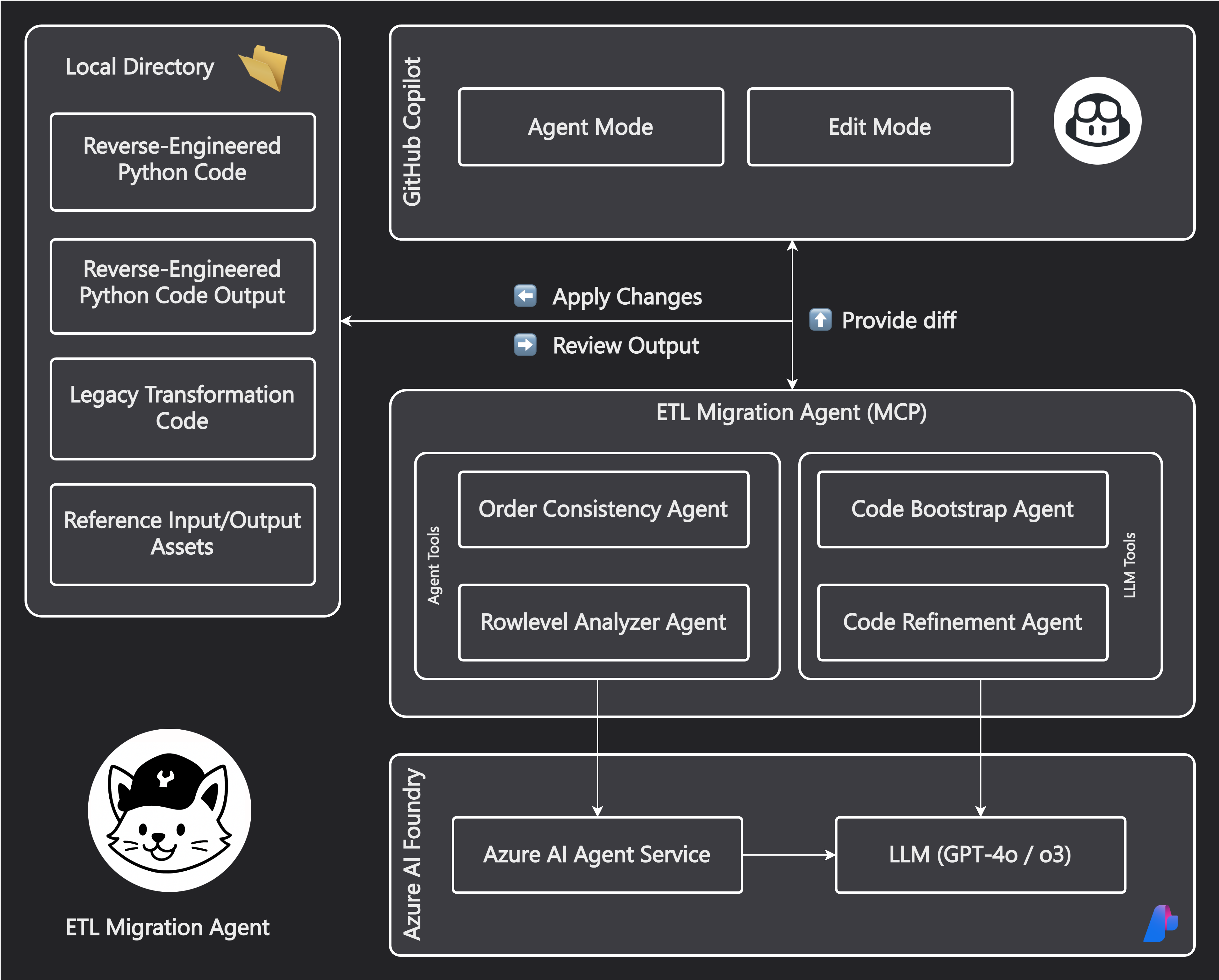
ETL Migration Agent is a Model Context Protocol (MCP) server that extends GitHub Copilot with specialized tools for migrating legacy ETL code to Python. It provides a suite of AI-powered tools that work together to analyze, convert, and validate ETL transformations.
Sample Output: See test_data/transformation_script.py for an example of generated Python code that migrates legacy SQL ETL logic to pandas operations.
Architecture
Core Services
- Azure AI Foundry: Provides access to LLMs (o3, gpt-4.1, gpt-4o) for language understanding and code generation
- Azure AI Agent Service: Used to build agents that perform changes or analysis on files
- MCP Server: Enables integration with GitHub Copilot by exposing tools through the Model Context Protocol
Tool and Agent Overview
| Tool/Agent | Purpose | Implementation | Models Used |
|---|---|---|---|
| Order Consistency Agent | Ensures source and target files have matching row orders + Uses LLM judge to select best ordering from multiple models | Azure AI Agent Service + Code Interpreter + LLM Judge | gpt-4, gpt-4.1 |
| Code Bootstrap Agent | Initial Python code generation from legacy ETL | Azure AI Foundry | Configured deployment model |
| Rowlevel Analyzer Agent | Comparison of output differences + Uses LLM judge to identify matching rows across files | Azure AI Agent Service + Code Interpreter + LLM Judge | Multiple model parallel processing |
| Code Refinement Agent | Refine Python code based on legacy ETL knowledge and current output. | Azure AI Foundry | gpt-4.1 (configurable) |
Migration Steps with Prompts
1. File Order Alignment
call #order_consistency_agent
Legacy ETL Output file: /workspaces/etl-migration-agent/test_data/output.csv
Source File: /workspaces/etl-migration-agent/test_data/input.csv
Data directory: /workspaces/etl-migration-agent/test_data
Review the generated files in the /workspaces/etl-migration-agent/test_data directory. The agent will create a new file with the same name as the original output file, but with _ordered appended to it (e.g., output_ordered.csv).
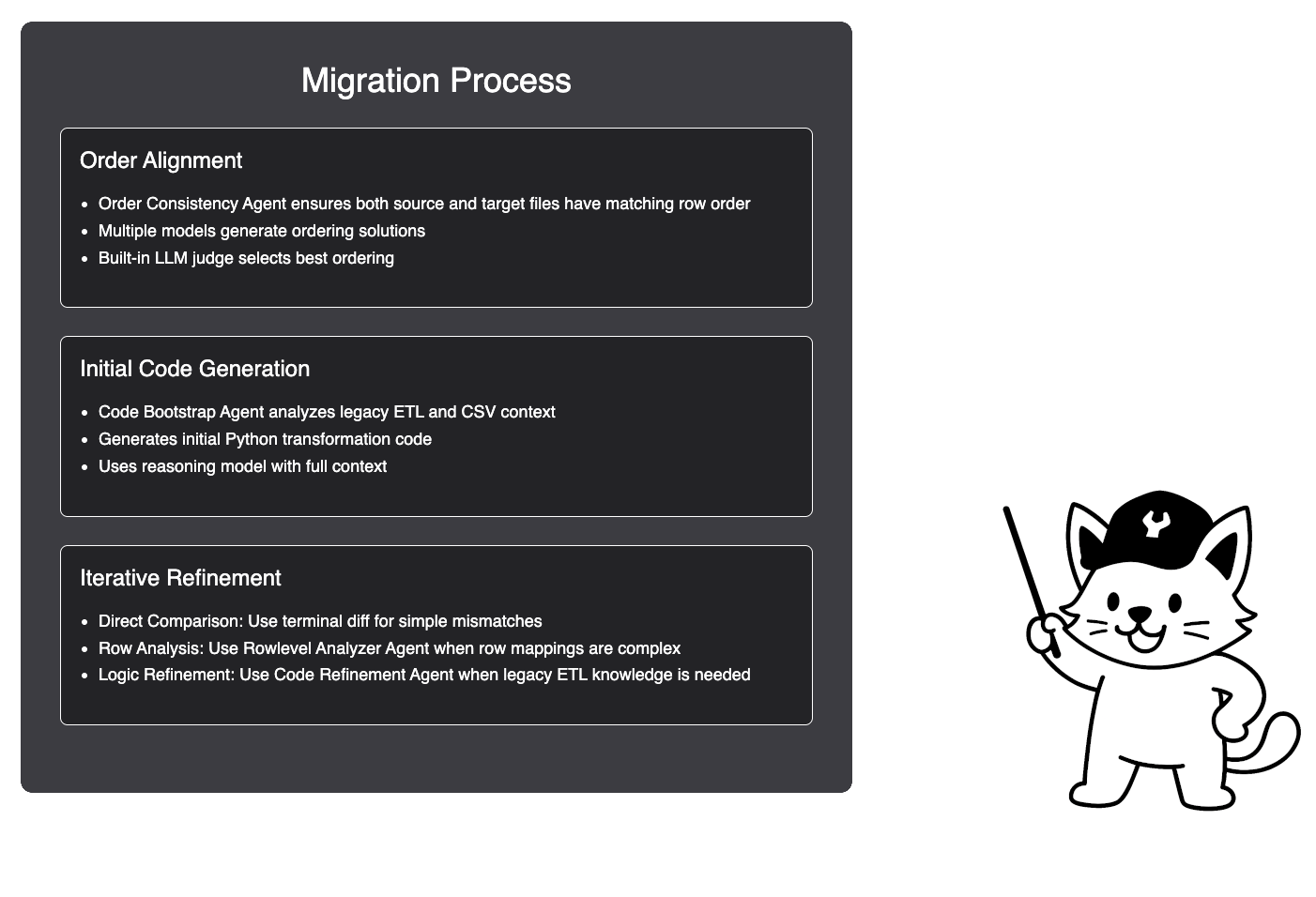
You may need to rerun the agent multiple times to ensure the row order matches between the source and target files. The agent will use multiple models to generate different row orders, and a built-in LLM judge will select the best one.
2. Initial Code Generation
call #code_bootstrap_agent
Target directory: /workspaces/etl-migration-agent/test_data
Output file: transformation_script.py
This may take a few minutes as the agent analyzes the legacy ETL code and generates the initial Python transformation script. The generated script will be saved as transformation_script.py in the specified directory. We’ll use the strongest reasoning model available to ensure the code is as accurate as possible.
3. Code Refinement Options
Choose the appropriate refinement method based on the issue:
A. Row Mapping Issues
call #rowlevel_analyzer_agent
Working directory: /workspaces/etl-migration-agent/test_data
Files: output_PY.csv, output.csv
B. Missing Legacy Functionality
call #code_refinement_agent
Working directory: /workspaces/etl-migration-agent/test_data
Files: transformation_script.py, input.csv, output.csv, output_PY.csv
C… CLI-based Validation
Use diff (or other CLI tools) to compare outputs:
diff <(head -n 5 output_PY.csv) <(head -n 5 output.csv)
Prompt 3a: Analyzing Row-Level Differences (GitHub Copilot - Edit Mode)
Evaluate the current Python code and its output.
Compare it to the expected output.

For files with different row mappings or sorting, use:

call #rowlevel_analyzer_agent

(Python output: output_PY.csv, Original output: output.csv)

Files are located in: /workspaces/etl-migration-agent/test_data
Prompt 3b: Refining Missing Functionality (GitHub Copilot - Edit Mode)
Evaluate the current Python code and its output.
Compare it to the expected output.

For missing functionality that requires knowledge of the legacy ETL code, use:

call #code_refinement_agent

(Python output: output_PY.csv, Original output: output.csv, input file: input.csv, transformation_script.py is not complete)

Files are located in: /workspaces/etl-migration-agent/test_data

Goal: Fix transformation_script.py so that output_PY.csv matches output.csv.
Prompt 3c: Applying Final Fixes (GitHub Copilot - Edit Mode)
Before running this prompt:
Compare outputs using this command:
diff <(head -n 5 output_PY.csv) <(head -n 5 output.csv)
Then run this prompt:
call #terminalLastCommand

Apply necessary fixes in transformation_script.py to resolve any differences.
You can use this command to check the similarity percentage between the two CSV files:
python3 -c "import csv; a = list(csv.reader(open('output.csv'))); b = list(csv.reader(open('output_PY.csv'))); total = min(len(a), len(b)) * min(len(a[0]), len(b[0])); same = sum(1 for i in range(min(len(a), len(b))) for j in range(min(len(a[i]), len(b[i]))) if a[i][j] == b[i][j]); print(f'{same/total*100:.2f} % similar')"
You may need to diff more lines as you get closer to the final output.
Setup
Prerequisites
- Python 3.11+
- Azure OpenAI API credentials
- Azure AI Agents Project endpoint
Configuration Options
| Environment Variable | Description | Default |
|---|---|---|
AZURE_OPENAI_API_KEY |
Azure OpenAI API key | Required |
AZURE_OPENAI_ENDPOINT |
Azure OpenAI endpoint URL | Required |
AZURE_OPENAI_DEPLOYMENT_NAME |
OpenAI model deployment name | o3 |
AZURE_OPENAI_API_VERSION |
API version | 2024-12-01-preview |
MODEL_DEPLOYMENTS |
Comma-separated list of models | gpt-4,gpt-4o-dz,gpt-4.1,gpt-4o |
REFINEMENT_MODEL |
Model for code refinement | gpt-4.1 |
BEST_OUTPUT_SELECTOR_MODEL |
Model for selecting best output | gpt-4.1 |
LEGACY_ETL_CODE_DESCRIPTION |
Type of legacy code | e.g. SQL |
PROJECT_ENDPOINT |
Azure AI Agents project endpoint | Required |
LOG_LEVEL |
Logging level | INFO |
Quick Start
- Create and activate a virtual environment:
python -m venv .venv
source .venv/bin/activate  # On Windows: .venv\Scripts\activate
- Install dependencies:
pip install -r requirements.txt
- Run the server with environment variables:
export AZURE_OPENAI_API_KEY="your_api_key_here"
export AZURE_OPENAI_ENDPOINT="your_endpoint_here"
export PROJECT_ENDPOINT="your_project_endpoint"
export LOG_LEVEL="INFO"
python server.py
VS Code MCP Integration
Add this configuration to your VS Code settings (mcp.json):
{
  "inputs": [
    {
      "type": "promptString",
      "id": "azure_openai_api_key",
      "description": "Azure OpenAI API Key",
      "password": true
    },
    {
      "type": "promptString",
      "id": "azure_openai_endpoint",
      "description": "Azure OpenAI Endpoint URL"
    },
    {
      "type": "promptString",
      "id": "azure_openai_deployment_name",
      "description": "Azure OpenAI Deployment Name (e.g., gpt-4, o3-mini)"
    },
    {
      "type": "promptString",
      "id": "azure_openai_api_version",
      "description": "Azure OpenAI API Version"
    },
    {
      "type": "promptString",
      "id": "project_endpoint",
      "description": "Azure AI Agents Project Endpoint URL"
    },
    {
      "type": "promptString",
      "id": "data_folder_path",
      "description": "Path to folder containing legacy code and CSV files"
    },
    {
      "type": "promptString",
      "id": "log_level",
      "description": "Logging level (DEBUG, INFO, WARNING, ERROR, CRITICAL)"
    }
  ],
  "servers": {
    "etl-migration": {
      "command": "python",
      "args": [
        "${workspaceFolder}/server.py"
      ],
      "env": {
        "PYTHONUNBUFFERED": "1",
        "AZURE_OPENAI_API_KEY": "${input:azure_openai_api_key}",
        "AZURE_OPENAI_ENDPOINT": "${input:azure_openai_endpoint}",
        "AZURE_OPENAI_DEPLOYMENT_NAME": "${input:azure_openai_deployment_name}",
        "LEGACY_ETL_CODE_DESCRIPTION": "SQL",
        "AZURE_OPENAI_API_VERSION": "${input:azure_openai_api_version}",
        "PROJECT_ENDPOINT": "${input:project_endpoint}",
        "LOG_LEVEL": "${input:log_level}"
      },
      "workingDirectory": "${workspaceFolder}/mcp"
    }
  }
}
Detailed Dev Workflow
graph TD
    A[Legacy ETL Code + CSV Files] --> B[Order Consistency Agent]
    B -->|Reordered Files| C[Code Bootstrap Agent]
    C -->|Initial Python Code| D[Iterative Refinement]
    D --> E{Analysis Method}
    E -->|Simple Differences| F[Terminal diff]
    E -->|Complex Row Mappings| G[Rowlevel Analyzer Agent]
    E -->|Legacy Logic Needed| H[Code Refinement Agent]
    F & G & H --> I{Issues Resolved?}
    I -->|No| D
    I -->|Yes| J
License
This project is licensed under the MIT License - see the LICENSE file for details.
Dev Tools Supporting MCP
The following are the main code editors that support the Model Context Protocol. Click the link to visit the official website for more information.







