
Fetch Mcp Server
What is Fetch Mcp Server
Fetch MCP Server is a Model Context Protocol (MCP) server implementation that enables real-time communication through Server-Sent Events (SSE) and provides web content fetching capabilities using Playwright.
Use cases
Use cases include fetching multiple URLs and converting their content to Markdown, searching and retrieving content from web pages, and enabling real-time updates in applications through SSE.
How to use
To use Fetch MCP Server, clone the repository, install dependencies using Yarn, and start the server in either development or production mode. Use the /sse endpoint for persistent connections and the /messages endpoint to send messages to the server.
Key features
Key features include Model Context Protocol (MCP) implementation, real-time communication via Server-Sent Events (SSE), web content fetching with Playwright, Google search capability with SERP results, HTML to Markdown conversion, and resource templating and management.
Where to use
Fetch MCP Server can be used in AI applications, web scraping, real-time data processing, and any scenario that requires fetching and managing web content dynamically.
Clients Supporting MCP
The following are the main client software that supports the Model Context Protocol. Click the link to visit the official website for more information.





Overview
What is Fetch Mcp Server
Fetch MCP Server is a Model Context Protocol (MCP) server implementation that enables real-time communication through Server-Sent Events (SSE) and provides web content fetching capabilities using Playwright.
Use cases
Use cases include fetching multiple URLs and converting their content to Markdown, searching and retrieving content from web pages, and enabling real-time updates in applications through SSE.
How to use
To use Fetch MCP Server, clone the repository, install dependencies using Yarn, and start the server in either development or production mode. Use the /sse endpoint for persistent connections and the /messages endpoint to send messages to the server.
Key features
Key features include Model Context Protocol (MCP) implementation, real-time communication via Server-Sent Events (SSE), web content fetching with Playwright, Google search capability with SERP results, HTML to Markdown conversion, and resource templating and management.
Where to use
Fetch MCP Server can be used in AI applications, web scraping, real-time data processing, and any scenario that requires fetching and managing web content dynamically.
Clients Supporting MCP
The following are the main client software that supports the Model Context Protocol. Click the link to visit the official website for more information.
Content
Fetch MCP Server
A Model Context Protocol (MCP) server implementation with web content fetching capabilities, enabling server-sent events (SSE) based communication.
Overview
Fetch MCP Server provides a Model Context Protocol implementation that allows for real-time communication using Server-Sent Events (SSE). It features web content fetching and search capabilities, designed to work with AI applications and provides a standardized way of managing and communicating with models and resources.
Features
- Model Context Protocol (MCP) implementation
- Server-Sent Events (SSE) for real-time communication
- Web content fetching with Playwright
- Google search capability with SERP results
- HTML to Markdown conversion
- Resource templating and management
Prerequisites
- Node.js (v14 or higher recommended)
- Yarn package manager
- Kubernetes cluster (for deployment)
Installation
Clone the repository and install dependencies:
git clone [email protected]:pnparadise/fetch-mcp-server.git
cd fetch-mcp-server
yarn install
Usage
Starting the Server
To start the server in development mode:
yarn dev
This will run the server with the MCP inspector for debugging.
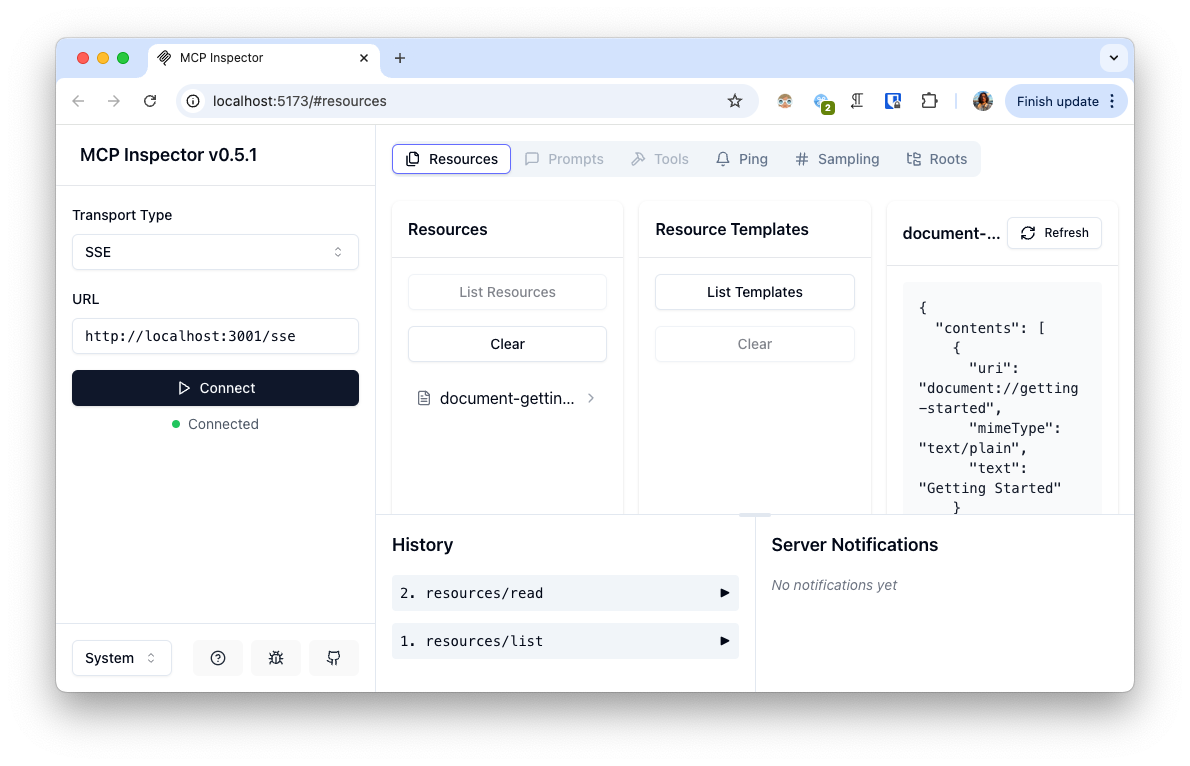
To start the server in production mode:
yarn start
By default, the server runs on port 3001. You can override this by setting the PORT environment variable:
PORT=5000 yarn start
Endpoints
/sse- SSE endpoint for establishing persistent connections/messages- Endpoint for sending messages to the MCP server
Available Tools
fetchUrls- Fetch multiple URLs and convert their content to markdownsearch- Search and retrieve content from web pages with SERP results
Project Structure
src/index.ts- Main entry point of the applicationsrc/mcp-server.ts- Implementation of the MCP server and tool definitionssrc/sse-server.ts- SSE server implementation using Expressk8s/- Kubernetes deployment configurations
Dependencies
- @modelcontextprotocol/sdk - SDK for Model Context Protocol
- Express - Web framework for Node.js
- Playwright - Browser automation library
- Turndown - HTML to Markdown converter
Dev Tools Supporting MCP
The following are the main code editors that support the Model Context Protocol. Click the link to visit the official website for more information.







