
Finance Mcp Server
What is Finance Mcp Server
finance-mcp-server is a Model Context Protocol server that provides accurate and up-to-date prices and news about stock and cryptocurrency tickers.
Use cases
Use cases include tracking stock prices for investment decisions, monitoring cryptocurrency market trends, and providing news updates for financial analysis.
How to use
To use finance-mcp-server, install it via Smithery or locally using pip. You can run the server using commands for uv or Docker, and configure it in the respective configuration files for applications like Claude Desktop or 5ire.
Key features
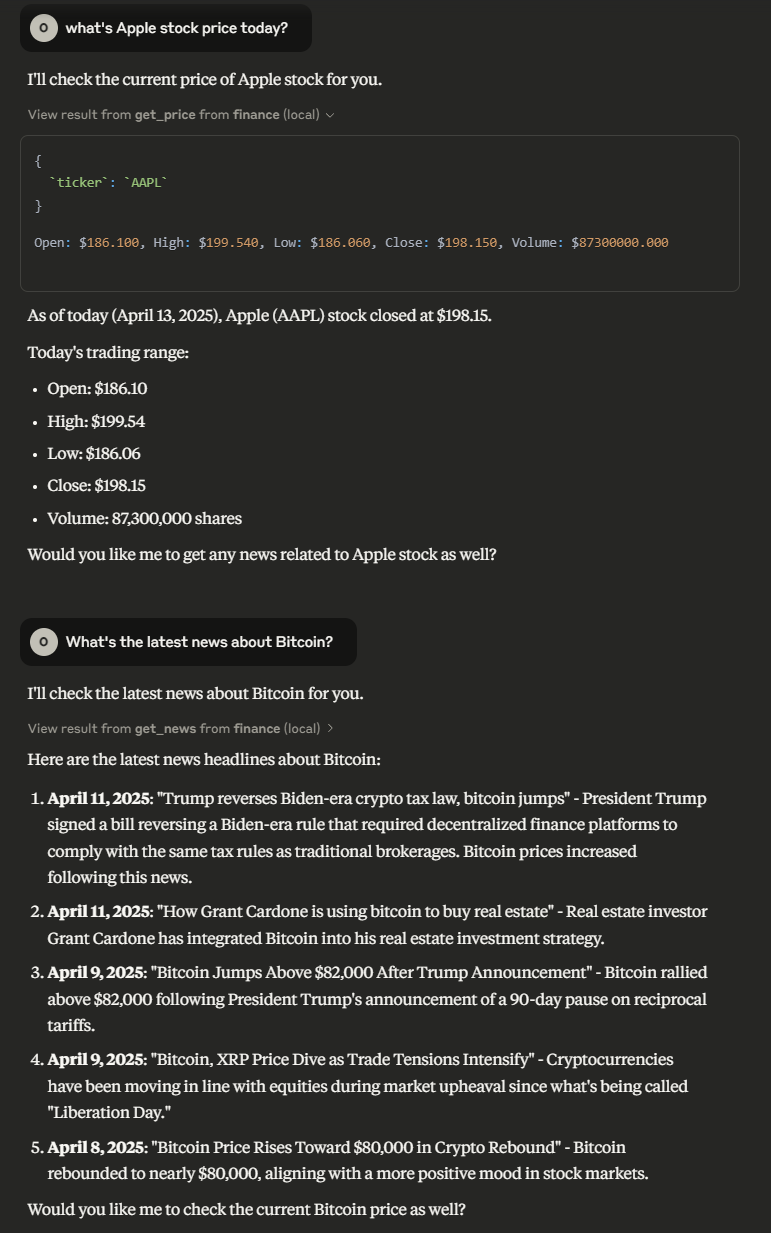
Key features include the ability to retrieve current prices of stocks and cryptocurrencies using the ‘get_price_tool’, and to fetch news articles related to specific tickers using the ‘get_news_tool’.
Where to use
finance-mcp-server can be used in financial applications, trading platforms, investment analysis tools, and any software that requires real-time financial data.
Clients Supporting MCP
The following are the main client software that supports the Model Context Protocol. Click the link to visit the official website for more information.





Overview
What is Finance Mcp Server
finance-mcp-server is a Model Context Protocol server that provides accurate and up-to-date prices and news about stock and cryptocurrency tickers.
Use cases
Use cases include tracking stock prices for investment decisions, monitoring cryptocurrency market trends, and providing news updates for financial analysis.
How to use
To use finance-mcp-server, install it via Smithery or locally using pip. You can run the server using commands for uv or Docker, and configure it in the respective configuration files for applications like Claude Desktop or 5ire.
Key features
Key features include the ability to retrieve current prices of stocks and cryptocurrencies using the ‘get_price_tool’, and to fetch news articles related to specific tickers using the ‘get_news_tool’.
Where to use
finance-mcp-server can be used in financial applications, trading platforms, investment analysis tools, and any software that requires real-time financial data.
Clients Supporting MCP
The following are the main client software that supports the Model Context Protocol. Click the link to visit the official website for more information.
Content
yfinance MCP Server
Model Context Protocol server that allows LLMs to get accurate and up-to-date prices and news about stock/cryptocurrencies tickers.
Available Tools
get_price_tool: Get the price of a stock/cryptocurrency ticker- Arguments:
ticker(string): Required - Ticker name or alias (e.g., “BTC-USD”, “AAPL”)period(string): Optional - Time period (e.g., “1d”, “5d”, “1mo”). Defaults to “1d”
- Arguments:
get_news_tool: Get the news of a stock/cryptocurrency ticker.- Required arguments:
ticker(string): Requiredcount(string): Optional - Number of articles to retrieve (default: 5)
- Required arguments:
Installation
Installing via Smithery
To install yfinance-mcp-server for Claude Desktop automatically via Smithery:
npx -y @smithery/cli install @Otman404/finance-mcp-server --client claude
Using uv
Install the package locally
uv pip install -e .
Run the server
finance-mcp-server
Using docker
# build the container
docker build -t finance-server .

# run the container
docker run -it finance-server
Configuration
Usage for Claude Desktop
Add the following to claude_desktop_config.json
uvx
docker
{
  "mcpServers": {
    "finance": {
      "command": "docker",
      "args": [
        "run",
        "-i",
        "--rm",
        "finance-server"
      ]
    }
  }
}
Usage for 5ire
uvx
{
  "key": "finance",
  "command": "uvx",
  "args": [
    "finance-mcp-server"
  ]
}
docker
{
  "key": "finance-server",
  "command": "docker",
  "args": [
    "run",
    "-i",
    "--rm",
    "finance-server"
  ]
}
Example Interactions
Dev Tools Supporting MCP
The following are the main code editors that support the Model Context Protocol. Click the link to visit the official website for more information.







