
Financial Reports Mcp Server
What is Financial Reports Mcp Server
The financial-reports-mcp-server is an MCP (Model Context Protocol) server designed to facilitate access to European financial reports by connecting the FinancialReports.eu API with AI technologies. It allows users to query, analyze, and explain complex financial data easily.
Use cases
Use cases include financial analysts conducting company evaluations, researchers studying market trends, developers integrating financial data into applications, and educational institutions teaching finance-related subjects.
How to use
To use the financial-reports-mcp-server, you can run it via Docker for an isolated and reproducible setup. Clone the repository, build the Docker image, and run the server with the appropriate configurations. You may also use provided example scripts to interact with the server.
Key features
Key features include searching for companies by name, country, or sector, accessing detailed company information, retrieving the latest financial filings, looking up industry classifications, and obtaining filing details and content.
Where to use
The financial-reports-mcp-server is applicable in various fields such as finance, investment analysis, academic research, and any domain requiring access to detailed financial data and reports.
Clients Supporting MCP
The following are the main client software that supports the Model Context Protocol. Click the link to visit the official website for more information.





Overview
What is Financial Reports Mcp Server
The financial-reports-mcp-server is an MCP (Model Context Protocol) server designed to facilitate access to European financial reports by connecting the FinancialReports.eu API with AI technologies. It allows users to query, analyze, and explain complex financial data easily.
Use cases
Use cases include financial analysts conducting company evaluations, researchers studying market trends, developers integrating financial data into applications, and educational institutions teaching finance-related subjects.
How to use
To use the financial-reports-mcp-server, you can run it via Docker for an isolated and reproducible setup. Clone the repository, build the Docker image, and run the server with the appropriate configurations. You may also use provided example scripts to interact with the server.
Key features
Key features include searching for companies by name, country, or sector, accessing detailed company information, retrieving the latest financial filings, looking up industry classifications, and obtaining filing details and content.
Where to use
The financial-reports-mcp-server is applicable in various fields such as finance, investment analysis, academic research, and any domain requiring access to detailed financial data and reports.
Clients Supporting MCP
The following are the main client software that supports the Model Context Protocol. Click the link to visit the official website for more information.
Content
Financial Reports MCP Server
🎬 Demo
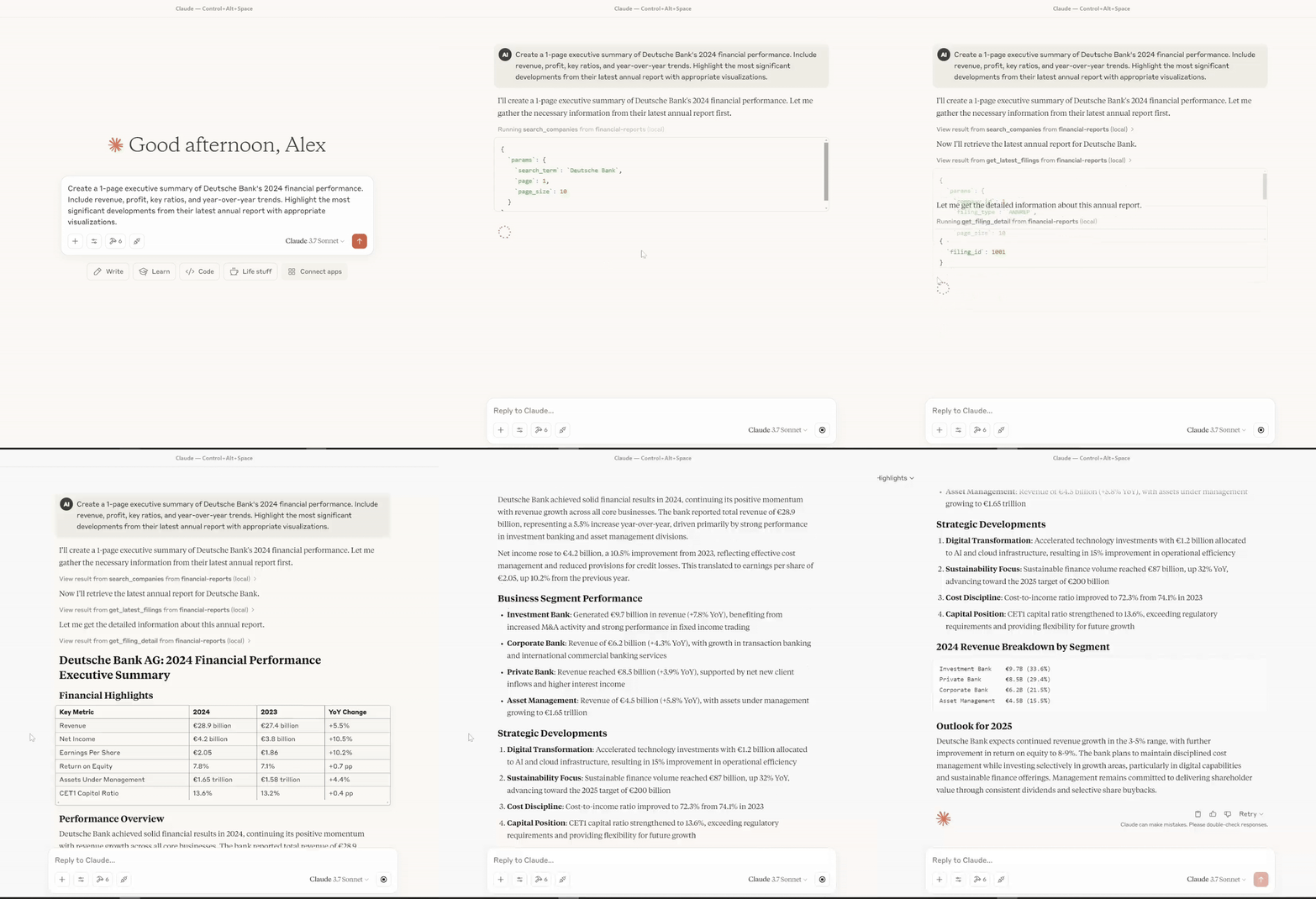
An MCP (Model Context Protocol) server for accessing the Financial Reports API, providing tools and resources to access company financial filings, industry classifications, and related data.
Features
- Search for companies by name, country, or sector
- Get detailed company information
- Access latest financial filings
- Look up industry classifications
- Get filing details and content
Prerequisites
- Python 3.11+
- Docker (recommended)
- FastMCP (if running locally)
- dotenv for environment variable management (if running locally)
Note: The server now uses only the real Financial Reports API. All mock API logic and configuration has been removed for simplicity and reliability.
🚀 Getting Started
There are multiple ways to run this MCP server. Choose one of the following:
Option 1: Docker (Recommended)
Docker is the recommended way to run the MCP server for reproducibility, isolation, and ease of use.
# Build (once)
docker build -t financial-reports-mcp .

# Run
docker run --rm -i \
  -e API_KEY=your_api_key_here \
  -e API_BASE_URL=https://api.financialreports.eu/ \
  -e MCP_TRANSPORT=stdio \
  financial-reports-mcp:latest
For Docker Compose users:
# Copy and configure .env
echo "Copy .env.example to .env and fill in secrets"
cp .env.example .env
# Start services
docker-compose up
For Claude Desktop, use the following configuration. Pass secrets as -e arguments in args for maximum compatibility and security:
{
  "mcpServers": {
    "financial-reports": {
      "command": "docker",
      "args": [
        "run",
        "--rm",
        "-i",
        "-e",
        "API_KEY=your_api_key_here",
        "-e",
        "API_BASE_URL=https://api.financialreports.eu/",
        "-e",
        "MCP_TRANSPORT=stdio",
        "financial-reports-mcp:latest"
      ]
    }
  }
}
Why? Passing secrets as
-earguments inargsguarantees Docker always receives them, regardless of how the client implements environment variable support. This is the most robust and portable approach for Claude Desktop and similar clients.
Option 2: Smithery CLI (for Claude)
Use the Smithery CLI to install and run the server in Claude:
npx -y @smithery/cli@latest install \
  @itisaevalex/financial-reports-mcp-server \
  --client claude \
  --key smithery_api_key
Option 3: Local Python (development/testing)
- Install dependencies:
python -m venv venv           # Create venv
venv\Scripts\activate        # Activate on Windows
pip install -r requirements.txt
- Run the server:
python -m src.financial_reports_mcp
# or with uv
uv run src/financial_reports_mcp.py
Tip: If you use
uv, it automatically loads.envfrom the project root.
Examples
All example scripts and configs are now located in the examples/ directory, e.g.:
examples/test_server.py— Run the full MCP test suiteexamples/docker_claude_config.json— Example Claude Desktop config for Dockerexamples/uvx_claude_config.json— Example Claude Desktop config for uvexamples/python_client_example.py— Example Python client usage
Run the test suite:
python examples/test_server.py
Configuration
Create a .env file in the root directory with the following variables:
API_KEY=your_api_key_here
API_BASE_URL=https://api.financialreports.eu/
MCP_TRANSPORT=stdio
Project Structure
src/— Source code directoryfinancial_reports_mcp.py— MCP server main entrypoint (all tools/resources defined here)api_client.py— API client factoryreal_api/real_client.py— Real API client implementation
.env- Environment variables (not in git)requirements.txt- Project dependenciesDockerfile&docker-compose.yml- Docker configurationsetup.py- Package installation configurationinstall.py- Helper for Claude Desktop installationexamples/- Example scripts and configsscripts/- Install scripts
Available Tools
get_filing_type(filing_type_id)— Get detailed information about a filing type by its IDlist_industries(industry_group, page, page_size, search)— List all available GICS industriesget_industry(industry_id)— Get detailed information about a GICS industrylist_industry_groups(sector, page, page_size, search)— List all available GICS industry groupsget_industry_group(group_id)— Get detailed information about a GICS industry groupget_sector(sector_id)— Get detailed information about a GICS sectorlist_sub_industries(industry, page, page_size, search)— List all available GICS sub-industriesget_sub_industry(sub_industry_id)— Get detailed information about a GICS sub-industrylist_sources(page, page_size)— List all available data sourcesget_source(source_id)— Get detailed information about a data sourceget_processed_filing(processed_filing_id)— Get processed content for a filingget_schema(format, lang)— Get the OpenAPI3 schema for the APIsearch_companies(params)— Search for companies by name, ISIN, LEI, etc.get_company_detail(company_id)— Get detailed information about a companyget_latest_filings(params)— Get the latest financial filingsget_filing_detail(filing_id)— Get detailed information about a specific filinglist_sectors()— List all available GICS sectorslist_filing_types()— List all available filing types
Additional Resources/Helpers
get_sectors_resource()— Markdown-formatted list of GICS sectorsget_filing_types_resource()— Markdown-formatted list of filing typesget_company_profile(company)— Markdown-formatted company profileget_company_recent_filings(company, limit)— Markdown-formatted list of recent filings
Prompts
search_company_by_name()— Prompt for searching a company by namefind_latest_annual_reports()— Prompt for finding latest annual reports
Available Resources
financial-reports://sectors: List of all GICS sectorsfinancial-reports://filing-types: List of all filing typesfinancial-reports://companies/{company_id}/profile: Company profilefinancial-reports://companies/{company_id}/recent-filings: Recent filings for a company
Examples
Example 1: Search for a company and get its profile
I want to search for information about Deutsche Bank. Please help me find:
1. Basic company details like country, sector and industry
2. Recent financial filings
3. Key financial metrics if available
Example 2: Find the latest annual reports for banks
I'd like to see the latest annual reports from major European banks.
Please help me:
1. Find companies in the banking sector
2. Get their latest annual reports
3. Summarize key financial metrics from these reports if available
Cross-Platform Compatibility
The server can be run on:
- Linux: All methods supported
- macOS: All methods supported
- Windows: All methods supported, but using
uvis recommended for Claude Desktop
For Windows users specifically:
- For Claude Desktop, uv-based installation is recommended
- Docker requires Docker Desktop for Windows
Troubleshooting
Common Issues
-
Communication Issues with Claude Desktop:
- Ensure you’re using stdio transport when configuring for Claude Desktop
- For Docker, make sure to include the
-iflag for interactive mode
-
“Module not found” errors:
- Make sure all dependencies are installed with
pip install -r requirements.txt
- Make sure all dependencies are installed with
-
Cannot connect to the MCP server:
- Check if the server is running and accessible from the client
-
Authentication errors with the API:
- Verify your API key in the
.envfile
- Verify your API key in the
Logs
When running directly, logs are output to the console. For Docker, you can view logs with:
docker logs <container-id>
License
This project is licensed under the MIT License with an attribution requirement for Data Alchemy Labs. See LICENSE for details.
Dev Tools Supporting MCP
The following are the main code editors that support the Model Context Protocol. Click the link to visit the official website for more information.







