
Focus Mcp Data
What is Focus Mcp Data
focus_mcp_data is an intelligent data query plugin under DataFocus that enables multi-round conversations and provides plug-and-play ChatBI capabilities for natural language data queries.
Use cases
Use cases include querying sales data, generating reports, answering customer inquiries, and facilitating data-driven decision-making through conversational interfaces.
How to use
To use focus_mcp_data, register on DataFocus to create an application space, import the data tables for analysis, and configure the MCP settings to connect to the server. Users can then query data using natural language.
Key features
Key features include the ability to register on DataFocus, import data tables, initialize dialogues for data acquisition, and obtain results through natural language queries.
Where to use
focus_mcp_data can be used in various fields such as business intelligence, data analysis, customer support, and any application requiring natural language data interaction.
Clients Supporting MCP
The following are the main client software that supports the Model Context Protocol. Click the link to visit the official website for more information.





Overview
What is Focus Mcp Data
focus_mcp_data is an intelligent data query plugin under DataFocus that enables multi-round conversations and provides plug-and-play ChatBI capabilities for natural language data queries.
Use cases
Use cases include querying sales data, generating reports, answering customer inquiries, and facilitating data-driven decision-making through conversational interfaces.
How to use
To use focus_mcp_data, register on DataFocus to create an application space, import the data tables for analysis, and configure the MCP settings to connect to the server. Users can then query data using natural language.
Key features
Key features include the ability to register on DataFocus, import data tables, initialize dialogues for data acquisition, and obtain results through natural language queries.
Where to use
focus_mcp_data can be used in various fields such as business intelligence, data analysis, customer support, and any application requiring natural language data interaction.
Clients Supporting MCP
The following are the main client software that supports the Model Context Protocol. Click the link to visit the official website for more information.
Content
FOCUS DATA MCP Server [中文]
A Model Context Protocol (MCP) server enables artificial intelligence assistants to directly query data results. Users can obtain data results from DataFocus using natural language.
Features
- Register on DataFocus to open an application space, and import (directly connect to) the data tables to be analyzed.
- Select Datafocus data table initialization dialogue
- Natural language data acquisition results
Prerequisites
- jdk 23 or higher. Download jdk
- gradle 8.12 or higher. Download gradle
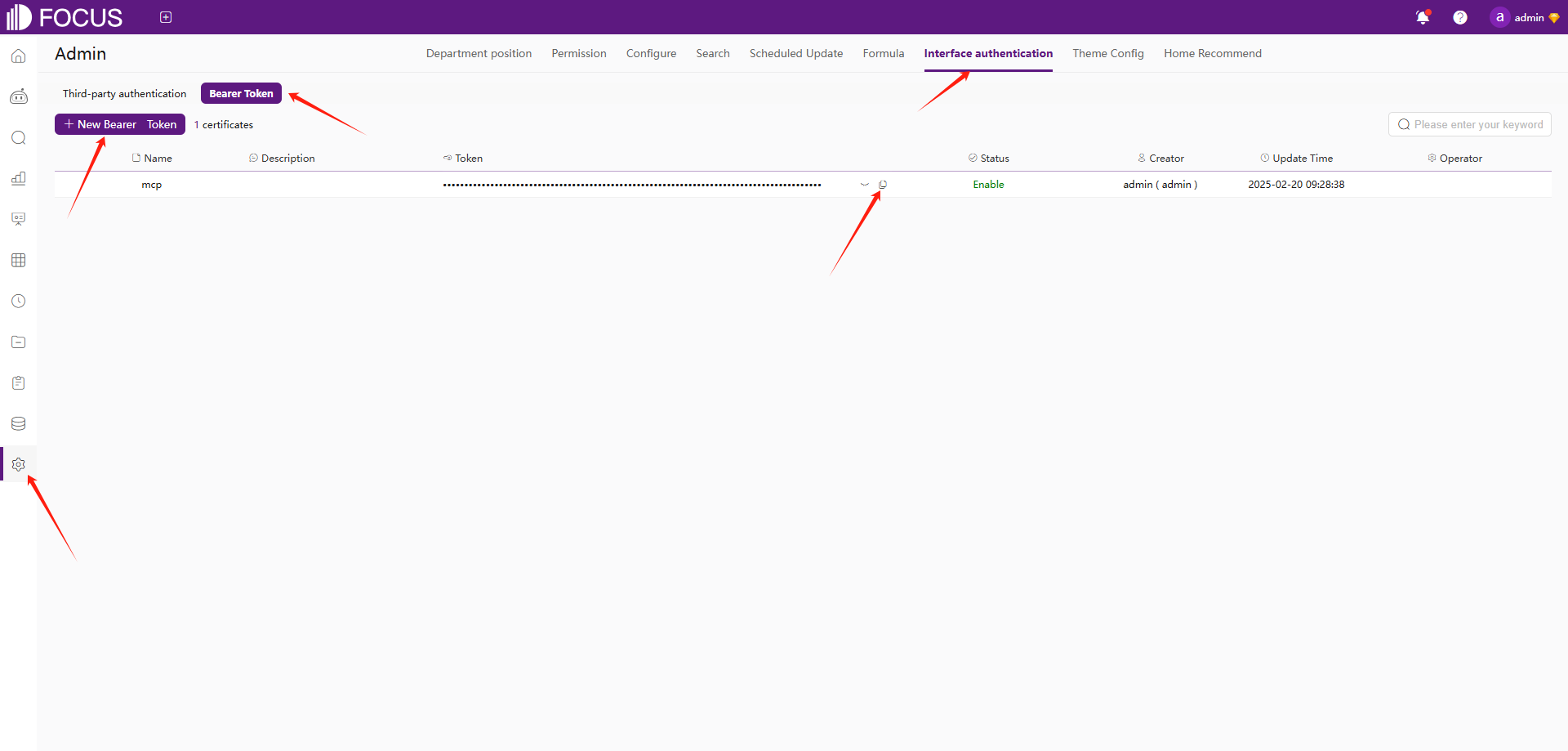
- register Datafocus to obtain bearer token:
- Register an account in Datafocus
- Create an application
- Enter the application
- Admin -> Interface authentication -> Bearer Token -> New Bearer Token
Installation
- Clone this repository:
git clone https://github.com/FocusSearch/focus_mcp_data.git
cd focus_mcp_data
- Build the server:
gradle clean
gradle bootJar

The jar path: build/libs/focus_mcp_data.jar
MCP Configuration
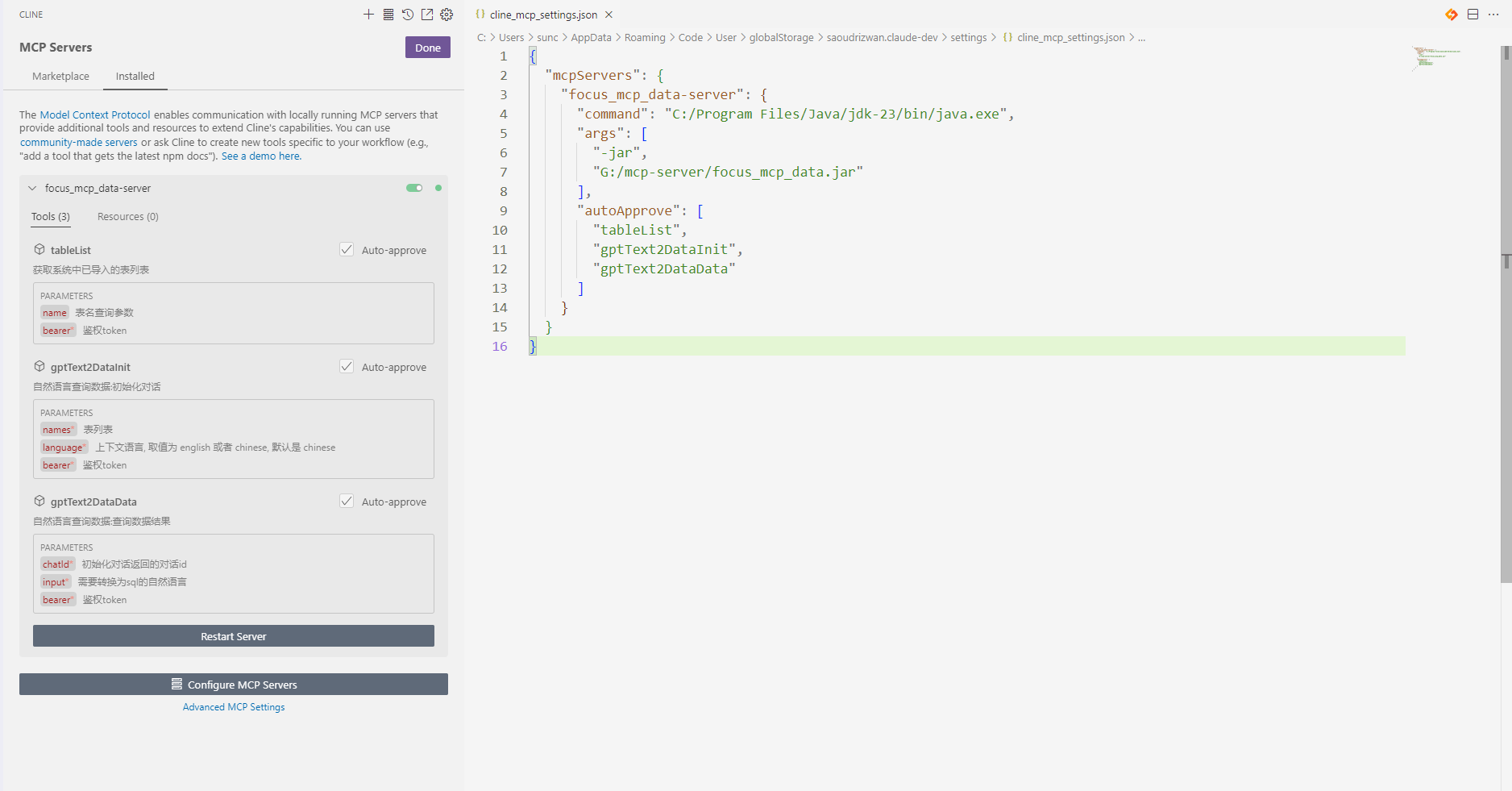
Add the server to your MCP settings file (usually located
at ~/AppData/Roaming/Code/User/globalStorage/saoudrizwan.claude-dev/settings/cline_mcp_settings.json):
{
  "mcpServers": {
    "focus_mcp_data": {
      "command": "java",
      "args": [
        "-jar",
        "path/to/focus_mcp_data/focus_mcp_data.jar"
      ],
      "autoApprove": [
        "tableList",
        "gptText2DataInit",
        "gptText2DataData"
      ]
    }
  }
}
Available Tools
1. tableList
Get table list in datafocus.
Parameters:
name(optional): table name to filterbearer(required): bearer token
Example:
{
  "name": "test",
  "bearer": "ZTllYzAzZjM2YzA3NDA0ZGE3ZjguNDJhNDjNGU4NzkyYjY1OTY0YzUxYWU5NmU="
}
2. gptText2DataInit
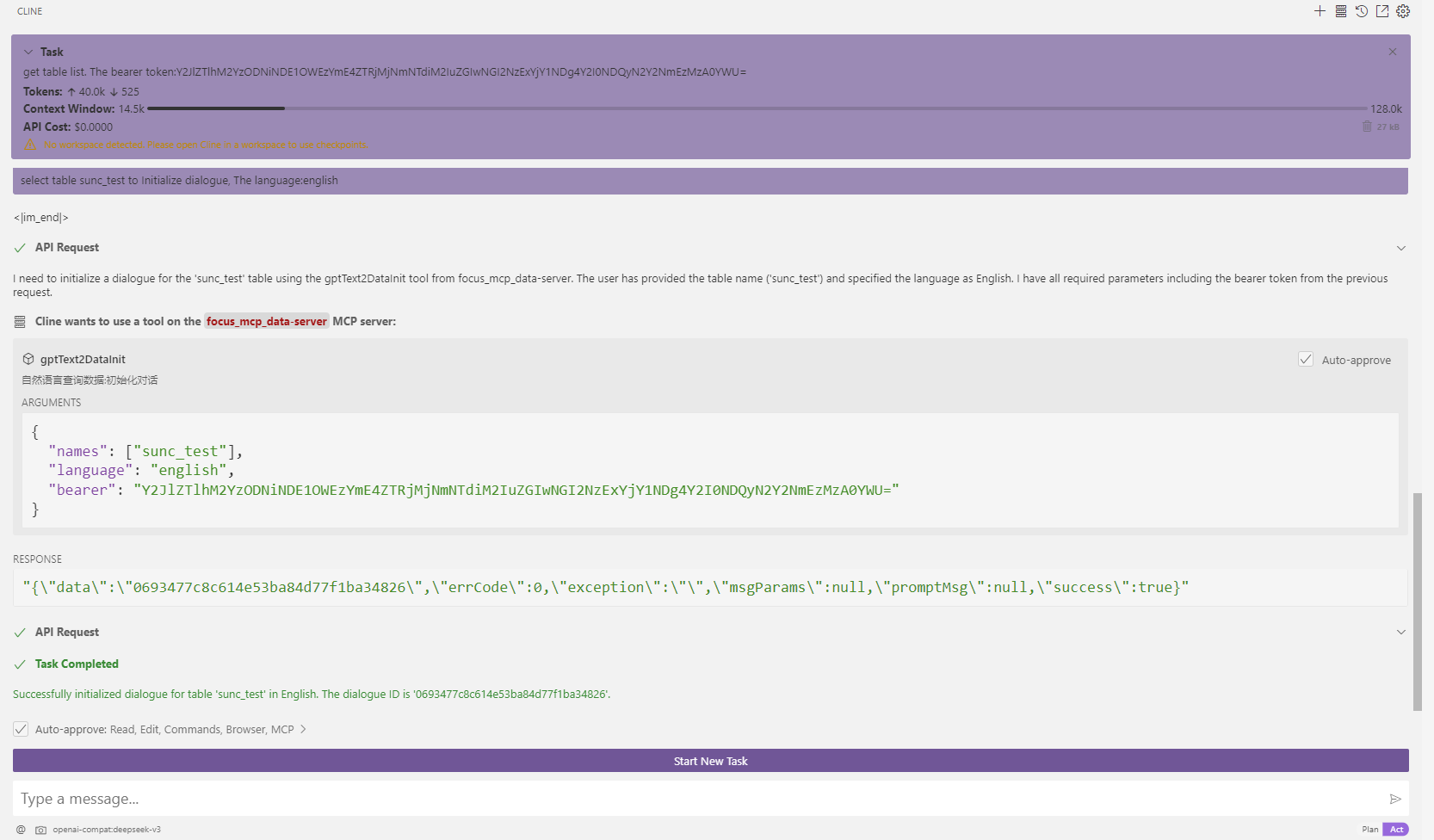
Initialize dialogue.
Parameters:
names(required): selected table namesbearer(required): bearer tokenlanguage(optional): language [‘english’,‘chinese’]
Example:
{
  "names": [
    "test1",
    "test2"
  ],
  "bearer": "ZTllYzAzZjM2YzA3NDA0ZGE3ZjguNDJhNDjNGU4NzkyYjY1OTY0YzUxYWU5NmU="
}
3. gptText2DataData
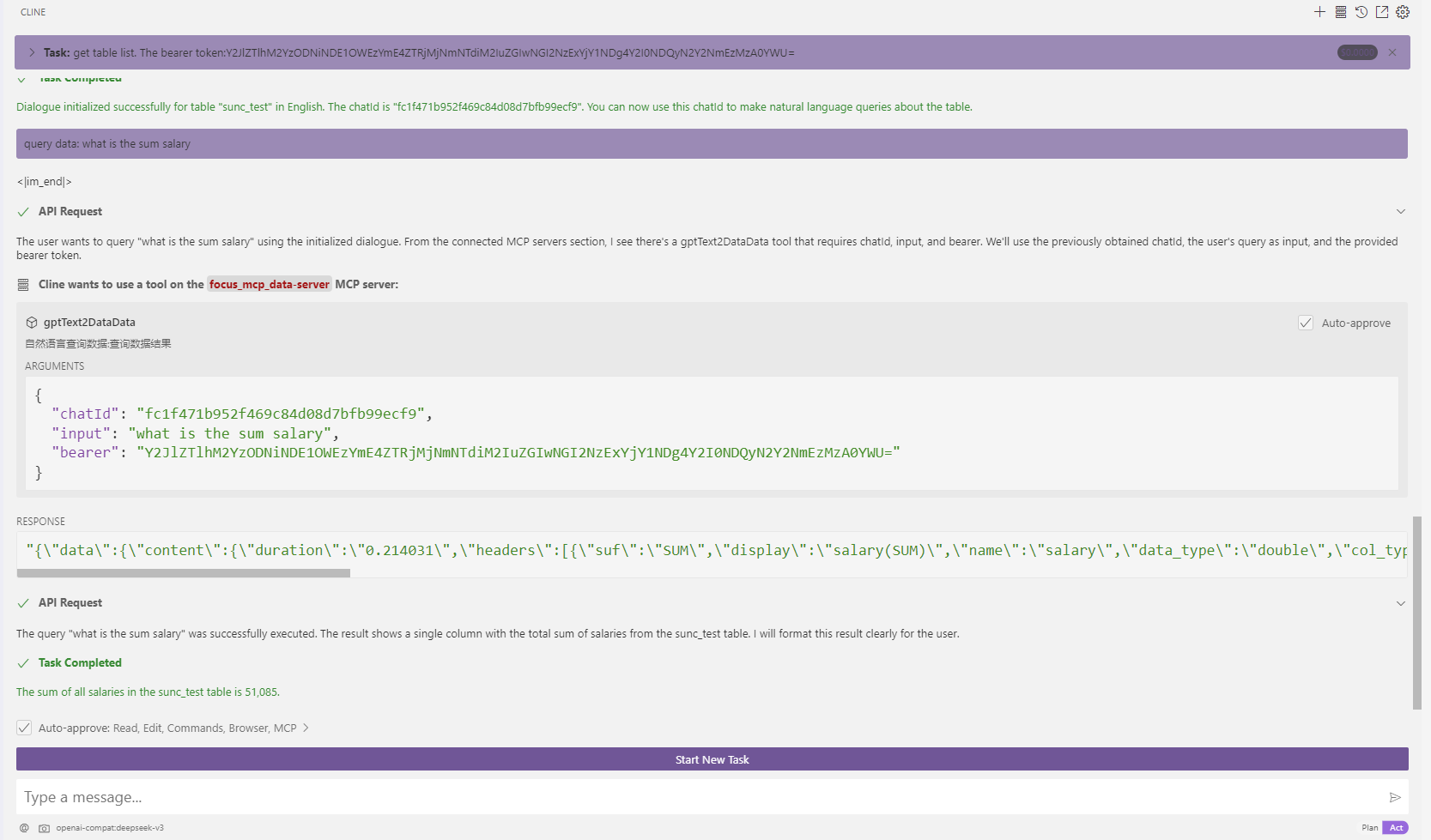
Query data results.
Parameters:
chatId(required): chat idinput(required): Natural languagebearer(required): bearer token
Example:
{
  "chatId": "03975af5de4b4562938a985403f206d4",
  "input": "max(age)",
  "bearer": "ZTllYzAzZjM2YzA3NDA0ZGE3ZjguNDJhNDjNGU4NzkyYjY1OTY0YzUxYWU5NmU="
}
Response Format
All tools return responses in the following format:
{
  "errCode": 0,
  "exception": "",
  "msgParams": null,
  "promptMsg": null,
  "success": true,
  "data": {}
}
Visual Studio Code Cline Sample
- vsCode install cline plugin
- mcp server config
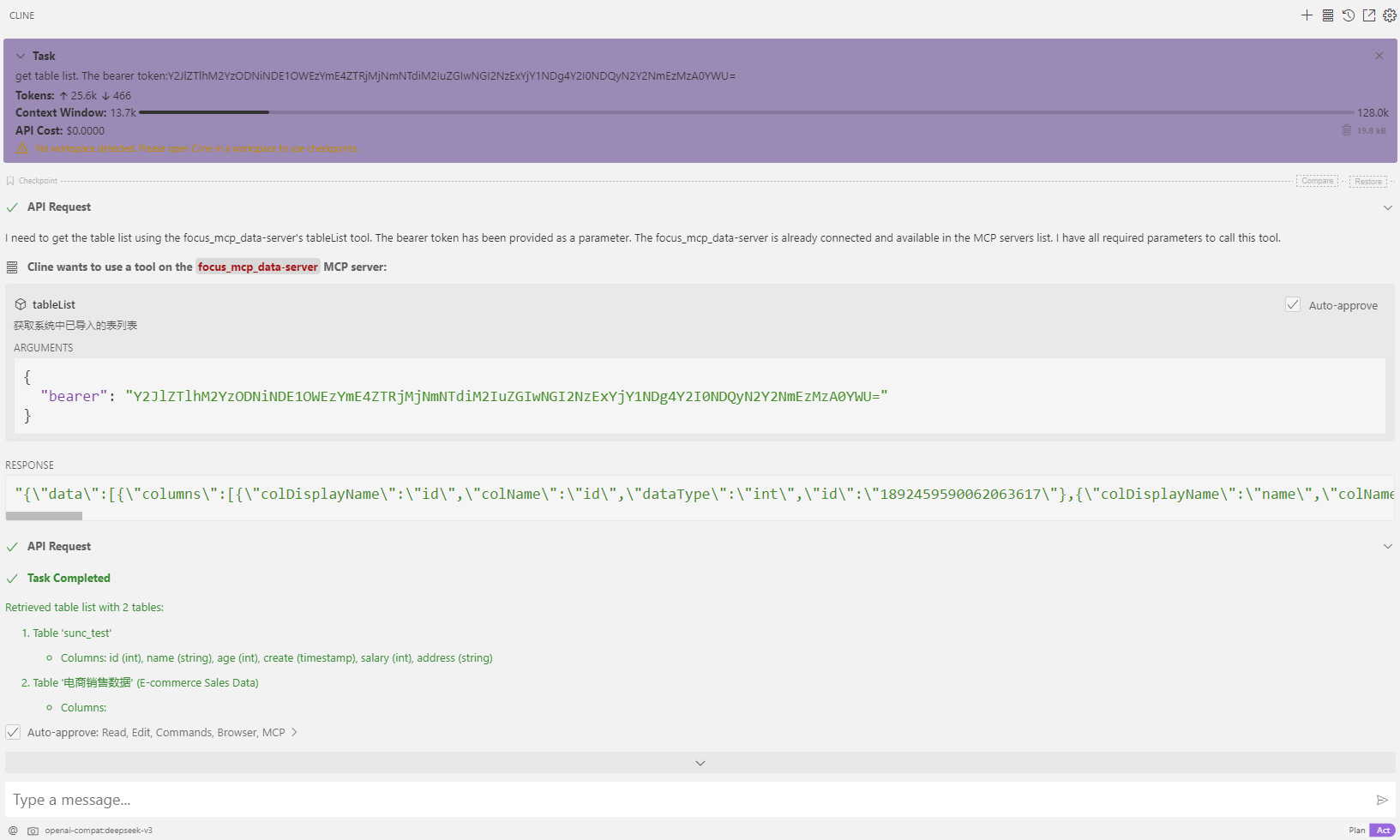
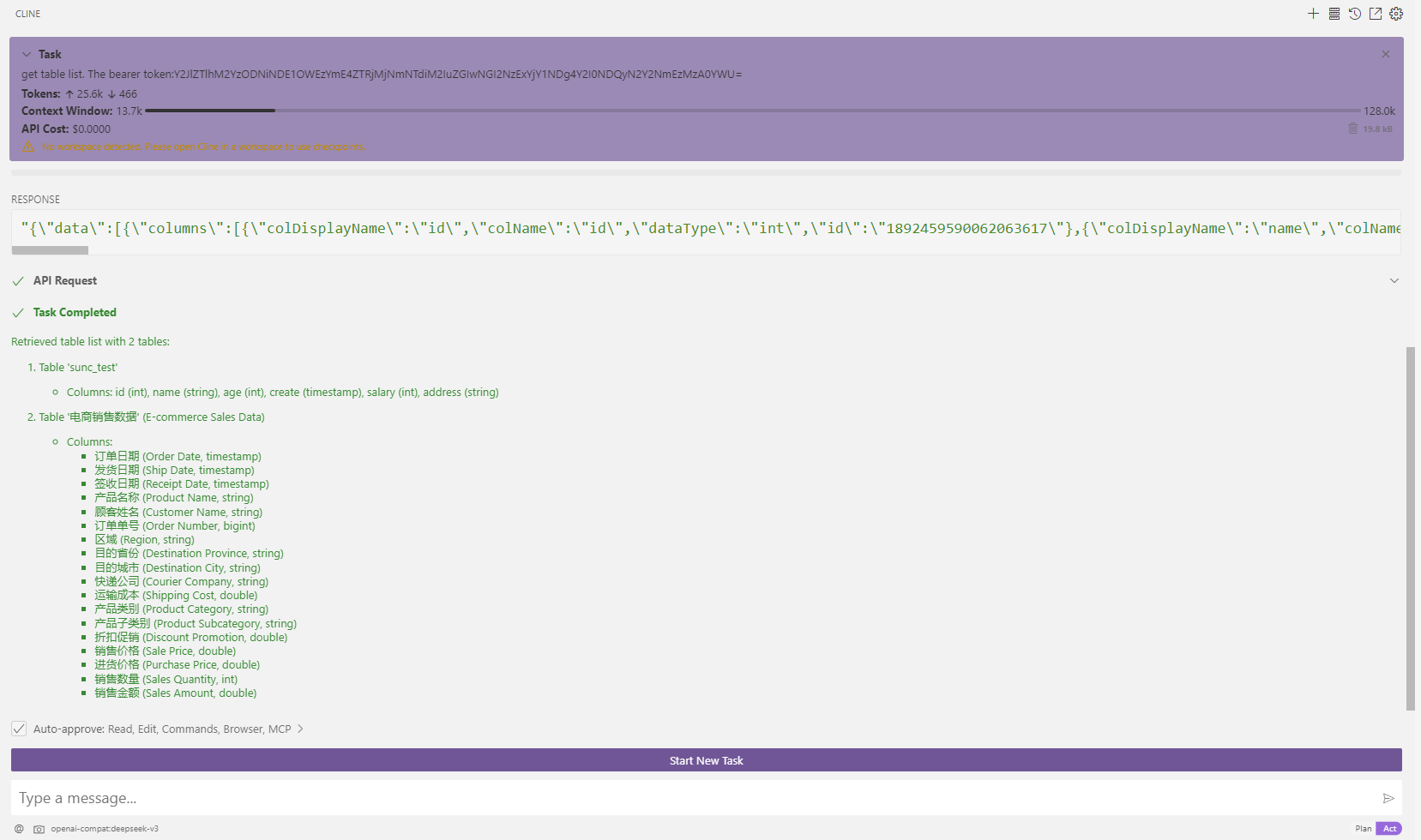
- use
- get table list
- Initialize dialogue
- query: what is the sum salary
- get table list
Contact:

Dev Tools Supporting MCP
The following are the main code editors that support the Model Context Protocol. Click the link to visit the official website for more information.







