
Fofa Mcp Server
What is Fofa Mcp Server
fofa-mcp-server is a query server based on the Model Control Protocol (MCP) that provides a simple and user-friendly interface for querying FOFA data.
Use cases
Use cases include searching for specific IP addresses, retrieving detailed account information from FOFA, and integrating FOFA data queries into larger applications for enhanced data analysis.
How to use
To use fofa-mcp-server, clone the project from GitHub, install the required dependencies, configure the server with your FOFA API key, and run the server. You can then perform queries using the provided API methods.
Key features
Key features include basic FOFA API query support, complete field information querying options, account information retrieval, high performance through an asynchronous HTTP client, and easy integration with other systems using the MCP protocol.
Where to use
fofa-mcp-server can be used in various fields such as cybersecurity, network analysis, and data mining, where querying and analyzing internet data is essential.
Clients Supporting MCP
The following are the main client software that supports the Model Context Protocol. Click the link to visit the official website for more information.





Overview
What is Fofa Mcp Server
fofa-mcp-server is a query server based on the Model Control Protocol (MCP) that provides a simple and user-friendly interface for querying FOFA data.
Use cases
Use cases include searching for specific IP addresses, retrieving detailed account information from FOFA, and integrating FOFA data queries into larger applications for enhanced data analysis.
How to use
To use fofa-mcp-server, clone the project from GitHub, install the required dependencies, configure the server with your FOFA API key, and run the server. You can then perform queries using the provided API methods.
Key features
Key features include basic FOFA API query support, complete field information querying options, account information retrieval, high performance through an asynchronous HTTP client, and easy integration with other systems using the MCP protocol.
Where to use
fofa-mcp-server can be used in various fields such as cybersecurity, network analysis, and data mining, where querying and analyzing internet data is essential.
Clients Supporting MCP
The following are the main client software that supports the Model Context Protocol. Click the link to visit the official website for more information.
Content
README
FOFA MCP Server
基于 MCP (Model Control Protocol)的 FOFA API 查询服务器,提供简单易用的 FOFA 数据查询接口。
功能特点
- 支持 FOFA API 的基础查询功能
- 提供完整的字段信息查询选项
- 支持查询账户信息
- 基于异步 HTTP 客户端,性能优异
- 使用 MCP 协议,便于与其他系统集成
环境要求
- Python >= 3.11
- FOFA API 密钥
- cline
安装
- 克隆项目到本地:
git clone https://github.com/intbjw/fofa-mcp-server.git
cd fofa-mcp-server
- 安装依赖:
pip install -r requirements.txt
或者使用 Poetry:
poetry install
配置
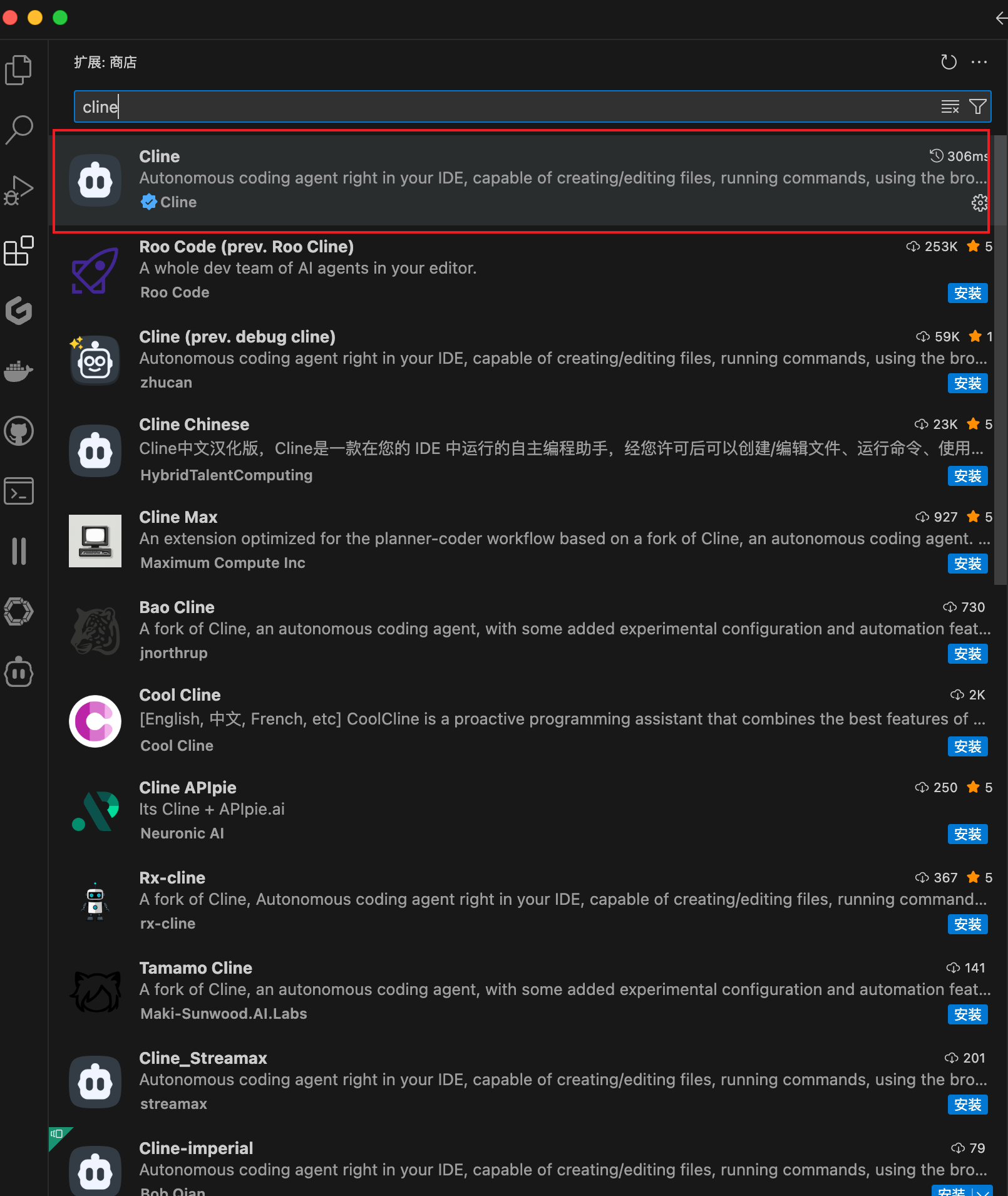
- 下载插件
使用 cline 进行配置,在 vscode 中下载插件
- 进行模型配置
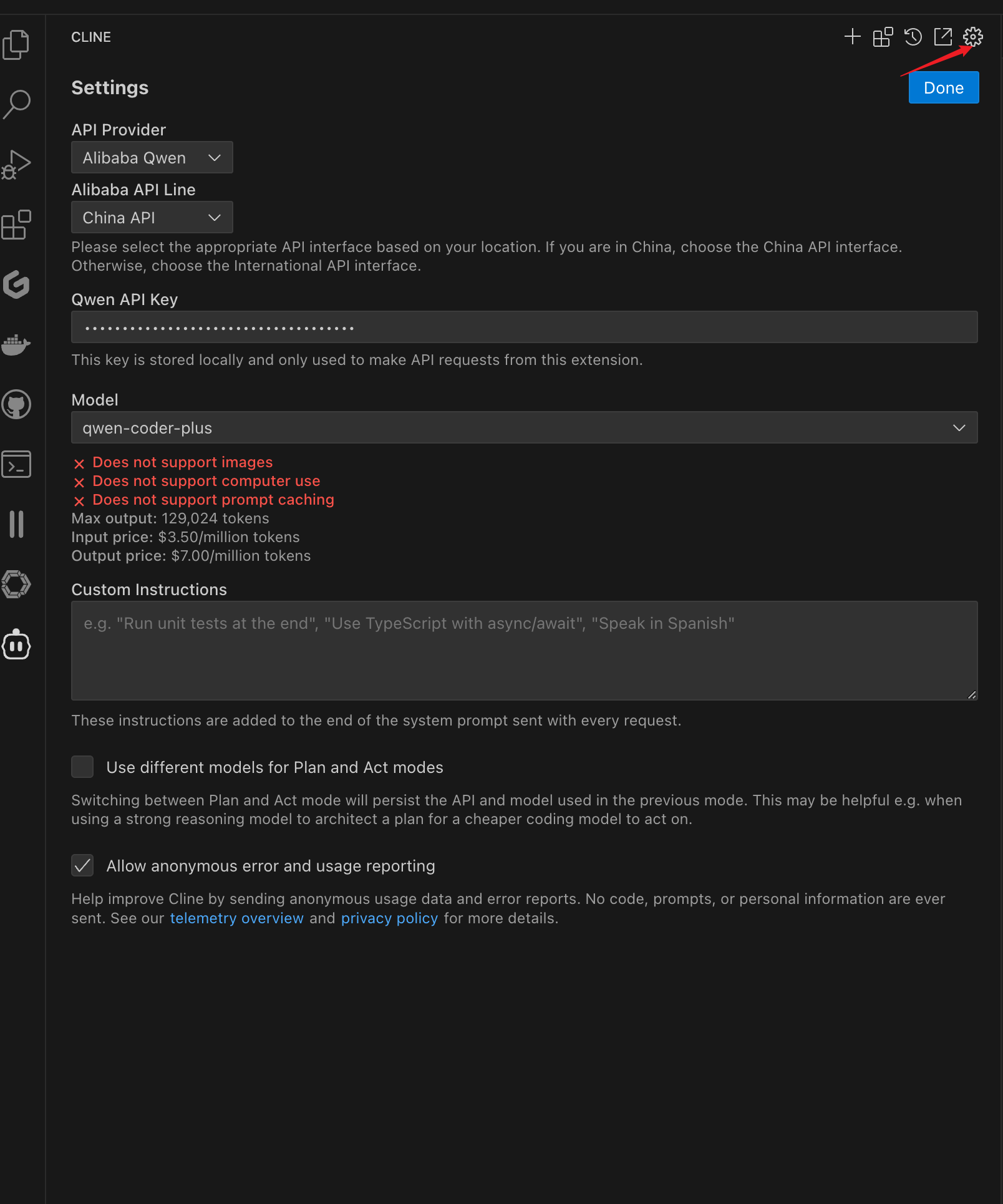
我这里选择的阿里云的qwen-coder,也可以使用本地大模型。
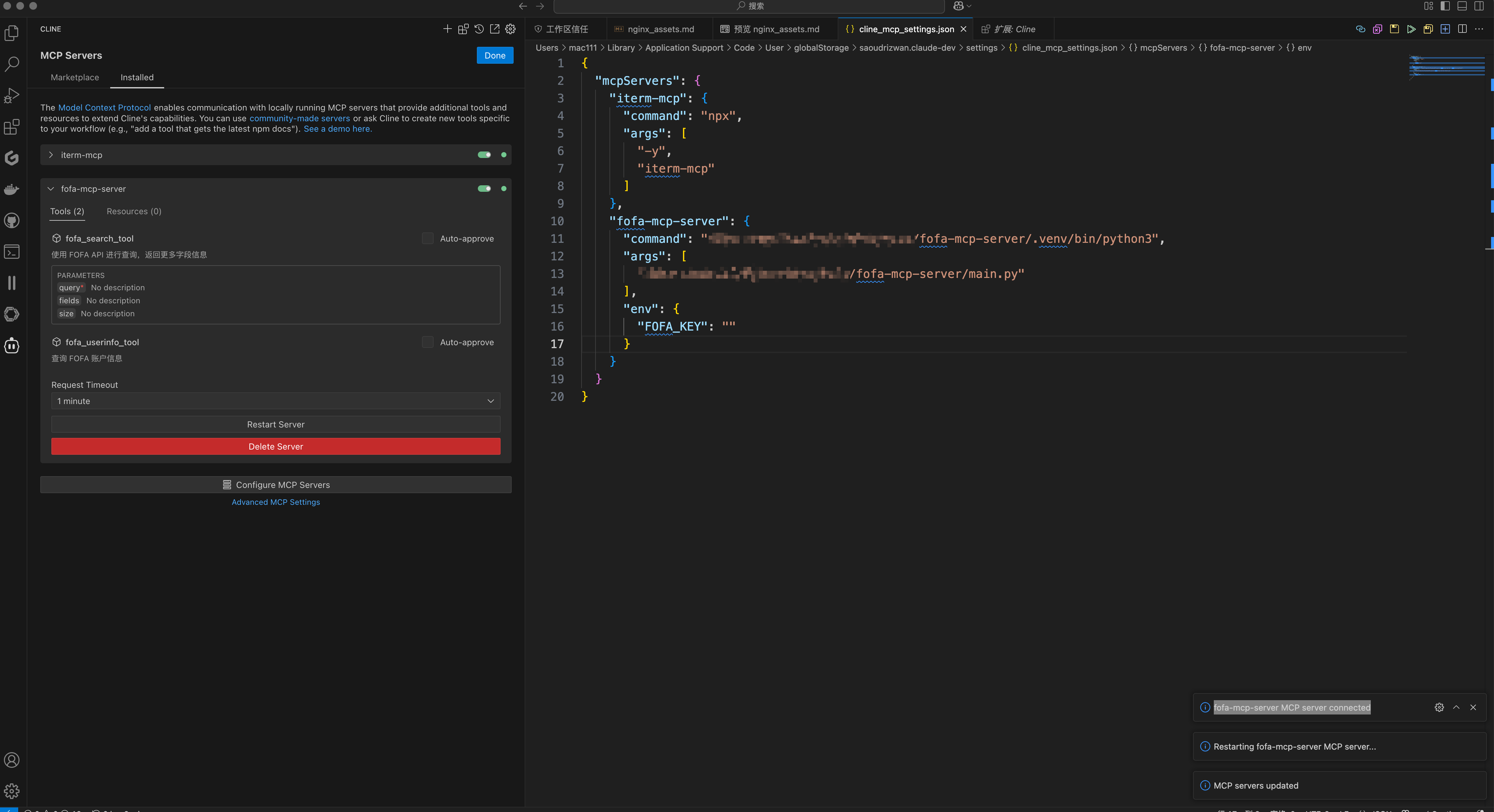
- 配置fofa-mcp-server
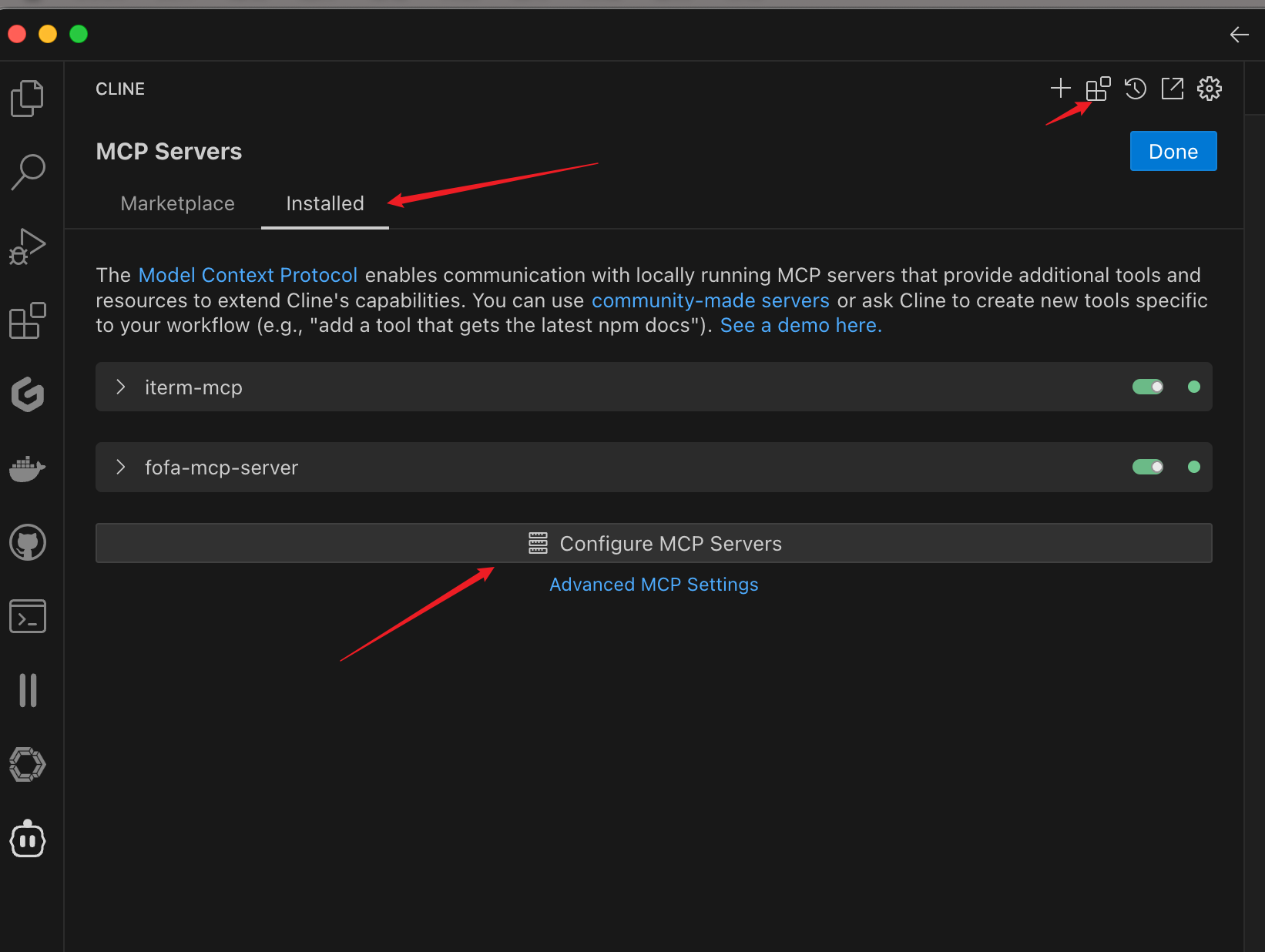
编写配置文件
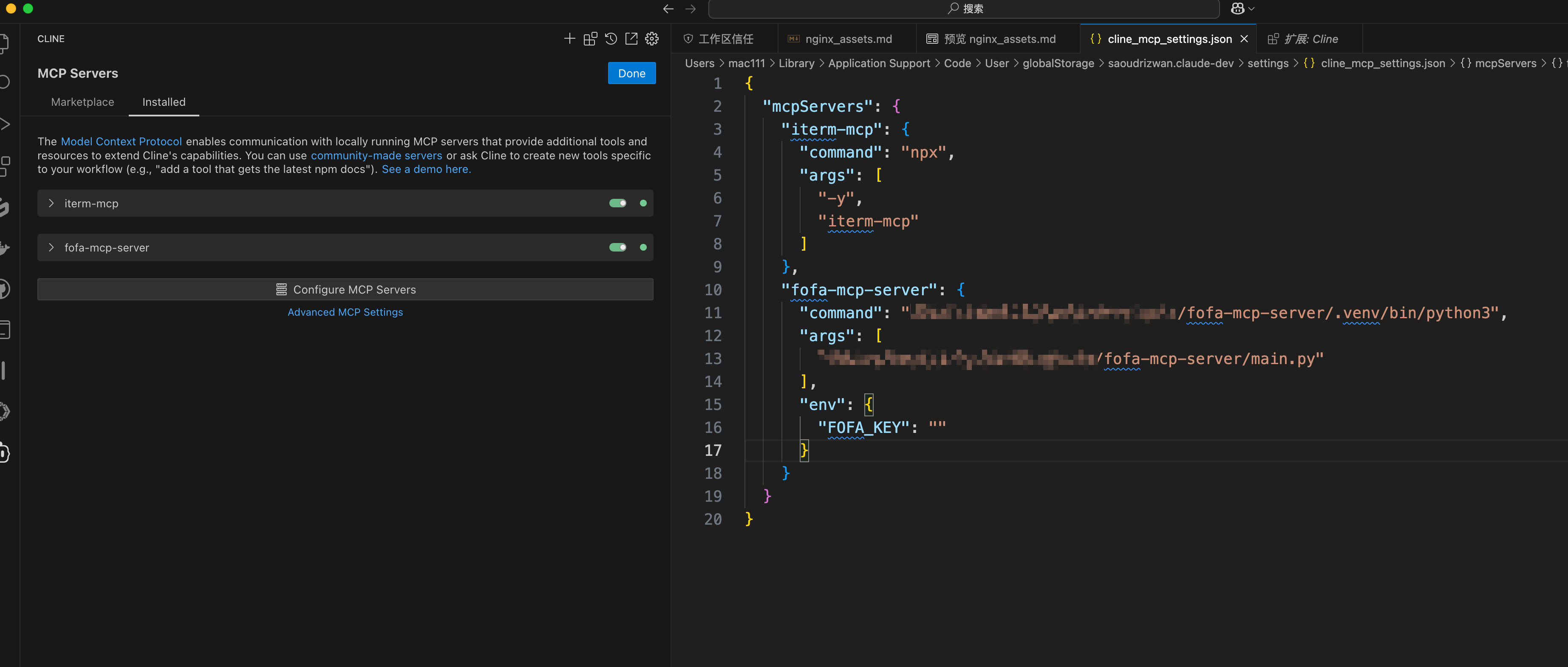
{
  "mcpServers": {
    "fofa-mcp-server": {
      "command": "python3",
      "args": [
        "/path/to/fofa-mcp-server/main.py"
      ],
      "env": {
        "FOFA_KEY": "API KEY"
      }
    }
  }
}提示fofa-mcp-server MCP server connected 配置成功
使用演示
[2025-03-14 17-49-49.mp4](https://raw.githubusercontent.com/intbjw/fofa-mcp-server/master/<video/2025-03-14 17-49-49_RUHw6_vWid.mp4>)
API 说明
1. FOFA 查询
fofa_search_tool(query: str, fields: str = "", size: int = 50) -> dict
参数说明:
query: FOFA 查询语句fields: 查询字段,可选值:- “”(默认):返回基础字段信息
- “all”:返回所有可用字段信息
size: 返回结果数量,默认 50 条
返回数据格式:
{
    "summary": str,  # 查询统计信息
    "data": List[Dict]  # 查询结果列表
}
2. 查询账户信息
fofa_userinfo_tool() -> dict
返回 FOFA 账户的详细信息。
字段说明
基础字段(默认)
- IP
- 端口
- 协议
- 主机名
- 域名
- ICP 备案号
- 网站标题
- 产品名
- 版本号
- 最后更新时间
完整字段(fields=“all”)
包含基础字段,以及:
- 国家代码
- 国家名
- 地区
- 城市
- 经度
- 纬度
- ASN 编号
- ASN 组织
- 操作系统
- 服务器
- JARM 指纹
- Header
- Banner
- 基础协议
- URL 链接
- 证书相关信息
- JA3S 指纹
- TLS 版本
- 产品分类
- 域名 CNAME
注意事项
- 请确保 FOFA API 密钥有效且具有足够的查询权限
- 注意遵守 FOFA 的 API 使用限制和规范
- 建议合理设置查询结果数量,避免消耗过多积分
TODO
- [x] 查询账号信息
- [x] 执行用户输入语句
- [ ] 支持大模型生成查询语句
- [ ] 模糊语句查询
许可证
贡献
欢迎提交 Issue 和 Pull Request!
Dev Tools Supporting MCP
The following are the main code editors that support the Model Context Protocol. Click the link to visit the official website for more information.







