
Framegrab Mcp Server
What is Framegrab Mcp Server
framegrab-mcp-server is a Model Context Protocol (MCP) server designed for capturing images from various video sources, including webcams, USB cameras, RTSP streams, and YouTube live streams, utilizing the framegrab library.
Use cases
Use cases include capturing images for security monitoring, creating thumbnails for video content, live broadcasting, and integrating with other media processing systems.
How to use
To use framegrab-mcp-server, integrate it into your application by configuring it in your claude_desktop_config.json or zed settings.json. You can create framegrabbers, grab frames, list available framegrabbers, and manage their configurations through provided tools.
Key features
Key features include creating and managing framegrabbers, capturing images in multiple formats (png, jpg, webp), listing available framegrabbers, and retrieving or updating their configurations.
Where to use
framegrab-mcp-server can be used in fields such as video surveillance, live streaming applications, media production, and any scenario requiring real-time image capture from video sources.
Clients Supporting MCP
The following are the main client software that supports the Model Context Protocol. Click the link to visit the official website for more information.





Overview
What is Framegrab Mcp Server
framegrab-mcp-server is a Model Context Protocol (MCP) server designed for capturing images from various video sources, including webcams, USB cameras, RTSP streams, and YouTube live streams, utilizing the framegrab library.
Use cases
Use cases include capturing images for security monitoring, creating thumbnails for video content, live broadcasting, and integrating with other media processing systems.
How to use
To use framegrab-mcp-server, integrate it into your application by configuring it in your claude_desktop_config.json or zed settings.json. You can create framegrabbers, grab frames, list available framegrabbers, and manage their configurations through provided tools.
Key features
Key features include creating and managing framegrabbers, capturing images in multiple formats (png, jpg, webp), listing available framegrabbers, and retrieving or updating their configurations.
Where to use
framegrab-mcp-server can be used in fields such as video surveillance, live streaming applications, media production, and any scenario requiring real-time image capture from video sources.
Clients Supporting MCP
The following are the main client software that supports the Model Context Protocol. Click the link to visit the official website for more information.
Content
framegrab-mcp-server
Overview
A Model Context Protocol (MCP) server for capturing images from cameras and video streams. Uses the framegrab library to handle the actual image capture.
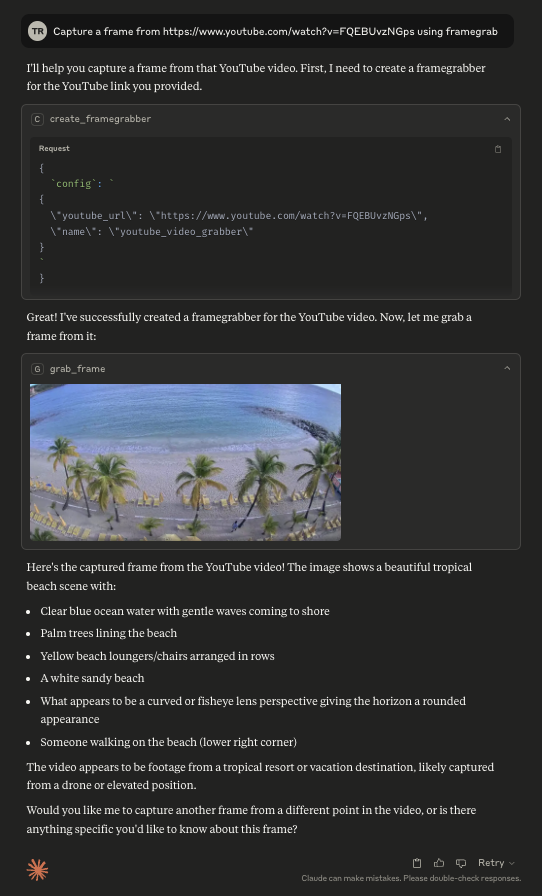
This server can be used to capture images from a webcam, a USB camera, an RTSP stream, a youtube live stream, or any other video source supported by the framegrab library.
This MCP server is still in early development. The functionality and available tools are subject to change and expansion as we continue to develop and improve the server.
Tools
The following tools are available in the Framegrab MCP server:
- create_framegrabber: Create a new framegrabber from a configuration object and add it to the available grabbers.
- grab_frame: Grab a frame from the specified framegrabber and return it as an image in the desired format (png, jpg, or webp).
- list_framegrabbers: List all available framegrabbers by name, sorted alphanumerically.
- get_framegrabber_config: Retrieve the configuration of a specific framegrabber.
- set_framegrabber_config: Update the configuration options for a specific framegrabber.
- release_framegrabber: Release a framegrabber and remove it from the available grabbers.
Resources
The following resources are available in the Framegrab MCP server:
- framegrabbers: Lists all available framegrabbers by name, sorted alphanumerically.
Configuration
Usage with Claude Desktop
Add this to your claude_desktop_config.json:
{
  "mcpServers": {
    "framegrab": {
      "command": "uvx",
      "args": [
        "framegrab-mcp-server"
      ]
    }
  }
}
Usage with Zed
Add the following to your zed settings.json:
{
  "context_servers": {
    "framegrab": {
      "command": {
        "path": "uvx",
        "args": [
          "framegrab-mcp-server"
        ]
      }
    }
  }
}
(experimental) Enabling autodiscovery of framegrabbers
Enable autodiscovery of framegrabbers (such as your webcam or usb cameras) by setting
ENABLE_FRAMEGRAB_AUTO_DISCOVERY="true" in your environment variables. This will automatically add any discovered framegrabbers to the list of available framegrabbers.
If autodiscovery is enabled, then you can also configure how RTSP autodiscovery works by changing FRAMEGRAB_RTSP_AUTO_DISCOVERY_MODE. By default, it is set to "off", which disables RTSP autodiscovery. For a thorough attempt at autodiscovery, set it to "complete_fast".
{
  "mcpServers": {
    "framegrab": {
      "command": "uvx",
      "args": [
        "framegrab-mcp-server"
      ],
      "env": {
        "ENABLE_FRAMEGRAB_AUTO_DISCOVERY": "true",
        "FRAMEGRAB_RTSP_AUTO_DISCOVERY_MODE": "complete_fast"
      }
    }
  }
}
This will increase server startup time.
Dev Tools Supporting MCP
The following are the main code editors that support the Model Context Protocol. Click the link to visit the official website for more information.







