
Framelink Figma Mcp Docker
What is Framelink Figma Mcp Docker
framelink-figma-mcp-docker is a Docker-based implementation of the Framelink Figma MCP, designed to facilitate integration with Visual Studio Code.
Use cases
Use cases include developing design systems, collaborating on UI/UX projects, and automating design workflows with Figma.
How to use
To use framelink-figma-mcp-docker, clone the repository, set up environment variables in the .env file, build the Docker image, and run the container using Docker Compose or directly with Docker commands.
Key features
Key features include easy setup with Docker, integration with VS Code, and the ability to utilize the Figma API for design collaboration.
Where to use
framelink-figma-mcp-docker can be used in web development, design collaboration, and any projects that require integration with Figma for design assets.
Clients Supporting MCP
The following are the main client software that supports the Model Context Protocol. Click the link to visit the official website for more information.





Overview
What is Framelink Figma Mcp Docker
framelink-figma-mcp-docker is a Docker-based implementation of the Framelink Figma MCP, designed to facilitate integration with Visual Studio Code.
Use cases
Use cases include developing design systems, collaborating on UI/UX projects, and automating design workflows with Figma.
How to use
To use framelink-figma-mcp-docker, clone the repository, set up environment variables in the .env file, build the Docker image, and run the container using Docker Compose or directly with Docker commands.
Key features
Key features include easy setup with Docker, integration with VS Code, and the ability to utilize the Figma API for design collaboration.
Where to use
framelink-figma-mcp-docker can be used in web development, design collaboration, and any projects that require integration with Figma for design assets.
Clients Supporting MCP
The following are the main client software that supports the Model Context Protocol. Click the link to visit the official website for more information.
Content
!!!
피그마 팀이 공식 Dev Mode MCP Server를 지원합니다(2025년 6월 5일 기준 오픈베타).
키 발급, 외부 API 통신 없이, 피그마 데스크탑과 연동하면 마크업 작업이 가능합니다(http://127.0.0.1:3845/sse).
사용 방법은 곧 작성하여 링크 달아두겠습니다.
!!!
Docker로 Figma MCP 설정하기
- Framelink Figma MCP를 Docker를 사용하여 실행하고, VS Code와 연동하는 방법을 설명합니다.
저장소 클론
git clone https://github.com/Violet-Bora-Lee/framelink-figma-mcp-docker.git
-
폴더 구조
figma-mcp-docker/
├── Dockerfile
├── docker-compose.yml
├── .env.example
└── .env
2. 설정 단계
환경 변수 설정
-
.env.example을.env로 복사cp .env.example .env -
.env파일에 실제 Figma API 키 입력FIGMA_API_KEY=이곳에피그마개인키입력
Docker 이미지 빌드 및 실행
사전 준비사항: Docker Desktop 실행
Docker Compose V2를 사용하는 경우 (권장)
-
Docker 이미지 빌드
docker compose build- 정상 빌드시 로그에
✔ Service figma-mcp Built출력됨
- 정상 빌드시 로그에
-
컨테이너 백그라운드 실행
docker compose up -d-
정상 실행시 로그에 다음과 같은 내용 출력됨
✔ Network figma-mcp-docker_default  Created
✔ Container figma-mcp-server        Started
-
-
컨테이너 상태 확인
3-1. 명령어로 확인
docker compose ps-
정상 동작중이면 로그에 다음과 같은 내용 출력됨
NAME               IMAGE                        COMMAND                   SERVICE     CREATED         STATUS         PORTS
figma-mcp-server   figma-mcp-docker-figma-mcp   "docker-entrypoint.s…"   figma-mcp   2 minutes ago   Up 2 minutes
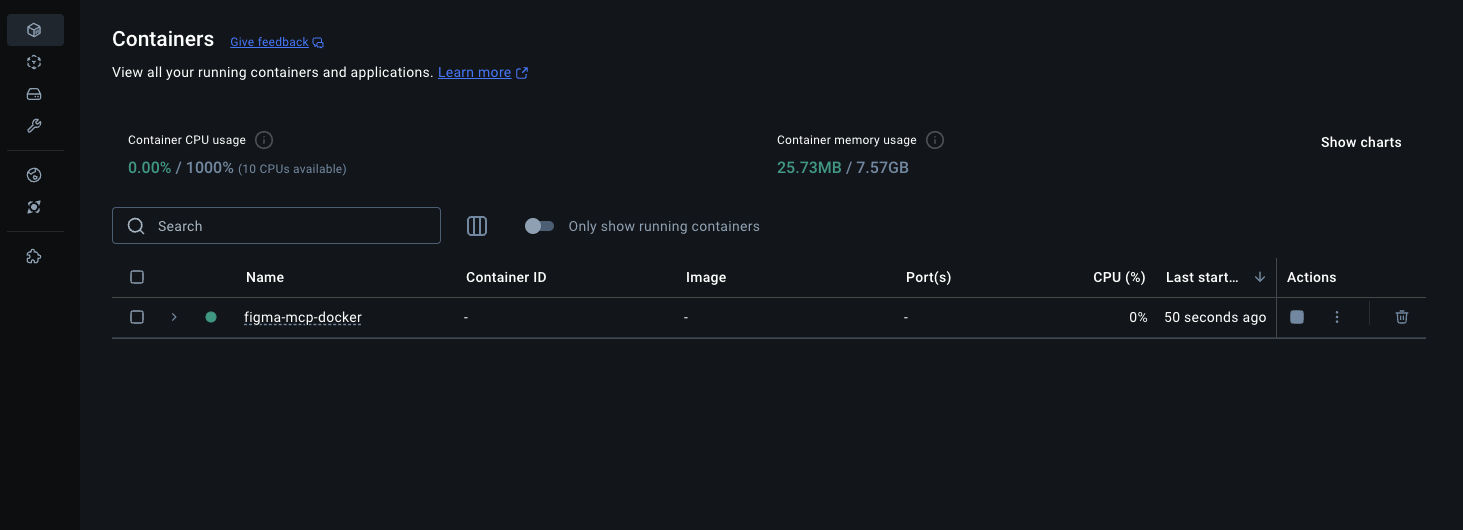
3-2. Docker Desktop에서 확인
- Containers 메뉴에서
figma-mcp-docker컨테이너가 실행 중임을 확인
-
Docker Compose가 없는 경우(직접 실행)
-
Docker 이미지 빌드
docker build -t figma-mcp . -
컨테이너 실행
2-1. (옵션1)
.env파일에서 환경 변수 로드하여 실행docker run -d --name figma-mcp-server \ --env-file .env \ -it figma-mcp2-2. (옵션2) 직접 환경 변수 지정
docker run -d --name figma-mcp-server \
  -e FIGMA_API_KEY="your_figma_api_key_here" \
  -it figma-mcp
3. VSCode 설정
-
VSCode의
settings.json이나 워크스페이스의mcp.json에 다음을 추가{ "servers": { "Framelink Figma MCP (Docker)": { "command": "docker", "args": [ "exec", "-i", "figma-mcp-server", "/app/start.sh" ] } } } -
GitHub Copilot Chat의 Agent 모드에서 MCP 연동 후 작업
5. 문제 해결
컨테이너 로그 확인
# Docker Compose V2
docker compose logs figma-mcp

# 또는 직접 Docker 명령어
docker logs figma-mcp-server
컨테이너 내부 접속
docker exec -it figma-mcp-server sh
API 키 확인
docker exec figma-mcp-server env | grep FIGMA
주의사항
- MCP는 stdio 기반 통신을 사용하므로 포트 매핑이 필요하지 않습니다
- Docker 컨테이너가 실행 중이어야 VSCode에서 연결 가능합니다
- Figma API 키는 안전하게 관리해야 합니다
.env파일로 키를 관리할 때는.gitignore에.env추가하여 저장소에 올라가지 않도록 관리- 명령창에 키를 직접 입력하면
history명령어로 키가 노출될 수 있으니 주의
API 키 보안 추가 팁
History 노출 방지:
# 1. 명령어 앞에 공백을 넣으면 일부 쉘에서 history에 저장되지 않음
 docker run -e FIGMA_API_KEY="your_key" figma-mcp

# 2. 민감한 명령어 실행 후 즉시 history에서 삭제
docker run -e FIGMA_API_KEY="your_key" figma-mcp
history -d $(history 1)

# 3. 현재 세션의 history 저장 비활성화
set +o history
docker run -e FIGMA_API_KEY="your_key" figma-mcp
set -o history
가장 안전한 방법:
- 환경 변수 파일(
.env) 사용이 가장 권장됨 - 키 관리 도구 사용 (AWS Secrets Manager, HashiCorp Vault 등)
- Docker secrets 활용 (Docker Swarm 환경)
Docker를 사용한 MCP의 장점
- VS Code 내에서 MCP를 실행하는것보다 Docker를 사용해 MCP를 띄운 후 연동하는게 나은 이유
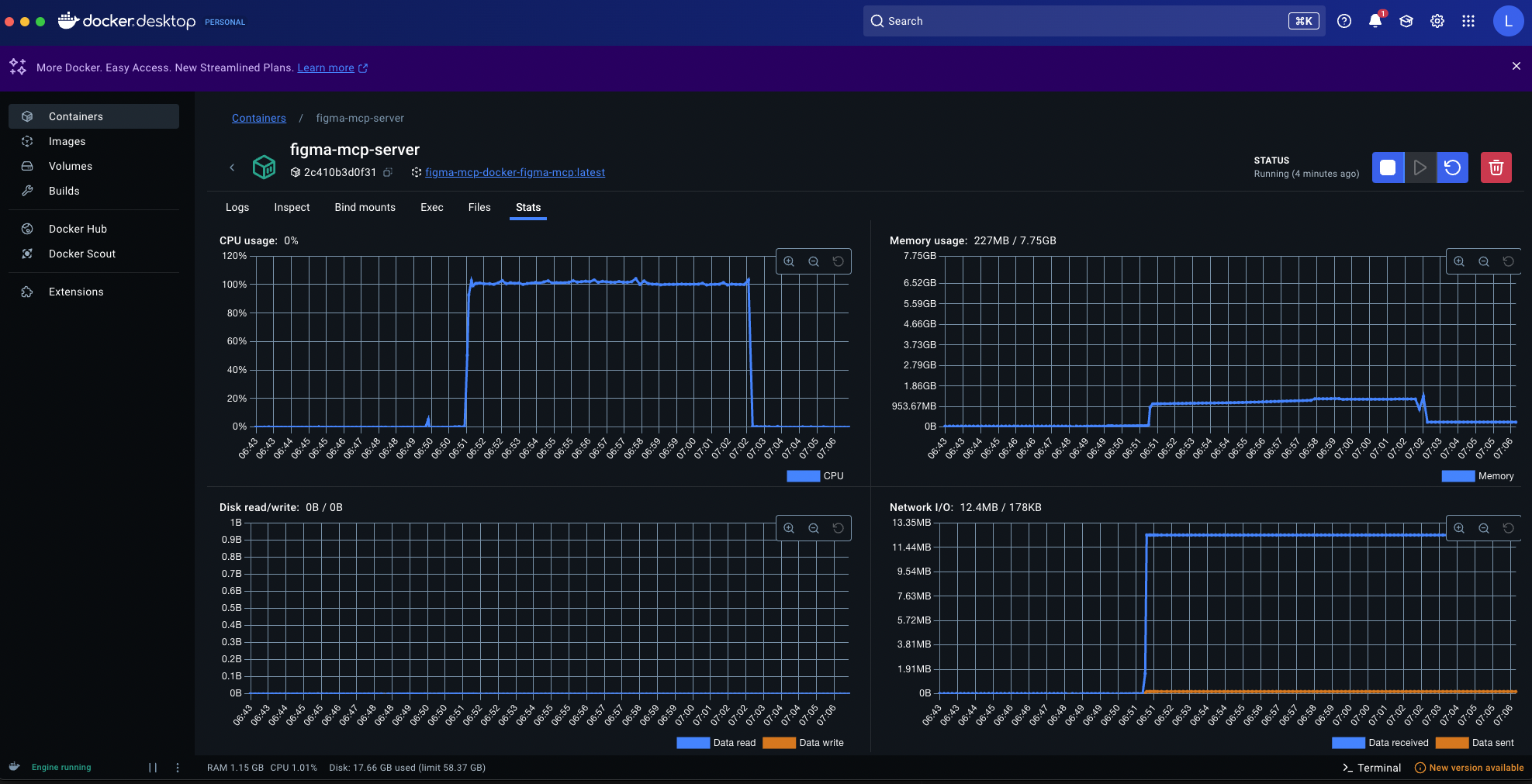
- Docker Desktop의 대시보드를 통해 컨테이너의 CPU, 메모리 사용량, 네트워크 I/O, 디스크 R/W 등의 리소스를 실시간으로 모니터링할 수 있어 MCP 서버의 상태를 파악하고 문제를 진단하는 데 용이함
- 로컬 환경에서 직접
npx를 사용해서 패키지를 실행할 때 발생할 수 있는 권한, 버전 충돌, 경로 문제 등으로 인한 설정 막힘 현상을 방지할 수 있음. Docker는 격리된 환경에서 필요한 모든 종속성을 포함하여 실행되므로, 일관되고 안정적인 MCP 서버 실행 환경을 제공함
- Docker Desktop의 대시보드를 통해 컨테이너의 CPU, 메모리 사용량, 네트워크 I/O, 디스크 R/W 등의 리소스를 실시간으로 모니터링할 수 있어 MCP 서버의 상태를 파악하고 문제를 진단하는 데 용이함
Dev Tools Supporting MCP
The following are the main code editors that support the Model Context Protocol. Click the link to visit the official website for more information.







