
Gbbai Semantickernel Using Mcptools
What is Gbbai Semantickernel Using Mcptools
gbbai-semantickernel-using-mcptools is a Semantic Kernel Agent orchestrator that utilizes MCP Tools through Azure API Management, enabling the integration of various tools with large language models (LLMs) via the Model Context Protocol.
Use cases
Use cases include developing AI-driven applications that require semantic understanding, automating workflows using LLMs, and enhancing data processing capabilities through tool integration.
How to use
To use gbbai-semantickernel-using-mcptools, set up a Python environment, install the required dependencies, and deploy the necessary Azure resources using the Azure Developer CLI (azd). Follow the instructions in the README for detailed steps.
Key features
Key features include the ability to plug and play tools with LLMs, end-to-end authentication and authorization via Azure API Management, and the management of OAuth 2.0 tokens for backend tools.
Where to use
gbbai-semantickernel-using-mcptools can be used in fields such as artificial intelligence, natural language processing, and cloud computing, particularly where integration of various tools with LLMs is required.
Clients Supporting MCP
The following are the main client software that supports the Model Context Protocol. Click the link to visit the official website for more information.





Overview
What is Gbbai Semantickernel Using Mcptools
gbbai-semantickernel-using-mcptools is a Semantic Kernel Agent orchestrator that utilizes MCP Tools through Azure API Management, enabling the integration of various tools with large language models (LLMs) via the Model Context Protocol.
Use cases
Use cases include developing AI-driven applications that require semantic understanding, automating workflows using LLMs, and enhancing data processing capabilities through tool integration.
How to use
To use gbbai-semantickernel-using-mcptools, set up a Python environment, install the required dependencies, and deploy the necessary Azure resources using the Azure Developer CLI (azd). Follow the instructions in the README for detailed steps.
Key features
Key features include the ability to plug and play tools with LLMs, end-to-end authentication and authorization via Azure API Management, and the management of OAuth 2.0 tokens for backend tools.
Where to use
gbbai-semantickernel-using-mcptools can be used in fields such as artificial intelligence, natural language processing, and cloud computing, particularly where integration of various tools with LLMs is required.
Clients Supporting MCP
The following are the main client software that supports the Model Context Protocol. Click the link to visit the official website for more information.
Content
 Semantic Kernel Agent Orchestrator using MCP Tools via Azure API Management
Model Context Protocol with Azure API Management to enable plug & play of
tools to LLMs
🔧 Prerequisites
- azd, used to deploy all Azure resources and assets used in this sample.
- PowerShell Core pwsh if using Windows
- Python 3.11
- An Azure Subscription with Contributor permissions
- Sign in to Azure with Azure CLI
- VS Code installed with the Jupyter notebook extension enabled
Architecture
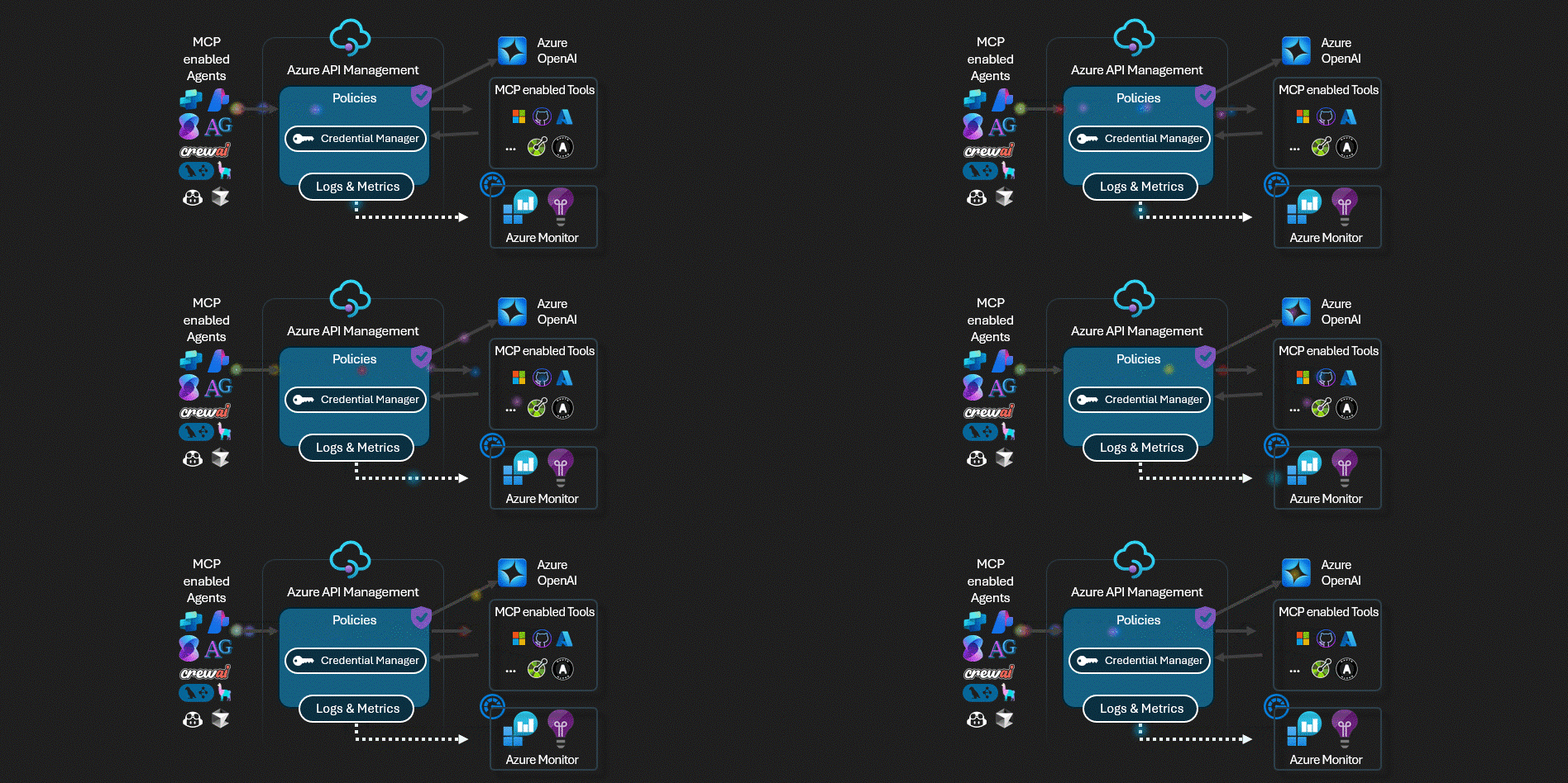
- Model Context Protocol servers runing behind with Azure API Management to enable plug & play of tools to LLMs. The API Management can ensure end-to-end authentication and authorization, using credential manager manager for managing OAuth 2.0 tokens to backend tools and client token validation [TO BE IMPLEMENTED].
Instructions
-
Python Environment Setup
python3.11 -m venv .venv source .venv/bin/activate # On Windows: .venv\Scripts\activate pip install -r requirements.txt -
Create the infrastructure
This sample usesazdand a bicep template to deploy all Azure resources, including Azure AI Search.-
Login to your Azure account:
azd auth login -
Create an environment:
azd env new -
Run
azd up.
- Choose your Azure subscription.
- Enter a region for the resources.
The deployment creates multiple Azure resources and runs multiple jobs. It takes several minutes to complete. The deployment is complete when you get a command line notification stating “SUCCESS: Your up workflow to provision and deploy to Azure completed.”
-
-
Running the Notebook with the Orchestrator
Open the notebook orchestrator-model-context-protocol and execute it to see the orchestrator in action. -
Delete the Resources
You can delete the infrastruture created before by usingazd down --purge
Dev Tools Supporting MCP
The following are the main code editors that support the Model Context Protocol. Click the link to visit the official website for more information.







