
Gdai Mcp Plugin Godot
What is Gdai Mcp Plugin Godot
gdai-mcp-plugin-godot is a MCP server designed to facilitate communication between various MCP clients such as Claude, Cursor, Windsurf, and VSCode, enabling them to perform a range of editor actions including scene creation, script writing, and error reading.
Use cases
Use cases for gdai-mcp-plugin-godot include collaborative game development, automated script generation, real-time error monitoring, and enhancing productivity by allowing developers to manage their projects more efficiently through various MCP clients.
How to use
To use gdai-mcp-plugin-godot, install the plugin within your Godot environment and configure it to connect with your preferred MCP clients. Follow the documentation for specific setup instructions and commands to execute editor actions.
Key features
Key features of gdai-mcp-plugin-godot include support for multiple MCP clients, the ability to create and manage scenes, write and edit scripts, read and display error messages, and enhance the overall development workflow within the Godot engine.
Where to use
gdai-mcp-plugin-godot can be used in game development environments, particularly for projects utilizing the Godot engine, where integration with various tools and editors is beneficial for streamlining development processes.
Clients Supporting MCP
The following are the main client software that supports the Model Context Protocol. Click the link to visit the official website for more information.





Overview
What is Gdai Mcp Plugin Godot
gdai-mcp-plugin-godot is a MCP server designed to facilitate communication between various MCP clients such as Claude, Cursor, Windsurf, and VSCode, enabling them to perform a range of editor actions including scene creation, script writing, and error reading.
Use cases
Use cases for gdai-mcp-plugin-godot include collaborative game development, automated script generation, real-time error monitoring, and enhancing productivity by allowing developers to manage their projects more efficiently through various MCP clients.
How to use
To use gdai-mcp-plugin-godot, install the plugin within your Godot environment and configure it to connect with your preferred MCP clients. Follow the documentation for specific setup instructions and commands to execute editor actions.
Key features
Key features of gdai-mcp-plugin-godot include support for multiple MCP clients, the ability to create and manage scenes, write and edit scripts, read and display error messages, and enhance the overall development workflow within the Godot engine.
Where to use
gdai-mcp-plugin-godot can be used in game development environments, particularly for projects utilizing the Godot engine, where integration with various tools and editors is beneficial for streamlining development processes.
Clients Supporting MCP
The following are the main client software that supports the Model Context Protocol. Click the link to visit the official website for more information.
Content
gdai-mcp-plugin-godot
🤖 GDAI MCP – MCP Server for Godot Game Engine
GDAI MCP Godot Plugin allows AI to control the Godot Editor to create scenes, nodes, scripts. It can debug script errors, debugger and output logs.
🚀 Feature Highlights
Take your Godot workflow to the next level by automating your game development.
-
🧱 Create Scenes Programmatically
Generates scenes, nodes, resources, scripts and more -
🛠️ Add & Manipulate Nodes
Modifies the scene tree adding/removing/updating nodes and their properties -
🐞 Debugger Integration
View debugger output, logs and scripts errors. -
📁 File & Asset Search
Searches for files and resources directly from the filesystem (res://) -
📐 Property Updates
Set and get node properties dynamically. -
🧩 Project Understanding
Has a deep understanding of your project, scenes and scripts. -
📝 GDScript context
Helps you write and debug GDScript
🛠️ How It Works
Use the GDAI MCP Plugin to control Godot from any MCP Client like Cursor, Windsurf, Claude, VSCode etc.
-
Install in Godot Project
Add the GDAI MCP Plugin to your Godot project.
Installation Guide -
Add command in MCP Client
Add the MCP server command to your MCP Client’s config.
MCP Client Config -
Start Chatting
Start chatting and see the MCP action!
Examples
💻 Example
User: Please fix my gdscript errors.
Assistant: I’d be happy to help fix your GDScript errors. Let me start by examining your current scene and looking for any errors in your script.
Running tool: get_open_script
Running tool: get_open_script_errors
…conversation continues
See more examples at the end
🤝 Compatible MCP Clients
Use GDAI MCP with your favorite MCP client or IDE:
- Cursor
- Claude Desktop
- VS Code (via GitHub Copilot, Cline, Roo Code, etc)
- WindSurf
- And more
🤝 Compatible Godot version
The plugin is compatible with Godot 4.1+
❓ Frequently Asked Questions
What is GDAI MCP Godot Plugin?
A plugin that allows any MCP Client to control Godot Engine Editor remotely, allowing it to create scenes, nodes, resources, scripts and more.
Can this make an entire game with one shot prompt?
Yes and no. It depends on the quality of your prompt and the LLM used. Claude Desktop most of the times is able to one-shot simple games.
Is Godot scripting experience required?
No, but it’s helpful.
Which clients are supported?
Any MCP client either a program or even a script can connect to the MCP server.
Can I use this in commercial projects?
Yes! You can use this plugin to make commercial games!
Can I use this in a public project?
Yes! But make sure to not commit the plugin to the public repository of your game.
Is there documentation?
Yes, detailed docs are available.
🚀 Take Your Godot Workflow to the Next Level
Unlock the full potential of AI through automated game development via the GDAI MCP Plugin.
🗣️ Suggestions
Have any question or feature requests?
Join the Discord Server or DM @3ddelano
💡 More examples
-
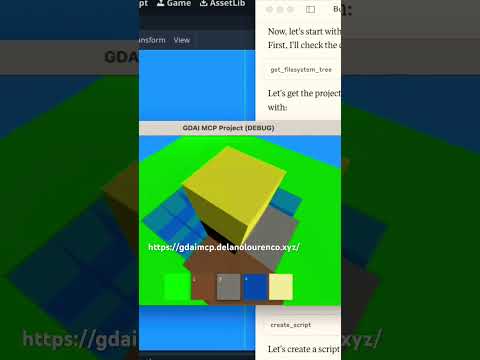
3D Minecraft clone
-
3D car racing game

-
Create scene with nodes
-
Edit GDScript files
© 2025 Delano Lourenco. All rights reserved.
Dev Tools Supporting MCP
The following are the main code editors that support the Model Context Protocol. Click the link to visit the official website for more information.







