
Generic Mcp Client Chat
What is Generic Mcp Client Chat
generic-mcp-client-chat is a simple chat client designed to connect to an MCP (Model Control Protocol) server, enabling users to interact with large language models (LLMs) and utilize various MCP tools.
Use cases
Use cases include developing chatbots, conducting interactive AI experiments, building educational tools, and integrating LLMs into existing applications for enhanced user interaction.
How to use
To use generic-mcp-client-chat, clone the repository, set up a virtual environment, install dependencies, create a .env file with your Anthropic API key, and run the MCP server. Access the chat interface via a web browser at http://localhost:8001.
Key features
Key features include a real-time chat interface, tool support (echo and repeat tools), WebSocket-based communication, modern responsive UI, connection status monitoring, error handling, multi-server support with automatic tool discovery, and compatibility with custom MCP servers.
Where to use
generic-mcp-client-chat can be used in various fields such as AI research, software development, customer support, and any application requiring interaction with language models and MCP tools.
Clients Supporting MCP
The following are the main client software that supports the Model Context Protocol. Click the link to visit the official website for more information.





Overview
What is Generic Mcp Client Chat
generic-mcp-client-chat is a simple chat client designed to connect to an MCP (Model Control Protocol) server, enabling users to interact with large language models (LLMs) and utilize various MCP tools.
Use cases
Use cases include developing chatbots, conducting interactive AI experiments, building educational tools, and integrating LLMs into existing applications for enhanced user interaction.
How to use
To use generic-mcp-client-chat, clone the repository, set up a virtual environment, install dependencies, create a .env file with your Anthropic API key, and run the MCP server. Access the chat interface via a web browser at http://localhost:8001.
Key features
Key features include a real-time chat interface, tool support (echo and repeat tools), WebSocket-based communication, modern responsive UI, connection status monitoring, error handling, multi-server support with automatic tool discovery, and compatibility with custom MCP servers.
Where to use
generic-mcp-client-chat can be used in various fields such as AI research, software development, customer support, and any application requiring interaction with language models and MCP tools.
Clients Supporting MCP
The following are the main client software that supports the Model Context Protocol. Click the link to visit the official website for more information.
Content
Generic MCP Client Chat
A simple chat client that connects to an MCP (Model Control Protocol) server, allowing you to interact with LLMs and use MCP tools.
Vibe coded using cursor.
Goals
I believe we should have completely generic agents and completely generic UIs.
People should not need to write new code to write new agents. This UI is an experiment in building this generic MCP client.
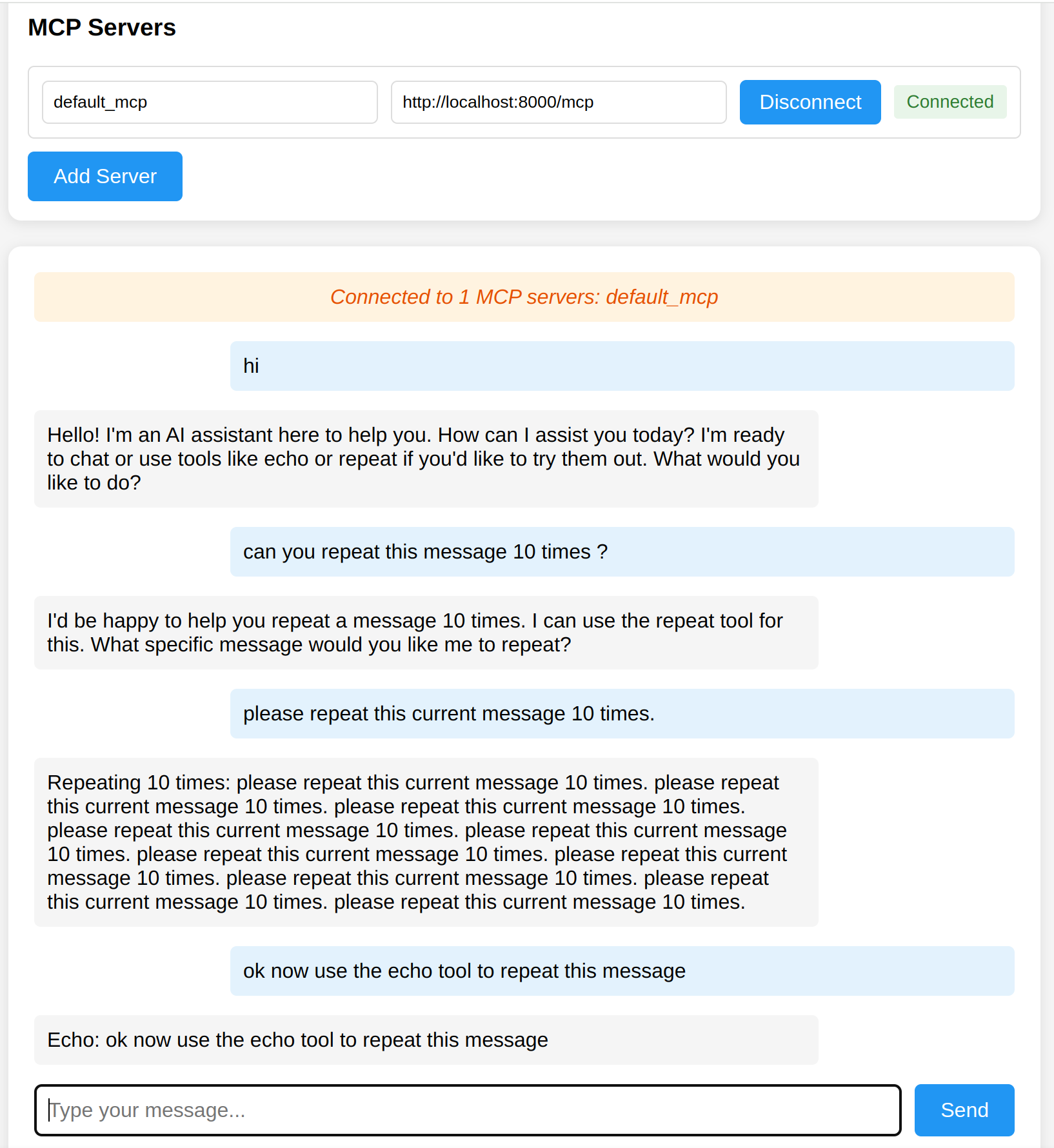
Screenshot
Features
- Real-time chat interface with Claude 3 Sonnet
- Tool support (echo and repeat tools)
- WebSocket-based communication
- Modern, responsive UI
- Connection status monitoring
- Error handling and user feedback
- Multi-server support with automatic tool discovery
- Support for custom MCP servers
Prerequisites
- Python 3.8 or higher
- Anthropic API key
Setup
- Clone the repository:
git clone https://github.com/rom1504/generic-mcp-client-chat.git
cd generic-mcp-client-chat
- Create and activate a virtual environment (optional but recommended):
python -m venv .venv
source .venv/bin/activate  # On Windows: .venv\Scripts\activate
- Install dependencies:
pip install -r requirements.txt
- Create a
.envfile in the project root:
ANTHROPIC_API_KEY=your_api_key_here
Running the Application
- Start the default MCP server:
python mcp_server.py
- (Optional) Start the second MCP server:
python second_mcp_server.py
- Start the main server:
python server.py
- Open your web browser and navigate to:
http://localhost:8001
- To use the second MCP server’s tools:
- Click “Add Server” in the web interface
- Enter server name (e.g., “math_server”)
- Enter server URL:
http://localhost:8002/mcp - Click “Connect”
Tool Support
The system supports multiple MCP servers with different tools:
Default MCP Server (Port 8000)
echo: Echoes back the input messagerepeat: Repeats the input message a specified number of times (default: 10)
Math Tools Server (Port 8002)
count_letters: Count the number of letters in a wordfibonacci: Calculate the fibonacci number for a given input
File System Server (Port 8003)
ls: List contents of a directory with file/folder iconscd: Change current working directory
To use the tools, simply ask Claude to use them. For example:
- “Can you use the echo tool to repeat back my message?”
- “Please use the repeat tool to repeat ‘Hello World!’ 5 times”
- “Count the letters in the word ‘hello’”
- “Calculate the 10th fibonacci number”
- “List the contents of the current directory”
- “Change to the parent directory”
Project Structure
mcp_server.py: WebSocket server that provides MCP toolsserver.py: Main server that connects to MCP servers and handles chatstatic/: Frontend filesindex.html: Main chat interfacejs/mcp-client.js: Frontend JavaScriptcss/styles.css: Styling
.env: Configuration file (create this)
Error Handling
The system handles various error cases:
- Invalid JSON messages
- Unknown tool calls
- Connection issues
- API errors
All errors are displayed to the user in the chat interface with appropriate styling.
Development
- The project uses FastAPI for the backend
- FastMCP for MCP server implementation
- Anthropic’s Claude API for chat
- Vanilla JavaScript for the frontend
Contributing
[Your contribution guidelines]
License
This project is licensed under the MIT License - see the LICENSE file for details.
Example MCP Servers
This repository includes several example MCP servers to demonstrate different capabilities. To use any of these example servers:
- Start the desired server (e.g.,
python example_mcp_servers/file_mcp_server.py) - Click “Add Server” in the web interface
- Enter a server name (e.g., “file_server”)
- Enter the server URL (e.g.,
http://localhost:8003/mcp) - Click “Connect”
Available MCP Servers
Beyond the example servers in this repository, you can connect to public MCP servers. Visit mcpservers.org/remote-mcp-servers for a list of available servers, or check out the awesome-mcp-servers repository for a curated collection of MCP server implementations.
A particularly useful one is the Fetch MCP Server which allows retrieving and processing web content.
To use any of these servers, add them through the web interface by clicking “Add Server” and entering their MCP endpoint URL.
Dev Tools Supporting MCP
The following are the main code editors that support the Model Context Protocol. Click the link to visit the official website for more information.







