
Geoapify Mcp
What is Geoapify Mcp
geoapify-mcp is a Demo Model Context Protocol Server designed for the Geoapify API, which allows users to convert addresses into GPS coordinates and create map images from those coordinates.
Use cases
Use cases for geoapify-mcp include converting multiple addresses into GPS coordinates for mapping, generating visual representations of locations, and integrating geolocation data into applications for enhanced user experience.
How to use
To use geoapify-mcp, you need to obtain an API key from Geoapify and set it as an environment variable named ‘GEO_APIKEY’. Then, configure your ‘claude_desktop_config.json’ file to run the server with the necessary dependencies.
Key features
Key features of geoapify-mcp include the ability to get GPS coordinates from addresses, create GEOJSON files, and generate map images from GEOJSON data. Currently, map image generation is only supported on MacOS.
Where to use
geoapify-mcp can be used in various fields such as urban planning, logistics, navigation applications, and any other domain that requires geolocation services.
Clients Supporting MCP
The following are the main client software that supports the Model Context Protocol. Click the link to visit the official website for more information.





Overview
What is Geoapify Mcp
geoapify-mcp is a Demo Model Context Protocol Server designed for the Geoapify API, which allows users to convert addresses into GPS coordinates and create map images from those coordinates.
Use cases
Use cases for geoapify-mcp include converting multiple addresses into GPS coordinates for mapping, generating visual representations of locations, and integrating geolocation data into applications for enhanced user experience.
How to use
To use geoapify-mcp, you need to obtain an API key from Geoapify and set it as an environment variable named ‘GEO_APIKEY’. Then, configure your ‘claude_desktop_config.json’ file to run the server with the necessary dependencies.
Key features
Key features of geoapify-mcp include the ability to get GPS coordinates from addresses, create GEOJSON files, and generate map images from GEOJSON data. Currently, map image generation is only supported on MacOS.
Where to use
geoapify-mcp can be used in various fields such as urban planning, logistics, navigation applications, and any other domain that requires geolocation services.
Clients Supporting MCP
The following are the main client software that supports the Model Context Protocol. Click the link to visit the official website for more information.
Content
Geoapify MCP Server
Convert addresses into GPS coordinates for mapping, and optionally create an image of those coordinates using the Geoapify server.
Installation
You’ll need to get an API key from Geoapify, and set it as an environment variable named GEO_APIKEY.
Your claude_desktop_config.json will look like this after:
You’ll notice we include all the dependencies in our args.
Tools
get_gps_coordinates
Used to get GPS coordinates from the API for creating GEOJSON, etc.
create_map_from_geojson
Create a map image and show it. (Showing only works on MacOS for now.)
Example Usage
Get GPS Coordinates
can you create a geojson of the following locations including their gps coordinates: 179 avenue du Général Leclerc, côté Rive Gauche
158 avenue du Général Leclerc, côté Rive Droite à l'angle de la rue Jules Herbron
112 avenue du Général Leclerc, côté Rive Droite
34 avenue du Général Leclerc, côté Rive Droite
En face du 57 rue Gaston Boissier, à côté de la borne
Route du Pavé de Meudon - à côté du chêne de la Vierge
6 avenue de Versailles (près du centre aquatique des Bertisettes)
3 places sur parking de la rue Costes et Bellonte
Rue Joseph Chaleil
18 rue des Sables – à côté de la crèche
25 sente de la Procession
33 rue Joseph Bertrand
Place Saint Paul
Place de la bataille de Stalingrad
Placette croisement avenue Pierre Grenier / avenue Robert Hardouin
107 avenue Gaston Boissier (en face de la caserne des pompiers)
Result: Attached JSON file
Returns a GeoJSON file.
Create a Map Image
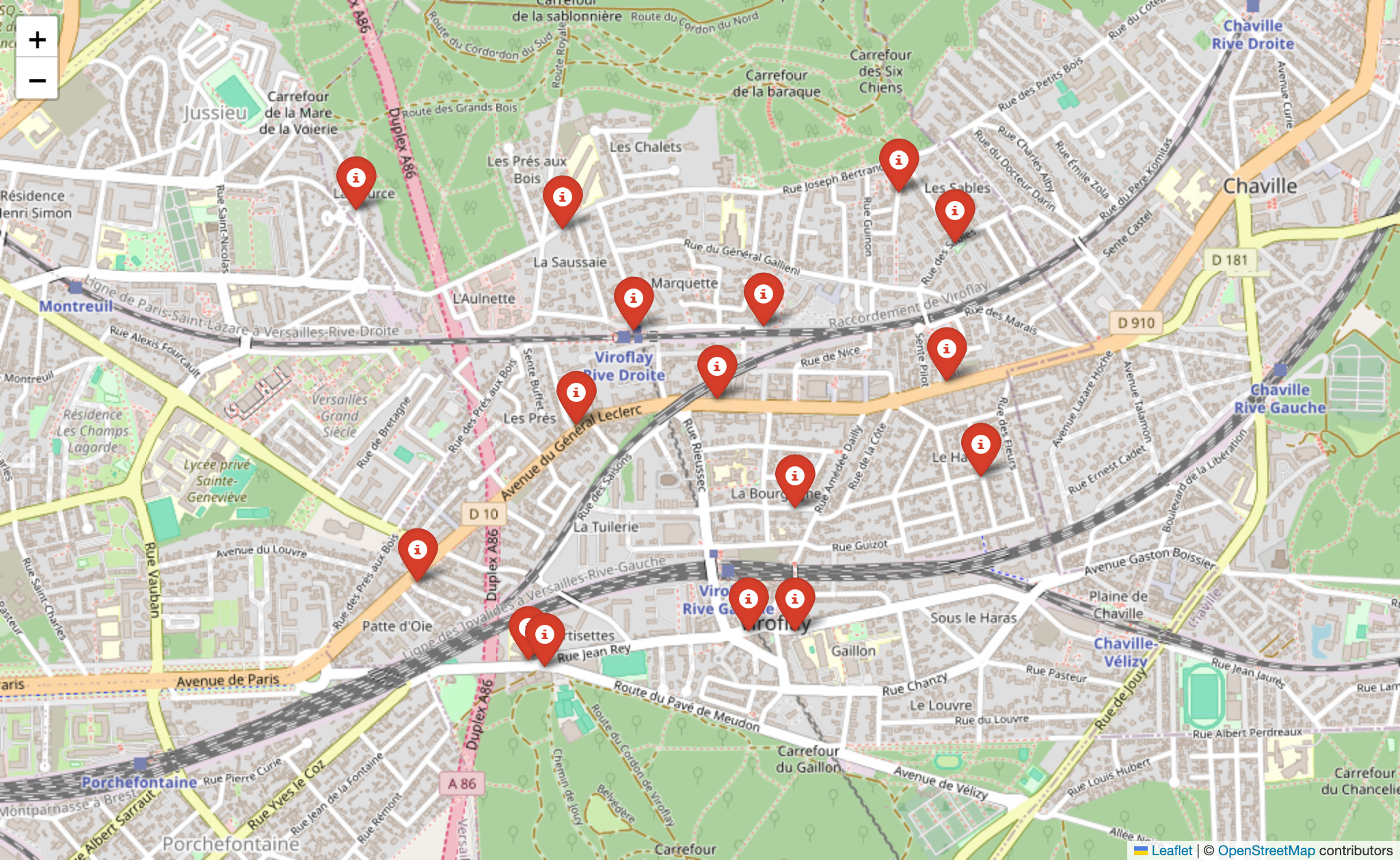
can you create a map from my attached geojson file?
Result:
LICENSE
MIT
Dev Tools Supporting MCP
The following are the main code editors that support the Model Context Protocol. Click the link to visit the official website for more information.







