
Get Mcp Keys
What is Get Mcp Keys
get-mcp-keys is a lightweight utility designed to securely load API keys for Cursor MCP servers from your home directory, preventing accidental exposure of sensitive information in repositories.
Use cases
Use cases for get-mcp-keys include securely managing API keys for projects using FireCrawl, Brave Search, Supabase, or any other MCP servers that require environment variables.
How to use
To use get-mcp-keys, create a .mcprc file in your home directory, add your API keys to this file, and update your MCP configuration to utilize the get-mcp-keys utility for loading these keys as environment variables.
Key features
Key features include secure storage of API keys in the home directory, prevention of accidental commits to repositories, dynamic loading of keys only when needed, and compatibility with multiple MCP servers.
Where to use
get-mcp-keys can be used in any development environment where MCP servers are utilized, particularly when working with AI coding assistants like Cursor AI.
Clients Supporting MCP
The following are the main client software that supports the Model Context Protocol. Click the link to visit the official website for more information.





Overview
What is Get Mcp Keys
get-mcp-keys is a lightweight utility designed to securely load API keys for Cursor MCP servers from your home directory, preventing accidental exposure of sensitive information in repositories.
Use cases
Use cases for get-mcp-keys include securely managing API keys for projects using FireCrawl, Brave Search, Supabase, or any other MCP servers that require environment variables.
How to use
To use get-mcp-keys, create a .mcprc file in your home directory, add your API keys to this file, and update your MCP configuration to utilize the get-mcp-keys utility for loading these keys as environment variables.
Key features
Key features include secure storage of API keys in the home directory, prevention of accidental commits to repositories, dynamic loading of keys only when needed, and compatibility with multiple MCP servers.
Where to use
get-mcp-keys can be used in any development environment where MCP servers are utilized, particularly when working with AI coding assistants like Cursor AI.
Clients Supporting MCP
The following are the main client software that supports the Model Context Protocol. Click the link to visit the official website for more information.
Content
🔐 get-mcp-keys
Stop accidentally committing API keys to your repos!
The Problem
When using Cursor AI (and other AI coding assistants) with MCP servers, you need API keys in your ./cursor/mcp.json file:
This is a security nightmare waiting to happen. One accidental commit and your keys are exposed in your Git history.
💯 The Solution
get-mcp-keys loads your API keys from a secure file in your home directory, keeping them out of your repositories entirely.
⚡ Quick Start
1. Create a .mcprc file in your home directory
touch ~/.mcprc
chmod 600 ~/.mcprc  # Make it readable only by you
3. Add your API keys to the file
# ~/.mcprc
FIRECRAWL_API_KEY="your_actual_api_key_here"
BRAVE_API_KEY="another_secret_key_here"
# Add any other MCP server keys you use
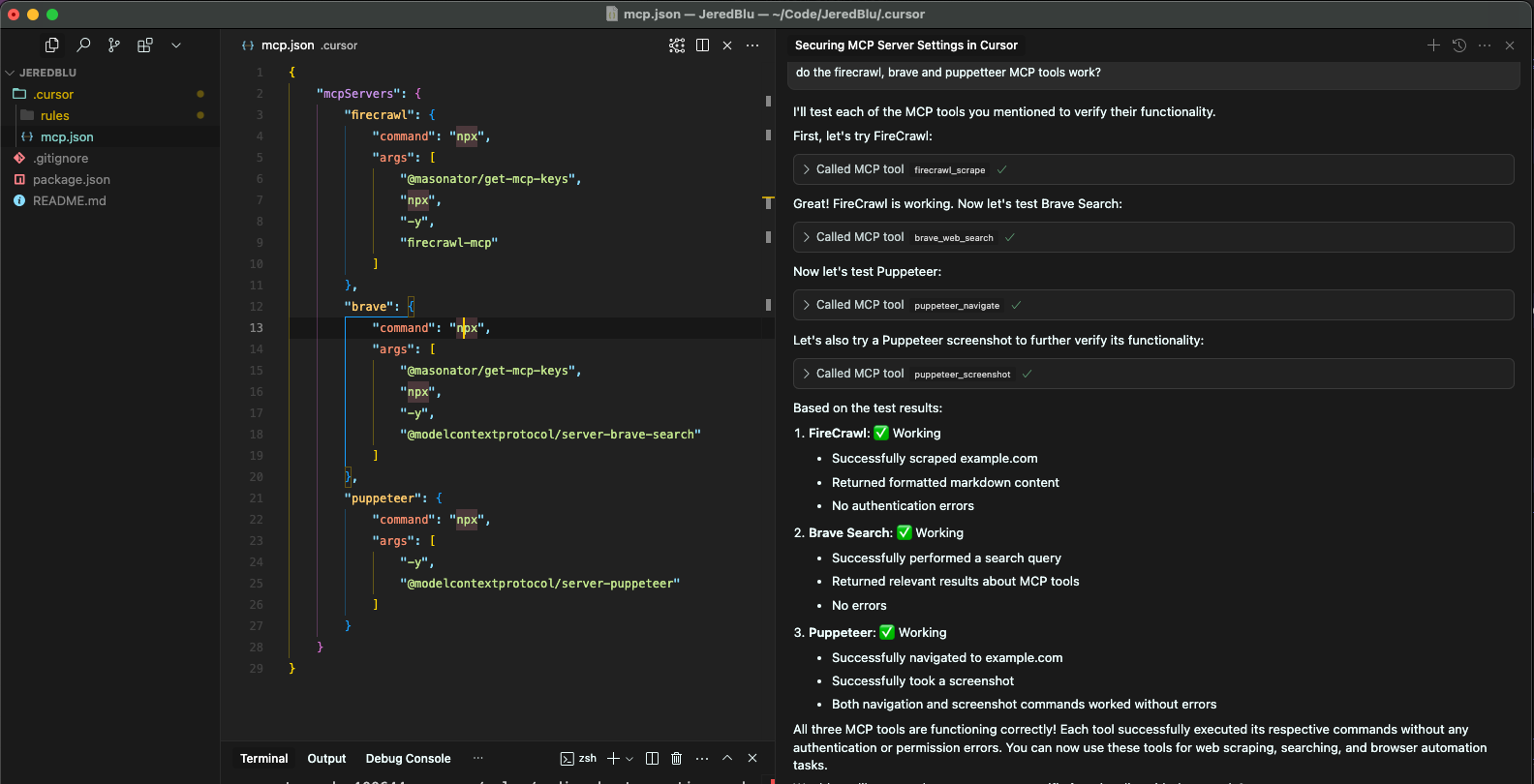
4. Update your MCP configuration to use get-mcp-keys
That’s it! The get-mcp-keys utility will:
- Load your API keys from
~/.mcprc - Inject them as environment variables
- Run your MCP server command with the keys available
🛡️ Security
- Your API keys stay in your home directory
- Keys are never committed to repositories
- Keys are loaded only when needed
- Debug output shows only first/last few characters of keys
🧰 Supported MCP Servers
Works with any MCP server that needs environment variables, including:
- FireCrawl
- Brave Search
- Supabase
- And any other MCP servers you configure!
🔍 How It Works
get-mcp-keys reads your .mcprc file, adds those environment variables to the current environment, and then executes whatever command you specify after it in the args list. It’s simple yet effective!
📋 License
MIT
⭐ If this saved you from committing your keys, star the repo!
Dev Tools Supporting MCP
The following are the main code editors that support the Model Context Protocol. Click the link to visit the official website for more information.







