
Go Mcp Practice
What is Go Mcp Practice
go_mcp_practice is a practice implementation of the Model Context Protocol (MCP) using the Go programming language. It serves as a tool for developers to understand and experiment with MCP functionalities.
Use cases
Use cases for go_mcp_practice include testing MCP protocol implementations, developing client applications that interact with MCP servers, and educational purposes for understanding MCP.
How to use
To use go_mcp_practice, run the server with the command ‘go run . -t sse’ to start the SSE server on port 8000. You can then establish a TCP connection and interact with the server using curl commands to send initialization and tool list requests.
Key features
Key features of go_mcp_practice include support for Server-Sent Events (SSE), capability negotiation during the initialization phase, and the ability to list available tools on the MCP server.
Where to use
go_mcp_practice can be used in software development environments where developers need to implement or test MCP functionalities, particularly in applications that require real-time data communication.
Clients Supporting MCP
The following are the main client software that supports the Model Context Protocol. Click the link to visit the official website for more information.





Overview
What is Go Mcp Practice
go_mcp_practice is a practice implementation of the Model Context Protocol (MCP) using the Go programming language. It serves as a tool for developers to understand and experiment with MCP functionalities.
Use cases
Use cases for go_mcp_practice include testing MCP protocol implementations, developing client applications that interact with MCP servers, and educational purposes for understanding MCP.
How to use
To use go_mcp_practice, run the server with the command ‘go run . -t sse’ to start the SSE server on port 8000. You can then establish a TCP connection and interact with the server using curl commands to send initialization and tool list requests.
Key features
Key features of go_mcp_practice include support for Server-Sent Events (SSE), capability negotiation during the initialization phase, and the ability to list available tools on the MCP server.
Where to use
go_mcp_practice can be used in software development environments where developers need to implement or test MCP functionalities, particularly in applications that require real-time data communication.
Clients Supporting MCP
The following are the main client software that supports the Model Context Protocol. Click the link to visit the official website for more information.
Content
參考
測試
SSE
啟動 SSE server
預設是 8000 port
go run . -t sse
2025/04/02 09:35:05 Registered tool: calculate
2025/04/02 09:35:05 SSE server listening on localhost:8000
建立 TCP 連線取得session
curl http://localhost:8000/sse
返回:
event: endpoint
data: /message?sessionId=f87b44d2-4bb3-48f8-b975-15b60de7ea14
測試Initialization
[!Tip]
MCP 連線的 LifeCycle
Client 從建立連線開始到結束會經歷 3 個階段,其中最重要的是 Initializeation 階段的準備。這階段就是提供 MCP Server 具體功能清單的階段。
- Initialization: Capability negotiation and protocol version agreement
- Operation: Normal protocol communication
- Shutdown: Graceful termination of the connection
[!Warning]
這邊用 2024-11-05 版本的 Specification做測試
可以在這邊看有哪些Specification
送出 initialize
curl -X POST --data '{
  "jsonrpc": "2.0",
  "id": 1,
  "method": "initialize",
  "params": {
    "protocolVersion": "2024-11-05",
    "capabilities": {
      "roots": {
        "listChanged": true
      },
      "sampling": {}
    },
    "clientInfo": {
      "name": "ExampleClient",
      "version": "1.0.0"
    }
  }
}' http://localhost:8000/message?sessionId=2679f10b-3091-4734-950b-4b9d27bc2b7d
回傳
{
  "jsonrpc": "2.0",
  "id": 1,
  "result": {
    "protocolVersion": "2024-11-05",
    "capabilities": {
      "tools": {}
    },
    "serverInfo": {
      "name": "mcp-practice",
      "version": "0.0.1"
    }
  }
}
[!Note]
先用 tools/list 來取得所有該 mcp server 能調用的功能
可以參考 Tools
發送 tools/list
curl -X POST --data '{
  "jsonrpc": "2.0",
  "id": 1,
  "method": "tools/list",
  "params":{}
}' http://localhost:8000/message?sessionId=2679f10b-3091-4734-950b-4b9d27bc2b7d
回傳的設定和 tools內的設定一樣
{
  "jsonrpc": "2.0",
  "id": 1,
  "result": {
    "tools": [
      {
        "description": "Perform basic arithmetic operations",
        "inputSchema": {
          "type": "object",
          "properties": {
            "operation": {
              "description": "The operation to perform (add, subtract, multiply, divide)",
              "enum": [
                "add",
                "substract",
                "multiply",
                "devide"
              ],
              "type": "string"
            },
            "x": {
              "description": "First number that the operation will take",
              "type": "number"
            },
            "y": {
              "description": "Second number that the operation will take",
              "type": "number"
            }
          },
          "required": [
            "operation",
            "x",
            "y"
          ]
        },
        "name": "calculate"
      }
    ]
  }
}
用
tools/call來呼叫function
curl -X POST --data '{
"jsonrpc": "2.0",
"id": 1,
"method": "tools/call",
"params": {
  "name": "calculate",
  "arguments": {
    "operation": "divide",
    "x": 1,
    "y": 2
  }
}
}' http://localhost:8000/message?sessionId=2679f10b-3091-4734-950b-4b9d27bc2b7d
回傳
{
  "jsonrpc": "2.0",
  "id": 1,
  "result": {
    "content": [
      {
        "type": "text",
        "text": "0.50"
      }
    ]
  }
}
cline 安裝
需要先自己設定一個 LLM 像是Gemini
Build binary
go build .
wsl的設定方法
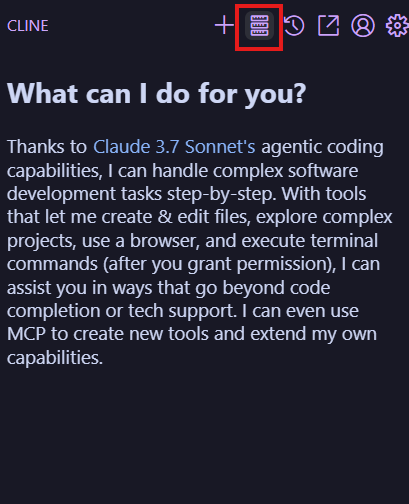
進入cline之後點選mcp server icon
接著點選config之後設定 Server,路徑要連到go build出來的binary
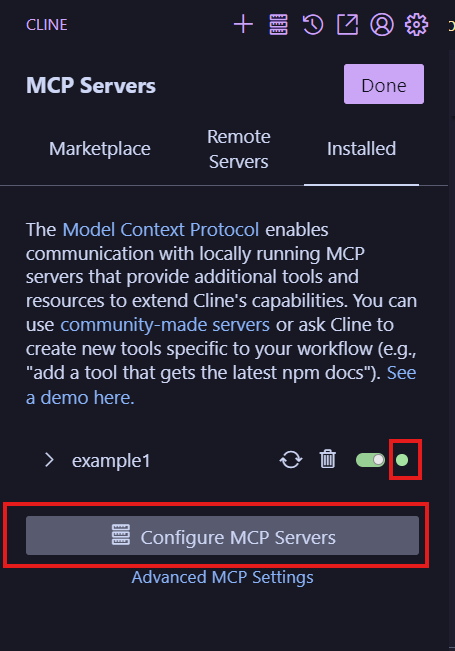
這邊我是用wsl所以 command 需要用wsl.exe才能連到 我的路徑
{
  "mcpServers": {
    "example1": {
      "command": "wsl.exe",
      "args": [
        "bash",
        "-c",
        "~/code/github/go_mcp_practice/mcpMathPractice"
      ],
      "env": {}
    }
  }
}
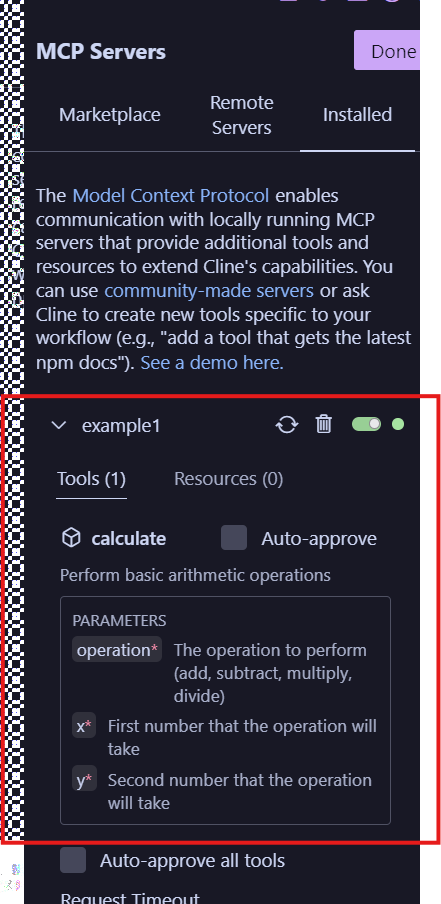
看到綠色表示成功,並會顯示出有哪一些function
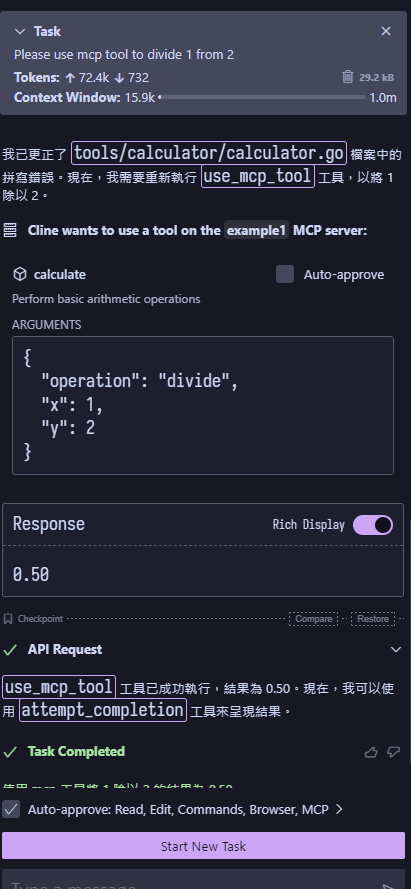
在cline中使用
Dev Tools Supporting MCP
The following are the main code editors that support the Model Context Protocol. Click the link to visit the official website for more information.







