
Google Openai Mcp
What is Google Openai Mcp
google_openai_mcp is a simple application that demonstrates the integration of Google’s Agent-to-Agent (A2A) protocol with Anthropic’s Model Context Protocol (MCP) for managing AWS EC2 instances.
Use cases
Use cases include creating and managing AWS EC2 instances through intelligent agents, automating cloud tasks, and demonstrating the interaction between different protocols in a multi-agent system.
How to use
To use google_openai_mcp, clone the repository, set up the required environment variables in a .env file, and run the application using Python or Docker. Follow the instructions in the README for detailed steps.
Key features
Key features include seamless protocol integration for multi-agent communication, leveraging OpenAI Agents SDK for intelligent agent capabilities, and automated cloud management for provisioning and terminating AWS EC2 instances.
Where to use
google_openai_mcp can be used in cloud computing environments, particularly for automating AWS resource management and enhancing multi-agent systems.
Clients Supporting MCP
The following are the main client software that supports the Model Context Protocol. Click the link to visit the official website for more information.





Overview
What is Google Openai Mcp
google_openai_mcp is a simple application that demonstrates the integration of Google’s Agent-to-Agent (A2A) protocol with Anthropic’s Model Context Protocol (MCP) for managing AWS EC2 instances.
Use cases
Use cases include creating and managing AWS EC2 instances through intelligent agents, automating cloud tasks, and demonstrating the interaction between different protocols in a multi-agent system.
How to use
To use google_openai_mcp, clone the repository, set up the required environment variables in a .env file, and run the application using Python or Docker. Follow the instructions in the README for detailed steps.
Key features
Key features include seamless protocol integration for multi-agent communication, leveraging OpenAI Agents SDK for intelligent agent capabilities, and automated cloud management for provisioning and terminating AWS EC2 instances.
Where to use
google_openai_mcp can be used in cloud computing environments, particularly for automating AWS resource management and enhancing multi-agent systems.
Clients Supporting MCP
The following are the main client software that supports the Model Context Protocol. Click the link to visit the official website for more information.
Content
🚀 Multi-Agent System: A2A & MCP Integration POC
POC: Integrating A2A, MCP, and OpenAI Agents for AWS Tasks 🖥️✨
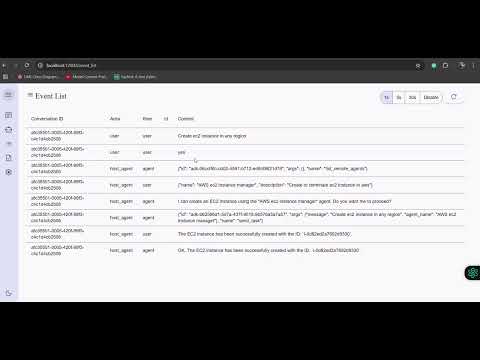
🎥 Demo Video
Watch the demo video to see MCP-AWS in action! 🚀
🌟 Features
-
🚀 Seamless Protocol Integration: Demonstrates the successful integration of the Agent-to-Agent (A2A) protocol with a Model Context Protocol (MCP) server for robust multi-agent communication.
-
🧠 Leverages OpenAI Agents SDK: Built upon the powerful OpenAI Agents SDK to create intelligent agents capable of understanding and acting on user prompts.
-
☁️ Automated Cloud Management: Enables direct provisioning and termination of AWS EC2 instances through simple user interactions, showcasing practical tool execution via the MCP.
🛠️ Tools in the MCP Server
The MCP server is a custom server with two tools:
initiate_aws_ec2_instance: Creates an AWS EC2 instance.terminate_aws_ec2_instance: Terminates an AWS EC2 instance by its ID.
🚀 Getting Started
Prerequisites
- Python 3.12+ (for local setup) or Docker (for containerized setup)
- AWS IAM Role: Create an IAM role with the necessary permissions to manage EC2 instances.
- Environment Variables: Prepare a
.envfile with the following variables:AWS_ACCESS_KEY_IDAWS_SECRET_ACCESS_KEYAWS_DEFAULT_REGIONOPENAI_API_KEYAMI_IDINSTANCE_TYPEKEY_NAMESECURITY_GROUP_IDSAWS_REGION
🏃♂️ Running the App
-
Clone the repository at the root:
git clone https://github.com/anirban1592/google_openai_mcp.git cd google_openai_mcp -
Create
.envfile as shown in prerequisites -
Run the remote agent example:
cd openai-agent/ uv run . -
Clone the A2A client code(by google) at the root dir:
git clone https://github.com/google/A2A.git cd demo/ui -
Create an environment file with your API key or enter it directly in the UI when prompted:
echo "GOOGLE_API_KEY=your_api_key_here" >> .env -
Run the front end example:
uv run main.py -
Refer to the attached video to see it in action
💬 Using the AI Agent
-
To create an EC2 instance:
Enter your command: Create an EC2 instance -
To terminate an EC2 instance:
Enter your command: Terminate EC2 instance with ID <instance-id>
⚠️ Word of Caution
- IAM Role and Credentials: Please create AWS IAM roles and credentials at your own risk. Ensure you follow AWS best practices for security.
- Billing and Security: This app is a proof of concept (POC) and is intended for learning purposes only. We are not responsible for any billing issues or security incidents.
📚 Learnings
This project demonstrates:
- How to integrate MCP servers with OpenAI Agents SDK
- How to build a simple AI-driven application for AWS resource management
Enjoy exploring the power of AI and MCP servers! 🌟
Dev Tools Supporting MCP
The following are the main code editors that support the Model Context Protocol. Click the link to visit the official website for more information.







