
Grafana Mcp Analyzer
What is Grafana Mcp Analyzer
Grafana MCP Analyzer is a Model Context Protocol server designed for analyzing Grafana monitoring data using AI assistants like Claude and ChatGPT.
Use cases
Use cases include automated performance monitoring, proactive issue detection, and providing actionable insights for system optimization.
How to use
To use Grafana MCP Analyzer, install it globally via npm, configure your AI assistant with the MCP server settings, and create a configuration file specifying your Grafana service details and queries.
Key features
Key features include natural language query support, intelligent anomaly detection, multi-data source compatibility, professional operational suggestions, instant response analysis, and lightweight deployment.
Where to use
Grafana MCP Analyzer can be used in IT operations, DevOps, and any environment that requires real-time monitoring and analysis of system performance data.
Clients Supporting MCP
The following are the main client software that supports the Model Context Protocol. Click the link to visit the official website for more information.





Overview
What is Grafana Mcp Analyzer
Grafana MCP Analyzer is a Model Context Protocol server designed for analyzing Grafana monitoring data using AI assistants like Claude and ChatGPT.
Use cases
Use cases include automated performance monitoring, proactive issue detection, and providing actionable insights for system optimization.
How to use
To use Grafana MCP Analyzer, install it globally via npm, configure your AI assistant with the MCP server settings, and create a configuration file specifying your Grafana service details and queries.
Key features
Key features include natural language query support, intelligent anomaly detection, multi-data source compatibility, professional operational suggestions, instant response analysis, and lightweight deployment.
Where to use
Grafana MCP Analyzer can be used in IT operations, DevOps, and any environment that requires real-time monitoring and analysis of system performance data.
Clients Supporting MCP
The following are the main client software that supports the Model Context Protocol. Click the link to visit the official website for more information.
Content
Grafana MCP Analyzer 🤖


让AI直接读懂你的监控数据,智能化运维分析助手
✨ 项目简介
想象一下这样的场景:
- 您问AI:“我的服务器现在怎么样?”
- AI直接查看您的Grafana监控,回答:“CPU使用率偏高,建议检查这几个进程…”
复杂的监控图表,AI帮您一键分析!告别传统的手动监控方式,让AI成为您的专属运维助手!
🚀 核心特性
Grafana MCP Analyzer 基于 MCP (Model Context Protocol) 协议,赋能Claude、ChatGPT等AI助手具备以下超能力:
- 自然对话查询:“帮我看看内存使用情况” → AI立即分析并提供专业建议,降低技术门槛
- curl命令支持:支持直接使用curl命令配置查询,从浏览器复制粘贴即可,简化配置流程
- 多层级分析:支持单个图表精准分析,也支持整个Dashboard聚合分析,灵活的分析粒度
- 智能异常检测:AI主动发现并报告性能瓶颈和异常情况,提前预警风险
- 全数据源支持:完美兼容Prometheus、MySQL、Elasticsearch等所有数据源/查询命令,统一监控视图
- 专业DevOps建议:不只是展示数据,更提供可执行的优化方案,提升DevOps效率
- 轻量化部署:超小KB体积,快速集成部署,零负担使用
🛠️ 快速开始
步骤1:安装和配置
全局安装
npm install -g grafana-mcp-analyzer
MCP 依赖
Node.js 18+环境,推荐安装方式详见:Node.js 快速安装最全指南
配置AI助手(以Cursor为例)
- 打开 Cursor设置 → 搜索 “MCP”
- 添加以下服务器配置:
{
  "mcpServers": {
    "grafana": {
      "command": "grafana-mcp-analyzer",
      "env": {
        "CONFIG_PATH": "./grafana-config.js"
      }
    }
  }
}
💡 提示:任何支持MCP协议的AI助手都可以使用类似配置。需要Node.js 18+环境支持。
💡 配置路径说明:
CONFIG_PATH支持相对路径、绝对路径及远程地址。详见 CONFIG_PATH_GUIDE
步骤2:创建配置文件
在项目根目录创建 grafana-config.js 配置文件:
const config = {
  // 连接你的Grafana
  baseUrl: 'https://your-grafana-domain.com',
  defaultHeaders: {
    'Authorization': 'Bearer your-api-token',
    'Content-Type': 'application/json'
  },
  queries: {
    // 方式1:curl命令(推荐,浏览器直接复制)
    cpu_usage: {
      curl: `curl 'https://your-grafana-domain.com/api/ds/query' \\
        -X POST \\
        -H 'Content-Type: application/json' \\
        -d '{"queries":[{"refId":"A","expr":"rate(cpu_usage[5m])","range":{"from":"now-1h","to":"now"}}]}'`,
      systemPrompt: `您是CPU性能分析专家。请从以下维度分析CPU使用率:
      1. 趋势变化与异常点识别;
      2. 性能瓶颈及根因分析;
      3. 优化建议与预警阈值;
      4. 对业务系统的潜在影响评估。`
    },
    // 方式2:HTTP API配置(适合复杂查询)
    frontend_performance: {
      url: "api/ds/es/query",
      method: "POST",
      data: {
        es: {
          index: 'frontend_metrics',
          query: 'your_elasticsearch_query'
        }
      },
      systemPrompt: `您是前端性能分析专家,请分析FCP指标并给出建议,包括:
      1. 页面加载趋势;
      2. P75表现;
      3. 性能预警;
      4. 用户体验评估;
      5. 针对性优化方案。`
    },
  },
  healthCheck: {
    url: 'api/health',
    timeout: 5000
  }
};

module.exports = config;
📌 配置获取技巧:
浏览器复制curl命令:(推荐)
- 在Grafana中执行查询 → 按F12打开开发者工具 → Network标签页
- 找到查询请求 → 右键 → Copy as cURL → 粘贴到配置文件的curl字段
HTTP API配置:
- 获取 Data 传参:进入图表 → “Query Inspector” → "JSON"解析 → 拷贝请求体(request)
- 获取 Url 和 Headers Token:通过 Network 面板查看请求参数,手动构造 HTTP 配置。
步骤3:测试运行
完全重启Cursor,然后体验智能分析:
👤 您:分析前端性能监控数据 frontend_performance
🤖 AI:正在连接Grafana并分析前端性能指标…
👤 您:分析 cpu_usage CPU使用率是否正常
🤖 AI:正在获取CPU监控数据并进行智能分析…
配置完成!
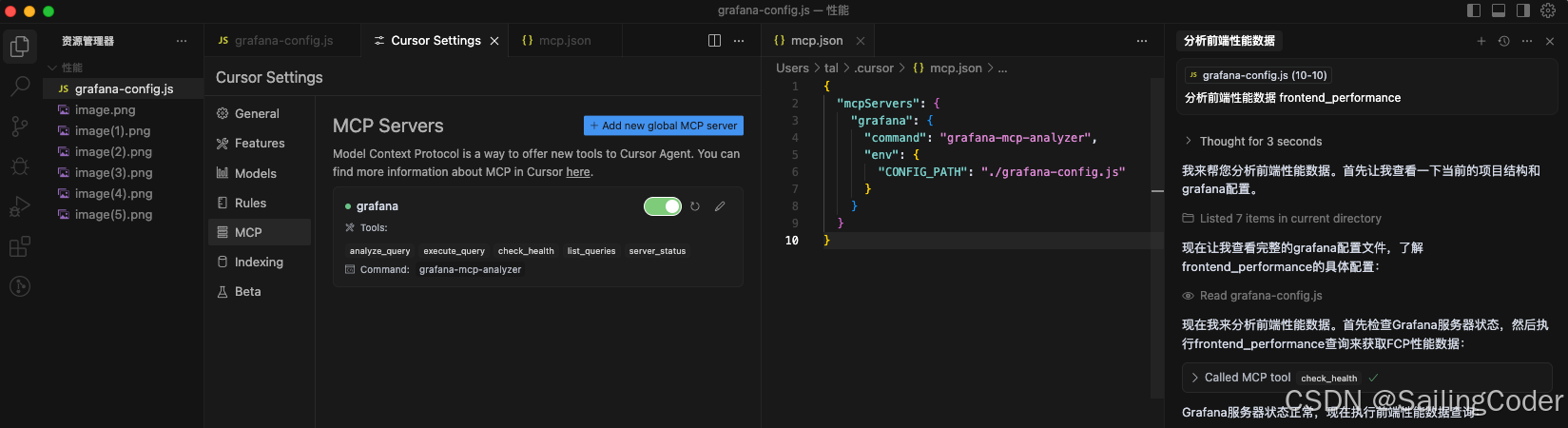
更多配置示例
指标监控配置
// 指标查询
prometheus_metrics: {
  curl: `curl 'api/ds/query' \\
    -X POST \\
    -H 'Content-Type: application/json' \\
    -d '{"queries":[{
      "refId":"A",
      "expr":"node_memory_MemAvailable_bytes / node_memory_MemTotal_bytes * 100",
      "range":{"from":"now-2h","to":"now"}
    }]}'`,
  systemPrompt: `内存使用率专家分析:重点关注内存泄漏风险、使用趋势、异常波动和优化建议。`
}
日志分析配置
// Elasticsearch日志查询
error_logs: {
  url: "api/ds/es/query",
  method: "POST",
  data: {
    es: {
      index: "app-logs-*",
      query: {
        "query": {
          "bool": {
            "must": [
              {"term": {"level": "ERROR"}},
              {"range": {"@timestamp": {"gte": "now-1h"}}}
            ]
          }
        }
      }
    }
  },
  systemPrompt: `日志分析专家:识别错误模式、频率分析、影响评估和问题定位建议。`
}
网络监控配置
// 网络延迟监控
network_latency: {
  curl: `curl 'api/ds/query' \\
    -X POST \\
    -d '{"queries":[{
      "refId":"A",
      "expr":"histogram_quantile(0.95, rate(http_request_duration_seconds_bucket[5m]))",
      "range":{"from":"now-30m","to":"now"}
    }]}'`,
  systemPrompt: `网络性能专家:分析P95延迟、识别慢请求、网络瓶颈定位和优化策略。`
}
数据库监控配置
// MySQL性能监控
mysql_performance: {
  url: "api/ds/mysql/query",
  method: "POST",
  data: {
    sql: "SELECT * FROM performance_schema.events_statements_summary_by_digest ORDER BY avg_timer_wait DESC LIMIT 10"
  },
  systemPrompt: `数据库性能专家:慢查询分析、索引优化建议、查询性能趋势评估。`
}
常见问题
❌ 无法连接到Grafana服务
- 检查Grafana地址格式:必须包含
https://或http:// - 验证API密钥有效性:确保未过期且有足够权限
- 测试网络连通性和防火墙设置
❌ AI提示找不到MCP工具
- 完全退出Cursor并重新启动
- 检查配置文件路径是否正确
- 确保Node.js版本 ≥ 18(node -v)
❌ 查询执行失败或超时
- 增加timeout设置
- 检查数据源连接状态
- 数据量过大,减小时间范围
⚠️ 当前局限性
(受限于 AI 模型上下文处理能力)
- 更适用于中小规模数据分析:当前分析能力主要聚焦在中小体量的监控数据,适合日常巡检、局部异常定位等场景,基本可覆盖常规运维需求
- 大数据量场景仍存挑战:在处理大规模监控数据时,受限于现阶段 AI 模型的上下文处理能力,可能出现重复调用自定义 Tool 的现象。建议在当前阶段通过缩小查询范围作为权宜之计
随着 AI 模型在上下文方面的持续进步,未来在大数据量处理方面有望获得更好的支持。同时,该库后续也会迭代大数据场景下提供更稳健的能力优化方案。
高级配置
环境变量配置
export GRAFANA_URL="https://your-grafana.com"
export GRAFANA_TOKEN="your-api-token"
MCP工具清单
| 工具 | 功能 | 使用场景 |
|---|---|---|
analyze_query |
查询+AI分析 | 需要专业建议 |
execute_query |
原始数据查询 | 仅需要数据 |
check_health |
健康检查 | 状态监控 |
list_queries |
查询列表 | 查看配置 |
工具使用方式
// AI助手会自动选择合适的工具
👤 "分析CPU使用情况" → 🤖 调用 analyze_query
👤 "获取内存数据" → 🤖 调用 execute_query
👤 "检查服务状态" → 🤖 调用 check_health
👤 "有哪些监控查询" → 🤖 调用 list_queries
文章推荐
- grafana-mcp-analyzer:基于 MCP 的轻量 AI 分析监控图表的运维神器! - CSDN技术博客深度解析
许可证
MIT 开源协议。详见 LICENSE 文件。
Dev Tools Supporting MCP
The following are the main code editors that support the Model Context Protocol. Click the link to visit the official website for more information.







