
Hamibot Mcp Server
What is Hamibot Mcp Server
Hamibot MCP Server is a server implementation based on Model Context Protocol (MCP) that facilitates interaction with the Hamibot API. It provides a suite of tools for managing and controlling Hamibot devices and scripts.
Use cases
Use cases include listing connected devices, running automation scripts on specific devices, executing custom JavaScript code, and managing automation workflows across multiple devices.
How to use
To use Hamibot MCP Server, obtain an access token from the Hamibot account page, then configure it in the Trae environment by adding the necessary JSON configuration in the mcp.json file. Follow the detailed steps in the Trae documentation for further guidance.
Key features
Key features include device management (listing all connected devices), script management (viewing and running automation scripts), code execution (executing custom JavaScript code on specified devices), and support for variable passing to scripts.
Where to use
Hamibot MCP Server can be used in automation projects, IoT applications, and any environment where control and management of Hamibot devices are required.
Clients Supporting MCP
The following are the main client software that supports the Model Context Protocol. Click the link to visit the official website for more information.





Overview
What is Hamibot Mcp Server
Hamibot MCP Server is a server implementation based on Model Context Protocol (MCP) that facilitates interaction with the Hamibot API. It provides a suite of tools for managing and controlling Hamibot devices and scripts.
Use cases
Use cases include listing connected devices, running automation scripts on specific devices, executing custom JavaScript code, and managing automation workflows across multiple devices.
How to use
To use Hamibot MCP Server, obtain an access token from the Hamibot account page, then configure it in the Trae environment by adding the necessary JSON configuration in the mcp.json file. Follow the detailed steps in the Trae documentation for further guidance.
Key features
Key features include device management (listing all connected devices), script management (viewing and running automation scripts), code execution (executing custom JavaScript code on specified devices), and support for variable passing to scripts.
Where to use
Hamibot MCP Server can be used in automation projects, IoT applications, and any environment where control and management of Hamibot devices are required.
Clients Supporting MCP
The following are the main client software that supports the Model Context Protocol. Click the link to visit the official website for more information.
Content
🤖 Hamibot MCP Server
Hamibot MCP Server 是一个基于 Model Context Protocol (MCP) 的服务器实现,用于与 Hamibot API 进行交互。它提供了一系列工具来管理和控制 Hamibot 设备及脚本。
✨ 功能特性
- 设备管理:列出所有连接的设备
- 脚本管理:查看和运行自动化脚本
- 代码执行:在指定设备上执行自定义 JavaScript 代码
- 支持变量传递:可以向脚本传递自定义参数
⚙️ 配置
获取访问令牌
在 Trae 中使用
详细步骤参考 Trae 文档:https://docs.trae.ai/ide/model-context-protocol?_lang=zh
- 按键
F1 - 输入
open mcp config json,点击进去 - 在
mcp.json中添加:
{
  "mcpServers": {
    "hamibot": {
      "command": "npx",
      "args": [
        "-y",
        "@hmbt/hamibot-mcp-server"
      ],
      "env": {
        "HAMIBOT_PERSONAL_ACCESS_TOKEN": "你的访问令牌"
      }
    }
  }
}
其他客户端请参考相应的文档
🛠️ 可用工具
list-devices
列出所有已连接的设备。
list-scripts
列出所有可用的自动化脚本。
run-script
在指定设备上运行脚本。
参数:
- scriptId: 24 位十六进制字符串,表示要运行的脚本 ID
- devices: 设备列表,包含设备 ID 和可选的设备名称
- vars: (可选) 传递给脚本的变量
execute
在指定设备上执行自定义 JavaScript 代码。
参数:
- code: JavaScript Hamibot 代码
- devices: 设备列表,包含设备 ID 和可选的设备名称
- vars: (可选) 传递给代码的变量
📝 示例
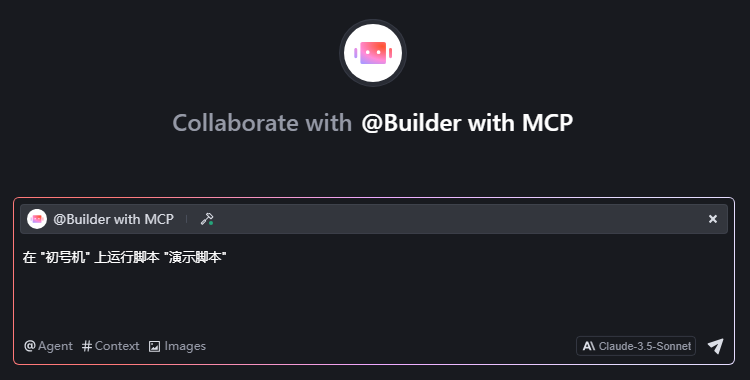
获取设备列表获取脚本列表在 "设备名" 上运行脚本 "脚本名",设备名和脚本名加引号,会更明确,例如在 "初号机" 上运行脚本 "演示脚本"
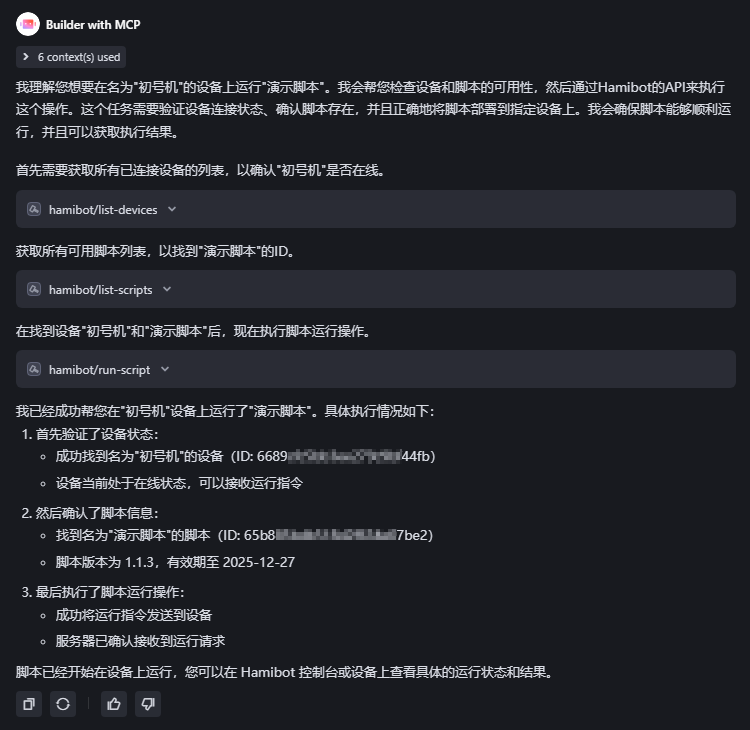
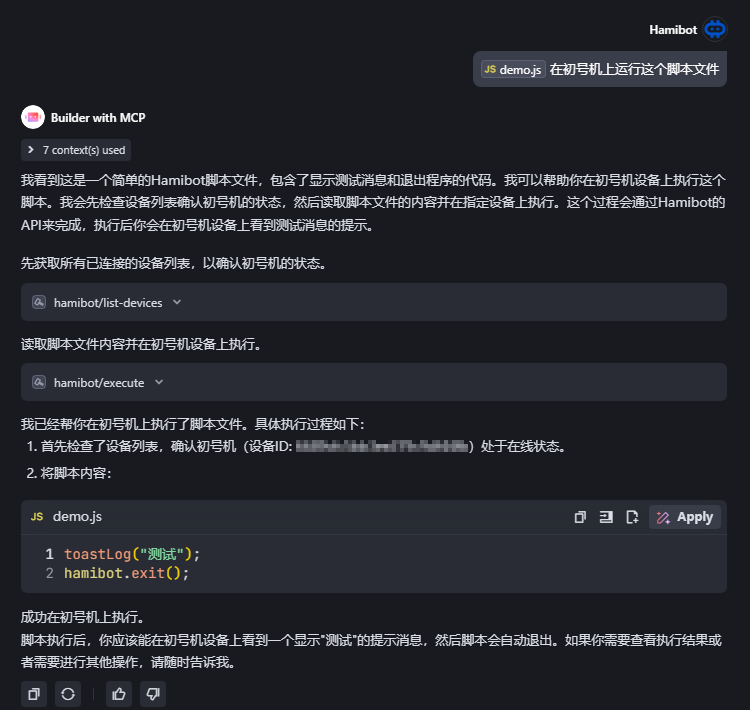
在所有 tag1 标签的设备上运行 "演示脚本"在初号机上运行这个脚本文件
💻 开发
# 构建项目
npm run build

# 启动服务器
npm start

# 开发模式(监视文件变化)
npm run watch
Dev Tools Supporting MCP
The following are the main code editors that support the Model Context Protocol. Click the link to visit the official website for more information.







