
Hello Mcp
What is Hello Mcp
hello-mcp is a simple implementation of the Model Control Protocol (MCP) that includes both client and server components. It serves as a demonstration to help users understand the MCP protocol and its functionalities.
Use cases
Use cases for hello-mcp include teaching the fundamentals of the MCP protocol, experimenting with client-server interactions, and developing applications that utilize the DeepSeek API for enhanced functionalities.
How to use
To use hello-mcp, clone the project repository, set up the environment by installing dependencies, configure the DeepSeek API key, and run the project using the provided commands.
Key features
Key features of hello-mcp include an MCP client that supports registering servers, an interactive command line interface, DeepSeek API conversations, and a simple MCP server based on FastMCP with health check support and basic path utilities.
Where to use
hello-mcp can be used in educational settings for learning about MCP, in development environments for building custom MCP clients and servers, and in research contexts where understanding protocol implementations is necessary.
Clients Supporting MCP
The following are the main client software that supports the Model Context Protocol. Click the link to visit the official website for more information.





Overview
What is Hello Mcp
hello-mcp is a simple implementation of the Model Control Protocol (MCP) that includes both client and server components. It serves as a demonstration to help users understand the MCP protocol and its functionalities.
Use cases
Use cases for hello-mcp include teaching the fundamentals of the MCP protocol, experimenting with client-server interactions, and developing applications that utilize the DeepSeek API for enhanced functionalities.
How to use
To use hello-mcp, clone the project repository, set up the environment by installing dependencies, configure the DeepSeek API key, and run the project using the provided commands.
Key features
Key features of hello-mcp include an MCP client that supports registering servers, an interactive command line interface, DeepSeek API conversations, and a simple MCP server based on FastMCP with health check support and basic path utilities.
Where to use
hello-mcp can be used in educational settings for learning about MCP, in development environments for building custom MCP clients and servers, and in research contexts where understanding protocol implementations is necessary.
Clients Supporting MCP
The following are the main client software that supports the Model Context Protocol. Click the link to visit the official website for more information.
Content
Hello-MCP 🚀
中文文档 🇨🇳
A simple implementation of MCP (Model Control Protocol) client and server.
Helps understand what MCP protocol is and how it works.
This project will ✅:
- Teach you the essence of MCP protocol
- Let you build your own MCP Client and Server
- Provide hands-on experience with MCP implementation
This project won’t ❌:
- Teach you how to configure existing MCP Hosts
- Implement generic server functionality (requires your own exploration)
Features ✨
MCP Client
- Supports registering MCP Server (both SSE and stdio methods)
- Interactive command line chat interface
- Supports DeepSeek API conversations (configure API key in config file)
- Streamed response output
MCP Server
- Simple server based on FastMCP (supports both SSE and stdio)
- Provides a basic path utility (lists all files in specified path)
- Health check support
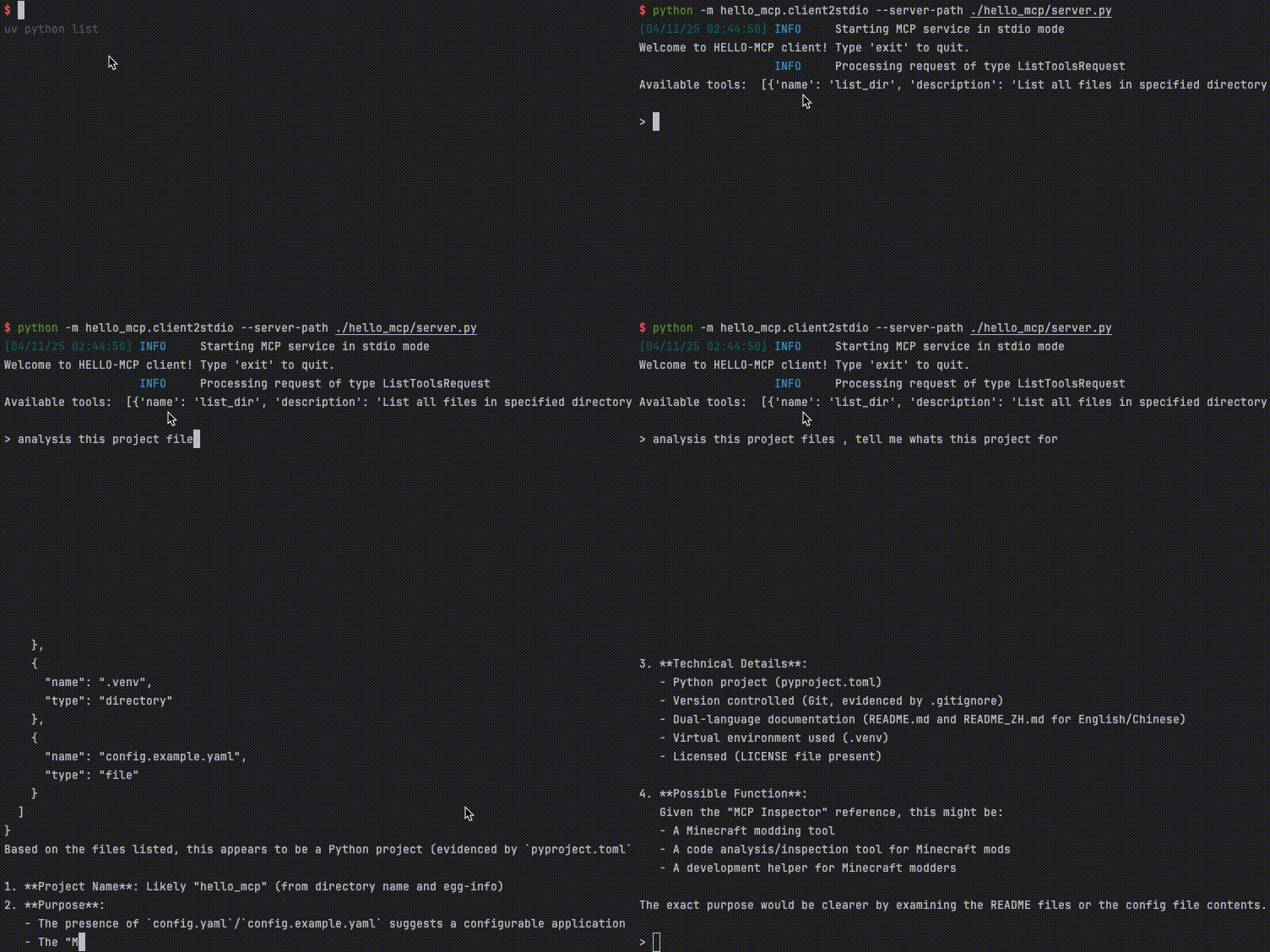
DEMO
Use List_Dir Tool to get files and analysis!
Usage Guide 📖
Environment Setup
Recommended to use uv for project management
0. Clone the project
git clone https://github.com/Cookie-HOO/hello-mcp.git
cd hello-mcp
1. Install uv
macOS:
curl -LsSf https://astral.sh/uv/install.sh | sh
Windows (requires PowerShell):
powershell -ExecutionPolicy ByPass -c "irm https://astral.sh/uv/install.ps1 | iex"
2. Initialize project dependencies
uv venv  # Create virtual environment
uv sync  # Install dependencies
source ./.venv/bin/activate  # macOS: activate virtual environment
.\.venv\Scripts\activate     # Windows: activate virtual environment
3. Set up DeepSeek API key
Currently only supports DeepSeek API - apply at:
DeepSeek API Platform
cp ./config.example.yaml ./config.yaml
# Edit to add your DeepSeek API key
4. Run the project
# Method 1: stdio (only need to explicitly start client)
python -m hello_mcp.client2stdio --server-path ./hello_mcp/server.py

# Method 2: SSE (need to explicitly start both server and client)
python -m hello_mcp.server --transport sse  # Start server in SSE mode
python -m hello_mcp.client2sse --server-url http://127.0.0.1:8000  # Register the MCP server with client
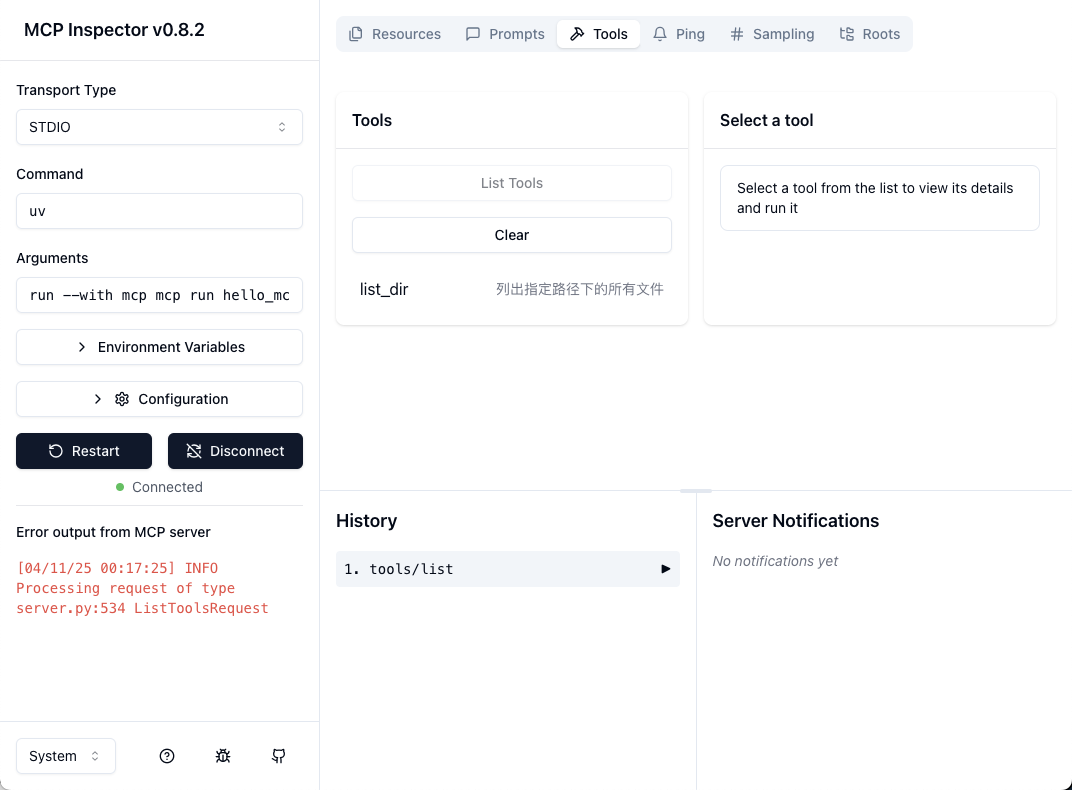
Debugging MCP Server
uv run mcp dev hello_mcp/server.py
License 📜
MIT License. See LICENSE file for details.
👋 Contributions welcome! Feel free to open issues and discussions.
MCP Usage Guide 🛠️
1. How to use MCP in daily work
- Find an MCP Server Host that supports your needs
- Configure the MCP Server
MCP Host reference list:
| Client | Resources | Prompts | Tools | Sampling | Roots | Notes |
|---|---|---|---|---|---|---|
| 5ire | ❌ | ❌ | ✅ | ❌ | ❌ | Supports tools. |
| Apify MCP Tester | ❌ | ❌ | ✅ | ❌ | ❌ | Supports tools |
| BeeAI Framework | ❌ | ❌ | ✅ | ❌ | ❌ | Supports tools in agentic workflows. |
| Claude Code | ❌ | ✅ | ✅ | ❌ | ❌ | Supports prompts and tools |
| Claude Desktop App | ✅ | ✅ | ✅ | ❌ | ❌ | Supports tools, prompts, and resources. |
| Cline | ✅ | ❌ | ✅ | ❌ | ❌ | Supports tools and resources. |
| Continue | ✅ | ✅ | ✅ | ❌ | ❌ | Supports tools, prompts, and resources. |
| Copilot-MCP | ✅ | ❌ | ✅ | ❌ | ❌ | Supports tools and resources. |
| Cursor | ❌ | ❌ | ✅ | ❌ | ❌ | Supports tools. |
2. How to find MCP tools
MCP Concept Q&A ❓
Q: What problems does MCP solve?
A: MCP (Model Control Protocol) addresses:
- Standardizing AI model interaction protocols
- Providing unified tool calling specifications
- Simplifying complex AI system integration
- Enabling modular and reusable model capabilities
Q: History of MCP
A: MCP development timeline:
- 2023: Concept introduced by Anthropic (Claude’s parent company)
- 2024: Multiple open-source implementations emerged
- 2025: Became a standard protocol for AI system integration
- Present: Widely used in various AI agent systems
Q: Current state of MCP
A: Main application scenarios:
- AI assistant systems
- Automated workflows
- Multi-model collaboration platforms
- Enterprise AI solutions
Popular implementations include FastMCP, PyMCP etc.
Q: Differences between MCP and Function Call
A: Similarities:
- Both execute specific functions
- Both require input/output definitions
Differences: - MCP is a standardized protocol, Function Call is a language feature
- MCP supports cross-language/platform calls
- MCP includes complete tool discovery/registration
Q: Relationship between MCP and Agents
A: Key points:
- Agents are entities that use MCP
- MCP is the protocol for Agent-Agent or Agent-Tool interaction
- One Agent can register multiple MCP tools
Project Q&A 💡
Q: How to solve DeepSeek API key configuration issues?
A: Ensure:
- api_key field in config.yaml is correctly filled
- No extra spaces or quotes in the key
- Try regenerating API key if authentication fails
Q: Port already in use when starting server?
A: Solutions:
- Check processes using port with
lsof -i :8000 - Terminate process or change server port
- Update client registration URL
Q: How to extend with new MCP tools?
A: Steps:
- Add new tool function in server.py
- Register with @tool decorator
- Define input parameter schema
- Test calling from client
Q: uv sync command fails?
A: Possible solutions:
- Check network connection
- Delete .venv and recreate for dependency conflicts
- Use sudo or fix directory permissions
Q: How to contribute code?
A: Welcome PRs on GitHub:
- Fork the project
- Create feature branch
- Commit with clear messages
- Open Pull Request
Dev Tools Supporting MCP
The following are the main code editors that support the Model Context Protocol. Click the link to visit the official website for more information.







