
Hello World Sayer Mcp
What is Hello World Sayer Mcp
hello-world-sayer-mcp is an implementation example of a ‘Hello World’ server using the Model Context Protocol (MCP).
Use cases
Use cases include greeting users in chat applications, providing personalized responses in customer service bots, and serving as a foundational example for developing more complex MCP servers.
How to use
To use hello-world-sayer-mcp, write the server implementation in ‘src/index.ts’, define the ‘getHelloWorld’ tool, run tests, build the project, and configure the client with the appropriate settings.
Key features
Key features include the ability to return personalized greetings based on input names, a simple server setup using StdioServerTransport, and easy integration with Claude Desktop.
Where to use
hello-world-sayer-mcp can be used in educational contexts for learning about MCP, as well as in applications requiring simple greeting functionalities.
Clients Supporting MCP
The following are the main client software that supports the Model Context Protocol. Click the link to visit the official website for more information.





Overview
What is Hello World Sayer Mcp
hello-world-sayer-mcp is an implementation example of a ‘Hello World’ server using the Model Context Protocol (MCP).
Use cases
Use cases include greeting users in chat applications, providing personalized responses in customer service bots, and serving as a foundational example for developing more complex MCP servers.
How to use
To use hello-world-sayer-mcp, write the server implementation in ‘src/index.ts’, define the ‘getHelloWorld’ tool, run tests, build the project, and configure the client with the appropriate settings.
Key features
Key features include the ability to return personalized greetings based on input names, a simple server setup using StdioServerTransport, and easy integration with Claude Desktop.
Where to use
hello-world-sayer-mcp can be used in educational contexts for learning about MCP, as well as in applications requiring simple greeting functionalities.
Clients Supporting MCP
The following are the main client software that supports the Model Context Protocol. Click the link to visit the official website for more information.
Content
Hello World Sayer MCP
Model Context Protocol (MCP) を使用した「Hello World」サーバーの実装例です。
開発手順
1. src/index.tsを書く
MCPサーバーとツールの実装を行います。このファイルでは:
- MCPサーバーの設定
getHelloWorldツールの定義(引数に指定された名前に対して「Hello {name};」を返す)- StdioServerTransportを使用したサーバーの起動
2. src/index.test.tsを書く
ツールのテストを実装します:
- 引数なしで呼び出した場合に「Hello World;」を返すことを確認
- 引数 name: ‘Alice’ を指定した場合に「Hello Alice;」を返すことを確認
3. テストする
npm run test
4. ビルドする
npm run build
5. 実行できるか確認する
node ./build/index.js
6. クライアントの設定をする
Claude Desktopで使用するには、claude_desktop_config.jsonに以下の設定を追加します:
{
  "mcpServers": {
    "helloWorldSayer": {
      "command": "node",
      "args": [
        "/absolute/path/to/your/hello-world-sayer/build/index.js"
      ]
    }
  }
}/absolute/path/to/your/hello-world-sayer/は、実際のプロジェクトのパスに置き換えてください。
使用例
Claude Desktopで以下のようにツールを呼び出すことができます:
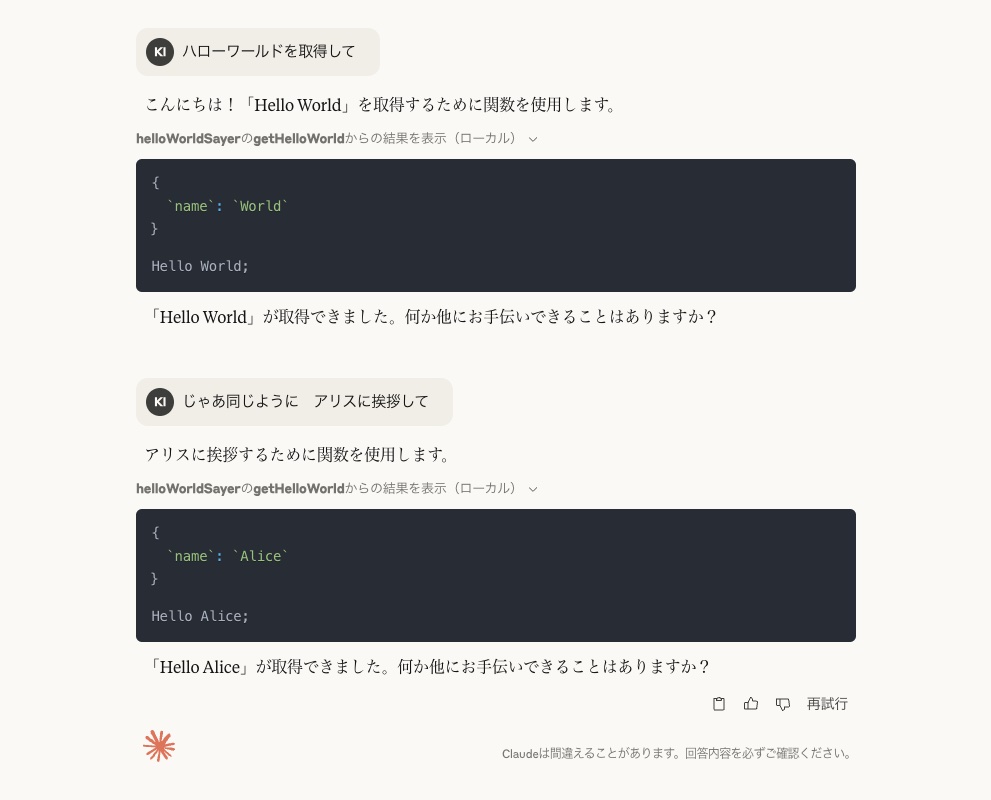
これにより、「Hello Alice;」というレスポンスが返されます。
参考資料
Dev Tools Supporting MCP
The following are the main code editors that support the Model Context Protocol. Click the link to visit the official website for more information.







