
Humanmcp
What is Humanmcp
humanmcp is a joke project that serves as an MCP server, allowing users to manually handle requests and responses in a simulated environment.
Use cases
Use cases include simulating server responses for client applications, practicing JSON-RPC interactions, and demonstrating the functionality of MCP servers in a controlled setting.
How to use
To use humanmcp, download the server binary from the Releases section on GitHub, add it to the MCP host settings, and manually read requests from ‘in.txt’ while writing responses to ‘out.txt’.
Key features
Key features include manual operation, the ability to read JSON-RPC requests, and write responses, making it a unique tool for testing and learning about MCP interactions.
Where to use
humanmcp can be used in development environments, particularly for testing MCP clients, educational purposes, and understanding the mechanics of MCP communication.
Clients Supporting MCP
The following are the main client software that supports the Model Context Protocol. Click the link to visit the official website for more information.





Overview
What is Humanmcp
humanmcp is a joke project that serves as an MCP server, allowing users to manually handle requests and responses in a simulated environment.
Use cases
Use cases include simulating server responses for client applications, practicing JSON-RPC interactions, and demonstrating the functionality of MCP servers in a controlled setting.
How to use
To use humanmcp, download the server binary from the Releases section on GitHub, add it to the MCP host settings, and manually read requests from ‘in.txt’ while writing responses to ‘out.txt’.
Key features
Key features include manual operation, the ability to read JSON-RPC requests, and write responses, making it a unique tool for testing and learning about MCP interactions.
Where to use
humanmcp can be used in development environments, particularly for testing MCP clients, educational purposes, and understanding the mechanics of MCP communication.
Clients Supporting MCP
The following are the main client software that supports the Model Context Protocol. Click the link to visit the official website for more information.
Content
humanmcp
YOU ARE THE MCP SERVER!
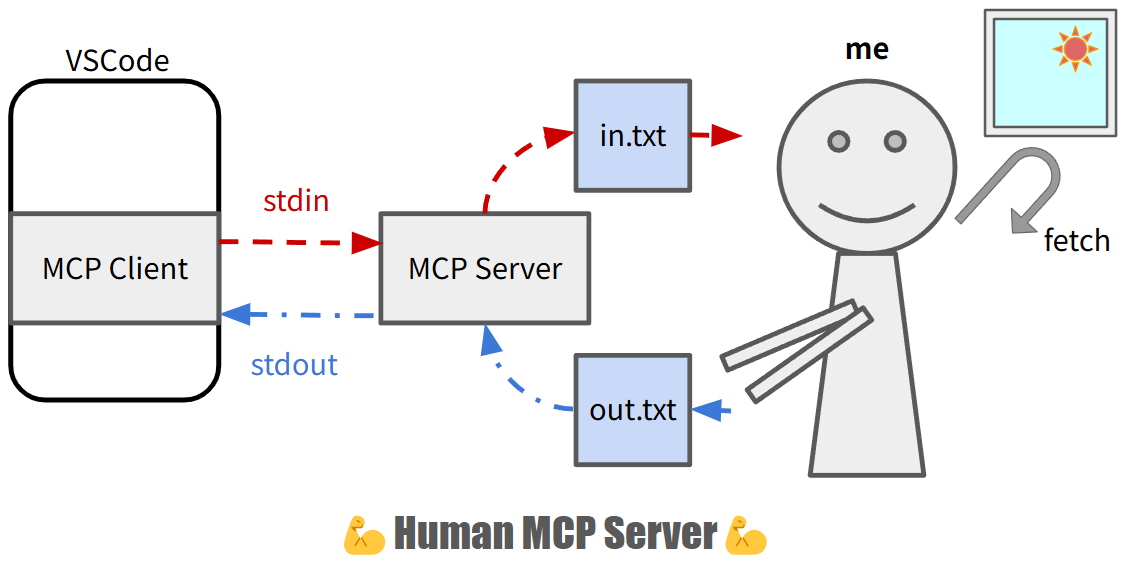
(Of course, this is a joke project :sweat_smile: )
Setup
-
- Download server binary from Releases
-
- add the server to the settings of MCP host
// example: VSCode settings
"mcp": {
  "inputs": [],
  "servers": {
    "human-mcp": {
      "command": "path/to/humanmcp/executable",
      "args": [
      ],
      "env": {}
    }
  }
}
Usage
This MCP server is 100% MANUAL. Good luck.
- You read the requests from
in.txt - You write the responses to
out.txt
# monitor requests from the client
$ tail -f in.txt
{"jsonrpc":"2.0","id":1,"method":"initialize","params":{"protocolVersion":"2024-11-05","capabilities":{"roots":{"listChanged":true}},"clientInfo":{"name":"Visual Studio Code","version":"1.99.2"}}}
{"method":"notifications/initialized","jsonrpc":"2.0"}
{"jsonrpc":"2.0","id":2,"method":"tools/list","params":{}}
{"jsonrpc":"2.0","id":3,"method":"tools/call","params":{"name":"get-japan-forecast","arguments":{"location":"Tokyo"}}}
# send responses back to the client
$ echo '{"result":{"protocolVersion":"2024-11-05","capabilities":{"tools":{}},"serverInfo":{"name":"humanmcp","version":"1.0.0","capabilities":{"resources":{},"tools":{}}}},"jsonrpc":"2.0","id":1}' > out.txt
$ echo '{"result":{"tools":[{"name":"get-japan-forecast","description":"Get weather forecast","inputSchema":{"type":"object","properties":{"location":{"type":"string","description":"location name"}},"required":["location"],"additionalProperties":false,"$schema":"http://json-schema.org/draft-07/schema#"}}]},"jsonrpc":"2.0","id":2}' > out.txt
$ echo '{"result":{"content":[{"type":"text","text":"sunny"}]},"jsonrpc":"2.0","id":3}' > out.txt
Dev Tools Supporting MCP
The following are the main code editors that support the Model Context Protocol. Click the link to visit the official website for more information.







