
Hyperf Mcp Demo
What is Hyperf Mcp Demo
hyperf-mcp-demo is a demonstration project based on the Hyperf framework, showcasing how to use the MCP (Micro-service Control Protocol) component to build and manage microservice tools.
Use cases
Use cases for hyperf-mcp-demo include developing microservice tools, managing service interactions, and providing a framework for building scalable applications.
How to use
To use hyperf-mcp-demo, clone the project from GitHub, install dependencies using Composer, copy the environment configuration file, and start the service using the provided command.
Key features
Key features of hyperf-mcp-demo include being built on the Hyperf framework, using annotations to define tools, and supporting tool descriptions and parameter explanations.
Where to use
hyperf-mcp-demo can be used in microservice architectures, particularly in environments that require efficient management and exposure of microservice functionalities.
Clients Supporting MCP
The following are the main client software that supports the Model Context Protocol. Click the link to visit the official website for more information.





Overview
What is Hyperf Mcp Demo
hyperf-mcp-demo is a demonstration project based on the Hyperf framework, showcasing how to use the MCP (Micro-service Control Protocol) component to build and manage microservice tools.
Use cases
Use cases for hyperf-mcp-demo include developing microservice tools, managing service interactions, and providing a framework for building scalable applications.
How to use
To use hyperf-mcp-demo, clone the project from GitHub, install dependencies using Composer, copy the environment configuration file, and start the service using the provided command.
Key features
Key features of hyperf-mcp-demo include being built on the Hyperf framework, using annotations to define tools, and supporting tool descriptions and parameter explanations.
Where to use
hyperf-mcp-demo can be used in microservice architectures, particularly in environments that require efficient management and exposure of microservice functionalities.
Clients Supporting MCP
The following are the main client software that supports the Model Context Protocol. Click the link to visit the official website for more information.
Content
MCP Demo
基于 Hyperf 框架的 MCP (Micro-service Control Protocol) 演示项目。
简介
本项目展示了如何使用 Hyperf 框架的 MCP 组件来构建和管理微服务工具。通过注解的方式,可以轻松地将类方法暴露为微服务工具。
特性
- 基于 Hyperf 框架
- 使用注解方式定义工具
- 支持工具描述和参数说明
安装
# 克隆项目
git clone https://github.com/huangdijia/mcp-demo.git

# 安装依赖
composer install

# 复制环境配置文件
cp .env.example .env

# 启动服务
php bin/hyperf.php start
使用方法
mcp-sse server 配置
在 config/autoload/server.php 中添加以下配置:
<?php

use Hyperf\Framework\Bootstrap\PipeMessageCallback;
use Hyperf\Framework\Bootstrap\WorkerExitCallback;
use Hyperf\Framework\Bootstrap\WorkerStartCallback;
use Hyperf\Mcp\Server\McpServer;
use Hyperf\Server\Event;
use Hyperf\Server\Server;
use Swoole\Constant;

return [
    'type' => Hyperf\Server\CoroutineServer::class, // !!!目前仅支持协程风格
    'mode' => SWOOLE_PROCESS,
    'servers' => [
        'http' => [
            'name' => 'http',
            'type' => Server::SERVER_HTTP,
            'host' => '0.0.0.0',
            'port' => 9501,
            'sock_type' => SWOOLE_SOCK_TCP,
            'callbacks' => [
                Event::ON_REQUEST => [Hyperf\HttpServer\Server::class, 'onRequest'],
            ],
            'options' => [
                // Whether to enable request lifecycle event
                'enable_request_lifecycle' => false,
            ],
        ],
        'mcp-sse' => [
            'name' => 'mcp-sse',
            'type' => Server::SERVER_HTTP,
            'host' => '0.0.0.0',
            'port' => 3000,
            'sock_type' => SWOOLE_SOCK_TCP,
            'callbacks' => [
                Event::ON_REQUEST => [McpServer::class, 'onRequest'],
                Event::ON_CLOSE => [McpServer::class, 'onClose'],
            ],
            'options' => [
                'mcp_path' => '/sse',
            ],
        ],
    ],
    'settings' => [
        Constant::OPTION_ENABLE_COROUTINE => true,
        Constant::OPTION_WORKER_NUM => swoole_cpu_num(),
        Constant::OPTION_PID_FILE => BASE_PATH . '/runtime/hyperf.pid',
        Constant::OPTION_OPEN_TCP_NODELAY => true,
        Constant::OPTION_MAX_COROUTINE => 100000,
        Constant::OPTION_OPEN_HTTP2_PROTOCOL => true,
        Constant::OPTION_MAX_REQUEST => 100000,
        Constant::OPTION_SOCKET_BUFFER_SIZE => 2 * 1024 * 1024,
        Constant::OPTION_BUFFER_OUTPUT_SIZE => 2 * 1024 * 1024,
    ],
    'callbacks' => [
        Event::ON_WORKER_START => [WorkerStartCallback::class, 'onWorkerStart'],
        Event::ON_PIPE_MESSAGE => [PipeMessageCallback::class, 'onPipeMessage'],
        Event::ON_WORKER_EXIT => [WorkerExitCallback::class, 'onWorkerExit'],
    ],
];
定义工具
使用 #[Tool] 和 #[Description] 注解来定义工具和参数说明:
use Hyperf\Mcp\Annotation\Description;
use Hyperf\Mcp\Annotation\Tool;

class Foo
{
    #[Tool(
        name: 'getBirthday',
        description: 'Get the birthday of the person',
        serverName: 'mcp-sse'
    )]
    public function getBirthday(
        #[Description('姓名')]
        string $name
    ):mixed
    {
        return match ($name) {
            'John' => '1990-01-01',
            'Jane' => '1991-02-02',
            'Jack' => '1992-03-03',
            'Jill' => '1993-04-04',
            default => null,
        };
    }
}
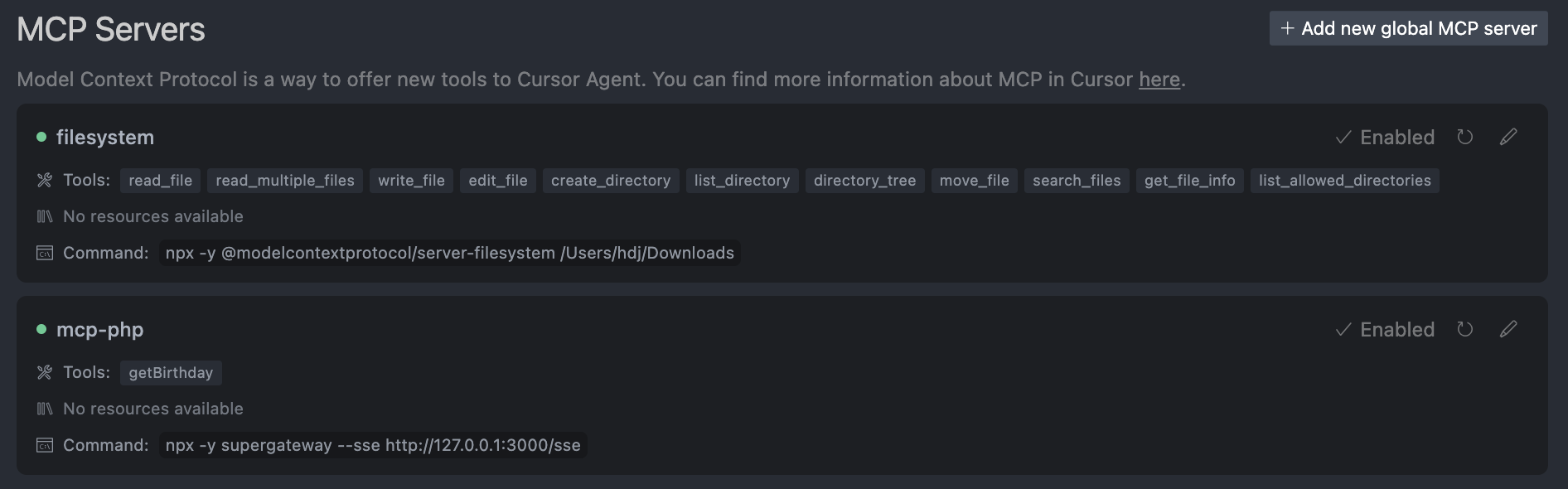
Cursor MCP 配置
要在 Cursor 中使用 MCP 工具,需要进行以下配置:
- 在项目根目录下创建
/Users/[your-name]/Library/Application Support/Claude/claude_desktop_config.json文件 - 添加以下配置内容:
{
  "mcpServers": {
    "mcp-php": {
      "command": "npx",
      "args": [
        "-y",
        "supergateway",
        "--sse",
        "http://127.0.0.1:3000/sse"
      ]
    }
  }
}
VSCode MCP 配置
在 VSCode 中使用 MCP 工具,需要进行以下配置:
- 在项目根目录下创建
.vscode/mcp.json文件
{
  "servers": {
    "mcp-server-stdio": {
      "type": "stdio",
      "command": "php",
      "args": [
        "${workspaceFolder}/bin/hyperf.php",
        "mcp:run",
        "--name",
        "demo"
      ],
      "env": {}
    },
    "mcp-server-sse": {
      "type": "sse",
      "url": "http://localhost:3000/sse"
    }
  }
}
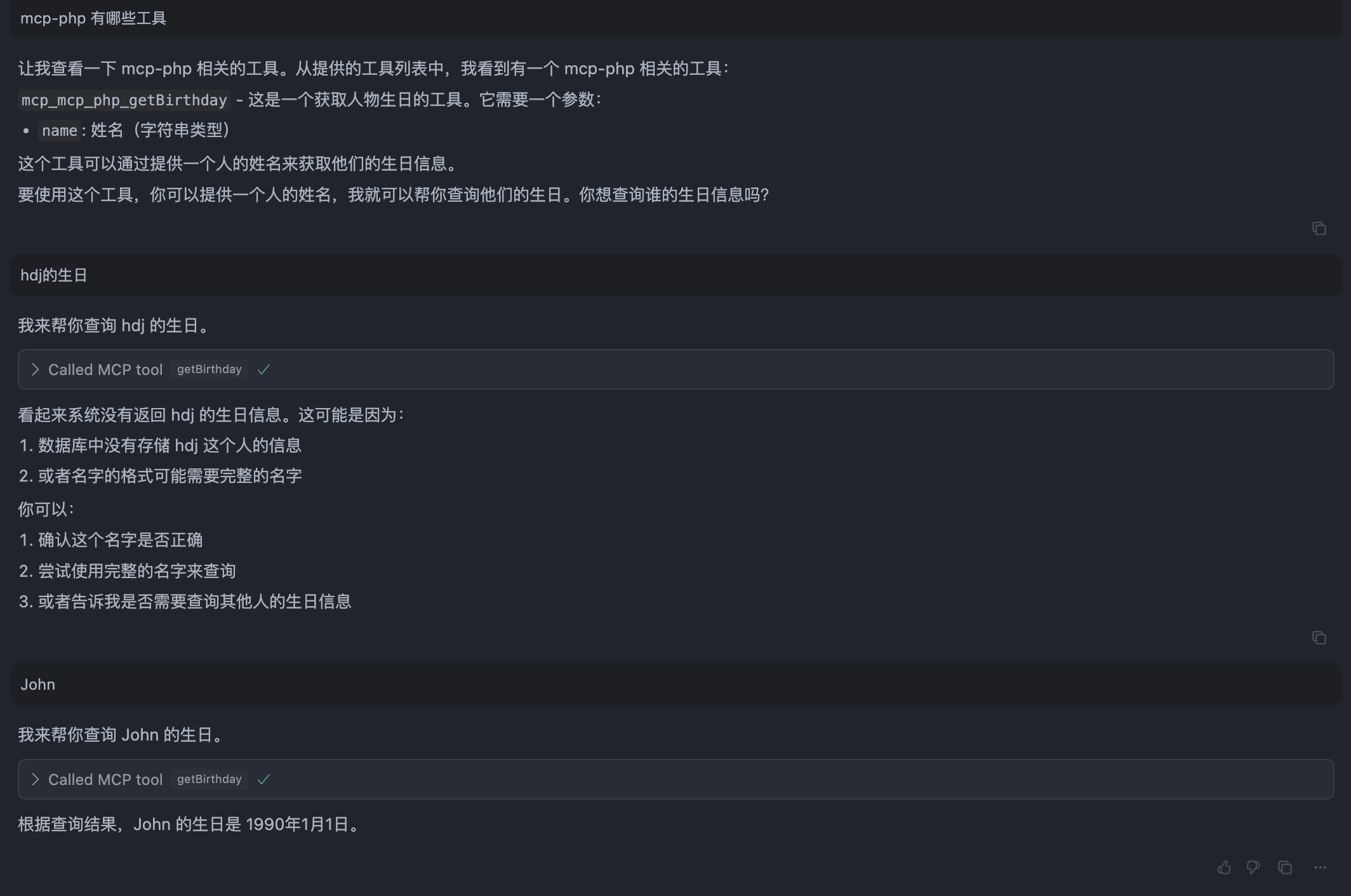
执行结果
在 Cursor 中调用 MCP 工具:
许可证
本项目使用 LICENSE 许可证。
Dev Tools Supporting MCP
The following are the main code editors that support the Model Context Protocol. Click the link to visit the official website for more information.







