
Image Worker Mcp
What is Image Worker Mcp
image-worker-mcp is a command-line tool that provides an MCP server specifically designed for image processing tasks such as resizing and transforming images.
Use cases
Use cases include preparing images for web applications, automating image processing workflows, and integrating image transformation capabilities into AI assistants.
How to use
To use image-worker-mcp, install it globally via npm, yarn, or pnpm. You can also run it directly using npx. Configure it in your MCP settings to integrate it with platforms like Cursor, Windsurf, and VS Code.
Key features
Key features include resizing images to various dimensions, converting between formats (JPEG, PNG, WebP, AVIF), optimizing images for web use, and applying basic transformations like rotation and flipping.
Where to use
image-worker-mcp can be used in web development, digital media processing, and any application requiring image manipulation and optimization.
Clients Supporting MCP
The following are the main client software that supports the Model Context Protocol. Click the link to visit the official website for more information.





Overview
What is Image Worker Mcp
image-worker-mcp is a command-line tool that provides an MCP server specifically designed for image processing tasks such as resizing and transforming images.
Use cases
Use cases include preparing images for web applications, automating image processing workflows, and integrating image transformation capabilities into AI assistants.
How to use
To use image-worker-mcp, install it globally via npm, yarn, or pnpm. You can also run it directly using npx. Configure it in your MCP settings to integrate it with platforms like Cursor, Windsurf, and VS Code.
Key features
Key features include resizing images to various dimensions, converting between formats (JPEG, PNG, WebP, AVIF), optimizing images for web use, and applying basic transformations like rotation and flipping.
Where to use
image-worker-mcp can be used in web development, digital media processing, and any application requiring image manipulation and optimization.
Clients Supporting MCP
The following are the main client software that supports the Model Context Protocol. Click the link to visit the official website for more information.
Content
@boomlinkai/image-worker-mcp
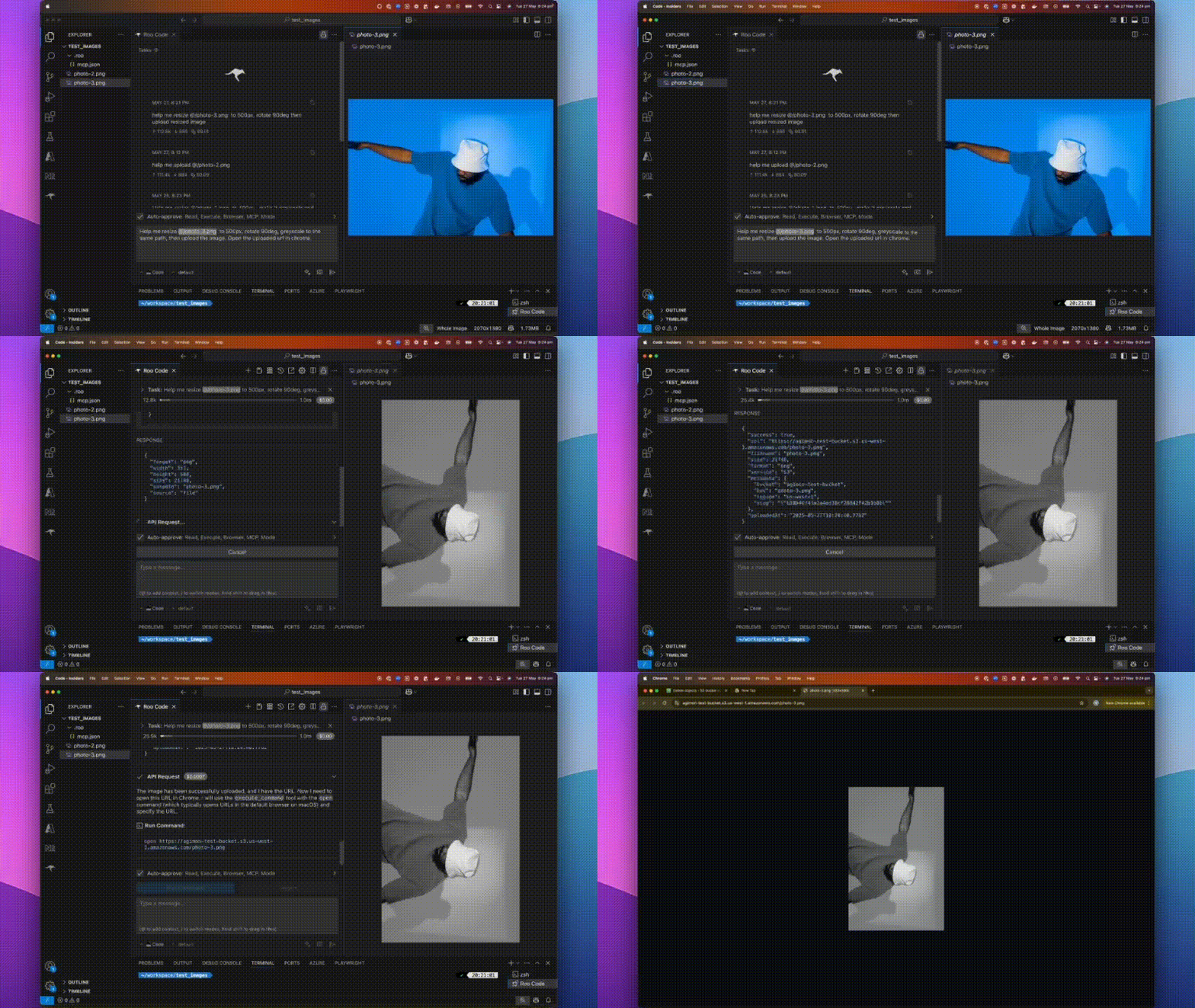
A fast, plug-and-play MCP server for image processing and cloud uploads, designed for AI assistants and automation workflows.
📝 What is @boomlinkai/image-worker-mcp?
A lightweight server implementing Model Context Protocol (MCP) for automated image manipulation and uploads. It makes image resizing, converting, optimizing, and uploading seamless for devs, AI tools, or automated pipelines.
✨ Features
- All-in-One Image Processing: Resize, convert, optimize, and transform images with the powerful sharp library.
- Effortless Cloud Uploads: Integrates with AWS S3, Cloudflare R2, Google Cloud Storage.
- AI & Workflow Ready: Built for MCP, integrates with any AI assistant or workflow runner.
- Flexible Input: Works with file paths, URLs, or base64 images.
- Automatable: Scriptable for batch tasks or as a backend service.
🚀 How to Install
Use npm (or yarn/pnpm):
npm install -g @boomlinkai/image-worker-mcp
# or
yarn global add @boomlinkai/image-worker-mcp
# or
pnpm add -g @boomlinkai/image-worker-mcp
Or use it instantly (no install):
npx @boomlinkai/image-worker-mcp
⚡ Quick Start
Start the MCP Server
npx @boomlinkai/image-worker-mcp
Example: AI Assistant Workflow
Resize an image:
{
  "tool_code": "use_mcp_tool",
  "tool_name": "resize_image",
  "server_name": "image-worker",
  "arguments": {
    "imageUrl": "https://example.com/original.jpg",
    "width": 800,
    "format": "webp",
    "outputPath": "./resized_image.webp"
  }
}
Upload an image:
{
  "tool_code": "use_mcp_tool",
  "tool_name": "upload_image",
  "server_name": "image-worker",
  "arguments": {
    "imagePath": "./resized_image.webp",
    "service": "s3",
    "filename": "my-optimized-image",
    "folder": "website-assets"
  }
}
🛠️ Usage & Configuration
The MCP server works via stdio, making it easy to plug into AI tools and code editors.
Platform Integrations
Click to expand platform setup guides (Cursor, Windsurf, VSCode, Zed, Claude, BoltAI, Roo Code)
Cursor
Add to ~/.cursor/mcp.json:
{
  "mcpServers": {
    "image-worker": {
      "command": "npx",
      "args": [
        "-y",
        "@boomlinkai/image-worker-mcp"
      ]
    }
  }
}
🧰 Tools Reference
resize_image
Resize and transform images via:
imagePath,imageUrl, orbase64Image(input)width,height,fit,format,quality,rotate, etc.- Returns path or base64 of processed image
upload_image
Upload any image (by path/url/base64) to:
service:s3|cloudflare|gcloudfilename,folder,public, etc.- Set credentials as env vars
🔑 Environment Variables
Set these for your chosen cloud provider:
AWS S3
export AWS_ACCESS_KEY_ID=xxx
export AWS_SECRET_ACCESS_KEY=xxx
export S3_BUCKET=your-bucket
export S3_REGION=us-east-1
# Optional: S3_ENDPOINT=https://...
Cloudflare R2
export CLOUDFLARE_R2_ACCESS_KEY_ID=xxx
export CLOUDFLARE_R2_SECRET_ACCESS_KEY=xxx
export CLOUDFLARE_R2_BUCKET=your-bucket
export CLOUDFLARE_R2_ENDPOINT=https://...
Google Cloud Storage
export GCLOUD_PROJECT_ID=xxx
export GCLOUD_BUCKET=your-bucket
# Optionally: GCLOUD_CREDENTIALS_PATH=/path/to/key.json
Default upload service:
export UPLOAD_SERVICE=s3
⚠️ Never commit credentials to source control. Use environment variables or secret managers.
🏗️ Requirements
- Node.js 18.x or higher
- No system dependencies;
sharpis auto-installed
🐞 Troubleshooting / FAQ
- Install fails on ARM/Apple Silicon? Run
brew install vips(sharp dependency) or use Node 18+. - Credentials not working? Check env var spelling/casing.
- Image output is blank or corrupt? Confirm input image type and size.
🤝 Contributing
PRs and issues welcome! Please open an issue or submit a pull request.
👤 Author
Vuong Ngo – BoomLink.ai
🌐 Connect with Us



- Join our Discord for support, feedback, and community discussions
- Follow us on X.com for updates and news
- Connect on LinkedIn for company news and insights
📄 License
MIT
💖 Sponsored by BoomLink.ai

Dev Tools Supporting MCP
The following are the main code editors that support the Model Context Protocol. Click the link to visit the official website for more information.







