
Imagegen Mcp
What is Imagegen Mcp
imagegen-mcp is an MCP OpenAI Image Generation Server that acts as a wrapper around OpenAI’s Image Generation and Editing APIs, providing functionalities for generating and editing images based on text and existing images.
Use cases
Use cases include generating unique artwork from textual descriptions, editing existing images based on user input, and integrating image generation features into applications or editors like Cursor.
How to use
To use imagegen-mcp, you can run the server directly from npm using the command ‘npx imagegen-mcp [options]’. Ensure you have Node.js, npm, and an OpenAI API key. You can also integrate it with Cursor for seamless image generation within the editor.
Key features
Key features include support for text-to-image generation using models like DALL-E 2 and DALL-E 3, image-to-image editing, configurable parameters for size, quality, style, and format, and the ability to save generated images to temporary files.
Where to use
imagegen-mcp can be used in various fields such as digital art, content creation, marketing, and any application that requires image generation or editing capabilities.
Clients Supporting MCP
The following are the main client software that supports the Model Context Protocol. Click the link to visit the official website for more information.





Overview
What is Imagegen Mcp
imagegen-mcp is an MCP OpenAI Image Generation Server that acts as a wrapper around OpenAI’s Image Generation and Editing APIs, providing functionalities for generating and editing images based on text and existing images.
Use cases
Use cases include generating unique artwork from textual descriptions, editing existing images based on user input, and integrating image generation features into applications or editors like Cursor.
How to use
To use imagegen-mcp, you can run the server directly from npm using the command ‘npx imagegen-mcp [options]’. Ensure you have Node.js, npm, and an OpenAI API key. You can also integrate it with Cursor for seamless image generation within the editor.
Key features
Key features include support for text-to-image generation using models like DALL-E 2 and DALL-E 3, image-to-image editing, configurable parameters for size, quality, style, and format, and the ability to save generated images to temporary files.
Where to use
imagegen-mcp can be used in various fields such as digital art, content creation, marketing, and any application that requires image generation or editing capabilities.
Clients Supporting MCP
The following are the main client software that supports the Model Context Protocol. Click the link to visit the official website for more information.
Content
MCP OpenAI Image Generation Server

This project provides a server implementation based on the Model Context Protocol (MCP) that acts as a wrapper around OpenAI’s Image Generation and Editing APIs (see OpenAI documentation).
Features
- Exposes OpenAI image generation capabilities through MCP tools.
- Supports
text-to-imagegeneration using models like DALL-E 2, DALL-E 3, and gpt-image-1 (if available/enabled). - Supports
image-to-imageediting using DALL-E 2 and gpt-image-1 (if available/enabled). - Configurable via environment variables and command-line arguments.
- Handles various parameters like size, quality, style, format, etc.
- Saves generated/edited images to temporary files and returns the path along with the base64 data.
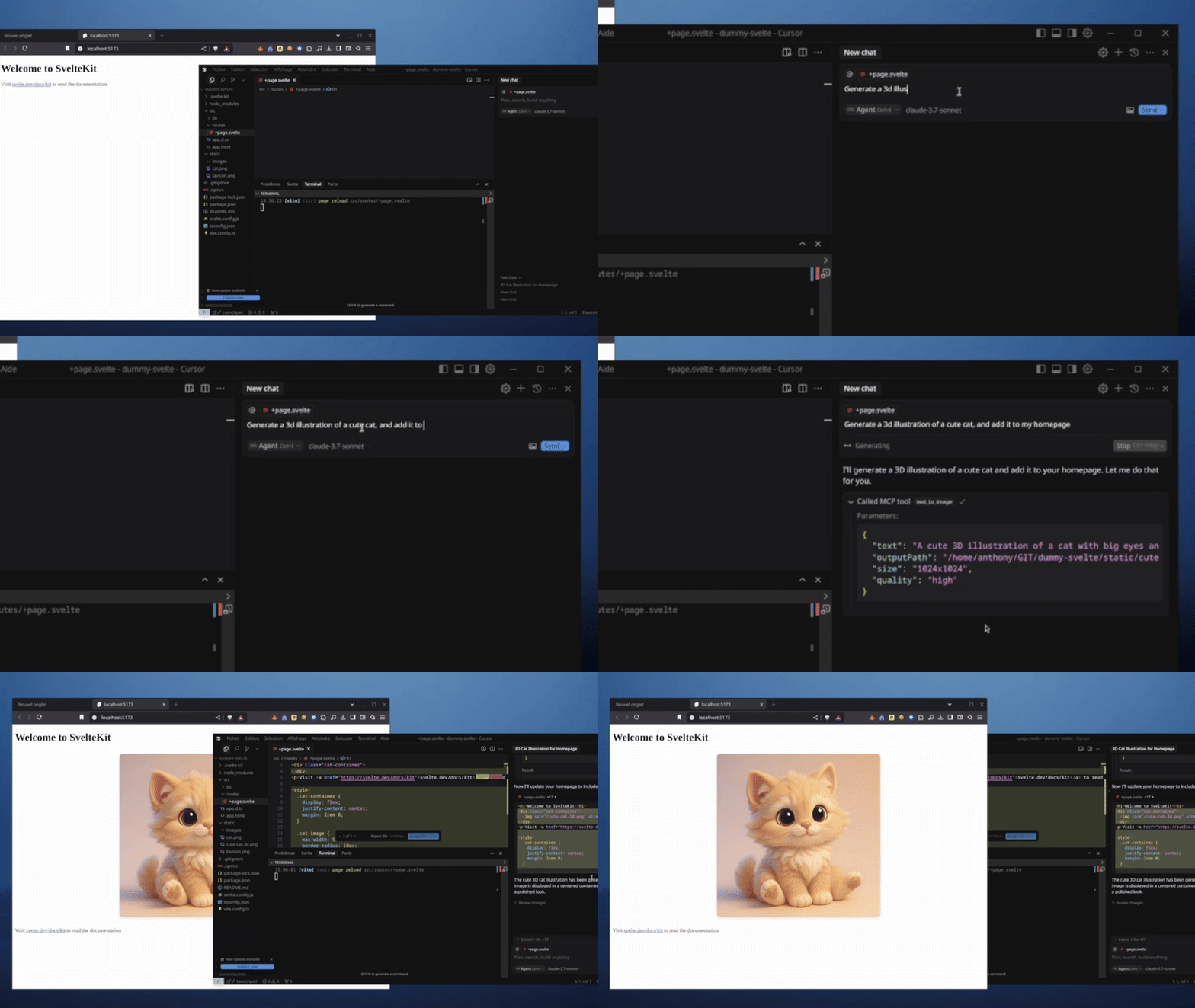
Here’s an example of generating an image directly in Cursor using the text-to-image tool integrated via MCP:
Quick Run with npx
You can run the server directly from npm using npx (requires Node.js and npm):
npx imagegen-mcp [options]
See the Running the Server section for more details on options and running locally.
Prerequisites
- Node.js (v18 or later recommended)
- npm or yarn
- An OpenAI API key
Integration with Cursor
You can easily integrate this server with Cursor to use its image generation capabilities directly within the editor:
-
Open Cursor Settings:
- Go to
File > Preferences > Cursor Settings(or use the shortcutCtrl+,/Cmd+,).
- Go to
-
Navigate to MCP Settings:
- Search for “MCP” in the settings search bar.
- Find the “Model Context Protocol: Custom Servers” setting.
-
Add Custom Server:
- Click on “Edit in settings.json”.
- Add a new entry to the
mcpServersarray. It should look something like this:
- Customize the command:
- You can change the
--modelsargument in thecommandfield to specify which models you want Cursor to have access to (e.g.,--models dall-e-3or--models gpt-image-1). Make sure your OpenAI API key has access to the selected models.
- You can change the
-
Save Settings:
- Save the
settings.jsonfile.
- Save the
Cursor should now recognize the “OpenAI Image Gen” server, and its tools (text-to-image, image-to-image) will be available in the MCP tool selection list (e.g., when using @ mention in chat or code actions).
Setup
-
Clone the repository:
git clone <your-repository-url> cd <repository-directory> -
Install dependencies:
npm install # or yarn install -
Configure Environment Variables:
Create a.envfile in the project root by copying the example:cp .env.example .envEdit the
.envfile and add your OpenAI API key:OPENAI_API_KEY=your_openai_api_key_here
Building
To build the TypeScript code into JavaScript:
npm run build
# or
yarn build
This will compile the code into the dist directory.
Running the Server
This section provides details on running the server locally after cloning and setup. For a quick start without cloning, see the Quick Run with npx section.
Using ts-node (for development):
npx ts-node src/index.ts [options]
Using the compiled code:
node dist/index.js [options]
Options:
--models <model1> <model2> ...: Specify which OpenAI models the server should allow. If not provided, it defaults to allowing all models defined insrc/libs/openaiImageClient.ts(currently gpt-image-1, dall-e-2, dall-e-3).- Example using
npx(also works for local runs):... --models gpt-image-1 dall-e-3 - Example after cloning:
node dist/index.js --models dall-e-3 dall-e-2
- Example using
The server will start and listen for MCP requests via standard input/output (using StdioServerTransport).
MCP Tools
The server exposes the following MCP tools:
text-to-image
Generates an image based on a text prompt.
Parameters:
text(string, required): The prompt to generate an image from.model(enum, optional): The model to use (e.g.,gpt-image-1,dall-e-2,dall-e-3). Defaults to the first allowed model.size(enum, optional): Size of the generated image (e.g.,1024x1024,1792x1024). Defaults to1024x1024. Check OpenAI documentation for model-specific size support.style(enum, optional): Style of the image (vividornatural). Only applicable todall-e-3. Defaults tovivid.output_format(enum, optional): Format (png,jpeg,webp). Defaults topng.output_compression(number, optional): Compression level (0-100). Defaults to 100.moderation(enum, optional): Moderation level (low,auto). Defaults tolow.background(enum, optional): Background (transparent,opaque,auto). Defaults toauto.transparentrequiresoutput_formatto bepngorwebp.quality(enum, optional): Quality (standard,hd,auto, …). Defaults toauto.hdonly applicable todall-e-3.n(number, optional): Number of images to generate. Defaults to 1. Note:dall-e-3only supportsn=1.
Returns:
content: An array containing:- A
textobject containing the path to the saved temporary image file (e.g.,/tmp/uuid.png).
- A
image-to-image
Edits an existing image based on a text prompt and optional mask.
Parameters:
images(string, required): An array of file paths to local images.prompt(string, required): A text description of the desired edits.mask(string, optional): A file path of mask image (PNG). Transparent areas indicate where the image should be edited.model(enum, optional): The model to use. Onlygpt-image-1anddall-e-2are supported for editing. Defaults to the first allowed model.size(enum, optional): Size of the generated image (e.g.,1024x1024). Defaults to1024x1024.dall-e-2only supports256x256,512x512,1024x1024.output_format(enum, optional): Format (png,jpeg,webp). Defaults topng.output_compression(number, optional): Compression level (0-100). Defaults to 100.quality(enum, optional): Quality (standard,hd,auto, …). Defaults toauto.n(number, optional): Number of images to generate. Defaults to 1.
Returns:
content: An array containing:- A
textobject containing the path to the saved temporary image file (e.g.,/tmp/uuid.png).
- A
Development
- Linting:
npm run lintoryarn lint - Formatting:
npm run formatoryarn format(if configured inpackage.json)
Contributing
Pull Requests (PRs) are welcome! Please feel free to submit improvements or bug fixes.
Dev Tools Supporting MCP
The following are the main code editors that support the Model Context Protocol. Click the link to visit the official website for more information.







