
Intelligent Browser Agent With Mcp
What is Intelligent Browser Agent With Mcp
The intelligent-browser-agent-with-mcp is an interactive application that leverages modern language models (LLMs) such as Google Gemini, Azure OpenAI, or OpenAI to automate web browsing tasks in real-time. It allows users to control a real browser using natural language commands.
Use cases
Use cases include automating repetitive web tasks, extracting information from websites, summarizing articles or content, and providing interactive browsing experiences for users. It can also be used for testing web applications and gathering insights from online data.
How to use
To use the intelligent-browser-agent-with-mcp, clone the repository, set up a virtual environment, install the required dependencies, configure your API keys in a .env file, and run the application using Streamlit. Users can then input natural language commands to navigate and interact with websites.
Key features
Key features include the ability to navigate websites using natural language, perform actions like clicking and scrolling, take screenshots, summarize content with LLMs, and switch between multiple LLM providers. The application also features a user-friendly interface built with Streamlit.
Where to use
The intelligent-browser-agent-with-mcp can be used in various fields such as web automation, data extraction, content summarization, and enhancing user interaction with web applications. It is particularly useful in research, marketing, and customer support.
Clients Supporting MCP
The following are the main client software that supports the Model Context Protocol. Click the link to visit the official website for more information.





Overview
What is Intelligent Browser Agent With Mcp
The intelligent-browser-agent-with-mcp is an interactive application that leverages modern language models (LLMs) such as Google Gemini, Azure OpenAI, or OpenAI to automate web browsing tasks in real-time. It allows users to control a real browser using natural language commands.
Use cases
Use cases include automating repetitive web tasks, extracting information from websites, summarizing articles or content, and providing interactive browsing experiences for users. It can also be used for testing web applications and gathering insights from online data.
How to use
To use the intelligent-browser-agent-with-mcp, clone the repository, set up a virtual environment, install the required dependencies, configure your API keys in a .env file, and run the application using Streamlit. Users can then input natural language commands to navigate and interact with websites.
Key features
Key features include the ability to navigate websites using natural language, perform actions like clicking and scrolling, take screenshots, summarize content with LLMs, and switch between multiple LLM providers. The application also features a user-friendly interface built with Streamlit.
Where to use
The intelligent-browser-agent-with-mcp can be used in various fields such as web automation, data extraction, content summarization, and enhancing user interaction with web applications. It is particularly useful in research, marketing, and customer support.
Clients Supporting MCP
The following are the main client software that supports the Model Context Protocol. Click the link to visit the official website for more information.
Content
🌐 Intelligent Browser Agent with MCP
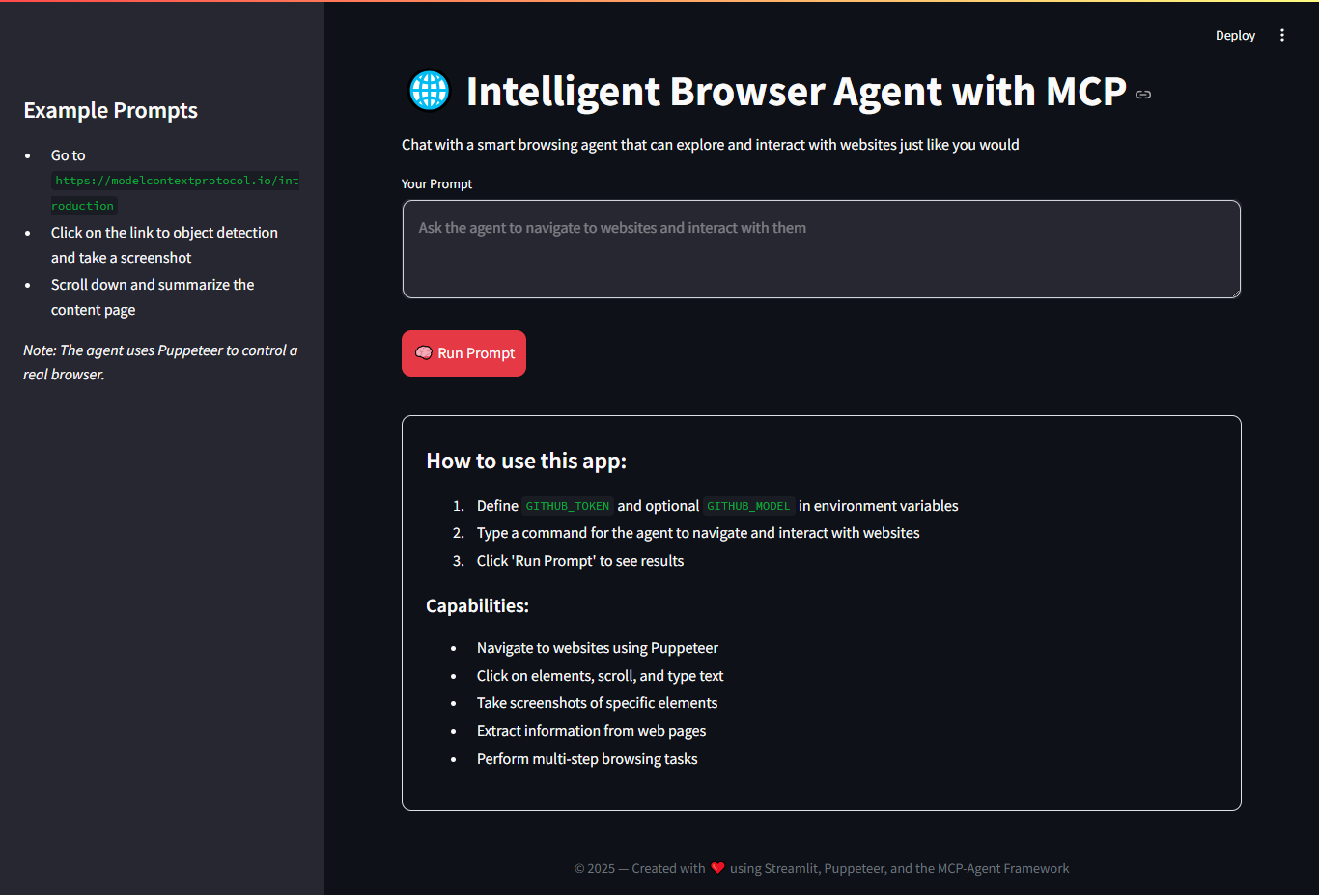
An interactive application built with Streamlit and the MCP-Agent framework to control a real browser using Puppeteer. You can send natural commands for the agent to navigate, interact with websites, take screenshots, and summarize content using a language model (LLM) like Gemini, OpenAI, or Azure OpenAI.
🚀 Features
- Navigate to websites with natural language commands.
- Perform actions like click, scroll, type, and extract data.
- Take screenshots of web elements.
- Summarize content using LLMs (Gemini, Azure, OpenAI).
- Visual interface built with Streamlit.
- Easily switch between multiple LLM providers.
🛠️ Requirements
- Python 3.10+
- Node.js (for Puppeteer)
npxinstalled- API Key for Gemini, Azure, or OpenAI
📦 Installation
git clone https://github.com/your-username/your-repo.git
cd your-repo

# Create virtual environment
python -m venv .venv
source .venv/bin/activate  # On Windows: .venv\Scripts\activate

# Install dependencies
pip install -r requirements.txt
🔐 Configuration
Create a .env file in the root directory with the following variables based on the LLM provider you use:
🌟 Gemini (Google AI)
GEMINI_API_KEY=your_gemini_key
GEMINI_MODEL=gemini-pro
☁️ Azure OpenAI (optional)
AZURE_API_KEY=your_azure_key
AZURE_BASE_URL=https://your-resource-name.openai.azure.com/
GITHUB_MODEL=gpt-4
🔓 OpenAI (optional)
OPENAI_API_KEY=your_openai_key
OPENAI_BASE_URL=https://api.openai.com/v1
GITHUB_MODEL=gpt-4
🧠 Run the App
streamlit run app.py
This opens a web interface where you can enter commands like:
Go to https://modelcontextprotocol.io/introduction
Click on the link to object detection
Take a screenshot of the section
📋 Example Commands
Go to Google.com and search for "Machine Learning"Scroll down and summarize the contentClick on the first link and extract the heading textTake a screenshot of the main section
📁 Project Structure
📁 mcp_browser_agent
├── browser-mcp-agent-v1.py        # Main Streamlit app
├── browser-mcp-agent-v2.py        # Main Chainlit app
├── .env.sample                    # Environment variables
├── mcp_agent.config.yaml          # mcp agent configs
├── mcp_agent.secrets.sample.yaml
├── requirements.txt               # Dependencies
└── README.md                      # This file
📄 License
This project is licensed under the MIT License - free to use, modify, and distribute.
🤝 Credits
This project uses:
Dev Tools Supporting MCP
The following are the main code editors that support the Model Context Protocol. Click the link to visit the official website for more information.







